ToolMage
Sign in

Best 1 Ai Customization AI tools

Popular Ai Customization AI tools include Skin Ollama, helping you work more efficiently.

Skin Ollama
Paid

Skin Ollama

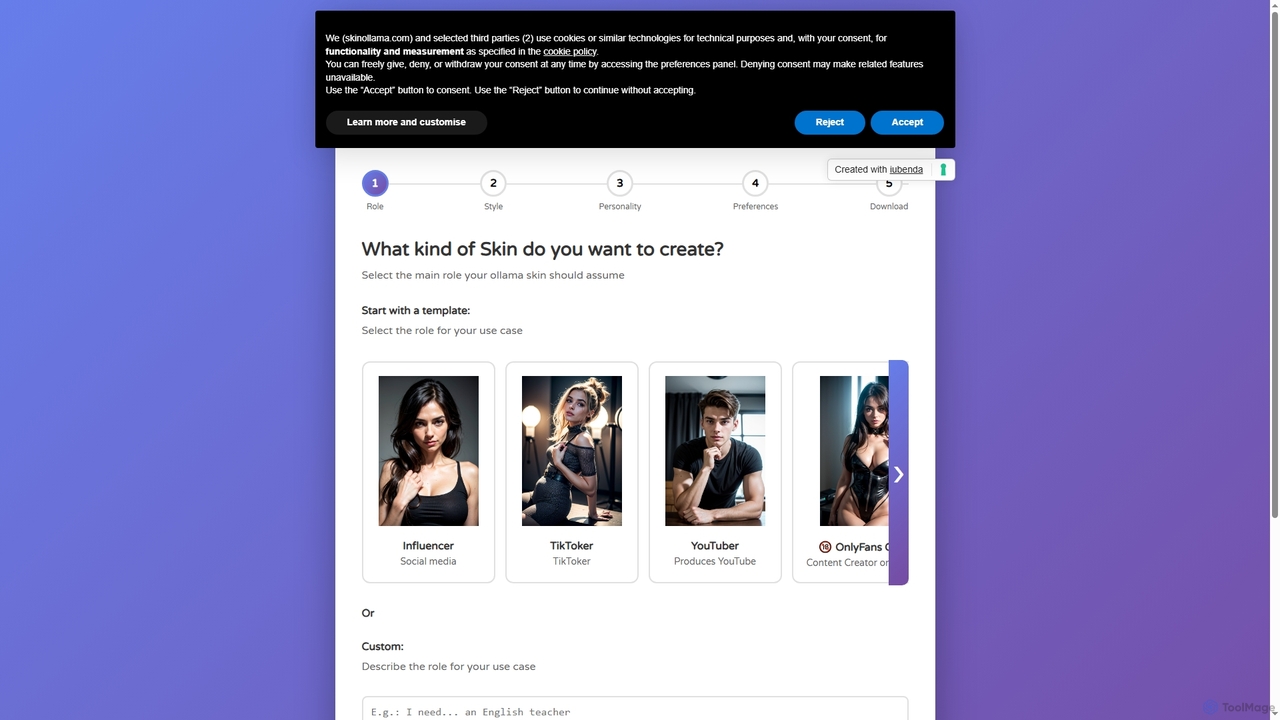
Skin Ollama is an intuitive online tool designed to customize Ollama AI models by building unique "skin files." Users can define their AI's role, communication style, personality, and advanced preferences, enabling highly personalized interactions and specialized AI behaviors for various applications.

Ai Persona Generation
Visits 5.3KFavorites 115Likes 130

About Ai Customization

AI Customization tools are platforms that enable users to adapt, fine-tune, or build bespoke AI models and applications for specific needs. These tools often utilize no-code or low-code interfaces, allowing users to connect their own data sources, define specific behaviors, and modify pre-trained models without extensive machine learning expertise. The primary value lies in creating highly relevant and context-aware AI solutions that align with a specific brand voice, internal knowledge base, or unique business process. This approach significantly lowers the barrier to entry for developing powerful, tailored AI systems.

Core Features

  • Model Fine-Tuning: Adapt a pre-trained foundation model using your own dataset to improve performance on a specific task.
  • No-Code/Low-Code Builder: Visually design, build, and deploy AI applications and workflows with minimal to no coding.
  • Knowledge Base Integration: Connect AI models to private documents, websites, or databases to provide answers based on proprietary information.
  • Prompt Engineering Interface: Tools to create, test, and manage complex prompts for guiding AI behavior effectively.
  • API & Integration Support: Seamlessly connect custom-built AI applications with other software systems like CRMs, Slack, or websites.

Use Cases

AI Customization tools are widely used across various sectors. In customer service, companies build chatbots trained on their product documentation to provide instant, accurate support. Marketing teams use them to create content generators that adhere strictly to brand guidelines. Internally, businesses deploy AI assistants connected to their knowledge bases to help employees find information about company policies or technical procedures quickly.

How to Choose

When selecting an AI Customization tool, first consider your team's technical skill level; choose between no-code, low-code, or developer-focused platforms. Evaluate the supported foundation models (e.g., GPT, Claude, Llama) and their suitability for your task. Data security and privacy policies are critical, especially when using proprietary data. Finally, assess the platform's integration capabilities and pricing model to ensure it aligns with your existing tech stack and budget.

Ai Customization use cases

1

Build a Custom Customer Support Chatbot

A customer support manager for an e-commerce company needs to reduce response times and handle common queries more efficiently. Using an AI customization platform, they upload all product manuals, FAQs, and past support tickets into a knowledge base. They then build a chatbot that connects to this data. The resulting AI assistant can instantly answer specific customer questions about product features, troubleshooting, and return policies 24/7, freeing up human agents to focus on complex issues and improving overall customer satisfaction.

2

Generate On-Brand Marketing Content

A marketing team wants to scale their content creation while maintaining a consistent brand voice. They use an AI customization tool to fine-tune a large language model. The training data includes their best-performing blog posts, ad copy, social media captions, and brand style guides. The resulting custom model can generate new drafts for emails, articles, and social posts that naturally adopt the company's specific tone, terminology, and messaging style, reducing editing time by over 70% and ensuring brand consistency across all channels.

3

Develop an Internal Knowledge Base Assistant

An HR department is overwhelmed with repetitive questions from employees about benefits, leave policies, and expense reports. Using a no-code AI builder, they create an internal AI assistant. They simply upload all relevant policy documents, handbooks, and internal guides. Now, employees can ask the AI assistant questions in natural language via Slack or an internal portal and receive instant, accurate answers sourced directly from official documents. This empowers employees with self-service information and reduces the HR team's administrative workload.

4

Automate Data Extraction from Documents

A financial analyst needs to extract key figures like revenue, net profit, and operational costs from hundreds of quarterly PDF reports. Manually doing this is tedious and error-prone. They use a low-code AI customization tool to build a data extraction workflow. They define the specific data points they need and provide a few example documents. The AI learns to identify and extract this information accurately from any new report, structuring the output into a clean CSV file. This automates hours of manual work and ensures data consistency for analysis.

5

Create a Personalized Sales Outreach Assistant

A sales team struggles with writing personalized outreach emails at scale. A sales operations manager uses an AI customization platform to build a sales assistant. The AI is connected to the company's CRM and is fine-tuned on successful email templates and case studies. When a salesperson inputs a prospect's LinkedIn profile or company website, the AI generates a highly personalized email draft. The draft references the prospect's recent activities, company news, and relevant case studies, significantly increasing email open rates and meeting bookings.

6

Prototype a New AI-Powered Application Feature

A product manager has an idea for a new feature that summarizes meeting transcripts for users. Instead of waiting for engineering resources, they use a low-code AI customization tool to build a functional prototype. They create a simple interface where a user can upload a transcript, and then build a workflow that uses a pre-trained language model to generate a structured summary with key takeaways and action items. This allows them to test the concept with users and gather feedback in days instead of months, validating the idea before committing development resources.

Ai Customization FAQ

What is AI Customization?

AI Customization refers to the process of adapting general-purpose AI models to perform specific tasks or operate within a particular context. Instead of building an AI from scratch, customization tools allow you to take a powerful, pre-trained foundation model and tailor it using your own data, rules, or instructions. This often involves techniques like fine-tuning (retraining the model on a specific dataset) or retrieval-augmented generation (RAG), where the model is connected to a private knowledge base to provide context-specific answers.

How to choose the right AI Customization tool?

Choosing the right tool depends on several factors. Consider the following:

  • Technical Expertise: Are you a developer who needs API access, or a business user who needs a no-code, drag-and-drop interface?
  • Use Case: Do you need to build a chatbot, generate content, or extract data? Some platforms specialize in specific applications.
  • Data Security: How will your proprietary data be handled? Look for platforms with strong security and privacy policies.
  • Supported Models: Check which underlying AI models (like GPT-4, Claude 3, etc.) the platform supports and if they fit your needs.
  • Scalability and Cost: Understand the pricing model. Is it based on usage, number of users, or a flat fee? Ensure it can scale with your needs.
What's the difference between AI customization and training a model from scratch?

The primary difference is the starting point and resource requirement. Training a model from scratch involves building a new AI model from the ground up, which requires massive amounts of data (billions of data points), immense computational power, and deep machine learning expertise. This process can take months or years and cost millions. AI customization, on the other hand, starts with a pre-trained foundation model that already understands language and reasoning. You are simply adapting or fine-tuning this existing model for your specific purpose, which is significantly faster, cheaper, and requires far less data and technical skill.

Do I need coding skills for AI Customization?

Not necessarily. The field of AI customization offers a wide spectrum of tools for different skill levels. Many leading platforms are 'no-code' or 'low-code', featuring visual, drag-and-drop interfaces that allow business users, marketers, and support managers to build custom AI applications without writing a single line of code. For developers and more technical users, there are also platforms that are API-first, providing extensive libraries and SDKs for deep, code-based customization and integration into existing software.

Who can benefit from using AI Customization tools?

A wide range of users can benefit from AI customization. Businesses can create specialized chatbots for customer service or internal support, improving efficiency and user experience. Marketing teams can build on-brand content generators to scale their output consistently. Developers can rapidly prototype and deploy unique AI features without the overhead of model training. Furthermore, industries like finance, healthcare, and legal can build tools trained on their specific domain knowledge to automate complex data analysis and document review tasks, ensuring higher accuracy and relevance.