
ToolMage
Sign in

Best 1 Invitation Design AI tools for Event Planning

Popular Invitation Design AI tools in Event Planning include PleaseRSVP, helping you work more efficiently.

PleaseRSVP
Freemium

PleaseRSVP

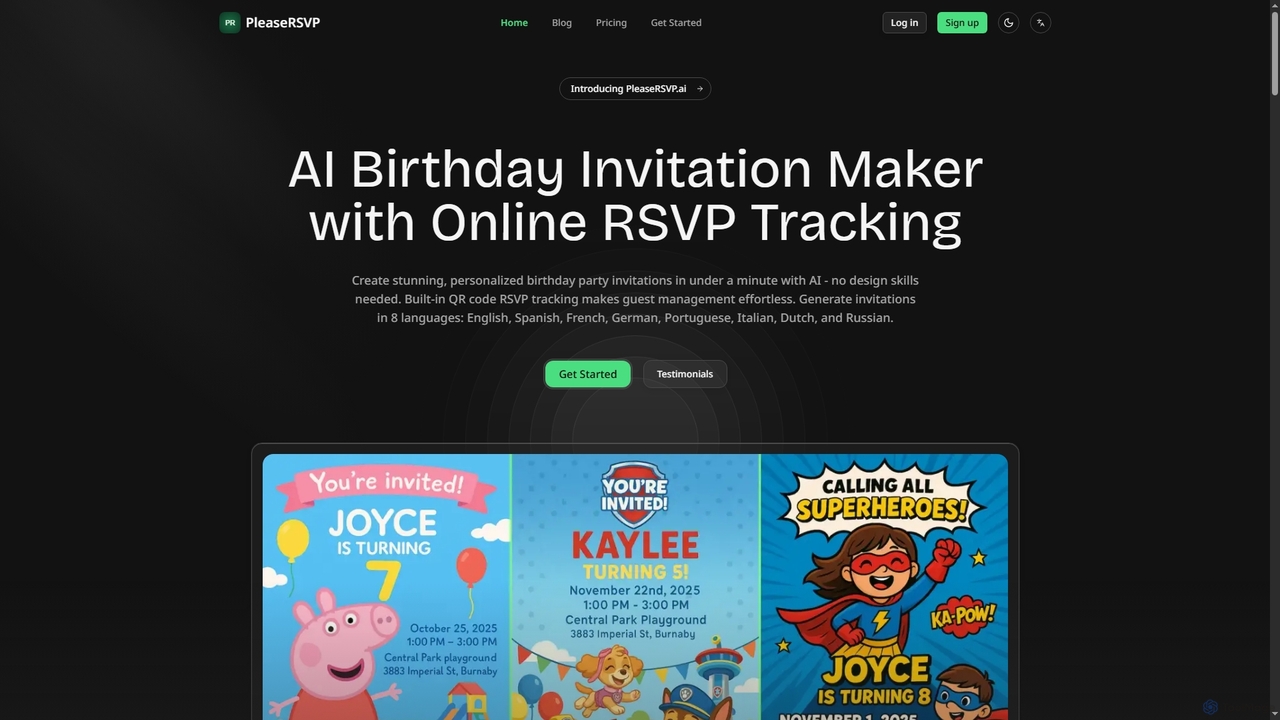
PleaseRSVP is an AI-powered platform designed for busy parents to effortlessly create stunning, personalized birthday party invitations and manage guest RSVPs. It generates unique designs in minutes, offers a rich theme library, and includes smart QR code-based RSVP tracking with real-time updates and automatic reminders, simplifying party planning from start to finish.

Image Generation
Visits 6.2KFavorites 107Likes 102

About Invitation Design

AI Invitation Design tools are specialized applications that use artificial intelligence to generate and customize invitations for various events. Leveraging generative AI for text and visuals, these tools create unique designs, suggest compelling wording, and adapt to themes based on simple user prompts. This automates a key component of event planning, enabling users to produce professional-quality invitations quickly without needing advanced design skills. They bridge the gap between simple templates and complex manual design software.

Core Features

  • AI-Powered Template Generation: Creates diverse and customizable invitation layouts based on event type, theme, and tone (e.g., formal, casual, festive).
  • Automated Wording Assistance: Generates engaging headlines, event details, calls-to-action, and RSVP instructions tailored to the occasion.
  • Thematic Visual Creation: Suggests or generates relevant images, icons, and color palettes that align with the specified event theme.
  • Multi-Format Export: Allows users to download designs in formats suitable for digital sharing (PNG, JPG) and high-resolution printing (PDF).
  • Integrated RSVP Tracking: Some tools offer features to send invitations directly and track guest responses, streamlining guest management.

Applicable Scenarios

These tools are ideal for professional event planners, marketing teams, small business owners, and individuals organizing personal events. They are used for creating everything from formal wedding invitations and corporate conference announcements to casual birthday party e-vites and webinar registration pages.

Selection Criteria

When choosing an AI Invitation Design tool, consider the variety and quality of the AI-generated designs, the level of customization available, the sophistication of the text generation, integration with guest management systems, and the range of available export formats for both digital and print use.

Invitation Design use cases

1

Designing Corporate Event Invitations

A marketing manager for a tech company needs to create a sleek, professional invitation for an upcoming product launch. Instead of spending days with a graphic designer, they use an AI tool. They input key details: 'Product Launch for 'Innovate X', professional and futuristic theme, brand colors 005A9C and FFFFFF'. The AI instantly generates five distinct design concepts, complete with compelling copy for the event description and a clear call-to-action. The manager selects one, makes minor text adjustments, and exports it for email distribution, saving significant time and budget.

2

Creating a Cohesive Wedding Invitation Suite

A couple planning their wedding wants a consistent theme across all their stationery. They use an AI invitation designer to create a full suite. They specify a 'minimalist botanical' theme with a green and gold color palette. The AI generates designs not just for the main invitation, but also for the save-the-date cards, RSVP cards, and thank-you notes. This ensures a professional and harmonious look across all items without the high cost of a bespoke designer, allowing them to easily customize names, dates, and venue details.

3

Quickly Generating Digital Invites for a Party

A student wants to organize a last-minute birthday party and needs to send out digital invitations quickly. They use a mobile-friendly AI invitation tool. They type a simple prompt: 'Casual 21st birthday party, neon theme, this Saturday at 8 PM'. The AI generates several vibrant, eye-catching e-vite designs optimized for mobile screens. The student chooses one, adds the address, and instantly shares the invitation link with friends via a messaging app. The entire process takes less than ten minutes.

4

Creating E-vites for a Professional Webinar

A B2B marketing team is hosting a webinar on 'The Future of AI in Marketing'. They need an invitation that looks professional and drives registrations. Using an AI tool, they input the webinar title, speaker names, and key topics. The AI generates a clean, corporate-style e-vite layout, suggests a professional color scheme, and drafts a concise, benefit-oriented text. It also creates a prominent 'Register Now' button. The team can then export the design as an HTML email template for their marketing automation platform.

5

Designing Themed Invites for a Child's Birthday

A parent is planning a 'space adventure' themed birthday party for their 7-year-old. They use an AI invitation tool to bring the theme to life. They enter the prompt: 'Invitation for a 7th birthday party, space adventure theme, with rockets, planets, and aliens, fun and colorful'. The AI generates several playful designs featuring cartoon rockets and friendly aliens. It also suggests fun, thematic wording like 'Get ready to blast off for an out-of-this-world celebration!'. The parent chooses their favorite design, adds the party details, and prints them out at home.

6

Drafting Elegant Invitations for a Charity Gala

A non-profit organization is hosting its annual fundraising gala. The invitation needs to be elegant and convey the importance of the event to encourage donations. The event coordinator uses an AI tool, specifying 'Elegant charity gala invitation, black and gold theme, formal tone'. The AI generates sophisticated layouts with classic typography and suggests refined wording for the invitation text, including a section for sponsorship levels and a call for donations. This allows the small team to produce a high-end invitation without hiring an expensive design agency.

Invitation Design FAQ

What are AI Invitation Design tools?

AI Invitation Design tools are software applications that use artificial intelligence, particularly generative AI, to automate the creation of invitations. Unlike traditional templates, they generate unique designs, text, and imagery based on user prompts describing the event's theme, tone, and details. They serve as a key part of the event planning process, making professional design accessible to users without graphic design skills.

How do AI invitation tools differ from traditional design software like Canva or Adobe Illustrator?

The main difference lies in the creation process. Traditional software like Canva provides templates and tools for manual design, requiring the user to choose layouts, fonts, and graphics. AI invitation tools automate this process. The user provides a text prompt (e.g., 'a fun pirate-themed kids party invitation'), and the AI generates a complete design concept. AI tools focus on generation and speed, while traditional tools offer more granular manual control.

Can I use these tools for both digital and printed invitations?

Yes, most high-quality AI Invitation Design tools are built for both purposes. They typically offer export options tailored for different uses. For digital sharing (email, social media), you can download lower-resolution files like JPG or PNG. For professional printing, they provide high-resolution, print-ready formats like PDF with options for bleed and crop marks. Always check the export capabilities of a tool before committing to a design.

How to choose the right AI Invitation Design tool?

To choose the best tool for your needs, consider these factors:

  • Design Quality & Variety: Does the tool produce aesthetically pleasing and diverse designs that match your style?
  • Customization Level: How much control do you have over the AI-generated design? Can you easily change text, colors, and images?
  • Ease of Use: Is the interface intuitive? Can you create an invitation quickly without a steep learning curve?
  • Features: Does it offer necessary features like RSVP tracking, guest list management, or specific export formats?
  • Pricing: Does the pricing model (subscription, pay-per-design) align with your budget and frequency of use?
Who can benefit most from AI Invitation Design tools?

A wide range of users can benefit. This includes:

  • Individuals: For personal events like birthdays, weddings, or baby showers, allowing them to create custom, high-quality invitations without design skills.
  • Small Business Owners: For creating professional invitations for store openings, sales events, or workshops quickly and affordably.
  • Event Planners & Marketers: To streamline their workflow, quickly generate multiple design concepts for clients, and manage RSVPs efficiently within a single platform.

Essentially, anyone who needs to create visually appealing invitations but lacks the time, budget, or expertise for traditional design methods will find these tools highly valuable.