ToolMage
Sign in

Best 1 Creative Feedback AI tools for Humor

Popular Creative Feedback AI tools in Humor include Memepreneur, helping you work more efficiently.

Memepreneur

Memepreneur

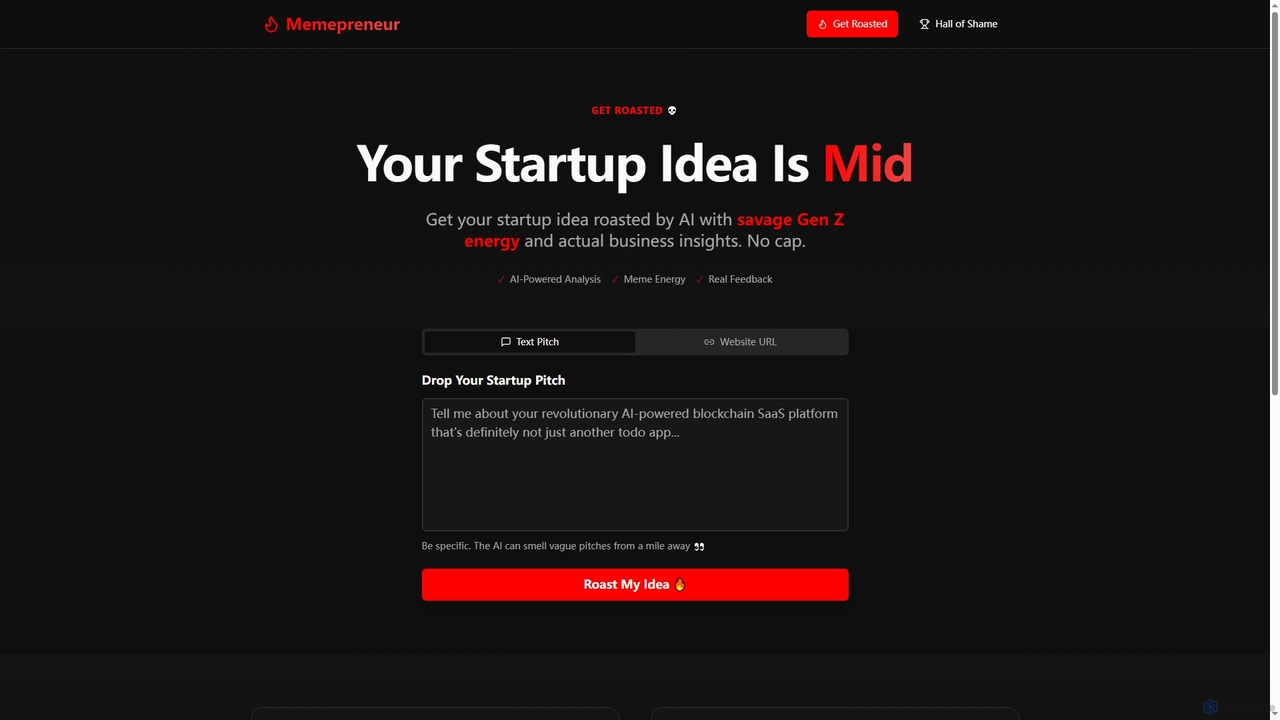
Memepreneur is an AI-powered tool designed for founders to get brutally honest, Gen Z-style feedback on their startup ideas. It combines savage humor with genuine business insights to help entrepreneurs refine their pitches and validate concepts.

Startup Tools
Visits 4.1KFavorites 111Likes 112

About Creative Feedback

Creative Feedback tools are a unique category of AI that provides analysis and critiques on user-submitted content, often using humor, satire, or unconventional perspectives. Leveraging large language models, these tools analyze text, code, or designs to generate feedback that is not only insightful but also entertaining. Their primary value lies in offering a fresh, memorable, and less intimidating way to receive criticism, helping creators spot flaws from a novel angle. Unlike standard analysis tools that provide dry reports, Creative Feedback tools aim to engage the user, making the improvement process more enjoyable.

Core Features

  • Humorous Analysis: Delivers feedback in a witty, roasting, or satirical tone to make critiques more engaging.
  • Multi-Format Input: Accepts various content types, including plain text, code snippets, website URLs, and documents.
  • Persona-Based Feedback: Allows users to choose a specific AI persona (e.g., a cynical critic, an overly enthusiastic fan) for tailored feedback.
  • Actionable Suggestions: Provides concrete improvement suggestions cleverly embedded within the humorous commentary.

Use Cases

These tools are ideal for developers seeking a lighthearted code review, writers wanting to check their copy for clichés in an engaging way, and designers looking for unconventional feedback on UI/UX layouts. They serve as an excellent first-pass review mechanism to catch obvious issues before a formal peer review process.

How to Choose

When selecting a Creative Feedback tool, consider the variety of feedback styles and personas offered. Evaluate the supported content types to ensure they match your needs (e.g., code, prose, design). Assess the quality of the underlying analysis—good tools provide genuinely useful insights beneath the humor. Finally, check for customization options that allow you to adjust the intensity of the feedback.

Featured tool rankings

Creative Feedback use cases

1

Lighthearted Code Review for Developers

A solo developer uses a creative feedback tool to get a 'roast' of their new feature's code. The AI analyzes the code for potential bugs, inefficient logic, or poor naming conventions, delivering its findings in a sarcastic but surprisingly insightful tone. For example, it might point out a convoluted function by calling it 'a beautiful mess that only its creator could love.' This approach makes the debugging process less stressful and helps the developer catch issues they might have overlooked before a formal peer review.

2

Breaking Writer's Block for Copywriters

A marketing copywriter is stuck on a product description. They paste their draft into a creative feedback tool, which, acting as a cynical critic, highlights bland phrases and clichés. It might suggest replacing 'state-of-the-art' with 'so advanced, your coffee maker will be jealous.' This unconventional perspective sparks new ideas, helps the writer see their work through fresh eyes, and refines the copy to be more memorable and engaging for the target audience.

3

Unconventional UI/UX Design Feedback

A UI/UX designer uploads a screenshot of their new app interface. The AI provides feedback from the perspective of a comically impatient user, pointing out confusing navigation or poorly placed buttons. It might say, 'I had to click three times to find the settings menu. Was this designed as a puzzle?' This humorous but direct feedback helps the designer identify usability issues they might have become blind to, leading to a more intuitive and user-friendly final product.

4

Improving Public Speaking Scripts

A professional preparing for a presentation inputs their speech script into a creative feedback tool. The AI analyzes the text for pacing, repetitive words, and weak arguments, delivering the critique as if from a bored audience member. It might highlight a long sentence with, 'I fell asleep somewhere in the middle of this sentence.' This helps the speaker identify parts that lack impact and refine their message to be more compelling, dynamic, and memorable for their actual audience.

5

Fun Peer Review in Educational Settings

An educator in a creative writing class uses a creative feedback tool for an initial round of feedback. Students submit their short stories to the AI, which might critique a character's motivation by saying, 'This character changes their mind more often than a traffic light.' The humorous and exaggerated critiques make receiving criticism less intimidating for students, encouraging them to revise their work with a positive attitude before engaging in more formal peer-to-peer or instructor reviews.

6

Stress-Testing Startup Pitches

An entrepreneur preparing their startup pitch inputs the core text into a creative feedback tool. The AI acts as an overly skeptical venture capitalist, poking holes in the business model and questioning market assumptions. It might comment, 'Your total addressable market is 'everyone'? I see you're aiming for modesty.' This 'stress test' helps the founder anticipate tough questions, identify weaknesses in their narrative, and strengthen their pitch before presenting it to real investors.

Creative Feedback FAQ

What are Creative Feedback tools?

Creative Feedback tools are AI-powered applications that analyze user-submitted content like text, code, or designs and provide critiques in an unconventional, often humorous or satirical, manner. Unlike standard analysis tools that offer objective, dry reports, these tools use unique personas and witty language to make the feedback process more engaging and memorable. Their goal is to help creators see their work from a fresh perspective and identify areas for improvement in a low-pressure, entertaining way.

How to choose a good Creative Feedback tool?

To choose the right tool, consider these factors:

  • Feedback Style & Tone: Look for a tool that offers a variety of personas or tones (e.g., sarcastic, encouraging, brutally honest) to match your preference.
  • Supported Content Types: Ensure the tool can analyze the format you work with, whether it's code, prose, a URL, or an image.
  • Quality of Insight: The best tools provide genuinely useful, actionable advice beneath the layer of humor. Check if the feedback goes beyond simple jokes.
  • Customization: Some tools allow you to adjust the intensity of the feedback or provide context, which can lead to more relevant critiques.
What's the difference between Creative Feedback and standard analysis tools?

The primary difference lies in the delivery and intent. Standard analysis tools (like linters or grammar checkers) focus on objective, rule-based correctness and present findings in a direct, technical report. Creative Feedback tools prioritize engagement and perspective. They use humor and personality to deliver insights, aiming to make the process of receiving criticism less intimidating and more enjoyable. While a standard tool might say 'Syntax error on line 5,' a creative feedback tool might say 'Line 5 looks like it was written by a cat walking on your keyboard.'

Is the feedback from these tools actually useful for professional work?

Yes, it can be very useful. While presented humorously, the best creative feedback tools are built on powerful analytical models capable of identifying genuine issues in code, writing, or design. The humor serves as a delivery mechanism for valid criticism. They are particularly effective for:

  • An initial, low-stakes review to catch obvious errors.
  • Breaking through creative blocks by offering a different perspective.
  • Making the iterative process of improvement more enjoyable and less of a chore.

However, they should be seen as a supplement to, not a replacement for, formal peer reviews or expert analysis.

Who are the main users of Creative Feedback tools?

The primary users are individuals and teams involved in creative processes who can benefit from a fresh, informal perspective on their work. This includes:

  • Software Developers: For lighthearted, informal code reviews and debugging.
  • Writers & Marketers: To check copy for clarity, tone, and clichés in an engaging way.
  • UI/UX Designers: To get unconventional feedback on usability and aesthetics.
  • Students & Educators: To make the feedback process in learning environments less intimidating and more fun.