ToolMage
Sign in

Best 1 Model Orchestration AI tools for Large Language Models

Popular Model Orchestration AI tools in Large Language Models include ChatBetter, helping you work more efficiently.

ChatBetter
Freemium

ChatBetter

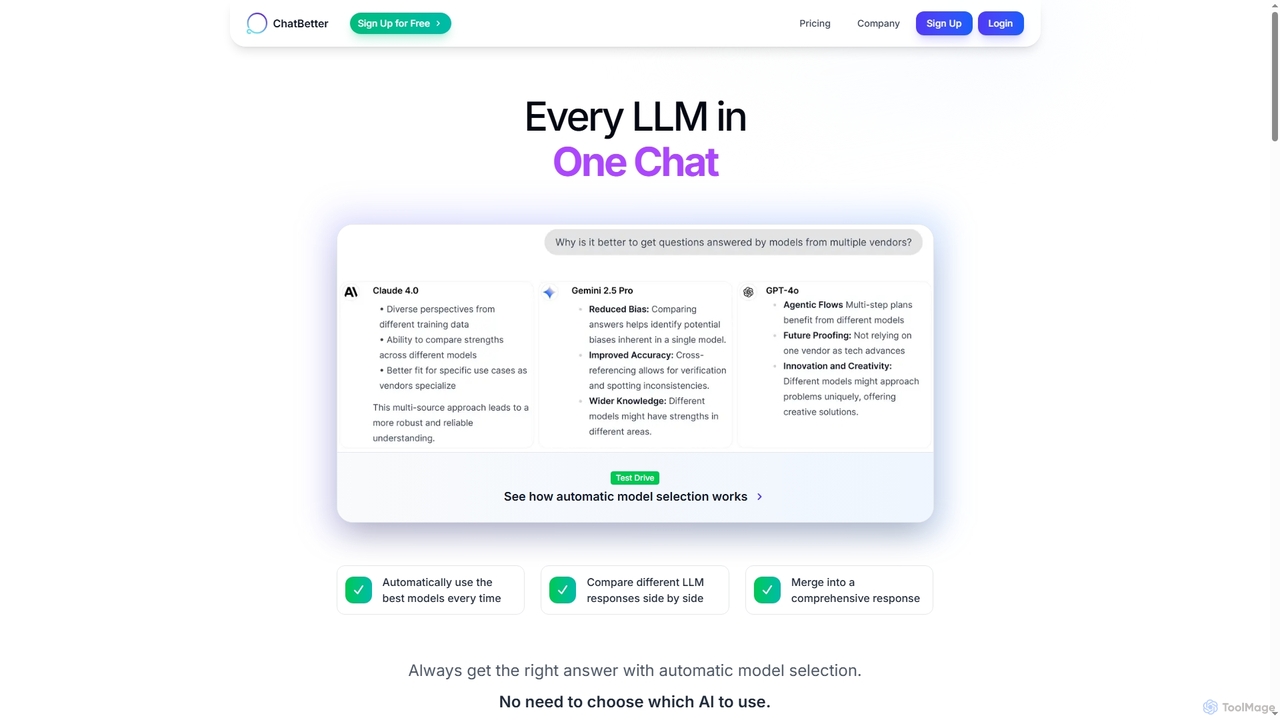
ChatBetter is an advanced AI chat platform that consolidates all major large language models (LLMs) into a single interface. It automatically selects the best model for your query, compares responses side-by-side, and merges insights for comprehensive answers, enhancing productivity for both individual users and enterprise teams.

Team Collaboration
Visits 4.7KFavorites 118Likes 124

About Model Orchestration

Model Orchestration tools are platforms designed to build, manage, and deploy complex applications powered by multiple AI models. They function as a control layer, allowing developers to chain different models, APIs, and data sources into sophisticated workflows. This enables the creation of advanced agents that can perform multi-step reasoning, interact with external tools, and dynamically select the best model for a specific task. By abstracting the complexity of state management and API calls, these platforms significantly accelerate the development of robust, production-ready AI applications.

Core Features

  • Workflow Chaining: Connect multiple AI models, prompts, and logic steps into a coherent sequence to perform complex tasks.
  • Model Routing: Dynamically select the most appropriate model for a sub-task based on cost, speed, or capability.
  • Tool Integration: Allow models to interact with external APIs, databases, and other software as functional tools (e.g., search, calculation).
  • State Management: Maintain context, memory, and data across multiple interactions or steps within a workflow.
  • Observability and Debugging: Provide tools to trace, monitor, and debug the execution of complex multi-model interactions.

Use Cases

These tools are ideal for developers building sophisticated AI agents, such as advanced customer service chatbots that can query databases and process orders. They are also used to create automated content creation pipelines that leverage different models for ideation, drafting, and editing. In enterprise settings, they power internal tools that automate complex data analysis and reporting by combining data retrieval with natural language generation.

How to Choose

When selecting a Model Orchestration tool, consider its integration support for the LLMs and services you use. Evaluate the development experience—whether you prefer a low-code visual builder or a code-first SDK. Also, assess its deployment options (cloud vs. self-hosted), scalability for production traffic, and the quality of its debugging and monitoring features, which are critical for maintaining complex applications.

Featured tool rankings

Model Orchestration use cases

1

Building an Autonomous AI Customer Support Agent

A developer aims to create a support agent that goes beyond simple FAQs. Using a model orchestration platform, they design a workflow: 1) An initial LLM classifies the user's intent (e.g., 'order status', 'technical issue'). 2) The workflow routes the request to a specific tool; for 'order status', it calls the company's internal API with the order number. 3) Another LLM takes the API response (e.g., 'shipped') and formulates a natural, helpful reply to the user. This creates a highly capable agent that can perform real actions, not just answer questions.

2

Creating a Multi-Step Content Generation Pipeline

A marketing team wants to automate blog post creation. They use an orchestration tool to build a pipeline: 1) A creative, fast model like Claude Sonnet generates a list of potential blog titles based on a keyword. 2) After a human selects a title, a more powerful model like GPT-4 generates a detailed outline. 3) The outline is then passed to another specialized writing model to draft the full article. 4) Finally, a summarization model creates a short version for social media. This chain uses the best model for each specific task, improving quality and efficiency.

3

Developing a Financial Data Analysis Agent

A financial analyst needs an agent to summarize daily market reports. The orchestration workflow is set up to: 1) Use a web scraping tool to fetch the latest financial news from specified sources. 2) Pass the raw text to an LLM specialized in financial text to extract key events and sentiment. 3) Route this structured data to another model to generate a concise, bullet-pointed summary. 4) The agent then sends this summary to the analyst via email. This automates a time-consuming research task by connecting data retrieval tools with multiple specialized AI models.

4

Cost-Optimizing LLM-Powered Applications

A startup is building a chatbot that handles a high volume of queries. To manage costs, they use a model orchestrator with a router. The router first analyzes the complexity of an incoming user query. For simple questions like 'What are your hours?', it sends the query to a fast, inexpensive model. For complex, multi-part questions requiring reasoning, it routes the query to a more powerful but expensive model like GPT-4 Turbo. This dynamic routing strategy ensures a high-quality user experience while significantly reducing operational costs compared to using a single powerful model for all tasks.

5

Automating Complex Document Processing

A legal firm needs to process thousands of contracts to extract key clauses. An orchestration platform automates this: 1) An OCR tool converts scanned PDF contracts into machine-readable text. 2) A text classification model identifies the contract type (e.g., NDA, employment agreement). 3) Based on the type, a specific chain is triggered. For an NDA, a specialized LLM is prompted to extract the 'Term Length' and 'Governing Law' clauses. 4) The extracted data is structured into a JSON format and saved to a database. This multi-step, multi-tool workflow transforms a manual, error-prone task into a fast, automated process.

6

Building Advanced RAG (Retrieval-Augmented Generation) Systems

A company wants to build a chatbot that answers questions based on its internal knowledge base. A simple RAG might fail on complex queries. Using an orchestration tool, they create an advanced RAG workflow: 1) A query decomposition step breaks a complex question like 'Compare product A and B on price and features' into two separate queries. 2) The system retrieves relevant documents for each sub-query from the vector database. 3) An LLM synthesizes the retrieved information for each sub-query into separate answers. 4) A final LLM combines these answers into a single, comprehensive response. This orchestrated approach provides more accurate and detailed answers than a basic RAG setup.

Model Orchestration FAQ

What is AI Model Orchestration?

AI Model Orchestration is the process of managing and coordinating multiple AI models, tools, and data sources to work together in a complex workflow. Instead of relying on a single model, orchestration platforms allow you to build multi-step applications where the output of one component becomes the input for another. This enables the creation of sophisticated AI agents that can reason, use external tools (like APIs or databases), and perform tasks that are too complex for any single model to handle alone.

How to choose the right Model Orchestration platform?

Choosing the right platform depends on your specific needs. Consider the following factors:

  • Development Experience: Do you prefer a visual, low-code interface for building workflows, or a code-first SDK (like LangChain or LlamaIndex) for maximum flexibility?
  • Model & Tool Support: Ensure the platform integrates with the specific LLMs (OpenAI, Anthropic, etc.) and external APIs you need to use.
  • Deployment & Scalability: Can you self-host the platform for data privacy, or is it a managed cloud service? Check if it can handle your expected production load.
  • Observability: Look for strong debugging, logging, and tracing features, as they are crucial for troubleshooting complex chains.
What's the difference between Model Orchestration and directly using an LLM API?

Directly using an LLM API (like OpenAI's) involves sending a prompt to a single model and receiving a response. This is suitable for simple, one-step tasks. Model Orchestration, on the other hand, is for building applications that require multiple steps or models. It provides a framework to manage the logic, state, and data flow between different components. For example, an orchestration tool can first call a search API, then feed the results to an LLM for summarization, a task that is impossible with a single, direct API call.

Who are Model Orchestration tools for?

Model Orchestration tools are primarily for AI developers, machine learning engineers, and software developers who are building applications on top of large language models. They are particularly useful for those creating:

  • AI Agents: Autonomous systems that can reason, plan, and use tools to achieve goals.
  • Complex Chatbots: Customer service or internal bots that need to access databases, APIs, or perform actions.
  • RAG Systems: Applications that answer questions based on private documents or data.
  • Automated Workflows: Multi-step pipelines for tasks like content creation, data analysis, or document processing.
Essentially, anyone moving beyond simple prompt-and-response interactions to build stateful, multi-turn, or tool-using AI systems can benefit.

Why is state management important in Model Orchestration?

State management is crucial because complex AI applications often require memory of past interactions. For example, in a multi-turn conversation with a chatbot, the system needs to remember what was said earlier to provide coherent and contextually relevant responses. An orchestration platform handles this by managing the 'state'—such as conversation history, user data, or intermediate results from previous steps. This allows the AI to maintain context over time, enabling more natural and effective interactions, which is a key differentiator from simple, stateless API calls.