TestPlan
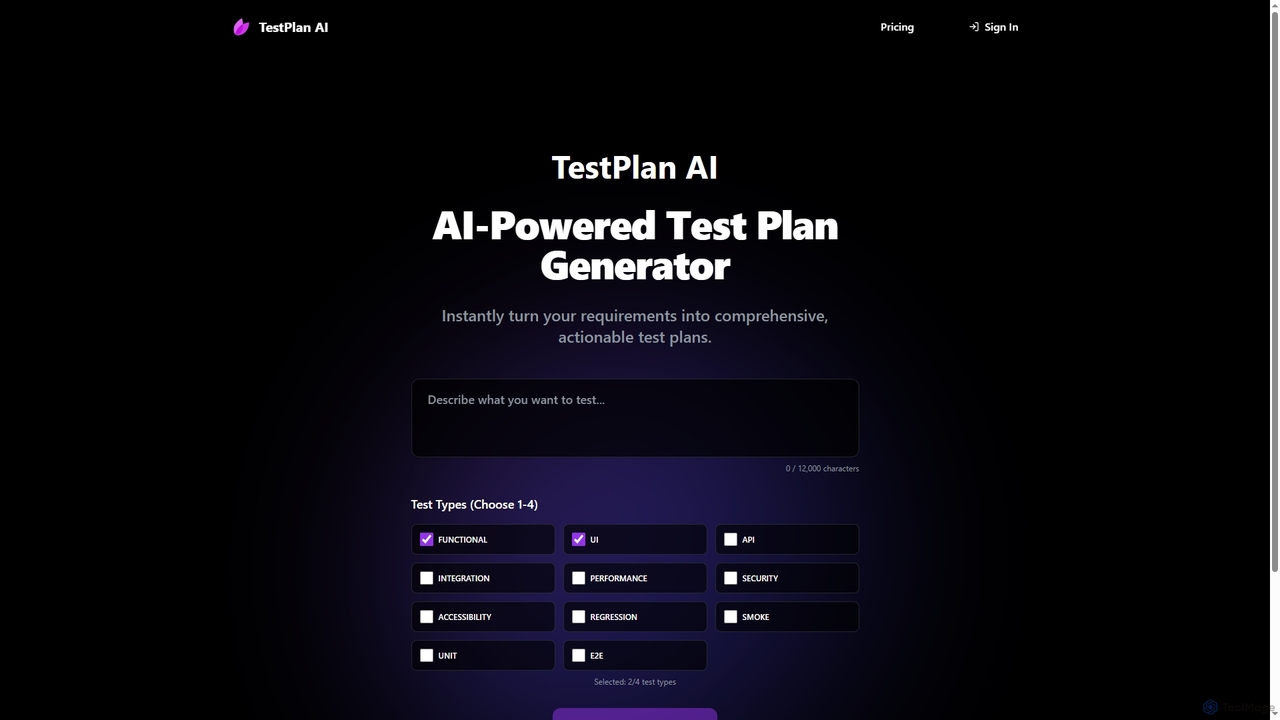
TestPlan is a powerful, AI-powered tool designed to instantly transform project requirements into comprehensive, actionable test plans and …
TestPlan is a powerful, AI-powered tool designed to instantly transform project requirements into comprehensive, actionable test plans and detailed test cases. It supports a wide range of test types, from functional to security, making software testing more efficient for development teams.
About Test Management
Test Management tools are a specialized category within Quality Assurance, designed to streamline and organize the entire software testing lifecycle. These platforms provide centralized control over test planning, execution, tracking, and reporting, ensuring systematic validation of software quality. They help teams manage test cases, defects, and test runs efficiently, leading to improved product reliability and faster release cycles.
Core Features
- Test Case Management: Create, organize, and maintain detailed test cases, including steps, expected results, and preconditions.
- Test Execution Tracking: Plan test cycles, assign tests to testers, execute tests, and record results (pass/fail/blocked).
- Defect Management Integration: Link test failures directly to bug reports, facilitating seamless defect tracking and resolution.
- Requirements Traceability: Map test cases to specific requirements, ensuring comprehensive test coverage and compliance.
- Reporting & Analytics: Generate detailed reports on test progress, defect trends, and overall quality metrics.
Applicable Scenarios
Test Management tools are essential for software development teams adopting Agile or Waterfall methodologies, particularly in regulated industries like finance or healthcare. They are used by QA engineers, test leads, and project managers to ensure that all software functionalities are thoroughly validated against requirements before release, minimizing risks and improving product quality.
How to Choose
When selecting a Test Management tool, consider its integration capabilities with existing development and bug tracking systems (e.g., Jira, Azure DevOps). Evaluate its scalability to handle growing test suites and team sizes, and assess its reporting features for actionable insights. User interface intuitiveness and support for various testing types (manual, automated, performance) are also crucial factors.

Test ManagementUse Cases
Centralizing Test Assets for Large-Scale Projects
For large software development projects involving multiple teams and complex features, a Test Management tool centralizes all test cases, test plans, and test data. QA leads can easily assign test suites to different teams, track their progress in real-time, and ensure consistent testing standards across the entire project, significantly reducing the risk of overlooked test areas and improving collaboration.
Streamlining Agile Sprint Testing
Agile development teams utilize test management tools to link user stories to test cases, plan sprint test cycles, execute tests, and track progress in real-time. This ensures all new features and bug fixes are thoroughly validated before sprint completion, providing clear visibility to product owners and reducing last-minute issues, thereby accelerating delivery.
Streamlining Agile Sprint Testing
In an Agile development environment, teams need to rapidly test new features within short sprints. Test Management tools facilitate this by allowing testers to quickly create and execute test cases linked to specific user stories. They provide immediate feedback on feature quality, enable quick defect logging and retesting, and offer dashboards to monitor sprint progress, ensuring timely delivery of high-quality increments.
Managing Extensive Regression Test Suites
QA managers leverage test management tools to organize and maintain extensive regression test suites. They can schedule automated or manual regression runs, assign tests to specific testers, and monitor execution status across multiple builds. This ensures that new changes don't negatively impact existing functionalities, maintaining product stability over time and reducing the risk of critical bugs.
Ensuring Regulatory Compliance in Healthcare Software
Developing software for regulated industries like healthcare requires stringent documentation and traceability. Test Management tools provide robust features for linking test cases to specific regulatory requirements, tracking every test execution, and maintaining an audit trail of all testing activities. This ensures that the software meets industry standards and simplifies the process of demonstrating compliance during audits.
Ensuring Compliance in Regulated Industries
Companies in highly regulated sectors like healthcare or finance use test management tools to maintain strict compliance. These tools provide robust requirements traceability, linking every test case back to specific regulatory requirements. This creates an auditable trail of validation, demonstrating due diligence and adherence to industry standards, which is crucial for audits and certifications.
Managing Regression Testing for Continuous Integration
With continuous integration and deployment pipelines, frequent code changes necessitate efficient regression testing. Test Management tools help organize and automate regression test suites, allowing teams to quickly identify if new code changes have introduced defects into existing functionalities. They integrate with CI/CD pipelines to trigger automated tests and report results, ensuring software stability with every new build.
Coordinating Distributed Testing Teams
For large enterprises with geographically dispersed QA teams, test management tools act as a central hub for collaboration. Test leads can assign tasks, monitor progress, and review results from different locations, ensuring consistent testing practices and real-time visibility into the overall project status. This improves communication and reduces overhead in complex testing environments.
Tracking and Prioritizing Defects Across Releases
As software evolves, managing a growing backlog of defects becomes critical. Test Management tools provide a centralized system for logging, categorizing, and prioritizing bugs based on severity and impact. Development and QA teams can collaborate on defect resolution, track their lifecycle from discovery to closure, and analyze defect trends over multiple releases to improve overall product quality.
Enhancing Collaboration Between Dev and QA
Test management tools foster better collaboration between development and QA teams by providing a shared platform for all testing-related activities. Developers can easily access test results, defect reports, and associated requirements, enabling quicker understanding and resolution of issues. This integrated workflow reduces friction and accelerates the feedback loop, leading to higher quality software.
Optimizing Test Coverage and Resource Allocation
QA managers use Test Management tools to gain insights into test coverage against requirements and identify areas with insufficient testing. By analyzing execution data and defect density, they can strategically allocate testing resources, prioritize critical test areas, and make data-driven decisions to optimize the overall testing effort. This ensures maximum quality assurance with efficient use of team capacity.
Optimizing Release Readiness and Reporting
Project managers and release managers use test management tools to gain a comprehensive overview of the software's quality status before a release. The robust reporting and analytics features provide real-time dashboards on test coverage, defect density, and overall test progress. This data-driven insight helps in making informed decisions about release readiness, ensuring that only high-quality software reaches the market.