ToolMage
Sign in

AI TOOL COMPARISON

10LevelUp vs Minvo

What is the difference, and which fits your workflow? Compare features, usage, pricing models and traffic side by side.

Jump to key differences

Product overview

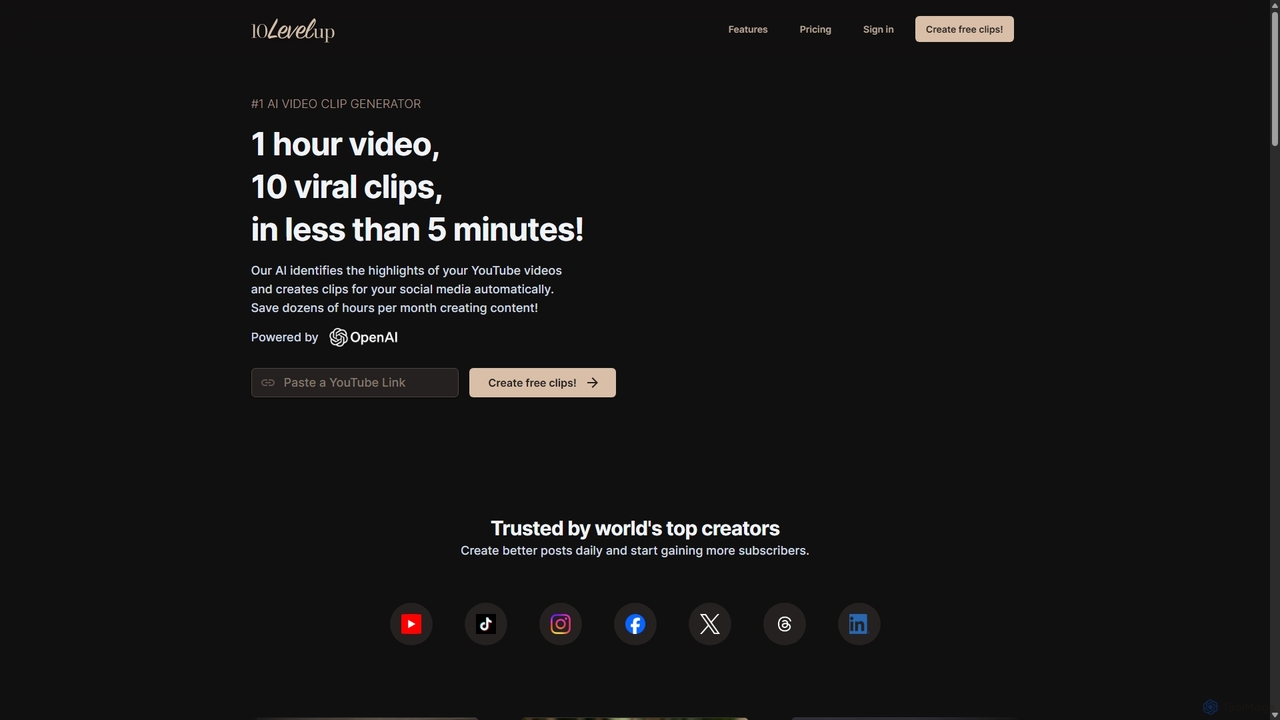
10LevelUp Product overview

10LevelUp is an AI-powered video clip generator that automatically transforms long videos and podcasts into engaging, shareable short clips for social media. It intelligently identifies the most compelling moments, formats them for platforms like TikTok, Reels, and Shorts, and supports over 100 languages, helping creators and marketers save time and grow their audience.

Preview

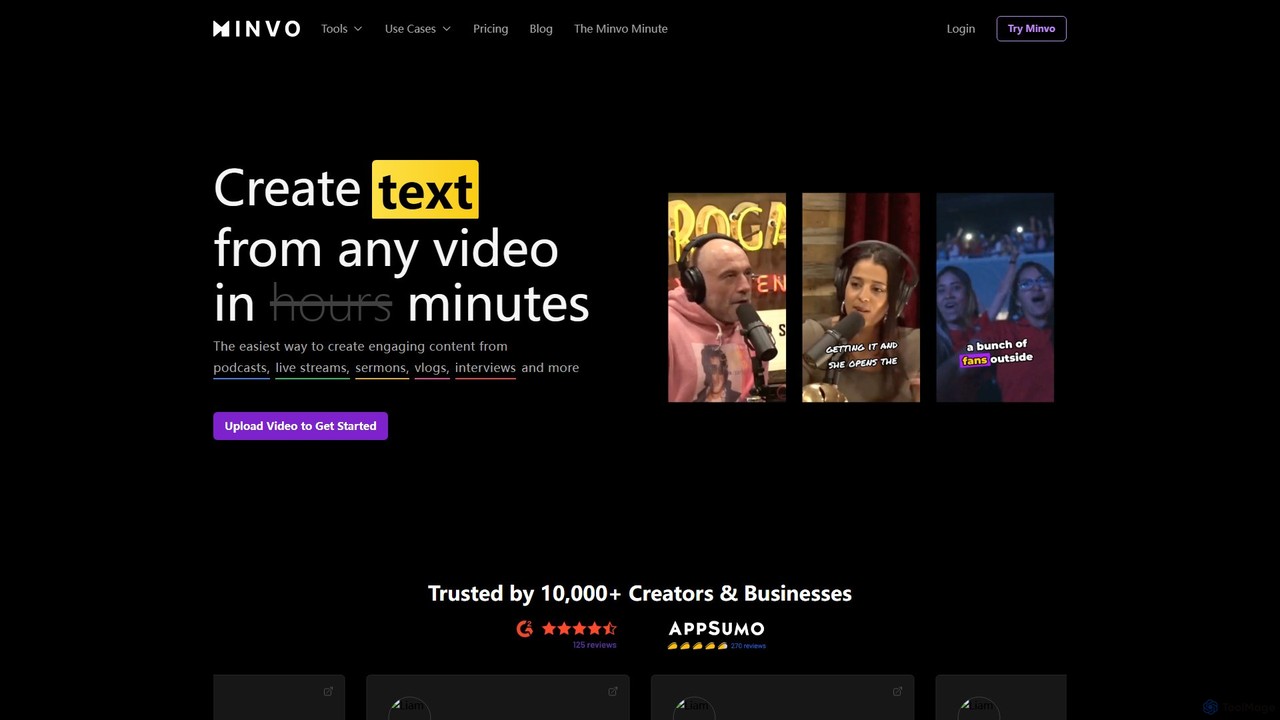
Minvo Product overview

Minvo is an AI-powered content studio that transforms long-form videos into engaging short clips, images, and text for social media. It automates the process of clipping, editing, captioning, and scheduling, helping creators and businesses save time and boost their online presence on platforms like YouTube, TikTok, and Instagram.

Preview

Quick facts

Compare product focus, pricing models and audiences. Highlighted rows indicate different listed information; unknown pricing does not mean free.

10LevelUp VS Minvo — Quick facts
Quick facts10LevelUpMinvo
Pricing modelFreemiumFreemium
Product typeWebWeb
Primary focusAutomationAutomation
Audience and rolesBrand Manager · Coach · Content Creator · Digital Marketer · Educator · Marketing Manager · Podcaster · Social Media Manager · YouTuberNo data available
CategoriesAutomation · Content Creation · EditingAutomation · Content Creation · Editing
AddedSep 15, 2025Aug 8, 2025
UpdatedNov 19, 2026Nov 19, 2026

Features, usage and use cases

Explore the listed product descriptions, features and workflows. Taxonomy labels alone are not feature evaluations.

10LevelUp

10LevelUp is a cutting-edge generative AI tool designed to solve a major challenge for content creators, podcasters, and marketers: the time-consuming process of repurposing long-form video content for social media. Born from the needs of its founders, two successful German podcasters, 10LevelUp automates the creation of short, engaging video clips, allowing users to effortlessly generate a high volume of content for platforms like YouTube Shorts, TikTok, Instagram Reels, and LinkedIn.

The platform's core technology analyzes long videos—such as podcasts, webinars, interviews, or tutorials—to intelligently identify the most interesting and potentially viral segments. It then automatically cuts these segments into perfectly formatted short clips, complete with engaging thumbnails integrated into the first frame. This process transforms a single one-hour video into over 30 distinct pieces of social media content, turning a task that once took 5-10 hours per week into a streamlined, automated workflow.

How to use 10LevelUp

Using 10LevelUp is designed to be simple and intuitive, requiring just a few steps to get from a long video to a library of ready-to-post clips:

  1. Upload Your Content: Start by either uploading a video file directly from your computer or simply pasting a YouTube video link. The platform handles the processing from there.
  2. AI Analysis: 10LevelUp's AI gets to work, transcribing the audio and analyzing the video content to pinpoint the most engaging hooks, key topics, and memorable moments.
  3. Review and Select Clips: Once the analysis is complete, the tool presents you with a selection of suggested short clips. You can review these AI-generated selections to choose the ones that best fit your content strategy.
  4. Customize and Format: Choose the ideal aspect ratio for your target platform. 10LevelUp supports 9:16 (for TikTok/Reels/Shorts), 1:1 (for Instagram/LinkedIn feeds), and 16:9 (for traditional video). The tool automatically adds a thumbnail to the first frame to grab viewers' attention immediately.
  5. Download and Publish: Download your finished clips and share them across your social media channels to maximize your reach and grow your audience.

Core Features of 10LevelUp

  • AI-Powered Clip Selection: The intelligent algorithm identifies the most compelling parts of your videos, ensuring your short clips are engaging and have high viral potential.
  • Multi-Platform Formatting: Automatically create videos in 16:9, 9:16, and 1:1 aspect ratios, perfectly optimized for all major social media platforms.
  • YouTube & Direct Upload Support: Flexibility to work with existing YouTube content or upload new video files directly.
  • Automatic Thumbnail Generation: Each clip starts with an eye-catching thumbnail in the first frame to improve click-through rates.
  • Extensive Language Support: Natively supports transcription and processing in over 100 languages, making it a global tool for creators worldwide.
  • High-Volume Content Repurposing: Generate dozens of unique content pieces from a single long-form video, creating a consistent content pipeline.
  • User-Friendly Interface: Designed for simplicity and speed, allowing users to create professional-looking clips without needing advanced video editing skills.

Use Cases for 10LevelUp

10LevelUp is versatile and valuable for a wide range of users:

  • Podcasters: Easily convert long audio or video podcast episodes into shareable video clips to promote on TikTok, Instagram, and YouTube Shorts, attracting new listeners.
  • YouTubers: Repurpose key moments from long-form videos to create promotional teasers for other platforms, driving traffic back to their main YouTube channel.
  • Marketing Managers: Efficiently slice webinars, product demos, and customer testimonials into bite-sized social media posts to increase brand engagement and lead generation.
  • Coaches and Educators: Break down lengthy courses or lectures into short, digestible tips and highlights to share with their audience and promote their services.
  • Content Agencies: Streamline the content creation workflow for multiple clients, saving countless hours of manual editing and delivering consistent results.

Advantages of 10LevelUp

Users choose 10LevelUp over other tools for several key reasons. It dramatically speeds up the content creation process, saving users hours of manual work each week. The AI's ability to select genuinely interesting parts of a video is highly praised, and the inclusion of a thumbnail in the first frame is a unique feature that boosts engagement. Above all, its simplicity and ease of use make it accessible to everyone, regardless of their technical expertise.

Pricing and Plans

10LevelUp offers a flexible freemium pricing model to suit different needs:

  • Free Plan: €0/month. Includes 0.5 hours of video upload per month, perfect for trying out the platform.
  • Creator Plan: €29/month. Includes 5 hours of video upload per month, ideal for individual creators and small channels.
  • Pro Plan: €59/month. Includes 15 hours of video upload per month, designed for professional creators and businesses with higher content volume.
  • Agency Plan: €119/month. Includes 40 hours of video upload per month, tailored for agencies and teams managing multiple accounts.

All prices are inclusive of VAT. The monthly hour limit resets on the first day of each month.

Minvo

Minvo is a comprehensive AI-powered content repurposing platform designed to streamline the creation of social media content from long-form videos. Trusted by over 10,000 creators and businesses, Minvo transforms podcasts, live streams, webinars, and vlogs into a multitude of engaging assets, including viral short clips, shareable quote images, and written content like blog posts and newsletters. By automating tedious editing tasks, Minvo allows users to generate weeks' worth of content in minutes, not hours.

The platform's core is its intelligent video analysis, which automatically identifies the most compelling moments in a video, assigning a score to each potential clip. This feature, called MagicMoment, ensures that the generated content is high-impact and likely to perform well on social media. Minvo's MagicEdit, powered by GPT-4o, further refines these clips by automatically removing silences and filler words (e.g., 'um's' and 'ah's'), enhancing audio quality to a studio level, and intelligently framing faces to keep the speaker in focus. It can also auto-insert relevant B-roll and emojis to make the content more dynamic.

How to use Minvo

Using Minvo is a simple, streamlined process designed for efficiency:

  1. Upload Your Video: Start by uploading a video file directly or by pasting a YouTube link. Minvo will import and begin processing the content.
  2. AI-Powered Clipping: Minvo's AI, MagicMoment, automatically analyzes the video transcript and identifies the most interesting and shareable segments, presenting them as ready-to-use clips.
  3. Edit and Refine: Users can edit the video using the intuitive transcript-based editor (simply highlight text to cut the corresponding video segment) or a more traditional timeline for precision adjustments. Apply AI-powered features like 'Remove Silences,' 'Enhance Audio,' and 'Face Framing' with a single click.
  4. Customize and Brand: Add animated subtitles from hundreds of available styles. Apply your custom branding, logos, and templates to maintain a consistent look across all your content.
  5. Generate and Repurpose: Use the AI Write feature to generate social media captions, hashtags, blog posts, X threads, and email newsletters based on the video's content.
  6. Schedule and Analyze: Connect your social media accounts (YouTube, TikTok, Instagram, Facebook, LinkedIn) and schedule your posts directly from the Minvo dashboard. Monitor the performance of your content with built-in analytics.

Core Features of Minvo

  • AI Clipping (MagicMoment): Automatically identifies and scores the most viral-worthy moments from long videos.
  • AI Editing Suite (MagicEdit): Powered by GPT-4o, it removes silences and filler words, adds B-roll and emojis, and enhances audio.
  • AI Face Framing: Automatically keeps the speaker centered in the frame, perfect for vertical video formats.
  • Animated & Translated Captions: Offers hundreds of caption styles and can translate and dub content into over 50 languages.
  • Transcript & Timeline Editing: Provides the flexibility to edit via text or a traditional visual timeline.
  • AI Content Generation: Creates written content such as blog posts, social media descriptions, titles, and email newsletters from your video.
  • Social Media Scheduling: Natively schedule and post content to YouTube, Instagram, TikTok, Facebook, and LinkedIn.
  • Analytics Dashboard: Track content performance across unlimited social media accounts and brands.
  • 4K Export: Export high-quality video clips without a watermark on paid plans.

Use Cases for Minvo

Minvo is ideal for a wide range of users:

  • Podcasters: Effortlessly turn long podcast episodes into engaging video clips for Reels, Shorts, and TikTok to promote their show.
  • Content Creators & YouTubers: Repurpose long-form videos into a steady stream of short-form content to grow their audience on multiple platforms.
  • Businesses & Marketers: Convert webinars, interviews, and product demos into promotional materials and social media updates.
  • Coaches & Educators: Share key insights and teachings from lectures or online courses as bite-sized, shareable videos.
  • Solo Entrepreneurs: Save significant time and resources by automating the entire content creation and distribution workflow, effectively replacing the need for a virtual assistant or multiple software tools.

Advantages of Minvo

Minvo stands out by offering an all-in-one solution that is both powerful and easy to use. Its main advantage is the immense time savings it provides, automating tasks that would typically take hours of manual work. The AI-driven feature set ensures high-quality, engaging output that is optimized for social media algorithms. The ability to manage, schedule, and analyze content for unlimited brands and social accounts from a single platform simplifies the entire content marketing process, making it a cost-effective and highly efficient tool for anyone looking to scale their video content strategy.

Pricing and Plans

Minvo offers a freemium model with a free trial to get started. Paid plans are available on a monthly or annual basis (with a 50% discount for annual billing).

  • Free Trial: Allows users to test the platform's features.
  • Creator Plan: Starting at $3.49/month (billed annually). Includes 1 hour of video upload per month, AI animated captions, unlimited social scheduling, and watermark-free exports.
  • Pro Plan: Starting at $14.49/month (billed annually). Includes 5 hours of video upload per month, support for landscape videos, more users, and longer video storage.
  • Pro+ Plan: Starting at $19.99/month (billed annually). Offers all Pro features plus a higher max upload length, extended video storage (180 days), and lightning-fast 10x transcription.

All paid plans include AI writing, social media analytics, and priority support.

Positioning

Their taxonomy shows where the products overlap and where each one has a more distinct focus. Unknown fields are shown explicitly and are never filled with assumptions.

Categories

Shared
AutomationContent CreationEditing
Only 10LevelUp
No listed items
Only Minvo
No listed items

Tags

Shared
AI video editorcontent creationInstagram Reelspodcast clipsshort-form videosocial media marketingvideo repurposingyoutube shorts
Only 10LevelUp
clip generatortiktok videovideo automation
Only Minvo
auto captionssocial media schedulertiktok

Audience and roles

Shared
No listed items
Only 10LevelUp
Brand ManagerCoachContent CreatorDigital MarketerEducatorMarketing ManagerPodcasterSocial Media ManagerYouTuber
Only Minvo
No listed items

Traffic comparison

Traffic is shown on the same scale so differences in market visibility are not visually understated.

How to interpret the traffic data

Both charts share the same months and vertical scale. Each tool identifies its latest reporting month; missing months are left blank, not counted as zero. Regional and source visit counts are estimates calculated from the reported shares.

10LevelUp

No data available

Minvo monthly traffic:

Latest traffic · 2026-05

Monthly visits
47.5K
Avg. visit duration
2:39
Pages per visit
4.16
Bounce rate
35.76%
Data updated 2026-06-11

Monthly traffic trend

  • 2025-09: 41.5K
  • 2026-01: 54.5K
  • 2026-02: 45.3K
  • 2026-03: 46.5K
  • 2026-04: 45.5K
  • 2026-05: 47.5K

Top regions

Top 5 countries/regions
Country/regionPercentageEstimated visits
🇺🇸United States45.4%21.5K
🇮🇳India18.75%8.9K
🇵🇭Philippines15.76%7.5K
🇳🇬Nigeria12.36%5.9K
🇨🇦Canada7.73%3.7K

Traffic sources

Source typePercentageEstimated visits
Direct100%47.5K

Search keywords

linkedin content length guidelinesmin clipsminvominvo aiminvo. ia

Community signals

Ratings, comments, favorites, and likes are community signals—not a substitute for product fit.

10LevelUp

Rating
No data available
Comments
0
Favorites
185
Likes
192

Minvo

Rating
No data available
Comments
0
Favorites
174
Likes
175

10LevelUp vs Minvo · Comparison FAQ

What do 10LevelUp and Minvo have in common?
Both tools are listed under Automation、Content Creation、Editing. These categories indicate overlapping use cases; compare their detailed descriptions for workflows, capabilities and limitations.
Are 10LevelUp and Minvo free?
Listed pricing models: 10LevelUp — Freemium; Minvo — Freemium. Missing pricing is not proof of a free plan, and freemium does not mean every feature is free. Check official sites for current plans, limits and trials.
How should I choose between 10LevelUp and Minvo?
The primary listed category is Automation for 10LevelUp, and Automation for Minvo. Compare features, steps and use cases, then verify pricing, data permissions and deployment needs. This page does not include hands-on testing and does not declare a winner from traffic or tags.

Sources and comparison methodology

This page is assembled from ToolMage product listings, taxonomy, traffic statistics and on-site user feedback. It is not a hands-on test or an independent review.

  • Feature and plan descriptions reflect information in the listings, not real-time guarantees. Verify pricing, quotas, availability and privacy terms on the official sites.
  • Traffic uses the reporting months shown. Missing statistics do not mean zero visits, and different periods do not establish growth or superiority. Regional and source visit counts are estimates based on shares.
  • Different tags indicate differences in the listings, not proof that the other product lacks a capability. Ratings, favorites and visits are not used to declare a winner.

Related comparisons