ToolMage
Sign in

AI TOOL COMPARISON

Assembo vs Filtrix

What is the difference, and which fits your workflow? Compare features, usage, pricing models and traffic side by side.

Jump to key differences

Product overview

Assembo Product overview

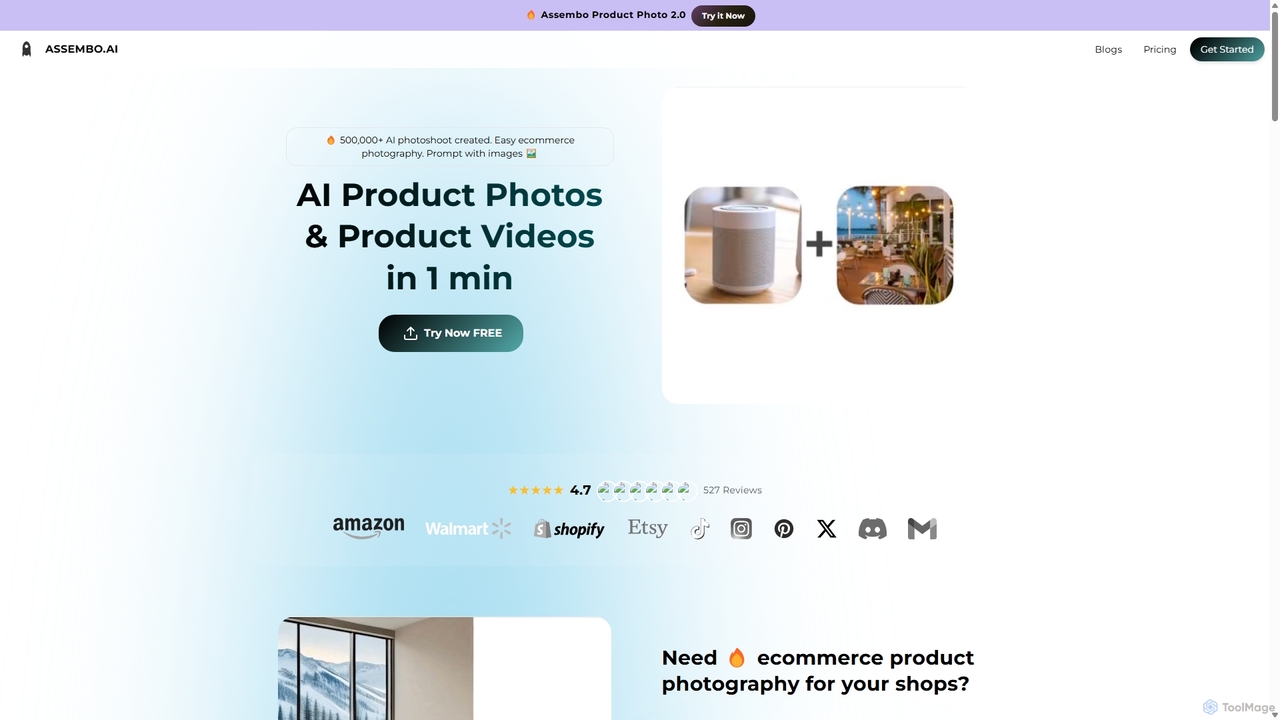
Assembo is an AI-powered platform that generates professional e-commerce product photos and animated videos in minutes. It allows users to create stunning visuals with custom backgrounds, AI-generated human models, and dynamic animations, eliminating the need for traditional photoshoots.

Preview

Filtrix Product overview

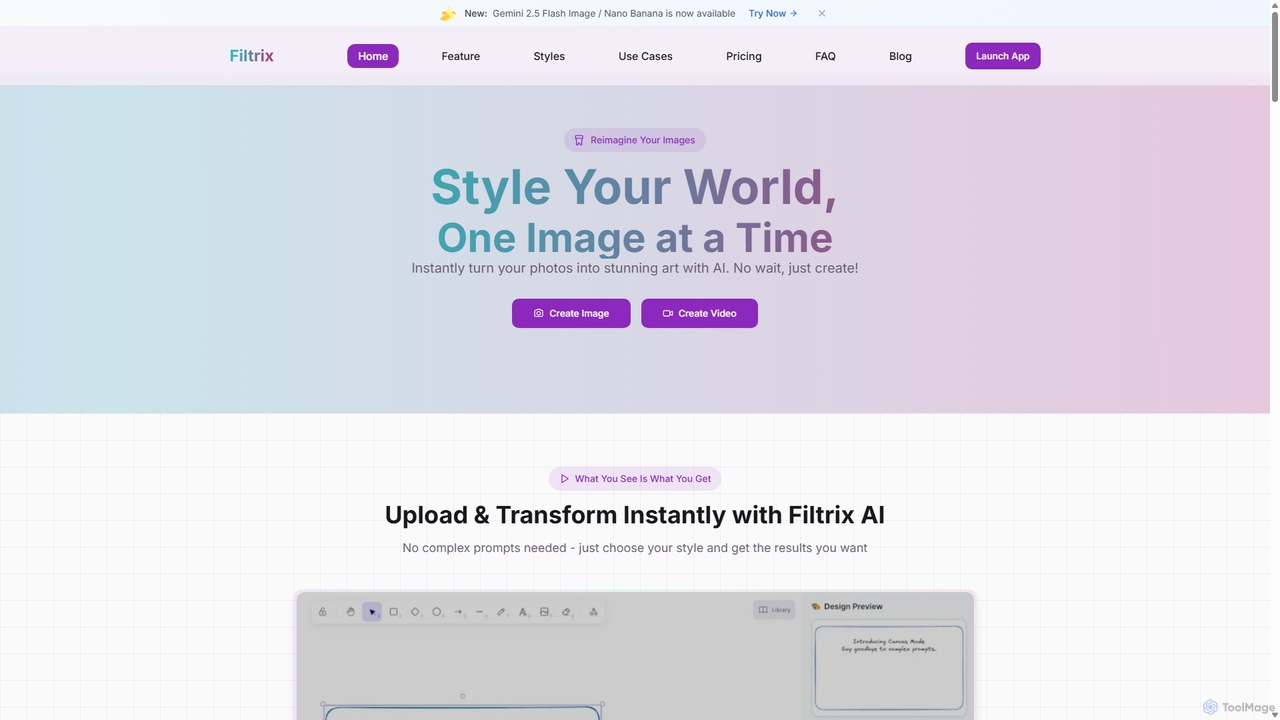
Filtrix is an AI-powered image and video generator that transforms your photos into stunning art with unique styles like Ghibli and Pixar. It simplifies content creation with one-click transformations, an intuitive canvas editor, and a powerful image-to-video feature, making it ideal for e-commerce, marketing, and social media.

Preview

Quick facts

Compare product focus, pricing models and audiences. Highlighted rows indicate different listed information; unknown pricing does not mean free.

Assembo VS Filtrix — Quick facts
Quick factsAssemboFiltrix
Pricing modelFreemiumPaid
Product typeWebWeb
Primary focusImage EditingArt Generation
Audience and rolesContent Creator · E-commerce Manager · Graphic Designer · Marketing Manager · Product Manager · Small Business Owner · Social Media ManagerArtist · Blogger · Content Creator · E-commerce Manager · Graphic Designer · Marketing Manager · Small Business Owner · Social Media Manager
CategoriesImage Editing · E Commerce · Content Creation · Video GenerationArt Generation · Image Editing · Social Media · Video Generation
AddedSep 14, 2025Sep 7, 2025
UpdatedNov 19, 2026Nov 19, 2026

Features, usage and use cases

Explore the listed product descriptions, features and workflows. Taxonomy labels alone are not feature evaluations.

Assembo

Assembo is a revolutionary AI tool designed to transform e-commerce product photography and videography. It empowers online sellers, marketers, and brands to create high-quality, studio-grade visual content effortlessly and affordably. By simply uploading a product image, users can generate a wide array of professional photos and animated videos tailored for platforms like Shopify, Amazon, Instagram, and TikTok. The platform leverages advanced AI to place products in realistic scenes, add virtual human models for lifestyle context, and create engaging animations that capture customer attention.

With over 500,000 AI photoshoots created, Assembo has proven to be a game-changer for businesses of all sizes. It replaces the time-consuming and expensive process of traditional photography with a streamlined, three-step workflow. Users can use simple text prompts or upload reference images to dictate the style, background, and overall aesthetic of their visuals. This flexibility allows for endless creative possibilities, from clean studio shots to vibrant lifestyle scenes, ensuring that every product is showcased in the best possible light.

How to use Assembo

Creating professional product visuals with Assembo is a simple and intuitive process that takes only a minute:

  1. Upload Your Product Image: Start by uploading an existing photo of your product. You can use a professional shot or even a quick picture taken with your smartphone. The AI is designed to work with various image qualities.
  2. Customize and Generate: This is where the magic happens. Use text prompts (e.g., "Chair in a minimalistic living room with plants") or upload a style reference image to guide the AI. You can also choose from a library of pre-designed studio or lifestyle templates. Add AI-generated fashion models to showcase apparel, shoes, or accessories. For videos, select an animation style to bring your product to life. The platform also offers preset sizes and styles optimized for specific e-commerce and social media platforms.
  3. Download and Use: Once you are satisfied with the result, export your AI-generated photos and videos. The visuals are optimized for your chosen platform and ready to be used in your online store, ad campaigns, or social media feeds. You can also save your favorite styles as templates for future use.

Core Features of Assembo

  • AI Product Photoshoot: Instantly generate high-resolution product photos with any background imaginable using text or image prompts.
  • AI Human Models: Add realistic, AI-generated models to your photos to create compelling lifestyle images for fashion, apparel, and accessories without hiring real models.
  • Animated Product Videos: Automatically create short, eye-catching product videos and animations from a single static image to boost engagement on social media.
  • Prompt-Based Customization: Describe the scene you want in plain text or upload a reference image to get precisely the style you need.
  • Template Library: Access a wide range of professional studio and lifestyle templates for quick and easy scene creation.
  • Platform Optimization: One-click optimization for popular platforms like Amazon, Shopify, Instagram, and TikTok with preset aspect ratios and styles.
  • Magic Eraser Tool: Easily edit and refine your generated images by erasing any unwanted objects or imperfections with a simple brush tool.

Use Cases for Assembo

Assembo is versatile and caters to a wide range of e-commerce needs:

  • E-commerce Store Owners: Create primary product listings and lifestyle images for Shopify, Amazon, Etsy, and Wayfair stores to increase click-through rates and conversions.
  • Fashion and Apparel Brands: Showcase clothing, shoes, and bags on AI models for social media campaigns on Instagram and TikTok, saving on model and studio costs.
  • Food and Beverage Companies: Generate appetizing photos of drinks and food items in various settings, such as on a beach or in a cozy café, for menus and promotional materials.
  • Electronics and Gadget Sellers: Place products in realistic lifestyle contexts, like a speaker at a party or a laptop in a modern office, to help customers visualize usage.
  • Jewelry and Accessory Designers: Create elegant and high-end photoshoots that highlight the intricate details of their products against luxurious backdrops.

Advantages of Assembo

Using Assembo provides a significant competitive edge:

  • Cost-Effective: Drastically reduces expenses by eliminating the need for photographers, models, studios, and expensive equipment.
  • Time-Saving: Generates a complete set of professional visuals in minutes, compared to the days or weeks required for a traditional photoshoot.
  • Increased Sales: High-quality, engaging visuals have been shown to improve customer engagement, click-through rates, and ultimately, sales.
  • Creative Freedom: Offers limitless possibilities for backgrounds and scenes, allowing brands to perfectly match their aesthetic and campaign themes.
  • Ease of Use: No technical or photography skills are required. The platform is designed for anyone to create professional-grade content.

Pricing and Plans

Assembo operates on a freemium model. Users can start with a free trial to experience the core features and generate a limited number of images. For more advanced needs, such as higher resolution downloads, unlimited generations, and access to premium features like AI models and video animations, Assembo offers several paid subscription plans. Custom services are also available for businesses with specific, large-scale requirements. For the most current pricing information, please visit the official Assembo website.

Filtrix

Filtrix is a versatile and user-friendly AI platform designed to revolutionize image and video creation. It empowers users to instantly transform simple photos into stunning works of art and dynamic videos without needing complex prompts or technical skills. By focusing on specialized, high-quality style transformations and purpose-built solutions, Filtrix stands out as a powerful tool for content creators, marketers, e-commerce businesses, and creative individuals.

The platform's core strength lies in its extensive library of unique artistic styles. Unlike generic AI tools, Filtrix offers distinctive filters such as Studio Ghibli, Pixar, Sesame Street, and Anime, allowing users to capture the essence of beloved artistic worlds. This makes it perfect for creating magical imagery for personal projects, engaging social media content, or professional marketing campaigns. The process is designed for speed and simplicity, delivering immediate results while maintaining high quality.

How to use Filtrix

Filtrix is designed for an intuitive and straightforward user experience. The creative process can be broken down into a few simple steps:

For Image Style Transformation:

  1. Upload Your Image: Start by uploading a photo from your device. Filtrix supports common formats like JPG, PNG, and WebP.
  2. Choose a Style: Browse the extensive Style Gallery and select a transformation filter, such as Ghibli, Pixar, or Pixel Art.
  3. Generate and Download: The AI instantly applies the style to your image. You can then download the stunning result. No complex prompts are required.

For Image-to-Video Generation:

  1. Upload Your Image: Drag and drop your static image onto the platform.
  2. Select AI Model & Settings: Choose from over 15 cutting-edge AI video models (like Google Veo 3 or Runway Gen-3). Customize parameters such as duration, motion, and style.
  3. Generate and Download: The AI processes the image and generates a dynamic video, which you can download in your preferred format and resolution.

Using Filtrix Canvas: For more precise control, the Canvas mode allows you to visually guide the AI, perfect for creating product mockups, sticker designs, and integrating elements into specific scenes.

Core Features of Filtrix

  • Specialized Style Transformations: Access a unique library of styles including Ghibli, Pixar, Sesame Street, Anime, South Park, and more to create distinctive visuals.
  • AI Image-to-Video Generator: Convert static images into dynamic videos using over 15 advanced AI models like Google Veo 3, Runway Gen-3, and Kling 1.6 Pro.
  • Filtrix Canvas: An intuitive visual editor for precise AI image generation, ideal for product mockups and detailed compositions without complex text prompts.
  • E-commerce Optimization: Specialized features to enhance product photos, creating professional, eye-catching visuals that can help drive sales.
  • Simplified Creative Process: Instant transformations with a user-friendly interface that requires no prompt engineering skills.
  • Special AI Video Effects: Create unique animations like the AI Kissing Generator or the cinematic Earth Zoom Out effect from any photo.
  • Diverse AI Generators: Includes tools for creating celebrity photos, Pokémon trainer avatars, landscapes, album covers, and pet portraits.

Use Cases for Filtrix

Filtrix is adaptable for a wide range of professional and personal applications:

  • E-commerce: Transform standard product shots into professional, high-conversion visuals and create engaging product demo videos.
  • Social Media Marketing: Generate eye-catching content for Instagram, TikTok, and other platforms, turning static posts into dynamic videos and unique images.
  • Content Creation: Design unique visuals for blogs, websites, and presentations. Create custom characters, avatars, and artistic scenes.
  • Advertising: Rapidly produce creative materials for ad campaigns, brand stories, and promotional videos without the high cost of traditional production.
  • Entertainment & Media: Generate concept art, character designs, music video segments, and movie trailer visuals quickly and affordably.
  • Personal Projects: Create personalized artwork, pet portraits, fun family photos in cartoon styles, or unique avatars for online profiles.

Advantages of Filtrix

Filtrix offers several key advantages over other AI image generators. Its primary strength is the collection of unique, specialized styles that are not available on generic platforms. The focus on a simplified, prompt-free workflow makes it accessible to everyone, regardless of technical expertise. For businesses, the e-commerce-specific features provide a tangible way to improve product marketing. Furthermore, its image-to-video generator provides access to a suite of the latest and most powerful AI models in a single, unified interface, offering professional-grade quality at a fraction of the cost and time.

Pricing and Plans

Filtrix offers several subscription plans based on a credit system:

  • Premium Plan: Priced at $14.99 per month (discounted from $19.99). This plan is ideal for professional creators and includes 850 credits per month, access to the full filter library, and higher image resolution options.
  • Professional Plan: Priced at $99 per month. Aimed at power users and teams, this plan provides 6000 credits per month, the highest image resolution options, and priority processing and support.
  • Enterprise Plan: Offers custom pricing for large organizations, with features and credit allowances tailored to specific needs.

Credits are used for various generations, including filter photo generations, custom high-quality generations, and image-to-video conversions.

Positioning

Their taxonomy shows where the products overlap and where each one has a more distinct focus. Unknown fields are shown explicitly and are never filled with assumptions.

Categories

Shared
Image EditingVideo Generation
Only Assembo
E CommerceContent Creation
Only Filtrix
Art GenerationSocial Media

Tags

Shared
e-commerceproduct photographysocial media contentvideo generator
Only Assembo
AI modelAI photoshootamazonbackground generatorlifestyle imagesmarketingShopify
Only Filtrix
ai artai filteranimationGhibli styleimage generatorimage to videoPixar stylestyle transfer

Audience and roles

Shared
Content CreatorE-commerce ManagerGraphic DesignerMarketing ManagerSmall Business OwnerSocial Media Manager
Only Assembo
Product Manager
Only Filtrix
ArtistBlogger

Traffic comparison

Traffic is shown on the same scale so differences in market visibility are not visually understated.

How to interpret the traffic data

Both charts share the same months and vertical scale. Each tool identifies its latest reporting month; missing months are left blank, not counted as zero. Regional and source visit counts are estimates calculated from the reported shares.

Assembo monthly traffic:

Latest traffic · 2026-05

Monthly visits
6.7K
Avg. visit duration
0:26
Pages per visit
1.71
Bounce rate
39.11%
Data updated 2026-06-15

Monthly traffic trend

  • 2025-09: 25K
  • 2026-01: 24.8K
  • 2026-02: 12.6K
  • 2026-03: 8.7K
  • 2026-04: 8.4K
  • 2026-05: 6.7K

Top regions

Top 5 countries/regions
Country/regionPercentageEstimated visits
🇺🇸United States43.57%2.9K
🇫🇷France25.17%1.7K
🇮🇳India19.8%1.3K
🇻🇳Vietnam8.54%575
🇧🇪Belgium2.92%197

Search keywords

assembo seoassembo-webappmost expensive jewels storephoto insta en grandwebrotate 360 alternative

Filtrix monthly traffic:

Latest traffic · 2026-05

Monthly visits
2.2K
Avg. visit duration
0:09
Pages per visit
1.95
Bounce rate
33.19%
Data updated 2026-06-15

Monthly traffic trend

  • 2025-09: 3.9K
  • 2026-01: 8.5K
  • 2026-02: 3.8K
  • 2026-03: 4.5K
  • 2026-04: 10K
  • 2026-05: 2.2K

Top regions

Top 5 countries/regions
Country/regionPercentageEstimated visits
🇧🇷Brazil64.88%1.4K
🇺🇸United States19.9%434
🇮🇹Italy13.61%297
🇯🇵Japan1.61%35

Search keywords

ai prompts isometric cityaltered photo dog flyfiltrixfiltrix ai画像合成 ai

Community signals

Ratings, comments, favorites, and likes are community signals—not a substitute for product fit.

Assembo

Rating
No data available
Comments
0
Favorites
161
Likes
151

Filtrix

Rating
No data available
Comments
0
Favorites
177
Likes
149

Assembo vs Filtrix · Comparison FAQ

What do Assembo and Filtrix have in common?
Both tools are listed under Image Editing、Video Generation. These categories indicate overlapping use cases; compare their detailed descriptions for workflows, capabilities and limitations.
Are Assembo and Filtrix free?
Listed pricing models: Assembo — Freemium; Filtrix — Paid. Missing pricing is not proof of a free plan, and freemium does not mean every feature is free. Check official sites for current plans, limits and trials.
How should I choose between Assembo and Filtrix?
The primary listed category is Image Editing for Assembo, and Art Generation for Filtrix. Compare features, steps and use cases, then verify pricing, data permissions and deployment needs. This page does not include hands-on testing and does not declare a winner from traffic or tags.

Sources and comparison methodology

This page is assembled from ToolMage product listings, taxonomy, traffic statistics and on-site user feedback. It is not a hands-on test or an independent review.

  • Feature and plan descriptions reflect information in the listings, not real-time guarantees. Verify pricing, quotas, availability and privacy terms on the official sites.
  • Traffic uses the reporting months shown. Missing statistics do not mean zero visits, and different periods do not establish growth or superiority. Regional and source visit counts are estimates based on shares.
  • Different tags indicate differences in the listings, not proof that the other product lacks a capability. Ratings, favorites and visits are not used to declare a winner.

Related comparisons