
ToolMage
Sign in

AI TOOL COMPARISON

Code Mentor vs jetcode.app

What is the difference, and which fits your workflow? Compare features, usage, pricing models and traffic side by side.

Jump to key differences

Product overview

Code Mentor Product overview

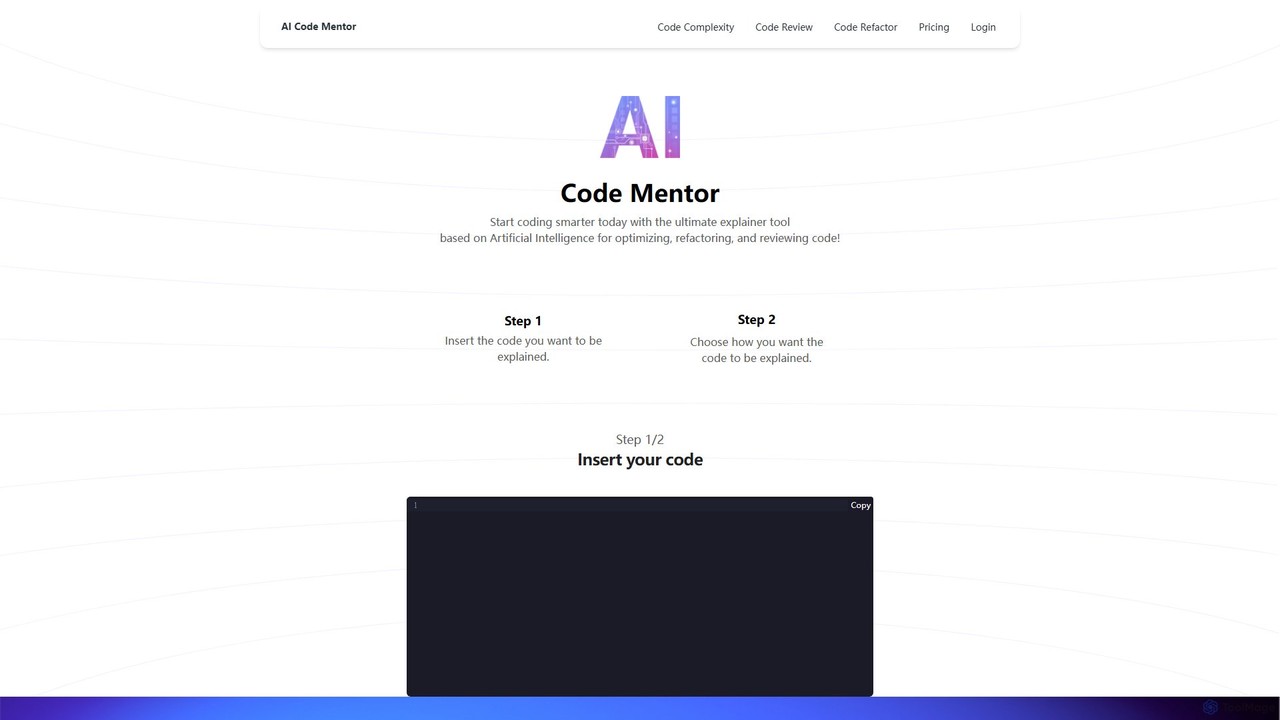
Code Mentor is an AI-powered tool that helps developers understand, optimize, refactor, and review code. It provides clear explanations in various styles through unique AI personas, making it perfect for both beginners and experts to improve code quality and accelerate learning.

Preview

jetcode.app Product overview

jetcode.app is an AI-powered coding assistant designed to accelerate software development. It helps developers write, debug, and optimize code faster by providing intelligent code generation, real-time completion, and powerful refactoring tools directly within their IDE.

Preview

Quick facts

Compare product focus, pricing models and audiences. Highlighted rows indicate different listed information; unknown pricing does not mean free.

Code Mentor VS jetcode.app — Quick facts
Quick factsCode Mentorjetcode.app
Pricing modelFreemiumFreemium
Product typeWebWeb
Primary focusCode AssistantCode Assistant
Audience and rolesNo data availableNo data available
CategoriesCode Assistant · Programming · Code OptimizationCode Assistant · Programming · Automation
AddedAug 16, 2025Aug 5, 2025
UpdatedNov 19, 2026Nov 19, 2026

Features, usage and use cases

Explore the listed product descriptions, features and workflows. Taxonomy labels alone are not feature evaluations.

Code Mentor

Code Mentor is an advanced AI-powered platform designed to serve as the ultimate assistant for developers, programmers, and students. It demystifies complex code, making it accessible and understandable for individuals at any skill level, from absolute beginners to seasoned professionals. The core mission of Code Mentor is to enhance coding proficiency by providing clear explanations, optimizing code structure, and automating the review process. By leveraging sophisticated artificial intelligence, the tool can analyze snippets of code in various programming languages and translate them into easy-to-digest narratives, tailored to the user's chosen perspective. Whether you're trying to grasp a new algorithm, refactor a legacy system, or ensure your code is clean and efficient, Code Mentor provides the insights you need to code smarter and faster.

How to use Code Mentor

The platform is designed for simplicity and efficiency, allowing users to get insights in just two easy steps:

  1. Insert Your Code: Simply copy and paste the code snippet you want to analyze into the provided editor. The tool supports a wide range of programming languages, including but not limited to JavaScript, Python, HTML, and CSS.
  2. Choose Your Explainer Persona: This is where Code Mentor truly shines. Instead of a generic explanation, you can choose how the code is explained to you. Select from a variety of personas, such as a "Beginner Programmer" for simple terms, a "Teacher" for a structured lesson, a "NASA Programmer" for a high-level technical breakdown, or even fun, creative personas like a "Pizza Delivery Guy" or a "Magician" (PRO features) for a more engaging and memorable learning experience.

Once you've made your selection, the AI generates a detailed, step-by-step explanation of the code's logic, functionality, and purpose, according to the chosen persona's style.

Core Features of Code Mentor

  • AI Code Explainer: The flagship feature that breaks down any code into simple, human-readable explanations. The unique persona-based system provides a personalized learning experience that caters to different learning styles.
  • Code Complexity Analysis (Free Feature): This tool helps you identify overly complex parts of your code. It encourages writing simpler, cleaner, and more maintainable code, which in turn improves performance and readability for collaboration.
  • Code Refactoring (PRO Feature): Go beyond understanding and start improving. The AI can automatically refactor your code to enhance its structure and readability. It helps identify and fix hidden bugs and vulnerabilities without altering the code's external behavior, resulting in a higher-quality, more robust project.
  • Code Review (PRO Feature): Automate one of the most critical but time-consuming steps in development. The AI acts as a peer reviewer, meticulously examining your code for potential issues, suggesting improvements, and providing necessary explanations to guide you through the process.

Use Cases for Code Mentor

Code Mentor is a versatile tool applicable in various scenarios:

  • Learning and Education: Students and junior developers can paste code from tutorials, textbooks, or open-source projects to gain a deep understanding of the underlying logic. It's like having a personal tutor available 24/7.
  • Onboarding and Training: New team members can get up to speed faster by using Code Mentor to understand a company's existing codebase.
  • Debugging and Troubleshooting: When faced with a bug, developers can use the explainer and refactoring tools to get a fresh perspective on the code's flow and identify potential error sources.
  • Code Optimization: Senior developers can use the complexity analysis and refactoring features to streamline legacy code, reduce technical debt, and improve application performance.
  • Preparing for Technical Interviews: Candidates can practice by analyzing different algorithms (like Bubble Sort, Quick Sort, etc.) and ensuring they fully understand how they work.

Advantages of Code Mentor

Using Code Mentor offers several distinct advantages. Firstly, it significantly speeds up the learning and development cycle by providing instant, clear explanations. Secondly, the unique persona-based approach makes learning to code more engaging and less intimidating. Thirdly, it improves overall code quality by promoting best practices in readability, simplicity, and structure. Finally, it serves as an invaluable assistant for both individual developers and teams, streamlining code reviews and fostering a deeper understanding of the software they build.

Pricing and Plans

Code Mentor offers a flexible pricing structure to suit different needs, including a generous free plan.

  • Basic Plan (Free): Ideal for beginners and casual use. Includes the Code Explainer and Code Complexity features with a 500-character limit per request.
  • Pro Monthly Plan ($7/month): Designed for professional developers and frequent users. Includes all Basic features plus Code Refactoring, Code Review, access to 5 exclusive new explainer models, and an increased limit of 2000 characters.
  • Pro Yearly Plan ($29/year): The best value for dedicated users. It offers all the benefits of the Pro Monthly plan at a significant discount.

All purchases are backed by a 30-day refund policy, ensuring user satisfaction.

jetcode.app

jetcode.app is a next-generation AI coding partner engineered to significantly boost developer productivity and improve code quality. It acts as an intelligent pair programmer, seamlessly integrating into your development workflow to help you tackle complex coding challenges with ease. By leveraging advanced large language models trained on a massive corpus of code, jetcode.app understands context, suggests optimal solutions, and automates repetitive tasks, allowing developers to focus on high-level logic and innovation.

How to use jetcode.app

Getting started with jetcode.app is straightforward. First, sign up on the official website and install the corresponding extension for your preferred Integrated Development Environment (IDE), such as VS Code, JetBrains suite (IntelliJ, PyCharm), or others. Once installed and configured with your API key, the tool works in the background. You can trigger its features in several ways: by writing a comment in natural language describing the function you need, and jetcode.app will generate the code for you. It also provides context-aware, multi-line code completions as you type. For specific tasks, you can highlight a block of code and use commands to refactor, explain, find bugs, or generate unit tests for it.

Core Features of jetcode.app

  • AI-Powered Code Generation: Generate complex functions, algorithms, and boilerplate code from simple natural language descriptions. Supports a wide range of languages including Python, JavaScript, TypeScript, Java, Go, and C++.
  • Intelligent Code Completion: Goes beyond standard autocompletion by suggesting entire blocks of code based on the current context, reducing typing and preventing errors.
  • Code Refactoring and Optimization: Analyze existing code to identify inefficiencies, suggest performance improvements, and automatically refactor it for better readability and maintainability.
  • Automated Bug Detection and Fixing: Scan your code to find potential bugs, logical errors, and security vulnerabilities, often providing one-click suggestions for fixes.
  • Unit Test Generation: Automatically create comprehensive unit tests for your functions and methods, ensuring code reliability and improving test coverage.
  • In-line Documentation and Code Explanation: Generate clear documentation for your code or get plain-language explanations for complex code snippets written by others.

Use Cases for jetcode.app

jetcode.app is versatile and valuable for various scenarios. Developers can use it for rapid prototyping, quickly scaffolding an entire application by describing its core features. It serves as an excellent learning tool for programmers exploring a new language, as it demonstrates best practices and idiomatic syntax. For legacy projects, it can be used to modernize the codebase by refactoring old functions and translating code between languages. DevOps engineers can use it to automate script writing for infrastructure management, and data scientists can accelerate the development of data analysis and machine learning models.

Advantages of jetcode.app

The primary advantage of jetcode.app is the massive boost in development speed, with some users reporting a 2x to 5x increase in productivity. It significantly improves code quality by catching bugs early and enforcing best practices. The tool reduces the cognitive load on developers, allowing them to stay in the flow and focus on creative problem-solving rather than tedious syntax. Its seamless integration into popular IDEs ensures a non-disruptive experience. Furthermore, it helps democratize software development by making it easier for beginners to write functional code and for experienced developers to work with unfamiliar technologies.

Pricing and Plans

jetcode.app operates on a freemium model, offering plans for different needs:

  • Free Plan: Ideal for students, hobbyists, and developers trying out the service. It includes a limited number of AI requests per month and core code completion features.
  • Pro Plan: Designed for individual professional developers. It offers unlimited AI requests, advanced features like code refactoring and test generation, and priority support.
  • Team/Enterprise Plan: Tailored for organizations and development teams. It includes all Pro features, plus centralized billing, team management, policy controls, and options for on-premise deployment or fine-tuning on a private codebase.

For detailed and up-to-date pricing, please visit the official jetcode.app website.

Positioning

Their taxonomy shows where the products overlap and where each one has a more distinct focus. Unknown fields are shown explicitly and are never filled with assumptions.

Categories

Shared
Code AssistantProgramming
Only Code Mentor
Code Optimization
Only jetcode.app
Automation

Tags

Shared
AI assistantdeveloper toolprogrammingrefactoring
Only Code Mentor
code analysiscode explainercode optimizationcode reviewdebuglearn to code
Only jetcode.app
code completioncode generationdebuggingsoftware developmentunit testing

Audience and roles

Shared
No listed items
Only Code Mentor
No listed items
Only jetcode.app
No listed items

Traffic comparison

Traffic is shown on the same scale so differences in market visibility are not visually understated.

How to interpret the traffic data

Both charts share the same months and vertical scale. Each tool identifies its latest reporting month; missing months are left blank, not counted as zero. Regional and source visit counts are estimates calculated from the reported shares.

Code Mentor monthly traffic:

Latest traffic · 2026-05

Monthly visits
3K
Avg. visit duration
0:19
Pages per visit
1.76
Bounce rate
41.64%
Data updated 2026-06-15

Monthly traffic trend

  • 2025-08: No data available
  • 2025-09: 4.7K
  • 2026-01: 3.1K
  • 2026-02: 2.7K
  • 2026-03: 4.4K
  • 2026-04: 3K
  • 2026-05: 3K

Top regions

Top 5 countries/regions
Country/regionPercentageEstimated visits
🇺🇸United States46.62%1.4K
🇮🇳India28.39%851
🇵🇰Pakistan14.64%439
🇩🇪Germany10.35%310

Search keywords

ai codeai code cocumentercode aicodementorcoder mentor ai

jetcode.app monthly traffic:

Latest traffic · 2026-05

Monthly visits
285
Avg. visit duration
0:00
Pages per visit
1.02
Bounce rate
32.34%
Data updated 2026-06-15

Monthly traffic trend

  • 2025-08: 0
  • 2025-09: 407
  • 2026-01: No data available
  • 2026-02: 422
  • 2026-03: 0
  • 2026-04: 495
  • 2026-05: 285

Search keywords

jetcode

Community signals

Ratings, comments, favorites, and likes are community signals—not a substitute for product fit.

Code Mentor

Rating
No data available
Comments
0
Favorites
179
Likes
151

jetcode.app

Rating
No data available
Comments
0
Favorites
185
Likes
170

Code Mentor vs jetcode.app · Comparison FAQ

What do Code Mentor and jetcode.app have in common?
Both tools are listed under Code Assistant、Programming. These categories indicate overlapping use cases; compare their detailed descriptions for workflows, capabilities and limitations.
Are Code Mentor and jetcode.app free?
Listed pricing models: Code Mentor — Freemium; jetcode.app — Freemium. Missing pricing is not proof of a free plan, and freemium does not mean every feature is free. Check official sites for current plans, limits and trials.
How should I choose between Code Mentor and jetcode.app?
The primary listed category is Code Assistant for Code Mentor, and Code Assistant for jetcode.app. Compare features, steps and use cases, then verify pricing, data permissions and deployment needs. This page does not include hands-on testing and does not declare a winner from traffic or tags.

Sources and comparison methodology

This page is assembled from ToolMage product listings, taxonomy, traffic statistics and on-site user feedback. It is not a hands-on test or an independent review.

  • Feature and plan descriptions reflect information in the listings, not real-time guarantees. Verify pricing, quotas, availability and privacy terms on the official sites.
  • Traffic uses the reporting months shown. Missing statistics do not mean zero visits, and different periods do not establish growth or superiority. Regional and source visit counts are estimates based on shares.
  • Different tags indicate differences in the listings, not proof that the other product lacks a capability. Ratings, favorites and visits are not used to declare a winner.

Related comparisons