ToolMage
Sign in

AI TOOL COMPARISON

Codeball vs Cubic

What is the difference, and which fits your workflow? Compare features, usage, pricing models and traffic side by side.

Jump to key differences

Product overview

Codeball Product overview

Codeball is an AI-powered code review assistant that integrates with GitHub to automatically analyze pull requests. It helps development teams ship better code faster by identifying bugs, suggesting improvements, and ensuring code quality without manual intervention.

Preview

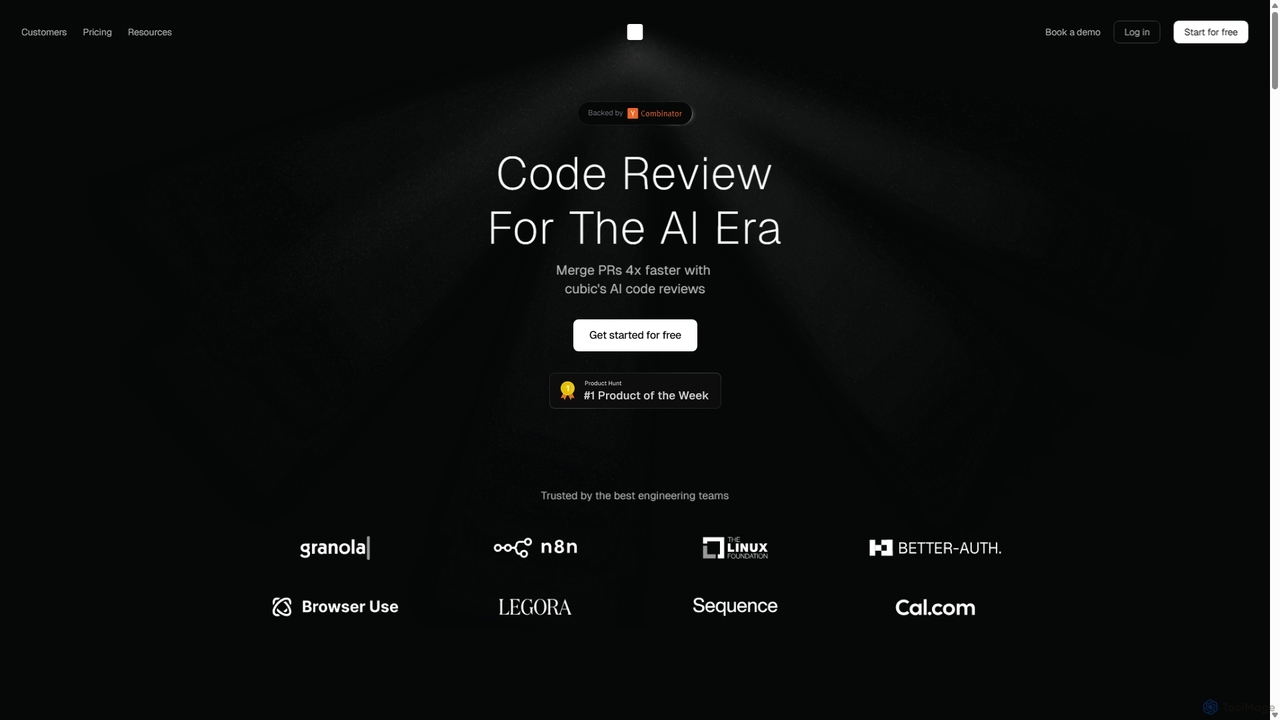
Cubic Product overview

Cubic is an AI-powered code review platform designed to accelerate development cycles. It integrates with GitHub to automatically review pull requests, catch bugs, enforce coding standards, and provide one-click fixes, helping engineering teams merge PRs up to 4x faster while improving code quality.

Preview

Quick facts

Compare product focus, pricing models and audiences. Highlighted rows indicate different listed information; unknown pricing does not mean free.

Codeball VS Cubic — Quick facts
Quick factsCodeballCubic
Pricing modelFreemiumFreemium
Product typeWebWeb
Primary focusCode ReviewCode Assistant
Audience and rolesDevOps Engineer · Engineering Manager · Product Manager · Software Developer · Tech LeadCTO · DevOps Engineer · Engineering Manager · Quality Assurance Engineer · Software Developer · Tech Lead
CategoriesCode Review · Debugging · AutomationCode Assistant · Code Review · Automation
AddedSep 19, 2025Sep 24, 2025
UpdatedNov 19, 2026Nov 19, 2026

Features, usage and use cases

Explore the listed product descriptions, features and workflows. Taxonomy labels alone are not feature evaluations.

Codeball

Codeball is an intelligent AI assistant designed to streamline and enhance the code review process for software development teams. By integrating directly into GitHub workflows, Codeball automates the tedious task of reviewing pull requests (PRs). It meticulously analyzes every line of code, identifying potential bugs, logical errors, and deviations from best practices. This allows human reviewers to focus on more complex architectural and logical aspects of the code, significantly accelerating development cycles and improving overall code quality.

The platform acts as a tireless, consistent team member that never misses a detail. It provides clear, actionable feedback directly within the pull request comments, making it easy for developers to understand and implement the suggested changes. Codeball helps enforce consistent coding standards across the entire team, which is especially valuable for onboarding new developers and maintaining a high-quality, scalable codebase.

How to use Codeball

Using Codeball is designed to be seamless and intuitive, requiring minimal setup to integrate into your existing development process:

  1. Installation & Integration: Start by installing the Codeball app from the GitHub Marketplace and grant it access to your desired repositories. The setup process is quick and requires only a few clicks.
  2. Open a Pull Request: Once integrated, simply continue your normal workflow. When a developer opens a new pull request, Codeball is automatically triggered.
  3. Automated Review: The AI engine immediately begins analyzing the changes. It checks for a wide range of issues, including potential bugs, performance bottlenecks, security vulnerabilities, and style inconsistencies.
  4. Receive Feedback: Codeball posts its findings as comments directly on the pull request, highlighting specific lines of code and providing clear explanations for its suggestions.
  5. Iterate and Approve: Developers can review the AI's feedback, accept the suggestions, or engage in a discussion. Once the issues are resolved and Codeball's checks pass, the PR can be approved with much higher confidence.

Core Features of Codeball

  • AI-Powered Pull Request Reviews: Automatically analyzes code changes in PRs to find bugs and suggest improvements.
  • Intelligent Bug Detection: Goes beyond simple linting to identify complex logical errors, null pointer exceptions, and race conditions.
  • Code Quality & Style Enforcement: Ensures code adheres to best practices for readability, maintainability, and performance.
  • Security Vulnerability Scanning: Performs basic checks to identify common security flaws like SQL injection or cross-site scripting (XSS).
  • Seamless GitHub Integration: Works directly within your existing GitHub workflow, providing feedback via PR comments.
  • Actionable & Contextual Feedback: Provides clear, concise, and relevant suggestions that are easy for developers to understand and act upon.
  • Customizable Review Rules: Allows teams to configure and customize the review standards to match their specific project requirements and coding conventions.

Use Cases for Codeball

Codeball is beneficial for a wide range of development scenarios:

  • Fast-Paced Startups: Helps small teams maintain high code quality and speed up their release cycles without hiring dedicated QA engineers.
  • Large Enterprise Teams: Enforces consistent coding standards across multiple teams and projects, reducing technical debt.
  • Open Source Projects: Provides an automated first line of review for contributions, helping maintainers manage a high volume of pull requests.
  • Onboarding New Developers: Acts as a mentor by providing instant feedback, helping new team members quickly get up to speed with the team's coding standards.

Advantages of Codeball

Implementing Codeball offers significant advantages:

  • Increased Efficiency: Drastically reduces the time senior developers spend on routine code reviews, freeing them to focus on more critical tasks.
  • Improved Code Quality: Catches subtle bugs and enforces best practices, leading to a more robust and reliable application.
  • Faster Development Cycles: By automating reviews, Codeball shortens the feedback loop and helps teams merge and deploy code faster.
  • Consistent Standards: Applies an objective and consistent set of rules to every pull request, eliminating human bias and variability in reviews.

Pricing and Plans

As Codeball is a specialized tool, pricing information is typically provided upon request or through a dedicated pricing page. It likely follows a freemium model common for developer tools:

  • Free Plan: Ideal for individual developers, students, and small open-source projects, offering basic review features for public repositories.
  • Team Plan: A per-user, per-month subscription designed for professional teams, offering unlimited private repositories, advanced analysis features, and priority support.
  • Enterprise Plan: Custom pricing for large organizations, including features like on-premise deployment, dedicated support, and advanced security and compliance options.

Cubic

Cubic is a state-of-the-art, AI-native code review platform built for the modern era of software development. It is designed to eliminate the bottlenecks in the code review process, enabling engineering teams to ship features faster without compromising on quality. By integrating directly into the GitHub workflow, Cubic provides instant, intelligent feedback on every pull request (PR), acting as a tireless AI teammate that catches bugs, enforces style guides, and identifies potential security vulnerabilities before a human reviewer even sees the code. This allows developers to focus on high-level architectural decisions and complex problem-solving, rather than getting bogged down in minor, repetitive corrections.

The platform is trusted by leading engineering teams, from fast-growing startups to large enterprises, who leverage its capabilities to increase velocity and maintain high standards. Cubic's AI learns from your team's existing codebase and comment history, adapting over time to provide more relevant and context-aware suggestions. It's not just a static linter; it's a dynamic partner that understands the nuances of your project.

How to use Cubic

Getting started with Cubic is a seamless process designed for immediate impact. First, you connect your GitHub account and grant Cubic access to the repositories you want it to review. The integration takes only a few minutes. Once enabled, Cubic automatically springs into action on every new pull request. When a developer opens a PR, the Cubic AI agent analyzes the changes and posts inline comments directly in GitHub, highlighting issues ranging from potential bugs and style inconsistencies to missed edge cases. For many of these suggestions, Cubic offers one-click fixes that the developer can apply instantly. For more complex issues, it can launch a background agent to resolve them. Developers are expected to address Cubic's feedback first, ensuring that by the time a PR is ready for human review, it's already polished and free of common errors. Teams can also configure custom rules to enforce their specific coding conventions and best practices, ensuring consistency across the entire organization.

Core Features of Cubic

  • Instant AI Code Reviews: Get automated, inline feedback on every PR in seconds, catching bugs and quality issues early.
  • One-Click Fixes: Resolve suggested issues with a single click, or deploy an AI agent for more complex refactoring tasks.
  • Automatic PR Descriptions: The AI generates clear and concise summaries of changes, highlighting the impact and context of the PR.
  • Learning & Memory: Cubic learns from your organization's comment history, codebase, and style guides to provide increasingly accurate and tailored feedback.
  • Custom Rule Enforcement: Define and enforce your team's specific coding standards, architectural patterns, and best practices on every PR.
  • Context-Aware Chat: An integrated chat allows developers to ask questions and deep-dive into the codebase for better understanding.
  • Security and Privacy First: Cubic is SOC 2 compliant, never stores your code, and never trains its models on your proprietary data.
  • Intelligent Grouping and Visualization: Break down complex PRs into smaller, easier-to-review chunks and visualize high-level changes.

Use Cases for Cubic

Cubic is versatile and addresses several key challenges in the software development lifecycle. For fast-paced startups like Cal.com and Better Auth, it helps maintain velocity by automating the review process and allowing small teams to merge PRs much faster. For larger, open-source projects like n8n, Cubic acts as the first line of defense, filtering out common mistakes and ensuring contributions meet a high-quality bar before engaging core maintainers. This reduces the review backlog and allows human reviewers to focus on architectural integrity and feature design. Engineering managers use Cubic to enforce consistency across their teams, reduce technical debt, and ensure that even subtle bugs, like a missed vulnerability in a different part of the codebase, are caught before they reach production. It also serves as an excellent tool for onboarding new developers, providing them with immediate, constructive feedback on team standards.

Advantages of Cubic

The primary advantage of Cubic is a dramatic increase in development velocity, with teams reporting merging PRs up to 4x faster. It significantly improves code quality by catching errors and inconsistencies that human reviewers might miss. By automating the tedious, low-level aspects of code review, it frees up senior developers' time to focus on more strategic work, boosting overall team productivity and morale. Unlike traditional static analysis tools, Cubic is context-aware and learns from your specific project, making its suggestions highly relevant. Its unwavering commitment to security and privacy, including SOC 2 compliance and a policy of never training on customer code, makes it a trusted choice for organizations of all sizes.

Pricing and Plans

Cubic offers a flexible pricing structure to suit different team sizes and needs.

  • Starter Plan: Free. This plan is ideal for individuals and small teams getting started. It includes the AI code review agent, 10 AI PR reviews per month, up to 5 custom rules, automatic PR descriptions, and access to the code review portal.
  • Team Plan: $24 per developer/month (billed annually) or $30 per developer/month (billed monthly). This plan includes everything in the Starter plan plus unlimited AI reviews, making it perfect for professional development teams. It also comes with a 14-day free trial.
  • Enterprise Plan: Custom pricing. Designed for large organizations, this plan includes all Team features plus additional custom rules, premium support, custom MSA and DPA, and flexible payment terms.

Additionally, Cubic is 100% free for open-source teams with public repositories, offering them unlimited AI reviews to support the open-source community.

Positioning

Their taxonomy shows where the products overlap and where each one has a more distinct focus. Unknown fields are shown explicitly and are never filled with assumptions.

Categories

Shared
Code ReviewAutomation
Only Codeball
Debugging
Only Cubic
Code Assistant

Tags

Shared
automationcode qualitygithubpull request
Only Codeball
ai coding assistantbug detectioncode reviewdeveloper tools
Only Cubic
ai code reviewcode assistantdeveloper productivitydevtoolssoftware developmentstatic analysis

Audience and roles

Shared
DevOps EngineerEngineering ManagerSoftware DeveloperTech Lead
Only Codeball
Product Manager
Only Cubic
CTOQuality Assurance Engineer

Traffic comparison

Traffic is shown on the same scale so differences in market visibility are not visually understated.

How to interpret the traffic data

Both charts share the same months and vertical scale. Each tool identifies its latest reporting month; missing months are left blank, not counted as zero. Regional and source visit counts are estimates calculated from the reported shares.

Codeball

No data available

Cubic monthly traffic:

Latest traffic · 2026-05

Monthly visits
519
Avg. visit duration
0:00
Pages per visit
1
Bounce rate
100%
Data updated 2026-06-15

Monthly traffic trend

  • 2025-09: 453
  • 2026-02: 0
  • 2026-03: 0
  • 2026-04: 471
  • 2026-05: 519

Community signals

Ratings, comments, favorites, and likes are community signals—not a substitute for product fit.

Codeball

Rating
No data available
Comments
0
Favorites
164
Likes
154

Cubic

Rating
No data available
Comments
0
Favorites
196
Likes
203

Codeball vs Cubic · Comparison FAQ

What do Codeball and Cubic have in common?
Both tools are listed under Code Review、Automation. These categories indicate overlapping use cases; compare their detailed descriptions for workflows, capabilities and limitations.
Are Codeball and Cubic free?
Listed pricing models: Codeball — Freemium; Cubic — Freemium. Missing pricing is not proof of a free plan, and freemium does not mean every feature is free. Check official sites for current plans, limits and trials.
How should I choose between Codeball and Cubic?
The primary listed category is Code Review for Codeball, and Code Assistant for Cubic. Compare features, steps and use cases, then verify pricing, data permissions and deployment needs. This page does not include hands-on testing and does not declare a winner from traffic or tags.

Sources and comparison methodology

This page is assembled from ToolMage product listings, taxonomy, traffic statistics and on-site user feedback. It is not a hands-on test or an independent review.


  • Feature and plan descriptions reflect information in the listings, not real-time guarantees. Verify pricing, quotas, availability and privacy terms on the official sites.
  • Traffic uses the reporting months shown. Missing statistics do not mean zero visits, and different periods do not establish growth or superiority. Regional and source visit counts are estimates based on shares.
  • Different tags indicate differences in the listings, not proof that the other product lacks a capability. Ratings, favorites and visits are not used to declare a winner.

Related comparisons