ToolMage
Sign in

AI TOOL COMPARISON

Codebay vs Plandex

What is the difference, and which fits your workflow? Compare features, usage, pricing models and traffic side by side.

Jump to key differences

Product overview

Codebay Product overview

Codebay is an AI-powered development platform designed to accelerate the entire software lifecycle. It acts as an intelligent co-pilot for developers, offering advanced features for code generation, automated review, intelligent debugging, and seamless integration with existing workflows to enhance productivity and code quality.

Preview

Plandex Product overview

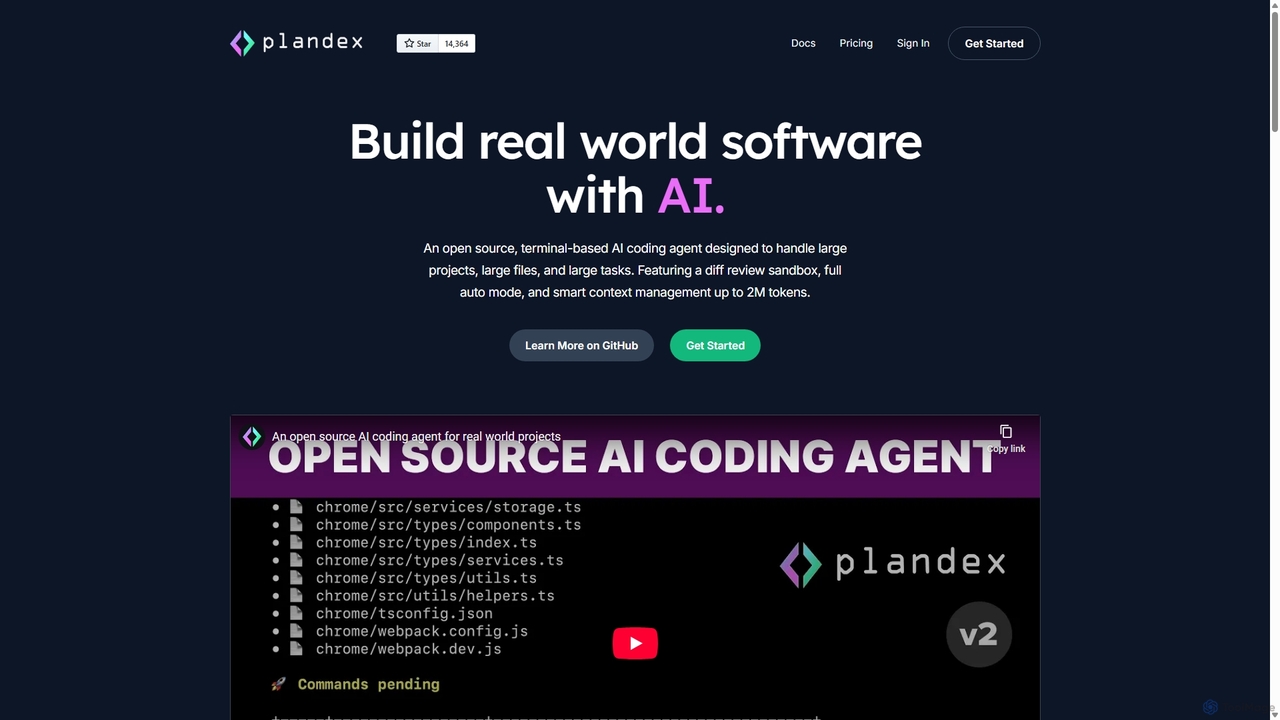
Plandex is an open-source, terminal-based AI coding agent designed for complex, large-scale software development tasks. It excels at handling large projects and files with its 2M token context window. Featuring a diff review sandbox, configurable autonomy, and multi-model support, Plandex empowers developers to build, debug, and refactor entire applications with AI assistance, ensuring control and productivity in a dev-friendly workflow.

Preview

Quick facts

Compare product focus, pricing models and audiences. Highlighted rows indicate different listed information; unknown pricing does not mean free.

Codebay VS Plandex — Quick facts
Quick factsCodebayPlandex
Pricing modelFreemiumFreemium
Product typeWebApp
Primary focusCode GenerationCode Generation
Audience and rolesData Scientist · DevOps Engineer · Engineering Manager · Product Manager · Quality Assurance Engineer · Software Developer · Technical LeadBackend Developer · Data Scientist · DevOps Engineer · Engineering Manager · Frontend Developer · Full-Stack Developer · Machine Learning Engineer · Software Developer
CategoriesCode Generation · Code Assistant · AutomationCode Generation · Code Assistant · Automation
AddedSep 8, 2025Sep 11, 2025
UpdatedNov 19, 2026Nov 19, 2026

Features, usage and use cases

Explore the listed product descriptions, features and workflows. Taxonomy labels alone are not feature evaluations.

Codebay

Codebay is a comprehensive AI-driven platform engineered to revolutionize the way software development teams build, test, and deploy applications. It serves as an all-in-one assistant, deeply integrated into the developer's workflow to provide intelligent support at every stage. From writing the first line of code to deploying the final product, Codebay leverages advanced artificial intelligence to automate tedious tasks, identify potential issues, and significantly boost overall efficiency.

The platform understands the context of your project, including existing codebases, libraries, and coding standards. This allows it to generate highly relevant, syntactically correct, and efficient code snippets, functions, or even entire modules based on simple natural language prompts. It's not just about writing code faster; it's about writing better code from the start.

How to use Codebay

Getting started with Codebay is a straightforward process designed for quick integration:

  1. Sign Up & Connect: Create an account on the Codebay website. Connect your Git repositories (GitHub, GitLab, Bitbucket) to give the AI context about your projects.
  2. IDE Integration: Install the Codebay extension for your favorite Integrated Development Environment (IDE), such as VS Code, JetBrains suite, or Sublime Text. This enables real-time assistance directly within your coding environment.
  3. Generate Code: Use natural language comments or a dedicated prompt window to describe the functionality you need. Codebay will instantly generate the corresponding code in your desired language.
  4. Automated Code Review: When you create a pull request, Codebay's AI automatically reviews the changes. It checks for bugs, security vulnerabilities, performance issues, and adherence to coding style guides, providing actionable feedback.
  5. Debug with AI: When you encounter a bug, use Codebay's intelligent debugger. It helps analyze the root cause and suggests potential fixes, saving hours of manual troubleshooting.
  6. Optimize & Refactor: Select a piece of code and ask Codebay to refactor it for better performance, readability, or maintainability.

Core Features of Codebay

  • AI-Powered Code Generation: Generates high-quality, context-aware code in multiple programming languages (Python, JavaScript, Java, Go, etc.) from natural language descriptions.
  • Automated Code Review: Scans pull requests for bugs, security flaws, and performance bottlenecks, providing instant, actionable feedback.
  • Intelligent Debugging Assistant: Analyzes errors and exceptions, providing explanations and suggesting solutions to accelerate the debugging process.
  • Code Refactoring and Optimization: Intelligently suggests improvements to existing code to enhance readability, performance, and maintainability.
  • Automatic Documentation Generation: Creates clear and concise documentation, including docstrings and comments, for your functions and classes.
  • Natural Language to Query: Translates plain English requests into complex SQL queries or API calls, simplifying database and service interactions.
  • Seamless CI/CD Integration: Integrates with popular CI/CD pipelines to automate testing and quality checks before deployment.

Use Cases for Codebay

Codebay is versatile and can be applied in various scenarios:

  • Rapid Application Development: Quickly scaffold new projects and features, turning ideas into functional code in a fraction of the time.
  • Legacy System Modernization: Assist in understanding, refactoring, and documenting old or complex codebases.
  • Team Onboarding: Help new developers get up to speed with a project's architecture and coding standards more quickly.
  • DevOps and Automation: Automate the creation of scripts for infrastructure management, testing, and deployment.
  • Data Science and Analysis: Accelerate the writing of data processing scripts, machine learning models, and complex database queries.

Advantages of Codebay

Adopting Codebay provides a significant competitive edge:

  • Massive Productivity Boost: Automates repetitive coding tasks, allowing developers to focus on complex problem-solving and innovation.
  • Improved Code Quality and Security: Proactively identifies and helps fix issues before they reach production, reducing technical debt and security risks.
  • Faster Time-to-Market: Shortens development cycles, enabling teams to ship features and products more quickly.
  • Enhanced Developer Experience: Reduces frustration from tedious tasks like debugging and documentation, making development more enjoyable.
  • Consistent Standards: Helps enforce consistent coding styles and best practices across the entire engineering team.

Pricing and Plans

Codebay offers a flexible pricing structure to suit different needs, from individual developers to large enterprises. While specific prices should be checked on the official website, the plans typically include:

  • Free Plan: Ideal for individuals, students, and open-source projects, offering core code generation and review features with usage limits.
  • Pro Plan: Designed for professional developers, providing unlimited access to advanced features, priority support, and higher processing capacity.
  • Team/Enterprise Plan: Tailored for organizations, this plan includes all Pro features plus centralized billing, advanced security controls, team management dashboards, and options for on-premise deployment.

Please visit the official Codebay website for the most up-to-date pricing information.

Plandex

Plandex is a sophisticated, open-source AI coding agent engineered to tackle the complexities of modern software development. Operating directly from your terminal, it's designed to go beyond simple code completion and assist with large-scale tasks, from building entire features to refactoring extensive codebases. Plandex bridges the gap between generative AI's potential and the practical demands of professional programming, offering a robust workflow for serious projects.

The core philosophy of Plandex is to empower developers, not replace them. It achieves this by handling the heavy lifting of understanding vast project structures and generating complex code, while keeping the developer firmly in control. With an effective context window of up to 2 million tokens and intelligent project mapping using tree-sitter, Plandex can grasp the intricacies of large repositories, ensuring that its suggestions are contextually aware and relevant.

How to use Plandex

Using Plandex is an interactive process within the command line. A developer starts by creating a 'plan'—a high-level description of the task, such as "Implement a user authentication system with JWT" or "Refactor the database service to use a connection pool." Plandex then breaks this goal down into actionable steps. It analyzes the existing codebase, identifies the files that need to be created or modified, and generates the necessary code. Crucially, it doesn't apply these changes automatically. Instead, it presents them as a 'diff' in a sandbox environment. The developer can review every single line of change across all affected files, request modifications, or approve the changes. Once approved, Plandex executes the changes, runs specified commands (like tests or linters), and can even automatically debug issues if they arise, creating a powerful, iterative development loop.

Core Features of Plandex

  • Large Context Window: With an effective context of up to 2 million tokens, Plandex can analyze entire projects, understanding inter-dependencies between files and modules for more accurate code generation.
  • Diff Review Sandbox: A critical safety feature that isolates all proposed changes. Developers can review, edit, and approve diffs across multiple files before they are applied to the actual codebase, preventing unintended consequences.
  • Configurable Autonomy: Plandex can operate in a fully autonomous mode for straightforward tasks or a granular, step-by-step mode that requires developer approval for each action, adapting to the user's comfort level and task complexity.
  • Multi-Model Support: Avoid vendor lock-in and optimize for performance and cost. Plandex can intelligently route tasks to the best models from providers like OpenAI, Anthropic, Google, and DeepSeek, using the right tool for each stage of the plan.
  • Open Source and Self-Hostable: Built on an MIT license, Plandex is fully transparent. Developers can inspect the code, customize it, and host it on their own infrastructure for maximum privacy and control.
  • Automated Debugging and Command Execution: Plandex can run shell commands, interpret their output, and use the information to debug failing tests or runtime errors, significantly speeding up the troubleshooting process.

Use Cases for Plandex

Plandex is versatile enough for a wide range of development tasks, including:

  • Feature Scaffolding: Rapidly creating the boilerplate code, file structure, and initial logic for a new feature.
  • Complex Refactoring: Performing large-scale code modifications, such as migrating from one framework to another or updating a core API across an entire application.
  • End-to-End App Creation: Building a small to medium-sized application from a detailed set of requirements.
  • Automated Testing: Writing unit tests, integration tests, and end-to-end tests for existing or new code.
  • Documentation Generation: Creating or updating documentation based on code changes and function signatures.

Advantages of Plandex

Plandex offers a significant competitive edge by being a developer-centric tool. Its main advantages include a massive boost in productivity by automating tedious coding tasks, improved code quality through its mandatory review process, and the ability to tackle projects of a scale that other AI tools cannot handle. Its flexibility in model choice and hosting provides both cost-effectiveness and control, making it a sustainable solution for individuals and teams alike.

Pricing and Plans

Plandex offers flexible pricing to suit different needs:

  • Open Source: Completely free. Users can self-host the Plandex server on their local machine or own infrastructure. This plan requires users to provide their own API keys from model providers and manage billing directly with them.
  • Cloud Integrated Models: $45 per month. This is the easiest way to get started, offering a 30-second install with no dependencies. It includes $20 in monthly credits that never expire, centralized billing, and access to a fine-tuned model for faster and cheaper file edits. Credits are used for model calls at the provider's price plus a 7% fee.
  • Cloud BYO API Key: $30 per month. This plan offers the same cloud benefits (easy install, multi-device support) but allows users to use their own API keys from providers like OpenRouter.ai. Billing for model usage is managed directly by the user with their provider.

Positioning

Their taxonomy shows where the products overlap and where each one has a more distinct focus. Unknown fields are shown explicitly and are never filled with assumptions.

Categories

Shared
Code AssistantAutomation
Only Codebay
Code Generation
Only Plandex
Code Generation

Tags

Shared
code generationdebuggingsoftware development
Only Codebay
ai coding assistantAI developer toolautomationcode refactoringcode reviewdeveloper productivityprogramming
Only Plandex
AI agentcode assistantcodingdeveloper toollarge projectsopen sourcerefactoringterminal

Audience and roles

Shared
Data ScientistDevOps EngineerEngineering ManagerSoftware Developer
Only Codebay
Product ManagerQuality Assurance EngineerTechnical Lead
Only Plandex
Backend DeveloperFrontend DeveloperFull-Stack DeveloperMachine Learning Engineer

Traffic comparison

Traffic is shown on the same scale so differences in market visibility are not visually understated.

How to interpret the traffic data

Both charts share the same months and vertical scale. Each tool identifies its latest reporting month; missing months are left blank, not counted as zero. Regional and source visit counts are estimates calculated from the reported shares.

Codebay monthly traffic:

Latest traffic · 2026-05

Monthly visits
1.6K
Avg. visit duration
1:01
Pages per visit
2.31
Bounce rate
34.79%
Data updated 2026-06-15

Monthly traffic trend

  • 2025-09: 2.6K
  • 2026-01: 1.4K
  • 2026-02: 1.4K
  • 2026-03: 1.7K
  • 2026-04: 3.3K
  • 2026-05: 1.6K

Top regions

Top 5 countries/regions
Country/regionPercentageEstimated visits
🇺🇸United States66.56%1K
🇨🇴Colombia33.44%522

Search keywords

ccodebayexample of logical error in pythonexamples of logic errors in pythonlogical error in pythonwhat is a logic error

Plandex monthly traffic:

Latest traffic · 2026-05

Monthly visits
21.2K
Avg. visit duration
0:11
Pages per visit
1.69
Bounce rate
39.58%
Data updated 2026-06-15

Monthly traffic trend

  • 2025-09: 9.6K
  • 2026-01: 16.2K
  • 2026-02: 15.6K
  • 2026-03: 16.8K
  • 2026-04: 15.8K
  • 2026-05: 21.2K

Top regions

Top 5 countries/regions
Country/regionPercentageEstimated visits
🇺🇸United States45.52%9.7K
🇻🇳Vietnam16.17%3.4K
🇷🇺Russia14.18%3K
🇹🇷Turkey12.11%2.6K
🇫🇷France12.02%2.6K

Search keywords

openvscode server vs code serverplandexplandex aiplandex dockerhub serverplandex как установить и начать работать?

Community signals

Ratings, comments, favorites, and likes are community signals—not a substitute for product fit.

Codebay

Rating
No data available
Comments
0
Favorites
176
Likes
190

Plandex

Rating
No data available
Comments
0
Favorites
156
Likes
168

Codebay vs Plandex · Comparison FAQ

What do Codebay and Plandex have in common?
Both tools are listed under Code Assistant、Automation. These categories indicate overlapping use cases; compare their detailed descriptions for workflows, capabilities and limitations.
Are Codebay and Plandex free?
Listed pricing models: Codebay — Freemium; Plandex — Freemium. Missing pricing is not proof of a free plan, and freemium does not mean every feature is free. Check official sites for current plans, limits and trials.
How should I choose between Codebay and Plandex?
The primary listed category is Code Generation for Codebay, and Code Generation for Plandex. Compare features, steps and use cases, then verify pricing, data permissions and deployment needs. This page does not include hands-on testing and does not declare a winner from traffic or tags.

Sources and comparison methodology

This page is assembled from ToolMage product listings, taxonomy, traffic statistics and on-site user feedback. It is not a hands-on test or an independent review.

  • Feature and plan descriptions reflect information in the listings, not real-time guarantees. Verify pricing, quotas, availability and privacy terms on the official sites.
  • Traffic uses the reporting months shown. Missing statistics do not mean zero visits, and different periods do not establish growth or superiority. Regional and source visit counts are estimates based on shares.
  • Different tags indicate differences in the listings, not proof that the other product lacks a capability. Ratings, favorites and visits are not used to declare a winner.

Related comparisons