
ToolMage
Sign in

AI TOOL COMPARISON

convertercode vs pythonconvert

What is the difference, and which fits your workflow? Compare features, usage, pricing models and traffic side by side.

Jump to key differences

Product overview

convertercode Product overview

An AI-powered tool for developers that seamlessly converts code from one programming language to another. It supports a wide range of languages, helping to modernize legacy systems, facilitate cross-platform development, and accelerate learning.

Preview

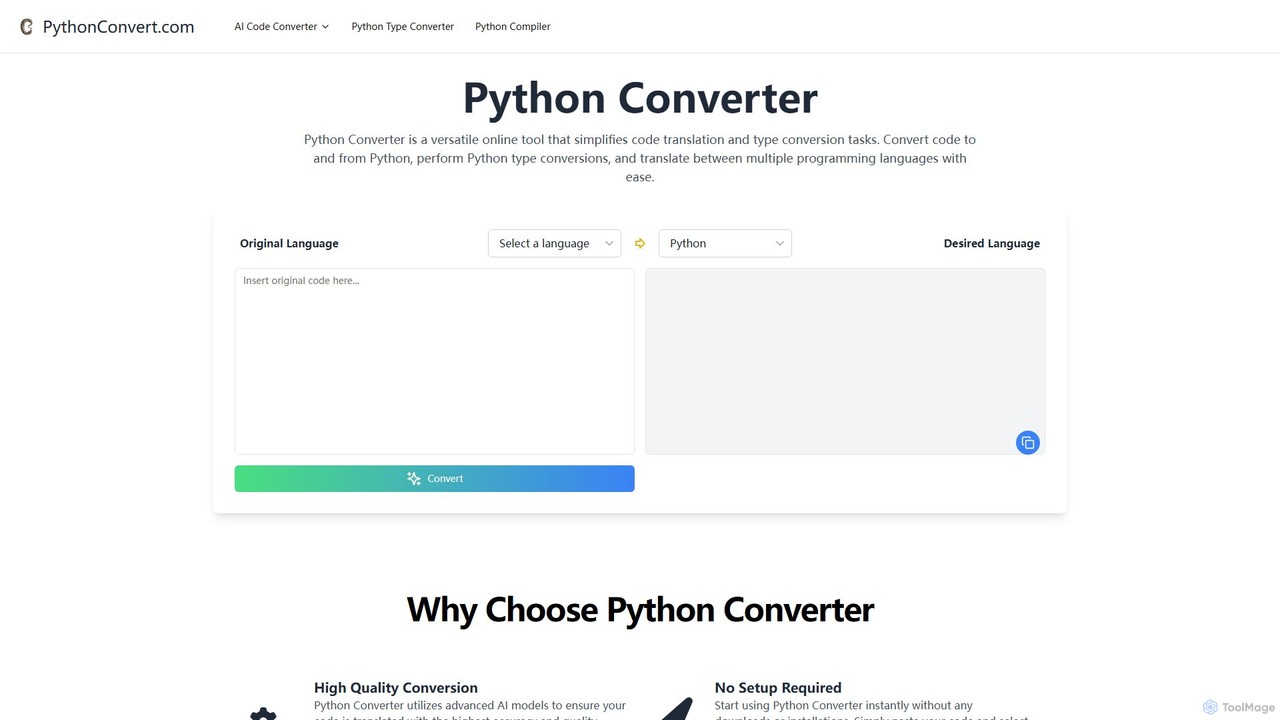
pythonconvert Product overview

pythonconvert is a versatile AI-powered online platform for developers. It offers a free code converter to seamlessly translate code between Python and other major languages like Java, C++, and JavaScript. It also features a Python type converter and an in-browser Python compiler for instant code execution and testing.

Preview

Quick facts

Compare product focus, pricing models and audiences. Highlighted rows indicate different listed information; unknown pricing does not mean free.

convertercode VS pythonconvert — Quick facts
Quick factsconvertercodepythonconvert
Pricing modelFreemiumFree
Product typeWebWeb
Primary focusCode AssistantCode Assistant
Audience and rolesNo data availableNo data available
CategoriesCode Assistant · Programming · AutomationCode Assistant · Programming · Developer Tools
AddedAug 16, 2025Aug 6, 2025
UpdatedNov 19, 2026Nov 19, 2026

Features, usage and use cases

Explore the listed product descriptions, features and workflows. Taxonomy labels alone are not feature evaluations.

convertercode

convertercode is an advanced AI-driven platform designed to streamline the process of code translation. It empowers developers, teams, and organizations to effortlessly migrate codebases, learn new programming languages, and enhance productivity. By leveraging sophisticated machine learning models, convertercode understands the context, logic, and nuances of code, ensuring high-fidelity translations that go beyond simple syntax replacement. Whether you're updating a legacy application from an old language to Java or converting a Python script to Go for better performance, convertercode is your intelligent coding companion.

How to use convertercode

Using convertercode is designed to be intuitive and efficient, allowing developers to get results in just a few simple steps:

  1. Input Code: Navigate to the convertercode website. You will find a user-friendly interface with an input field. Paste the code snippet or entire file content you wish to convert into this field.
  2. Select Languages: Choose the source programming language of your code from a dropdown menu. Then, select the desired target language you want to convert the code into. The platform supports a vast array of popular and legacy languages.
  3. Initiate Conversion: Click the 'Convert' button. The AI engine will analyze your code, understanding its structure, algorithms, and dependencies.
  4. Review and Refine: Within moments, the converted code will appear in the output window. The platform provides syntax highlighting for both source and target code for easy comparison. You can review the generated code, copy it to your clipboard, or make minor adjustments if needed.

Core Features of convertercode

  • Multi-Language Support: Translates between a wide variety of programming languages, including Python, JavaScript, Java, C++, C#, Go, Rust, TypeScript, PHP, and more.
  • AI-Powered Contextual Translation: Utilizes advanced LLMs to understand the logic and idioms of the source language, generating accurate and idiomatic code in the target language.
  • Syntax Highlighting: Provides clear and readable code blocks for both input and output, making it easy to compare and verify the translation.
  • Code Explanation: Offers an optional feature to generate natural language explanations of the converted code, which is an excellent tool for learning new languages or understanding complex logic.
  • Batch Conversion: Allows users to upload and convert multiple files or entire project directories, significantly speeding up large-scale migration projects.
  • Secure API Access: Provides a robust API for developers to integrate convertercode's translation capabilities directly into their CI/CD pipelines, IDEs, or custom applications.

Use Cases for convertercode

convertercode is a versatile tool suitable for various scenarios:

  • Legacy Code Migration: Modernize outdated applications by converting legacy code (e.g., COBOL, old Java versions) to modern, efficient languages like Go, Rust, or Python.
  • Cross-Platform Development: Adapt algorithms and functions written for one environment (e.g., a Python backend script) for use in another (e.g., a JavaScript function for a web application).
  • Educational Tool: Helps developers and students learn new programming languages by showing how concepts they already know are implemented in a different syntax.
  • Team Collaboration: Enables teams with diverse programming language skills to collaborate more effectively by easily translating code snippets for review and integration.
  • Rapid Prototyping: Quickly convert an algorithm prototyped in a high-level language like Python into a high-performance language like C++ or Rust for production deployment.

Advantages of convertercode

The primary advantage of convertercode is its ability to dramatically increase efficiency. It saves countless hours of manual, error-prone work, allowing developers to focus on feature development and problem-solving. The AI-driven approach ensures a higher degree of accuracy compared to manual conversion, especially for complex logic. It's a cost-effective solution for companies looking to modernize their tech stack without hiring a large team of specialized developers. Furthermore, it serves as a powerful on-the-job training tool, accelerating the learning curve for new technologies.

Pricing and Plans

convertercode operates on a freemium model to cater to a wide range of users:

  • Free Plan: Ideal for individual developers, students, and small tasks. It includes a limited number of conversions per day and supports smaller code snippets.
  • Pro Plan: Designed for professional developers and small teams. This plan offers unlimited conversions, support for larger files, priority processing, and access to advanced features like batch conversion.
  • Enterprise Plan: A custom solution for large organizations. It includes all Pro features, plus dedicated API access with higher rate limits, on-premise deployment options, premium support, and enhanced security compliance.

pythonconvert

pythonconvert is an all-in-one online toolkit designed to streamline the workflow of developers, students, and programming enthusiasts. It leverages advanced AI models to provide a suite of powerful, free-to-use tools centered around the Python programming language. The platform's core offerings include a multi-language code converter, a specialized Python type converter, and an interactive online Python compiler. This eliminates the need for complex local setups, allowing users to convert, write, test, and refactor code directly in their web browser, making it an invaluable resource for cross-language projects, learning, and rapid prototyping.

How to use pythonconvert

Using the tools on pythonconvert is straightforward and designed for efficiency:

  1. Select Your Tool: Navigate to the desired function on the website, such as the 'AI Code Converter' or the 'Online Python Compiler'.
  2. Provide Your Code: For the converter, paste your source code into the input box, then select the original and target programming languages. For the compiler, simply type or paste your Python script into the provided editor.
  3. Execute and Get Results: Click the 'Convert' or 'Run Code' button. The AI-powered engine will process your request instantly. The converted code or the program's output will appear, ready for you to copy, test, and integrate into your projects.

Core Features of pythonconvert

  • AI-Powered Code Converter: Accurately translates source code between Python and a wide array of popular languages, including Java, C++, C, C#, JavaScript, and Go.
  • Python Type Converter: A specialized utility to handle data type conversions within Python code, helping to ensure type consistency and reduce runtime errors.
  • Free Online Python Compiler: An interactive, in-browser environment to run and test Python code snippets instantly without any installation or configuration.
  • Versatile Language Support: Broad compatibility for both conversion to and from Python, facilitating smooth transitions for diverse coding needs.
  • No Setup Required: A fully web-based platform that offers immediate access to all features without any downloads or installations.
  • Educational Resources: Provides detailed tutorials, such as an in-depth guide to Python dictionaries, to help users learn and master key Python concepts.

Use Cases for pythonconvert

pythonconvert is a versatile tool applicable in various scenarios:

  • Cross-Language Development: Easily translate code modules between Python and other languages, for example, converting a Python data processing script to JavaScript for a web frontend, or a Java utility to Python for a data science backend.
  • Project Migration & Modernization: Seamlessly migrate legacy codebases written in languages like C++ or Java to modern, efficient Python.
  • Learning and Education: An excellent tool for students and new programmers to understand different programming paradigms by comparing equivalent code in multiple languages.
  • Code Refactoring: Refactor existing Python code to improve readability, update to modern syntax, or experiment with different coding styles for better performance and maintainability.
  • Rapid Prototyping & Testing: Use the online compiler to quickly test algorithms, debug code snippets, or experiment with Python libraries without the overhead of setting up a local development environment.

Advantages of pythonconvert

The platform offers several key benefits:

  • High-Quality Conversion: Utilizes advanced AI models to ensure that the translated code maintains its original logic and functionality with high fidelity.
  • Increased Efficiency: Automates the tedious and error-prone task of manual code translation, significantly speeding up development cycles and reducing time-to-market.
  • Accessibility: The free, user-friendly interface makes it accessible to developers of all skill levels, from beginners learning their first language to seasoned professionals working on complex systems.
  • Integrated Environment: By combining code conversion and execution in a single platform, it provides a cohesive and convenient user experience, eliminating the need to switch between different tools.

Pricing and Plans

pythonconvert is committed to supporting the developer community. All its core tools, including the AI Code Converter and the Online Python Compiler, are offered completely free of charge. There are no hidden fees or paid subscription plans, making it a truly accessible resource for everyone.

Positioning

Their taxonomy shows where the products overlap and where each one has a more distinct focus. Unknown fields are shown explicitly and are never filled with assumptions.

Categories

Shared
Code AssistantProgramming
Only convertercode
Automation
Only pythonconvert
Developer Tools

Tags

Shared
c++code convertergojavajavascriptpython
Only convertercode
AIcode translatordeveloper toolslegacy migrationprogrammingrust
Only pythonconvert
AI developer toolcode refactoringcode translationonline compilerprogramming education

Audience and roles

Shared
No listed items
Only convertercode
No listed items
Only pythonconvert
No listed items

Traffic comparison

Traffic is shown on the same scale so differences in market visibility are not visually understated.

How to interpret the traffic data

Both charts share the same months and vertical scale. Each tool identifies its latest reporting month; missing months are left blank, not counted as zero. Regional and source visit counts are estimates calculated from the reported shares.

convertercode

No data available

pythonconvert

No data available

Community signals

Ratings, comments, favorites, and likes are community signals—not a substitute for product fit.

convertercode

Rating
No data available
Comments
0
Favorites
177
Likes
176

pythonconvert

Rating
No data available
Comments
0
Favorites
159
Likes
163

convertercode vs pythonconvert · Comparison FAQ

What do convertercode and pythonconvert have in common?
Both tools are listed under Code Assistant、Programming. These categories indicate overlapping use cases; compare their detailed descriptions for workflows, capabilities and limitations.
Are convertercode and pythonconvert free?
Listed pricing models: convertercode — Freemium; pythonconvert — Free. Missing pricing is not proof of a free plan, and freemium does not mean every feature is free. Check official sites for current plans, limits and trials.
How should I choose between convertercode and pythonconvert?
The primary listed category is Code Assistant for convertercode, and Code Assistant for pythonconvert. Compare features, steps and use cases, then verify pricing, data permissions and deployment needs. This page does not include hands-on testing and does not declare a winner from traffic or tags.

Sources and comparison methodology

This page is assembled from ToolMage product listings, taxonomy, traffic statistics and on-site user feedback. It is not a hands-on test or an independent review.

  • Feature and plan descriptions reflect information in the listings, not real-time guarantees. Verify pricing, quotas, availability and privacy terms on the official sites.
  • Traffic uses the reporting months shown. Missing statistics do not mean zero visits, and different periods do not establish growth or superiority. Regional and source visit counts are estimates based on shares.
  • Different tags indicate differences in the listings, not proof that the other product lacks a capability. Ratings, favorites and visits are not used to declare a winner.

Related comparisons