ToolMage
Sign in

AI TOOL COMPARISON

GitLoop vs Kamara AI

What is the difference, and which fits your workflow? Compare features, usage, pricing models and traffic side by side.

Jump to key differences

Product overview

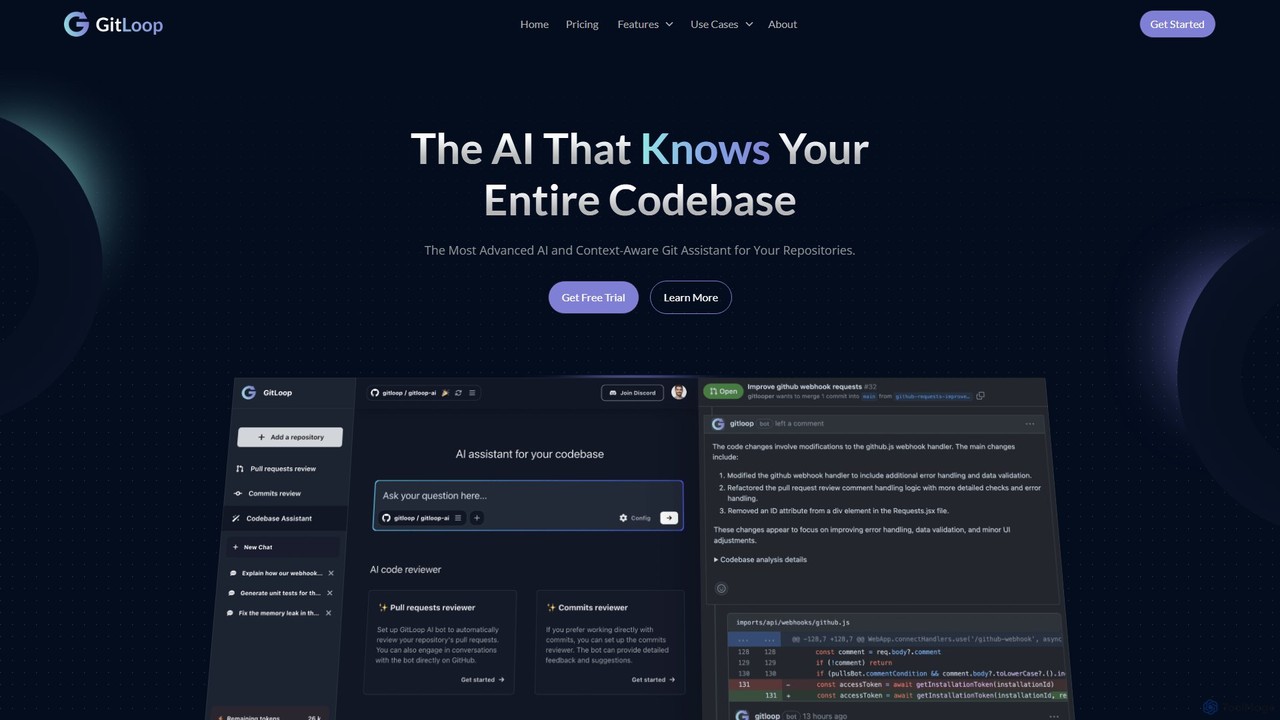
GitLoop Product overview

GitLoop is an AI-powered codebase assistant that revolutionizes software development. It allows developers to search codebases with natural language, automates pull request reviews, generates documentation and unit tests, and provides deep code insights, acting like a senior developer on your team.

Preview

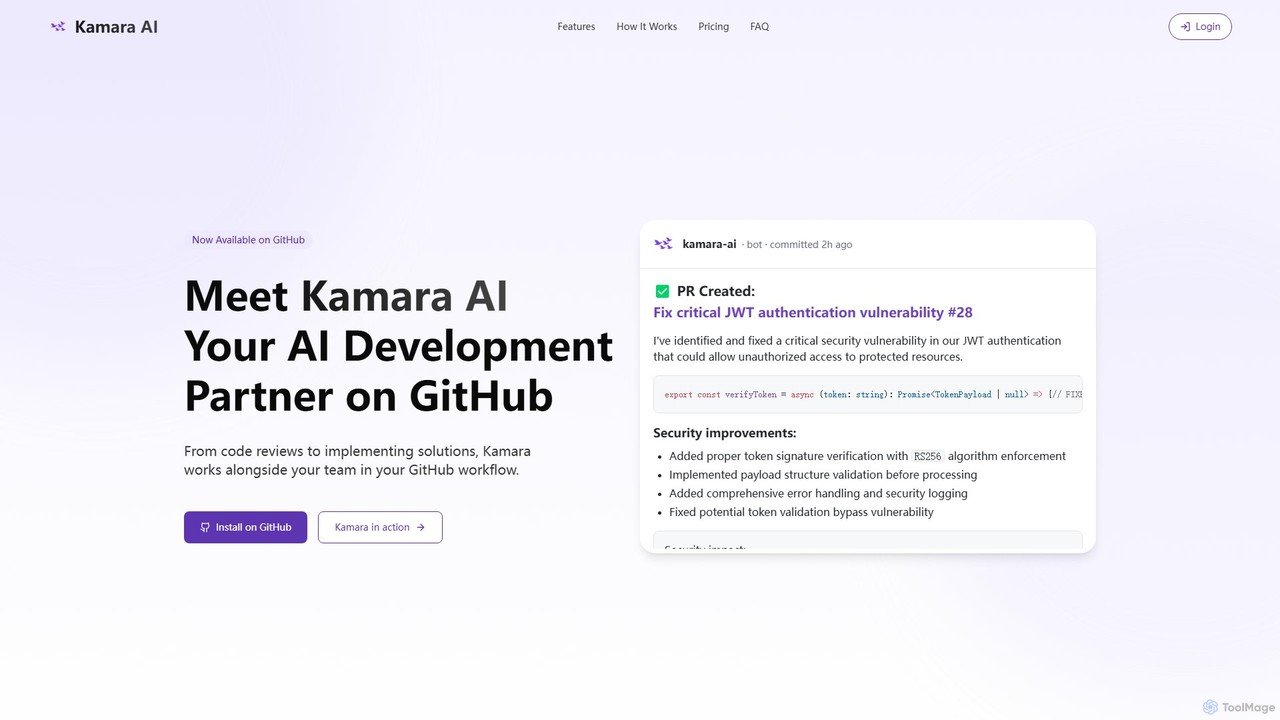
Kamara AI Product overview

Kamara AI is an intelligent development partner that integrates directly into your GitHub workflow. It acts as an AI team member, providing full-context code analysis, automated code reviews, AI-implemented pull requests from issue descriptions, and self-updating documentation. Kamara helps teams accelerate development, improve code quality, and preserve institutional knowledge seamlessly.

Preview

Quick facts

Compare product focus, pricing models and audiences. Highlighted rows indicate different listed information; unknown pricing does not mean free.

GitLoop VS Kamara AI — Quick facts
Quick factsGitLoopKamara AI
Pricing modelFreemiumFreemium
Product typeWebWeb
Primary focusCode ReviewCode Review
Audience and rolesNo data availableNo data available
CategoriesCode Review · Documentation · Code Assistant · Developer ToolsCode Review · Code Assistant · Automation
AddedAug 3, 2025Aug 8, 2025
UpdatedNov 19, 2026Nov 19, 2026

Features, usage and use cases

Explore the listed product descriptions, features and workflows. Taxonomy labels alone are not feature evaluations.

GitLoop

GitLoop is an advanced AI codebase assistant designed to enhance developer productivity and improve code quality. It goes beyond a simple chatbot by acting as a personalized AI agent that deeply understands the context and structure of your entire repository. By integrating directly with your development workflow, GitLoop helps teams search, understand, review, and document code with unprecedented efficiency. It supports integrations with platforms like GitLab, allowing for a seamless connection to your projects.

How to use GitLoop

Using GitLoop is an intuitive process designed to integrate smoothly into your existing workflow:

  1. Connect Your Repository: Start by securely connecting your Git repository (e.g., from GitLab) to the GitLoop platform. The system will then perform a fast and efficient indexing of your entire codebase.
  2. Interact with the AI Assistant: Use the conversational chat interface to communicate with the AI in natural language. You can ask questions, request code generation, or initiate reviews.
  3. Perform Tasks: Ask GitLoop to perform specific actions. For example, you can type "Generate documentation for the user authentication feature," "Review the latest pull request for potential bugs," or "Create unit tests for the payment processing module."
  4. Receive and Implement: GitLoop analyzes the relevant code and provides comprehensive outputs. This can include detailed code review comments, fully-formed documentation files, ready-to-use unit test scripts, or clear explanations of complex code, which you can then review and integrate into your project.

Core Features of GitLoop

  • Context-Aware AI Assistant: A sophisticated chat interface that has a deep understanding of your entire codebase, including dependencies and relationships between different parts of the code.
  • Natural Language Codebase Search: Effortlessly search and navigate through your project's codebase using plain English, saving significant time compared to manual searches.
  • AI-Powered PR & Commit Reviews: The AI acts as a virtual senior developer, automatically reviewing pull requests and commits to detect potential bugs, vulnerabilities, and style inconsistencies before they are merged.
  • Automated Documentation Generation: Automatically create clear, accurate, and comprehensive documentation for functions, modules, or entire features, ensuring your project's documentation is always up-to-date.
  • AI Unit Test Generation: Save time and improve code coverage by asking the AI to generate relevant and effective unit tests for your functions and features.
  • Code and Feature Explanation: Get simple, concise explanations of complex code, processes, and architectural patterns, making project onboarding and understanding legacy code easier than ever.
  • Bug Resolution Assistance: Leverage AI to identify, analyze, and receive suggestions for fixing bugs, speeding up the debugging process.

Use Cases for GitLoop

GitLoop is versatile and can be applied in various scenarios to boost development efficiency:

  • Accelerated Onboarding: New team members can use GitLoop as a learning companion to quickly understand the architecture, data flow, and logic of a complex codebase by asking direct questions.
  • Enhanced Code Quality: By integrating automated AI reviews into the CI/CD pipeline, teams can enforce higher coding standards and catch potential issues early, reducing technical debt.
  • Streamlined Documentation: Automate the tedious task of writing and maintaining documentation. Simply ask GitLoop to regenerate documentation after code changes to keep it perfectly synchronized.
  • Efficient Bug Fixing: When a bug is reported, developers can use GitLoop to quickly locate the relevant code sections, understand their functionality, and get suggestions for a fix.

Advantages of GitLoop

GitLoop offers a distinct competitive edge for modern development teams:

  • Productivity Boost: By automating routine tasks like code reviews, documentation, and test generation, developers can focus their time on more critical and creative work.
  • Improved Code Reliability: Early and consistent detection of bugs and vulnerabilities leads to more robust, secure, and maintainable software.
  • Enhanced Team Collaboration: Provides a centralized, intelligent resource for understanding the codebase, ensuring all team members are on the same page.
  • Security and Privacy: GitLoop prioritizes the safety of your intellectual property, using industry-standard encryption to ensure your source code remains private and secure.
  • Scalability: The platform is designed to handle large and complex repositories efficiently, providing fast and accurate analysis without slowing down your workflow.

Pricing and Plans

GitLoop offers a flexible freemium pricing model. A free plan is available, providing access to basic features suitable for individual developers, open-source projects, or small teams looking to explore the platform's capabilities. For more advanced features, higher usage limits, and dedicated support, GitLoop offers a premium plan starting at $15 per month per user. This makes it a highly competitive and cost-effective solution for professional development teams and enterprises aiming to maximize their efficiency.

Kamara AI

Kamara AI positions itself as an indispensable AI development partner, designed to integrate flawlessly within the GitHub ecosystem. It transforms a standard GitHub repository into a dynamic, intelligent workspace where AI actively contributes as a valued team member. Unlike tools that analyze isolated code snippets, Kamara boasts full-context intelligence, understanding the entire codebase, its architecture, and established conventions. This deep understanding allows it to provide highly relevant, context-aware assistance, accelerating development cycles and enhancing code quality.

The core mission of Kamara AI is to tackle common development bottlenecks. It streamlines workflows by automating tedious tasks, allowing developers to focus on complex problem-solving. From identifying critical security vulnerabilities to implementing complete features based on an issue description, Kamara works alongside your team, directly within the familiar GitHub interface, requiring no changes to your existing processes.

How to use Kamara AI

Getting started with Kamara AI is designed to be a straightforward, three-step process that provides immediate value with minimal setup:

  1. Install from GitHub Marketplace: The integration begins with a simple one-click installation from the GitHub Marketplace. This process grants Kamara secure, permission-based access to your selected repositories and can be completed in under two minutes.
  2. Repository Analysis: Once installed, Kamara AI begins to scan and analyze your entire codebase. It builds a comprehensive understanding of your project's structure, coding patterns, component relationships, and historical context. This initial analysis is crucial for providing its context-aware assistance.
  3. Collaborate on Issues and PRs: To engage the AI, simply mention @kamara in a GitHub issue or pull request comment. You can ask it to review a PR, suggest improvements, explain a piece of code, or even generate a full implementation for a new feature described in an issue. The AI's responses and contributions will appear directly in the conversation thread.

Core Features of Kamara AI

  • Full-Context Intelligence: Kamara analyzes your entire repository, not just isolated files. It understands project-specific patterns and conventions to provide truly relevant suggestions and code.
  • Superhuman Code Review: It performs thorough code reviews that detect potential bugs, performance bottlenecks, and critical security vulnerabilities that human reviewers might miss. Each suggestion is accompanied by a clear explanation.
  • AI-Implemented Pull Requests: Kamara can transform a detailed issue description into a complete, working pull request. It writes the code, includes necessary tests, and follows your project's established architectural patterns.
  • Living Documentation: As your code evolves, Kamara automatically updates the documentation. It can generate explanations at various technical levels, making the codebase accessible to different stakeholders, from junior developers to project managers.
  • Knowledge Preservation: The AI retains the context behind decisions made over time, effectively preserving institutional knowledge. This reduces dependency on specific team members and makes onboarding new developers smoother.
  • Seamless GitHub Integration: Kamara operates entirely within your existing GitHub workflow. There is no new dashboard to learn and zero configuration changes are needed.

Use Cases for Kamara AI

Kamara AI is versatile and can be applied in various scenarios to boost productivity and quality:

  • Accelerating Feature Development: A product manager creates a detailed issue for a new feature. A developer can then tag @kamara and ask it to create a PR, significantly reducing the time spent on boilerplate code and initial implementation.
  • Enhancing Code Security: Before merging a critical pull request, a team lead can request a security-focused review from @kamara to automatically scan for vulnerabilities like the JWT authentication flaw shown in its example.
  • Streamlining Team Onboarding: A new developer can ask @kamara to explain a complex module or the history behind a specific function, getting up to speed without interrupting senior developers.
  • Automating Refactoring Tasks: Teams can create issues for technical debt or refactoring and have Kamara generate the necessary code changes across multiple files, ensuring consistency.

Advantages of Kamara AI

Kamara AI offers a competitive edge by acting as a force multiplier for development teams. Its primary advantages include a significant increase in development velocity, a marked improvement in code quality and security through automated vigilance, and the long-term preservation of invaluable institutional knowledge. Its seamless, zero-configuration integration into GitHub means teams can adopt it without friction, realizing immediate benefits without a steep learning curve.

Pricing and Plans

Kamara AI offers a flexible, credit-based pricing model to suit different team sizes and needs:

  • Free Plan: $0/month. Includes 100 Kamara Credits, support for up to 1 repository, and community support. Ideal for trying out the service.
  • Indie Plan: $19/month. Includes 1,000 Kamara Credits per month, support for up to 3 repositories, and email support. Perfect for individual developers or very small teams.
  • Team Plan (Most Popular): $149/month. Includes 8,500 Kamara Credits per month, support for up to 8 repositories, usage tracking dashboards, and priority support. Designed for collaborative teams.
  • Business Plan: $499/month. Includes 30,000 Kamara Credits per month, support for up to 15 repositories, advanced team management, custom integrations, and enterprise support.

Teams can also purchase additional credits if they run out of capacity before their billing cycle renews.

Positioning

Their taxonomy shows where the products overlap and where each one has a more distinct focus. Unknown fields are shown explicitly and are never filled with assumptions.

Categories

Shared
Code ReviewCode Assistant
Only GitLoop
DocumentationDeveloper Tools
Only Kamara AI
Automation

Tags

Shared
code assistantcode reviewdocumentation generatorgithubpull requestsoftware development
Only GitLoop
AI developer toolbug detectioncodebase searchcommit analysisgitlabunit test generation
Only Kamara AI
ai pair programmerautomationdeveloper toolsecurity vulnerability

Audience and roles

Shared
No listed items
Only GitLoop
No listed items
Only Kamara AI
No listed items

Traffic comparison

Traffic is shown on the same scale so differences in market visibility are not visually understated.

How to interpret the traffic data

Both charts share the same months and vertical scale. Each tool identifies its latest reporting month; missing months are left blank, not counted as zero. Regional and source visit counts are estimates calculated from the reported shares.

GitLoop monthly traffic:

Latest traffic · 2026-05

Monthly visits
11.3K
Avg. visit duration
0:15
Pages per visit
1.74
Bounce rate
38.7%
Data updated 2026-06-15

Monthly traffic trend

  • 2025-09: 14.2K
  • 2026-01: 15.6K
  • 2026-02: 12.3K
  • 2026-03: 11.3K
  • 2026-04: 8.9K
  • 2026-05: 11.3K

Top regions

Top 5 countries/regions
Country/regionPercentageEstimated visits
🇮🇳India32.46%3.7K
🇻🇳Vietnam24.69%2.8K
🇺🇸United States24.2%2.7K
🇧🇷Brazil9.79%1.1K
🇺🇦Ukraine8.86%1K

Search keywords

bootstrap to tailwind converterpython to javascript converterregex explainerregex generatortypescript to javascript

Kamara AI monthly traffic:

Latest traffic · 2026-05

Monthly visits
183
Avg. visit duration
0:00
Pages per visit
1
Bounce rate
88.69%
Data updated 2026-06-15

Monthly traffic trend

  • 2025-09: 508
  • 2026-01: 848
  • 2026-02: 906
  • 2026-03: 1.9K
  • 2026-04: 49
  • 2026-05: 183

Top regions

Top 5 countries/regions
Country/regionPercentageEstimated visits
🇮🇳India100%183

Search keywords

kamara

Community signals

Ratings, comments, favorites, and likes are community signals—not a substitute for product fit.

GitLoop

Rating
No data available
Comments
0
Favorites
166
Likes
171

Kamara AI

Rating
No data available
Comments
0
Favorites
181
Likes
176

GitLoop vs Kamara AI · Comparison FAQ

What do GitLoop and Kamara AI have in common?
Both tools are listed under Code Review、Code Assistant. These categories indicate overlapping use cases; compare their detailed descriptions for workflows, capabilities and limitations.
Are GitLoop and Kamara AI free?
Listed pricing models: GitLoop — Freemium; Kamara AI — Freemium. Missing pricing is not proof of a free plan, and freemium does not mean every feature is free. Check official sites for current plans, limits and trials.
How should I choose between GitLoop and Kamara AI?
The primary listed category is Code Review for GitLoop, and Code Review for Kamara AI. Compare features, steps and use cases, then verify pricing, data permissions and deployment needs. This page does not include hands-on testing and does not declare a winner from traffic or tags.

Sources and comparison methodology

This page is assembled from ToolMage product listings, taxonomy, traffic statistics and on-site user feedback. It is not a hands-on test or an independent review.

  • Feature and plan descriptions reflect information in the listings, not real-time guarantees. Verify pricing, quotas, availability and privacy terms on the official sites.
  • Traffic uses the reporting months shown. Missing statistics do not mean zero visits, and different periods do not establish growth or superiority. Regional and source visit counts are estimates based on shares.
  • Different tags indicate differences in the listings, not proof that the other product lacks a capability. Ratings, favorites and visits are not used to declare a winner.

Related comparisons