ToolMage
Sign in

AI TOOL COMPARISON

Hexomatic vs No-Code Scraper

What is the difference, and which fits your workflow? Compare features, usage, pricing models and traffic side by side.

Jump to key differences

Product overview

Hexomatic Product overview

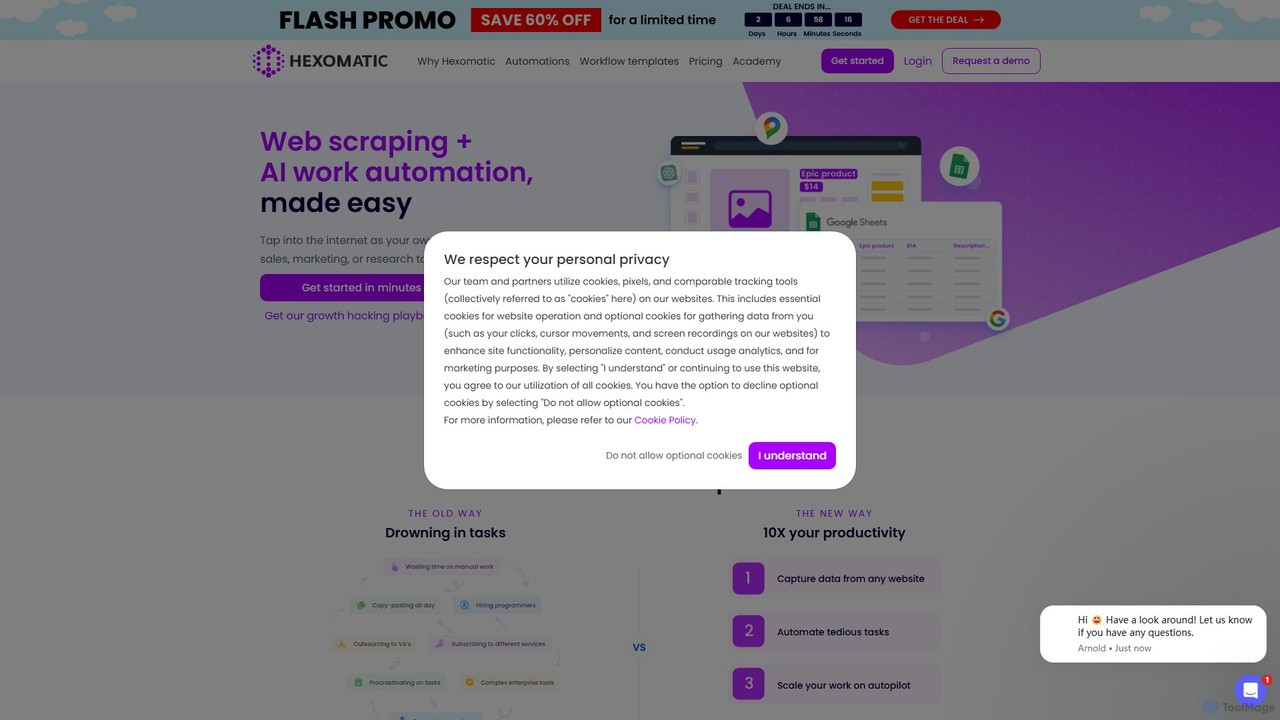
Hexomatic is a no-code, cloud-based web scraping and workflow automation platform. It empowers users to extract data from any website using a simple point-and-click interface and automate over 100 tasks for sales, marketing, and research. With integrated AI like ChatGPT and Google Gemini, you can scale your operations, from lead generation to content creation, without writing a single line of code.

Preview

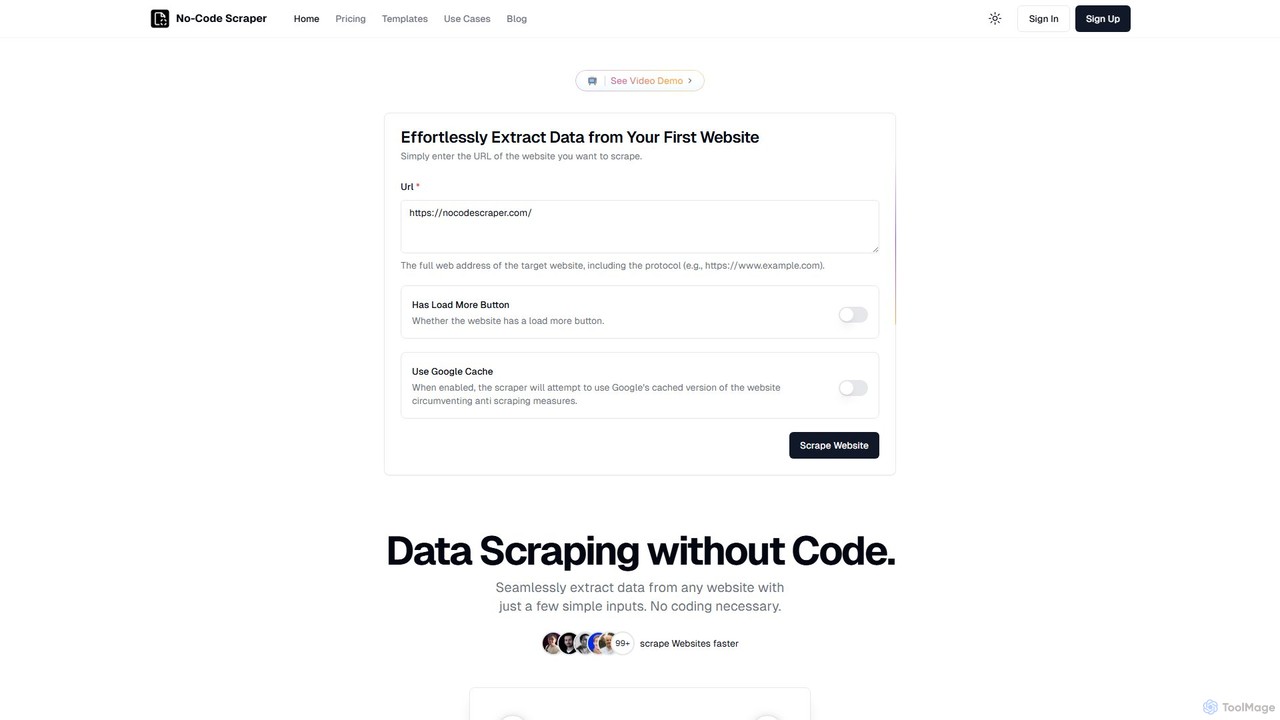
No-Code Scraper Product overview

No-Code Scraper is an AI-powered platform that enables users to extract data from any website without writing a single line of code. It uses large language models to automate data extraction, cleaning, and structuring, making web scraping accessible, reliable, and efficient for everyone.

Preview

Quick facts

Compare product focus, pricing models and audiences. Highlighted rows indicate different listed information; unknown pricing does not mean free.

Hexomatic VS No-Code Scraper — Quick facts
Quick factsHexomaticNo-Code Scraper
Pricing modelPaidFreemium
Product typeWebWeb
Primary focusWeb ScrapingWeb Scraping
Audience and rolesNo data availableNo data available
CategoriesWeb Scraping · Lead Generation · Automation · AnalysisWeb Scraping · Lead Generation · Development · Automation
AddedAug 3, 2025Aug 10, 2025
UpdatedNov 19, 2026Nov 19, 2026

Features, usage and use cases

Explore the listed product descriptions, features and workflows. Taxonomy labels alone are not feature evaluations.

Hexomatic

Hexomatic is a comprehensive, cloud-based platform designed to make web scraping and work automation accessible to everyone, regardless of their technical skills. It positions itself as a virtual assistant that operates 24/7, transforming the way businesses handle repetitive tasks. By combining a powerful no-code web scraper with a vast library of ready-made automations and AI capabilities, Hexomatic allows you to tap into the internet as your own data source and put your most time-consuming workflows on autopilot.

The platform is trusted by over 130,000 businesses, helping them move away from manual copy-pasting, expensive outsourcing, and complex enterprise software. Instead, Hexomatic offers a streamlined, scalable, and cost-effective solution to 10x productivity and focus on growth.

How to use Hexomatic

Getting started with Hexomatic is designed to be intuitive, following a simple three-step process to build powerful automated workflows:

  1. Scrape Any Website: Begin by capturing data from the web. You can use Hexomatic's point-and-click browser extension to create your own 'scraping recipes' in minutes for any website. For popular sites, there's a growing library of pre-built recipes you can use instantly. This process requires no coding and can handle complex scenarios like pagination to extract products, leads, or content at scale.
  2. Automate Tasks: Once you have your data (either from scraping or by uploading your own file), you can apply any of the 100+ ready-made automations. These automations perform specific tasks like finding contact information, validating email addresses, discovering a website's technology stack, extracting SEO meta tags, or even performing AI-powered analysis.
  3. Build and Run Workflows: The true power of Hexomatic lies in its workflow builder. You can chain together your scraping recipes and various automations to create end-to-end workflows. For example, you can create a workflow that scrapes Google Maps for businesses in a specific niche and location, then automatically finds contact details and social media profiles for each result, delivering a ready-to-use lead list. These workflows can be scheduled to run on autopilot, saving hundreds of hours per month.

Core Features of Hexomatic

  • No-Code Web Scraping: A user-friendly, point-and-click interface to extract text, images, and other data from any website without writing code. Includes a library of pre-built scraping recipes.
  • Workflow Automation: A visual workflow builder to combine scraping actions and automations, creating custom, repeatable processes that run in the cloud.
  • 100+ Ready-Made Automations: An extensive library of automations for data enrichment, email validation, SEO analysis, social media lookups, and more.
  • Integrated AI: Native integration with ChatGPT (GPT-3.5 & GPT-4) and Google Gemini allows you to perform advanced tasks like content summarization, article writing, data analysis, and product description generation at scale within your workflows.
  • Data Enrichment: Automatically find contact details, email addresses, and social media profiles for lists of prospects or websites.
  • Bulk Processing: Perform actions on thousands of data points simultaneously, from resizing images to analyzing sentiment in customer reviews.
  • Cloud-Based and Scalable: All workflows run in the cloud, allowing you to scale your operations without using your own computer's resources.
  • Software Integrations: Connect Hexomatic with your favorite tools and platforms to create a seamless data and automation ecosystem.

Use Cases for Hexomatic

Hexomatic is versatile and can be applied across various departments and industries:

  • Sales & Lead Generation: Scrape Google Maps or business directories to find B2B leads, then enrich them with contact information for outreach campaigns.
  • Marketing & SEO: Find guest post opportunities by searching for relevant keywords, identify backlink prospects from resource pages, and audit website SEO meta tags in bulk.
  • E-commerce: Scrape product data, prices, and reviews from competitor websites. Use AI to automatically rewrite or generate unique product descriptions.
  • Market Research: Monitor competitor pricing, track industry news by scraping news sites, and perform sentiment analysis on customer reviews.
  • Content Creation: Automate the creation of a social media content calendar by scraping articles and using AI to generate posts.

Advantages of Hexomatic

The primary advantage of Hexomatic is its ability to democratize data extraction and automation. It empowers non-technical users to perform complex tasks that would typically require a team of developers. It offers a significant productivity boost, saves countless hours of manual work, and provides a scalable way to grow a business. By consolidating web scraping, automation, and AI into a single platform, it eliminates the need for multiple, expensive subscriptions and simplifies the entire process.

Pricing and Plans

Hexomatic offers several paid plans tailored to different needs, often with significant discounts for annual billing.

  • Silver Plan: Starting at $49/month ($20/month when billed annually). Includes 4,500 automation credits, 10 simultaneous workflows, unlimited scraping recipe creation, and datacentre IP rotation.
  • Gold Plan: Starting at $99/month ($40/month when billed annually). Includes all Silver benefits, plus 10,000 automation credits, unlimited simultaneous workflows, and API access.
  • Enterprise Plan: Custom pricing for unique business needs. Includes all Gold benefits, plus personalized onboarding, team training, dedicated support, and a strategy consultant.
  • Premium Credit Add-on: Available for accessing premium services like ChatGPT, DeepL translation, residential proxies, and advanced data enrichment, starting from $9.99/month.

No-Code Scraper

No-Code Scraper is a revolutionary tool designed to democratize web data extraction. It empowers users, regardless of their technical background, to seamlessly pull valuable information from any website. By leveraging the power of advanced AI and large language models (LLMs), the platform automates the traditionally complex and fragile process of web scraping. It addresses common pain points such as the need for developers, frequent scraper breakages due to website updates, and the time-consuming task of cleaning raw data.

The platform is built on the principle of simplicity and resilience. Users can start scraping in just a few clicks, and the underlying AI is designed to adapt to changes in website structure, ensuring consistent and reliable data collection. This 'unbreakable' quality means you can create a single template and use it across thousands of similar sites without constant maintenance.

How to use No-Code Scraper

Getting started with No-Code Scraper is a straightforward, three-step process:

  1. Import Websites: Begin by entering the URL of the target website. You can also import a list of websites from a CSV file for bulk scraping operations.
  2. Define Data Points to Extract: Use the intuitive no-code interface to create a scraping template. Simply describe the data you want to extract (e.g., 'product name', 'price', 'customer review'). The AI will understand your requirements and handle the extraction, cleaning, and validation for you. You can also choose from a wide variety of pre-built templates for popular sites like Yelp, Google Maps, Product Hunt, and more.
  3. Launch Scraping Job: With your template configured, launch the job with a single click. The AI will get to work, scraping the data according to your specifications. Once complete, you can download the perfectly structured results as a CSV, Excel, or JSON file, or export it directly to tools like Google Sheets, Notion, and Airtable with higher-tier plans.

Core Features of No-Code Scraper

  • AI-Powered No-Code Interface: Easily set up scrapers by describing the data you need in plain language, no HTML or CSS knowledge required.
  • Unbreakable Resilience: The AI automatically adapts to website layout changes, preventing scrapers from breaking and eliminating the need for constant maintenance.
  • Automated Data Cleaning: Get perfectly structured, clean, and formatted data instantly, saving hours of manual data preparation.
  • Extensive Pre-built Templates: A large library of templates for common use cases and popular websites like Crunchbase, Glassdoor, Yelp, and Kickstarter to start scraping immediately.
  • Advanced Scraping Capabilities: Handles complex scenarios including pagination, 'load more' buttons, and dynamic JavaScript-rendered content.
  • Google Cache Integration: An option to use Google's cached version of a website to bypass some anti-scraping measures.
  • Flexible Data Export: Download data in CSV, Excel, or JSON formats.
  • Integrations & API Access: Connect with Google Sheets, Notion, and Airtable (Pro plan) or gain full programmatic control with API access (Expert plan).
  • Scheduled Scraping: Automate your data collection by scheduling scraping jobs to run at regular intervals (Pro plan and above).

Use Cases for No-Code Scraper

No-Code Scraper is versatile and can be used by marketers, founders, researchers, and sales teams for various purposes:

  • Lead Generation: Extract business details from directories like BBB or Yelp, or professional profiles from Medium.
  • Market Research: Scrape product data from Product Hunt, app information from app stores, or market trends from Crunchbase and Indie Hackers.
  • Competitive Analysis: Monitor competitor pricing, product features, and customer reviews from e-commerce sites or review platforms.
  • Recruitment: Collect job postings from platforms like Glassdoor, Upwork, and Y Combinator to analyze hiring trends and find opportunities.
  • Real Estate Analysis: Scrape property listings and details from sites like Redfin to track market trends and find investment opportunities.
  • Content Aggregation: Build directories or compile journals by extracting data from various sources across the web.

Advantages of No-Code Scraper

The primary advantage is its accessibility. It opens up the world of web data to non-technical users. Its AI-driven resilience significantly reduces the maintenance overhead typical of traditional scrapers. The automated data cleaning is a massive productivity booster, delivering ready-to-use data. The all-in-one platform handles everything from simple data pulls to complex, multi-page scraping scenarios, making it a comprehensive and cost-effective solution.

Pricing and Plans

No-Code Scraper offers a 5-day free trial and several subscription plans based on a credit system. Credits are used for actions like scraping a page or extracting data.

  • Starter Plan: $16.99/month for 400 credits. Includes Javascript rendering and basic data export (JSON, CSV, Excel).
  • Pro Plan: $19.99/month for 400 credits. Includes all Starter features plus export to Google Sheets, Notion, and Airtable, and scheduled scraping jobs.
  • Expert Plan: $25.99/month for 400 credits. Includes all Pro features plus full API access and premium proxy support for more demanding tasks.

The number of credits needed varies by task. For example, a simple page scrape costs 1 credit, while scraping and extracting data from a page using a proxy costs 6 credits.

Positioning

Their taxonomy shows where the products overlap and where each one has a more distinct focus. Unknown fields are shown explicitly and are never filled with assumptions.

Categories

Shared
Web ScrapingLead GenerationAutomation
Only Hexomatic
Analysis
Only No-Code Scraper
Development

Tags

Shared
automationdata extractionlead generationmarket researchno-codeweb scraping
Only Hexomatic
chatgptmarketing automationSEOworkflow
Only No-Code Scraper
AIdata cleaningdata mining

Audience and roles

Shared
No listed items
Only Hexomatic
No listed items
Only No-Code Scraper
No listed items

Traffic comparison

Traffic is shown on the same scale so differences in market visibility are not visually understated.

How to interpret the traffic data

Both charts share the same months and vertical scale. Each tool identifies its latest reporting month; missing months are left blank, not counted as zero. Regional and source visit counts are estimates calculated from the reported shares.

Hexomatic monthly traffic:

Latest traffic · 2026-05

Monthly visits
50.1K
Avg. visit duration
0:18
Pages per visit
2.18
Bounce rate
36.71%
Data updated 2026-06-15

Monthly traffic trend

  • 2025-09: 55.3K
  • 2026-01: 85.9K
  • 2026-02: 57K
  • 2026-03: 53.2K
  • 2026-04: 55.6K
  • 2026-05: 50.1K

Top regions

Top 5 countries/regions
Country/regionPercentageEstimated visits
🇺🇸United States31.12%15.6K
🇳🇬Nigeria22.7%11.4K
🇮🇳India16.96%8.5K
🇮🇩Indonesia16.84%8.4K
🇩🇪Germany12.38%6.2K

Search keywords

app to find technology stack on a sitediscover profilehexomatichtml extractorwebsite screenshot

No-Code Scraper monthly traffic:

Latest traffic · 2026-05

Monthly visits
3.3K
Avg. visit duration
0:47
Pages per visit
2.03
Bounce rate
45.35%
Data updated 2026-06-15

Monthly traffic trend

  • 2025-09: 5K
  • 2026-01: 2.6K
  • 2026-02: 2.2K
  • 2026-03: 5.1K
  • 2026-04: 3.9K
  • 2026-05: 3.3K

Top regions

Top 5 countries/regions
Country/regionPercentageEstimated visits
🇺🇸United States39.52%1.3K
🇭🇰Hong Kong33.21%1.1K
🇮🇩Indonesia18.52%617
🇮🇳India8.75%292

Traffic sources

Source typePercentageEstimated visits
Referral94.54%3.2K
Direct5.46%182

Search keywords

instant data scraperinstant data scraper extensionno code scrapernocodescraperno code web scraper

Community signals

Ratings, comments, favorites, and likes are community signals—not a substitute for product fit.

Hexomatic

Rating
No data available
Comments
0
Favorites
169
Likes
184

No-Code Scraper

Rating
No data available
Comments
0
Favorites
184
Likes
181

Hexomatic vs No-Code Scraper · Comparison FAQ

What do Hexomatic and No-Code Scraper have in common?
Both tools are listed under Web Scraping、Lead Generation、Automation. These categories indicate overlapping use cases; compare their detailed descriptions for workflows, capabilities and limitations.
Are Hexomatic and No-Code Scraper free?
Listed pricing models: Hexomatic — Paid; No-Code Scraper — Freemium. Missing pricing is not proof of a free plan, and freemium does not mean every feature is free. Check official sites for current plans, limits and trials.
How should I choose between Hexomatic and No-Code Scraper?
The primary listed category is Web Scraping for Hexomatic, and Web Scraping for No-Code Scraper. Compare features, steps and use cases, then verify pricing, data permissions and deployment needs. This page does not include hands-on testing and does not declare a winner from traffic or tags.

Sources and comparison methodology

This page is assembled from ToolMage product listings, taxonomy, traffic statistics and on-site user feedback. It is not a hands-on test or an independent review.
  • Feature and plan descriptions reflect information in the listings, not real-time guarantees. Verify pricing, quotas, availability and privacy terms on the official sites.
  • Traffic uses the reporting months shown. Missing statistics do not mean zero visits, and different periods do not establish growth or superiority. Regional and source visit counts are estimates based on shares.
  • Different tags indicate differences in the listings, not proof that the other product lacks a capability. Ratings, favorites and visits are not used to declare a winner.

Related comparisons