ToolMage
Sign in

AI TOOL COMPARISON

Icon vs Quickads

What is the difference, and which fits your workflow? Compare features, usage, pricing models and traffic side by side.

Jump to key differences

Product overview

Icon Product overview

Icon is an all-in-one AI Admaker that streamlines the entire advertising workflow. It combines 14+ tools to help users plan, create, and run thousands of high-performing video and static ads end-to-end. Leveraging features like AI CMO for automated strategy and AdGPT for assisted creation, Icon drastically reduces costs and time, replacing a multi-thousand dollar tech stack for a low monthly fee.

Preview

Quickads Product overview

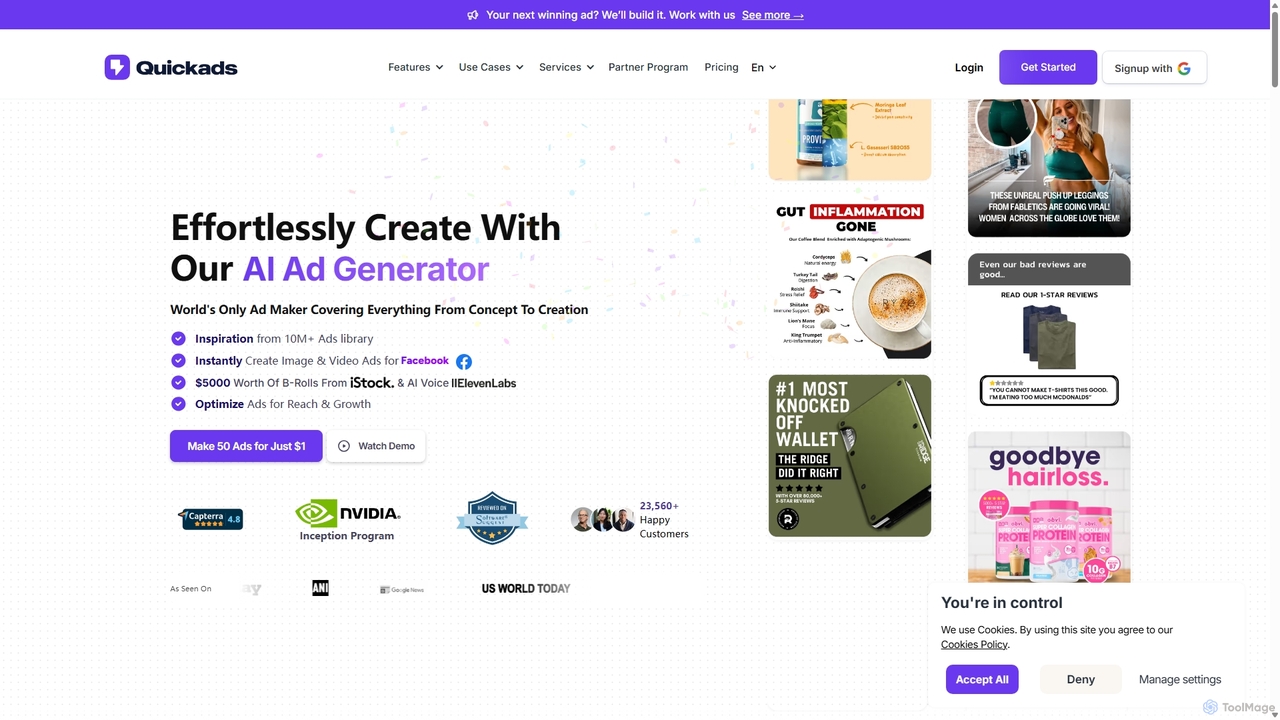
Quickads is an AI-powered ad generator that enables users to create high-converting image and video ads in seconds. It features a massive library of over 10 million ads for inspiration, virtual product photoshoots, AI avatars, and a unified platform to create, optimize, and publish campaigns across social media platforms like Meta, TikTok, and Google.

Preview

Quick facts

Compare product focus, pricing models and audiences. Highlighted rows indicate different listed information; unknown pricing does not mean free.

Icon VS Quickads — Quick facts
Quick factsIconQuickads
Pricing modelFreemiumPaid
Product typeWebWeb
Primary focusImage GenerationImage Generation
Audience and rolesAdvertising Specialist · Content Creator · Digital Marketer · E-commerce Manager · Growth Hacker · Marketing Agency · Marketing Manager · Small Business Owner · Social Media ManagerAdvertising Specialist · Content Creator · Digital Marketer · E-commerce Manager · Graphic Designer · HR Manager · Marketing Manager · Small Business Owner · Social Media Manager
CategoriesImage Generation · Advertising · Automation · Video GenerationImage Generation · Advertising · Content Creation · Video Generation
AddedSep 5, 2025Sep 21, 2025
UpdatedNov 19, 2026Nov 19, 2026

Features, usage and use cases

Explore the listed product descriptions, features and workflows. Taxonomy labels alone are not feature evaluations.

Icon

Icon positions itself as the world's first AI Admaker, an end-to-end platform designed to revolutionize the way brands and agencies plan, create, and run advertising campaigns. It consolidates over 14 different marketing tools into a single, cohesive ecosystem, aiming to replace a costly and fragmented tech stack that can range from $2,000 to $30,000 per month. By offering a comprehensive suite of AI-powered features, Icon enables users to scale their ad production from a handful to hundreds of creatives per week, thereby increasing the chances of discovering winning ads and optimizing campaign performance.

The platform is built around two core engines: AI CMO (Chief Marketing Officer) and AdGPT. The AI CMO function automates the strategic aspects of ad creation. It scans competitor ads, websites, customer reviews, and ad account performance to identify winning concepts. Based on this data, it generates three types of ad ideas: 'Competitor Clone' to replicate successful strategies, 'New Concept' for fresh approaches, and 'Winner Iteration' to scale what's already working. This automated intelligence provides a constant stream of data-backed creative briefs.

How to use Icon

Icon offers two distinct, yet complementary, workflows to cater to different needs for control and automation:

  1. AI-Assisted with AdGPT: This workflow gives users more creative control. It starts by analyzing your existing asset library (videos and images) and automatically tagging scenes and elements (e.g., 'unboxing,' 'product in use'). These tagged assets become 'lego blocks' for building ads. You can then use AdGPT Workflows—such as creating an ad from a prompt, cloning a competitor's ad, or repurposing existing UGC—to generate ads that are 0-99% complete. Final edits can be made using the integrated AdCut (video editor) and Canvas (image editor).
  2. Fully Automated with AI CMO: For maximum efficiency, the AI CMO workflow automates the entire process. It begins by identifying high-potential ad concepts from its continuous market research. It then auto-generates complete video and static ads based on these concepts, which are typically 50-99% ready to launch. Users can review these ads, make minor tweaks if necessary, and then download them or upload them directly to their ad accounts with a single click.

Core Features of Icon

  • AI CMO (Chief Marketing Officer): Automates ad strategy, concept generation, and campaign planning.
  • AdGPT: AI-powered workflows for creating ads from prompts, cloning successful ads, and utilizing existing assets.
  • AdCut (AI Video Editor): An intuitive, AI-enhanced video editor designed specifically for ad creation.
  • Canvas (AI Image Editor): A powerful image editor for creating and refining static ad creatives.
  • Adspy: A built-in tool for competitor ad analysis and cloning.
  • Creative Library: Smart asset management with AI-powered tagging and scene splitting.
  • UGC Creators & Asset Generator: Generate synthetic User-Generated Content (UGC), B-roll footage, and other creative assets.
  • AI Photoshoot: Create professional-grade studio photos without a physical photoshoot.
  • Variations (A/B Testing): Automatically generate variations of hooks and creative elements for robust A/B testing.
  • Language Matching: Adapts ad copy and visuals to match the language of the target audience.
  • Audience Research: Generates creative concepts tailored to specific audience demographics and psychographics.
  • Creative Analytics: Provides insights into creative performance to optimize ad spend and strategy.
  • Ads Manager Integration: Streamlines the process of uploading finished ads to platforms like Meta and TikTok.

Use Cases for Icon

Icon is ideal for a wide range of users in the digital advertising space. E-commerce brands can use it to rapidly scale their creative output for platforms like Meta, TikTok, and Google, testing hundreds of ad variations to find top performers. Marketing agencies can manage multiple client accounts efficiently, offering high-volume creative production without a massive overhead. Startups and small businesses can leverage Icon to launch professional, data-driven campaigns on a budget, competing with larger players. Content creators can also use the platform to produce promotional materials for their own products or brand partnerships.

Advantages of Icon

The primary advantage of Icon is its massive value proposition. By integrating 14+ tools into one platform for a starting price of $39/month, it offers unparalleled cost savings. It dramatically increases workflow efficiency, allowing teams to shift their focus from repetitive production tasks to high-level strategy. The end-to-end, integrated nature of the platform eliminates friction between different tools, from asset management to analytics. Furthermore, its data-driven approach to creativity, powered by AI CMO, de-risks the ad creation process by grounding it in proven concepts and market analysis.

Pricing and Plans

Icon offers a straightforward pricing model designed to be accessible for various scales of operation. All plans come with a 3-day free trial and a 100% money-back guarantee.

  • Solo Plan: Starting from $39/month, this plan is designed for individuals or small teams and includes up to 10 ad downloads per month.
  • Team Plan: Priced higher than the Solo plan, this option offers up to 100 ad downloads per month, suitable for larger teams and agencies.
  • Managed / Enterprise Plan: Starting at $1,000-$1,500/month (minimum), this plan provides a full-service solution. It includes full access to the Icon platform plus a dedicated team of humans (creative strategist, copywriter, video editor), custom integrations, enterprise-grade security, and prioritized feature development.

Users can choose between creating 'Static' ads or 'Static + Video' ads, which may affect the final pricing of the Solo and Team plans.

Quickads

Quickads is a comprehensive AI-driven advertising platform designed to streamline the entire ad creation and management process. It empowers marketing agencies, e-commerce businesses, and marketers of all sizes to produce professional-quality image and video ads effortlessly and at scale. By leveraging artificial intelligence, Quickads transforms product links or simple ideas into compelling, scroll-stopping ad creatives in just 30 seconds, aiming to significantly increase Return on Ad Spend (ROAS) and accelerate campaign launches.

How to use Quickads

The workflow on Quickads is designed for efficiency and simplicity, requiring no prior design or coding skills. Users can follow these steps to launch effective campaigns:

  1. Discover & Analyze: Start by exploring the world's largest AI-analyzed ad library, containing over 10 million ads from platforms like Meta and TikTok. Users can search by format, country, theme, or use case to find winning ad strategies and inspiration from competitors. The AI provides performance scores and generates similar ad scripts for easy adaptation.
  2. Create Creatives: Generate stunning image and video ads. For images, choose from over 10,000 high-converting templates. For videos, use intuitive tools to customize templates, add AI avatars, generate voiceovers in over 35 languages, and integrate high-quality product shots from the Virtual Photoshoot feature. This feature eliminates the need for expensive physical photoshoots.
  3. Optimize & Publish: The platform's AI automatically optimizes ad copy, graphics, and audience targeting to align with the latest Google and Facebook algorithms. Users can check performance and brand compliance scores before launching.
  4. Manage & Schedule: Quickads is a unified hub for managing both ads and social media content. Schedule posts, publish campaigns directly to social accounts, and analyze performance all from a single, centralized dashboard.

Core Features of Quickads

  • AI Ad Inspiration Library: Access to over 10 million ads from Meta, TikTok, and more, with AI-powered analysis, performance scoring, and script generation.
  • AI Image Ad Generator: Create static ads using a vast library of over 10,000 customizable templates organized by industry and use case.
  • AI Video Ad Generator: Produce captivating video ads with customizable templates, AI avatars, AI voice generation (supporting 35+ languages), and seamless transitions and effects.
  • Virtual Product & Fashion Photoshoots: Generate professional-grade product and apparel images without the cost and logistics of a physical photoshoot.
  • Unified Campaign Management: Schedule social media posts and publish ad campaigns directly to platforms like Facebook, Instagram, and Google from one place.
  • AI-Powered Optimization: Automatically generate and optimize ad copy, graphics, and audience targeting. Includes A/B testing automation to find the best-performing ad combinations.
  • Team Collaboration & White Labeling: Add team members to collaborate on projects. The Agency plan offers white-labeling to customize the platform with your own branding.
  • Multi-Language Support: Create ad copy and voiceovers in over 35 languages, including German, French, Dutch, and Hindi.

Use Cases for Quickads

Quickads is versatile and serves a wide range of industries and roles:

  • E-commerce Brands: Quickly create product ads for new arrivals or promotions using virtual photoshoots and high-converting templates.
  • Marketing Agencies: Manage multiple client accounts efficiently, use brand kits for consistency, and leverage the white-label feature for a branded client experience.
  • SaaS Companies: Develop video ads explaining software features using AI avatars and screen recordings.
  • Real Estate Agents: Create property tour videos and promotional image ads for listings.
  • HR & Recruitment: Design engaging job posting ads to attract top talent across social media.

Advantages of Quickads

Using Quickads provides a significant competitive edge by offering:

  • Speed and Efficiency: Reduce campaign launch times from weeks to minutes, creating ads 10x faster.
  • Cost-Effectiveness: Save on costs associated with hiring designers, videographers, and conducting physical photoshoots.
  • Higher ROAS: The platform reports users achieving up to 240% higher ROAS through AI-optimized, data-driven ad creatives.
  • Data-Driven Strategy: Leverage insights from a massive, AI-analyzed ad library to make informed creative decisions.
  • Simplicity: An intuitive, user-friendly interface that requires no technical expertise, making professional ad creation accessible to everyone.

Pricing and Plans

Quickads offers a variety of subscription and lifetime plans to suit different needs, with a $1 trial available for new users.

  • Monthly/Yearly Subscription Plans: These include the Starter Plan (from $63/month annually), Pro Plan (from $79/month annually), and Agency Plan (from $119/month annually). Plans differ in the number of downloads, brand kits, virtual photoshoots, AI avatar access, and video generation minutes. Higher-tier plans offer HD/4K video quality, premium AI voices, and white-labeling.
  • Lifetime License Plans: A one-time payment for lifetime access, with multiple tiers (from License Plan 1 at $69 to License Plan 6 at $739) that vary in user seats, download limits, and feature quotas.
  • Service Plans: For users who want a hands-off approach, Quickads offers service packages like Content Creation ($700/month), Campaign Execution ($1200/month), and Conversion Optimization ($1500/month), which include dedicated support and full campaign management.

Positioning

Their taxonomy shows where the products overlap and where each one has a more distinct focus. Unknown fields are shown explicitly and are never filled with assumptions.

Categories

Shared
Image GenerationAdvertisingVideo Generation
Only Icon
Automation
Only Quickads
Content Creation

Tags

Shared
ai ad generatormarketing automation
Only Icon
ad creativeadspycompetitor ad analysiscreative analyticse-commerce advertisingperformance marketingsocial media adsUGC generatorvideo ad maker
Only Quickads
ad libraryadvertising toolai avatarcompetitor analysisimage ad makerROAS optimizationsocial media marketingvideo ad creatorvirtual photoshoot

Audience and roles

Shared
Advertising SpecialistContent CreatorDigital MarketerE-commerce ManagerMarketing ManagerSmall Business OwnerSocial Media Manager
Only Icon
Growth HackerMarketing Agency
Only Quickads
Graphic DesignerHR Manager

Traffic comparison

Traffic is shown on the same scale so differences in market visibility are not visually understated.

How to interpret the traffic data

Both charts share the same months and vertical scale. Each tool identifies its latest reporting month; missing months are left blank, not counted as zero. Regional and source visit counts are estimates calculated from the reported shares.

Icon monthly traffic:

Latest traffic · 2026-05

Monthly visits
150K
Avg. visit duration
1:00
Pages per visit
2.43
Bounce rate
39.93%
Data updated 2026-06-15

Monthly traffic trend

  • 2025-09: 336K
  • 2026-01: 218.8K
  • 2026-02: 198.7K
  • 2026-03: 227.6K
  • 2026-04: 170.5K
  • 2026-05: 150K

Top regions

Top 5 countries/regions
Country/regionPercentageEstimated visits
🇺🇸United States71.46%107.2K
🇮🇳India9.18%13.8K
🇴🇲Oman9.08%13.6K
🇵🇭Philippines6.55%9.8K
🇧🇷Brazil3.73%5.6K

Traffic sources

Source typePercentageEstimated visits
Direct95.29%143K
Referral2.95%4.4K
Email1.76%2.6K

Search keywords

iconicon adsicon aiicon meskio founder

Quickads monthly traffic:

Latest traffic · 2026-05

Monthly visits
76.5K
Avg. visit duration
0:27
Pages per visit
1.93
Bounce rate
39.67%
Data updated 2026-06-15

Monthly traffic trend

  • 2025-09: 158.6K
  • 2026-01: 169.8K
  • 2026-02: 103.4K
  • 2026-03: 86.4K
  • 2026-04: 102.7K
  • 2026-05: 76.5K

Top regions

Top 5 countries/regions
Country/regionPercentageEstimated visits
🇺🇸United States26.75%20.5K
🇮🇩Indonesia24.82%19K
🇵🇰Pakistan18.84%14.4K
🇳🇬Nigeria14.84%11.4K
🇻🇳Vietnam14.75%11.3K

Traffic sources

Source typePercentageEstimated visits
Direct79.74%61K
Referral20.13%15.4K
Email0.13%100

Search keywords

fbadslibraryquick adsquickadsquickads aiwhere to log into my partnerstack dashboard

Community signals

Ratings, comments, favorites, and likes are community signals—not a substitute for product fit.

Icon

Rating
No data available
Comments
0
Favorites
149
Likes
148

Quickads

Rating
No data available
Comments
0
Favorites
177
Likes
183

Icon vs Quickads · Comparison FAQ

What do Icon and Quickads have in common?
Both tools are listed under Image Generation、Advertising、Video Generation. These categories indicate overlapping use cases; compare their detailed descriptions for workflows, capabilities and limitations.
Are Icon and Quickads free?
Listed pricing models: Icon — Freemium; Quickads — Paid. Missing pricing is not proof of a free plan, and freemium does not mean every feature is free. Check official sites for current plans, limits and trials.
How should I choose between Icon and Quickads?
The primary listed category is Image Generation for Icon, and Image Generation for Quickads. Compare features, steps and use cases, then verify pricing, data permissions and deployment needs. This page does not include hands-on testing and does not declare a winner from traffic or tags.

Sources and comparison methodology

This page is assembled from ToolMage product listings, taxonomy, traffic statistics and on-site user feedback. It is not a hands-on test or an independent review.

  • Feature and plan descriptions reflect information in the listings, not real-time guarantees. Verify pricing, quotas, availability and privacy terms on the official sites.
  • Traffic uses the reporting months shown. Missing statistics do not mean zero visits, and different periods do not establish growth or superiority. Regional and source visit counts are estimates based on shares.
  • Different tags indicate differences in the listings, not proof that the other product lacks a capability. Ratings, favorites and visits are not used to declare a winner.

Related comparisons