ToolMage
Sign in

Best 1 Character Animation AI tools for Ai Avatars

Popular Character Animation AI tools in Ai Avatars include AnyCameo, helping you work more efficiently.

AnyCameo
Paid

AnyCameo

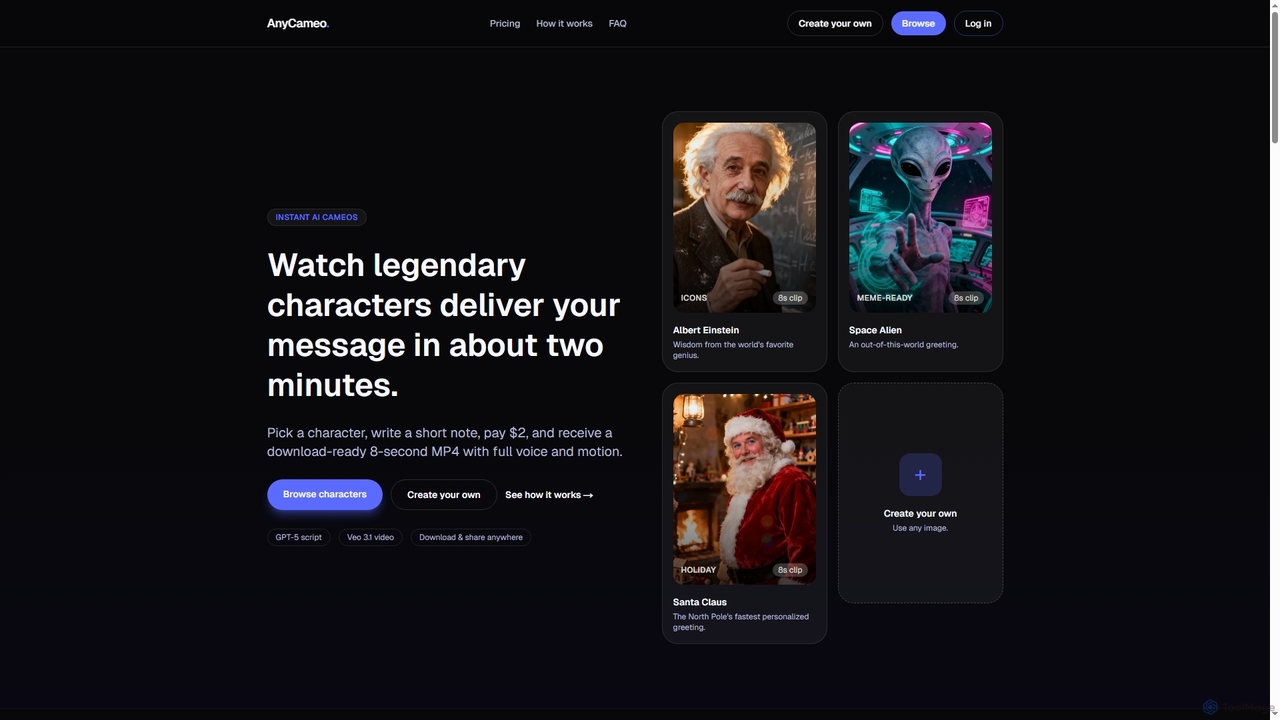
AnyCameo offers instant, personalized AI-generated video messages from legendary characters or custom uploaded images. In about two minutes, users can create an 8-second MP4 clip with synchronized voice and motion, perfect for sharing on social media or personal greetings, all for a flat fee of $2.

Character Animation
Visits 6.3KFavorites 133Likes 141

About Character Animation

Character Animation tools are AI-powered software designed to automate and simplify the process of bringing digital characters to life. These tools leverage advanced AI algorithms to generate realistic or stylized movements, expressions, and interactions for virtual characters. They significantly reduce the manual effort and time traditionally required for animation, enabling creators to produce high-quality character performances faster and at scale across various media.

Core Features

  • Automated Motion Generation: Creates fluid character movements from text descriptions, audio input, or simple commands.
  • Facial Expression & Lip-Sync: Synthesizes dynamic facial expressions and accurate lip-syncing for dialogue.
  • Motion Retargeting: Adapts existing motion capture data or animation clips to different character rigs and models.
  • Pose-to-Animation: Converts static character poses into smooth, continuous animation sequences.
  • Style Transfer: Applies various animation styles (e.g., realistic, cartoon, anime) to character movements.

Applicable Scenarios

These tools are invaluable for game developers needing to animate numerous NPCs, marketing teams creating engaging animated advertisements, and content creators producing explainer videos or social media content. They also assist filmmakers in pre-visualization and educators in developing interactive learning materials with dynamic characters.

How to Choose

When selecting an AI character animation tool, consider the desired animation fidelity and style, the flexibility of input methods (text, audio, video), and compatibility with your existing 3D software (e.g., Blender, Unity, Unreal). Evaluate the level of customization offered, the ease of use for your team's skill level, and the overall cost and licensing terms for commercial use.

Character Animation use cases

1

Game Development for NPCs

Game designers utilize AI character animation tools to rapidly generate diverse movement sets (walking, running, idling, reacting) for non-player characters (NPCs). This automates a time-consuming process, allowing for richer game worlds with more dynamic background characters without extensive manual keyframing, significantly accelerating development cycles and reducing production costs.

2

Marketing & Advertising Campaigns

Marketing teams leverage these tools to create engaging animated mascots or spokescharacters for digital ads, social media content, and brand videos. By inputting scripts or audio, AI generates lip-synced dialogue and expressive body language, producing captivating visuals that enhance brand storytelling and audience engagement without needing a full animation studio, making campaigns more cost-effective.

3

Educational Content & Explainer Videos

Educators and content creators utilize AI character animation to bring complex concepts to life through animated presenters or scenarios. This helps in creating more interactive and memorable learning experiences, such as animating a historical figure giving a speech or illustrating scientific processes with dynamic characters, making educational material more accessible and engaging for students of all ages.

4

Virtual Influencers & Digital Avatars

Brands and individuals employ character animation AI to animate virtual influencers or personal digital avatars for social media, live streams, and virtual events. The AI can generate natural movements and expressions based on voice input or pre-defined scripts, enabling consistent and scalable content creation for digital personas, fostering deeper audience connection and expanding digital presence.

5

Pre-visualization for Film & TV Production

Film directors and animators use these tools for rapid pre-visualization (pre-vis) of scenes, allowing them to block out character movements and camera angles quickly. By generating rough animations from simple descriptions, they can iterate on creative ideas, test different staging options, and refine storytelling before committing to full-scale production, saving significant time and resources in the early stages of filmmaking.

6

Interactive Training Simulations

Companies develop interactive training modules where AI-animated characters act as virtual instructors or simulated clients. These tools generate realistic character responses and actions within the simulation, providing immersive and consistent training experiences for employees in fields like customer service, healthcare, or technical operations, improving skill development and retention more effectively than traditional methods.

Character Animation FAQ

What are AI Character Animation tools?

AI Character Animation tools are software applications that use artificial intelligence to automate and assist in creating movements, expressions, and behaviors for digital characters. They can generate animations from text, audio, or simple commands, apply motion to different character rigs, and synthesize realistic facial expressions. The primary purpose is to significantly reduce the manual effort and time traditionally required for character animation, making it accessible to a wider range of creators and accelerating production workflows.

How do AI Character Animation tools differ from traditional animation software?

Traditional animation software relies heavily on manual keyframing, rigging, and artistic skill, requiring significant time and expertise for each movement. AI Character Animation tools, conversely, automate much of this process. Users provide high-level instructions (e.g., "character walks," "expresses joy"), and the AI generates the detailed animation. The key difference lies in efficiency and scalability: AI tools enable faster iteration and production, while traditional software offers granular control for highly customized, unique animations.

What types of input can AI Character Animation tools use?

AI Character Animation tools are versatile and can utilize various forms of input to generate animations. Common input types include text descriptions, where users describe desired actions or emotions (e.g., "sad walk," "excited jump"). Audio files are used for lip-syncing and emotional expressions based on speech. Some tools can analyze human motion from video references and transfer it to a digital character. Additionally, they can process and refine raw motion capture data or convert a series of static poses into fluid animation sequences.

Who can benefit most from using AI Character Animation tools?

A wide range of professionals can benefit significantly from AI Character Animation tools. Game developers can rapidly animate NPCs and prototype character movements. Content creators and marketers can produce engaging animated videos and virtual spokespersons without extensive animation skills. Filmmakers and animators find them useful for pre-visualization and quickly iterating on scene blocking. Educators can create dynamic and interactive learning materials with animated presenters. Essentially, anyone looking to bring digital characters to life efficiently and at scale, especially those with limited traditional animation expertise, will find these tools invaluable.

What should I consider when choosing an AI Character Animation tool?

When selecting an AI Character Animation tool, several factors are crucial. First, evaluate the animation quality, including realism, fluidity, and expressiveness, to ensure it meets your project's aesthetic needs. Second, check input and output compatibility; ensure it supports your preferred input methods (text, audio, video) and integrates with your existing 3D software (e.g., Blender, Unity, Unreal) and export formats. Third, assess customization options for fine-tuning generated animations. Fourth, consider the ease of use and learning curve for your team. Finally, understand the pricing structure, subscription models, and licensing terms for commercial use to align with your budget and project requirements.