ToolMage
Sign in

Best 1 Style Transfer AI tools for Artistic Styles

Popular Style Transfer AI tools in Artistic Styles include Pixgen, helping you work more efficiently.

Pixgen
Free

Pixgen

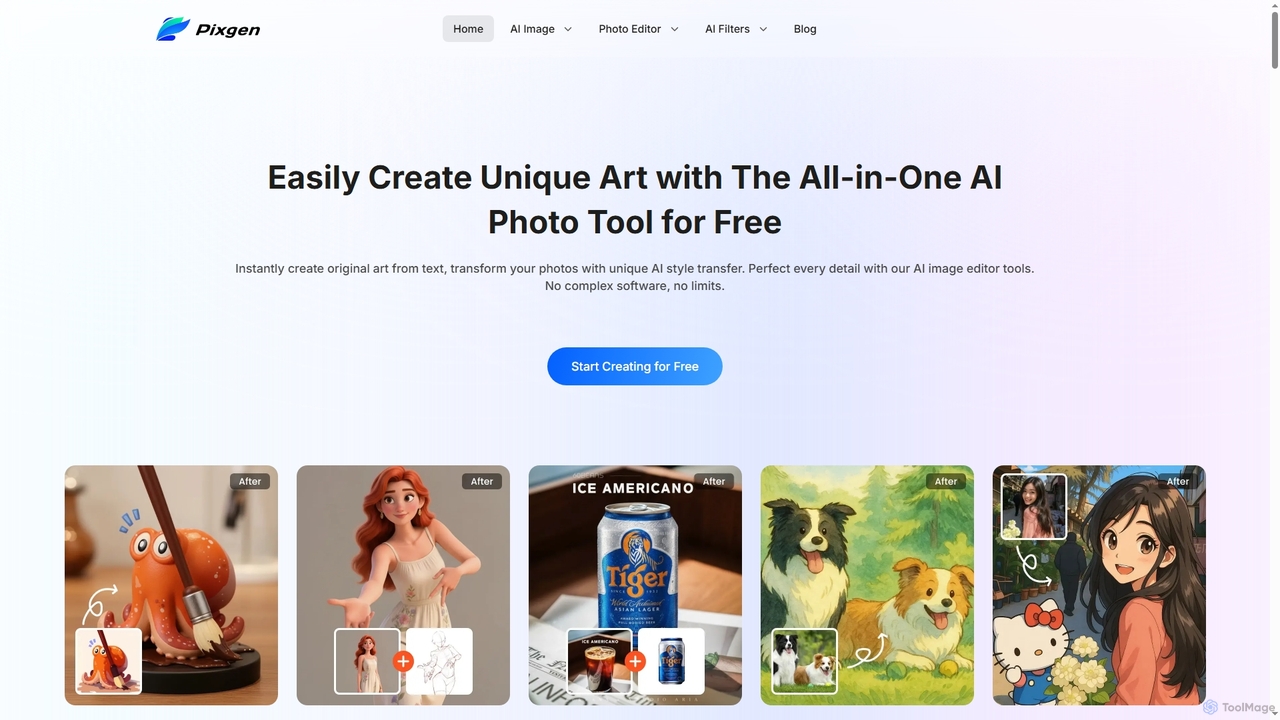
Pixgen is a free, all-in-one AI-powered online platform for creating, editing, and stylizing images. It allows users to generate unique art from text prompts, transform photos with AI style transfers, and perfect details using advanced editing tools like background removal, object erasure, and image enhancement. Designed for ease of use, Pixgen offers a seamless creative workflow without watermarks or hidden costs.

Style Transfer
Visits 12KFavorites 150Likes 142

About Style Transfer

Style Transfer tools are AI-powered applications that apply the artistic style of one image to the content of another, creating unique visual compositions. These tools leverage deep learning models, often convolutional neural networks, to separate and recombine content and style features from different sources. They enable users to transform ordinary photographs into artworks resembling famous paintings or specific artistic movements, offering a powerful avenue for creative expression. As a specialized sub-category within Artistic Styles, Style Transfer focuses on this unique fusion, allowing for innovative visual storytelling and design.

Core Features

  • Neural Style Application: Applying complex artistic styles from a source image to a target image.
  • Content Preservation: Maintaining the structural integrity and recognizable elements of the original content image.
  • Style Intensity Control: Adjusting the strength and prominence of the transferred style for desired artistic effect.
  • Color Preservation Options: Retaining the original color palette of the content image while applying the style's textures.
  • High-Resolution Output: Generating stylized images with sufficient detail and quality for various applications.

Applicable Scenarios

Digital artists use these tools to experiment with new aesthetics, transforming photos into painterly masterpieces without manual brushwork. Content creators enhance their visual assets for social media or blogs by applying distinctive artistic filters. Marketing professionals leverage style transfer to create eye-catching ad creatives that stand out with unique visual flair, quickly generating multiple stylized versions for campaigns.

How to Choose

When selecting a Style Transfer tool, consider the diversity and quality of its style library, ensuring it offers the artistic aesthetics you need. Evaluate the level of customization available, such as control over style intensity, color preservation, and resolution. Check the processing speed and the maximum output resolution supported, especially for professional use. Finally, assess the pricing model and ease of integration with your existing creative workflow.

Style Transfer use cases

1

Transform Photos into Digital Artworks

Digital artists and hobbyists can use style transfer tools to convert their photographs into unique digital paintings or sketches. By selecting a style from a famous artist or art movement, they can apply it to their photos, instantly generating a new piece of art. This process saves hours of manual work, allowing for rapid experimentation with different artistic interpretations and expanding their creative portfolio with diverse styles.

2

Enhance Social Media Visuals

Social media managers and content creators can leverage style transfer to make their posts more engaging and visually distinctive. By applying unique artistic styles to product images, event photos, or personal branding visuals, they can create a consistent and eye-catching aesthetic. This helps increase audience engagement, brand recognition, and stand out in crowded feeds, all while maintaining the original message of the content.

3

Create Personalized Gifts and Merchandise

Individuals and small businesses can use style transfer to create highly personalized gifts and merchandise. Imagine transforming a family photo into a Van Gogh-esque painting for a unique canvas print, or applying a comic book style to a pet's picture for a custom T-shirt. This application allows for mass customization of visual products, adding a distinctive artistic touch that makes items more special and appealing to customers seeking bespoke creations.

4

Game Development and Asset Styling

Game developers can utilize style transfer to maintain a consistent artistic theme across various game assets, characters, and environments. Instead of manually re-texturing or drawing every element, they can apply a chosen art style (e.g., pixel art, watercolor, oil painting) to 3D models or 2D sprites. This significantly accelerates the asset creation pipeline, ensures visual coherence, and allows for rapid prototyping of different aesthetic directions for a game.

5

Architectural and Interior Design Visualization

Architects and interior designers can use style transfer to present their concepts in various artistic renderings. By applying different painting styles to 3D architectural visualizations or interior mock-ups, they can quickly generate diverse aesthetic options for clients. This helps clients visualize the final look and feel of a project in a more engaging and artistic manner, facilitating decision-making and enhancing presentation quality without extensive manual rendering.

6

Marketing and Advertising Campaign Creatives

Marketing teams can utilize style transfer to generate unique and attention-grabbing visuals for advertising campaigns. By transforming standard product photos or promotional images into various artistic styles, they can create diverse ad creatives that resonate with different target audiences or campaign themes. This allows for rapid iteration of visual concepts, A/B testing of different aesthetics, and ultimately, more impactful and memorable marketing materials without extensive graphic design resources.

Style Transfer FAQ

What are AI Style Transfer tools?

AI Style Transfer tools are applications that use artificial intelligence, specifically deep learning, to apply the artistic style of one image (the style image) to the content of another image (the content image). The core idea is to separate the content and style representations of images and then combine the content of one with the style of another. This results in a new image that retains the objects and structure of the content image but is rendered in the aesthetic characteristics of the style image.

How does AI Style Transfer work technically?

AI Style Transfer typically works using convolutional neural networks (CNNs). The process involves feeding a content image and a style image into a pre-trained CNN. The network extracts high-level content features from the content image and captures the texture, color, and artistic patterns (style features) from the style image. An optimization algorithm then iteratively adjusts a new generated image to minimize the 'content loss' (how much it deviates from the content image's features) and the 'style loss' (how much it deviates from the style image's features), effectively blending them.

What's the difference between Style Transfer and a regular photo filter?

The key difference lies in their underlying technology and complexity. Regular photo filters apply predefined adjustments like color overlays, contrast changes, or simple textures uniformly across an image. Style Transfer, however, uses advanced AI to learn and extract complex artistic patterns, brushstrokes, and textures from a style image, then intelligently applies these learned characteristics to the content image while preserving its structure. This results in a much more sophisticated and integrated artistic transformation than a simple filter.

Who can benefit most from using Style Transfer tools?

A wide range of users can benefit from Style Transfer tools. Digital artists and illustrators can quickly experiment with new styles. Content creators and social media influencers can enhance their visuals for more engaging posts. Marketing and advertising professionals can generate diverse ad creatives. Game developers can maintain consistent art styles across assets. Even hobbyists and individuals looking to create personalized gifts or unique profile pictures can find immense value in these tools for their creative flexibility and efficiency.

What should I consider when choosing a Style Transfer tool?

When selecting a Style Transfer tool, consider several factors. First, evaluate the variety and quality of its style library, ensuring it aligns with your artistic vision. Second, check the customization options, such as control over style intensity, color preservation, and output resolution. Third, assess the processing speed and the maximum resolution it supports, which is crucial for professional use. Finally, consider the pricing model (free, subscription, or pay-per-use) and its ease of integration with your existing creative software or workflow.