
ToolMage
Sign in

Best 1 Authentication AI tools

Popular Authentication AI tools include Starbase, helping you work more efficiently.

Starbase

Starbase

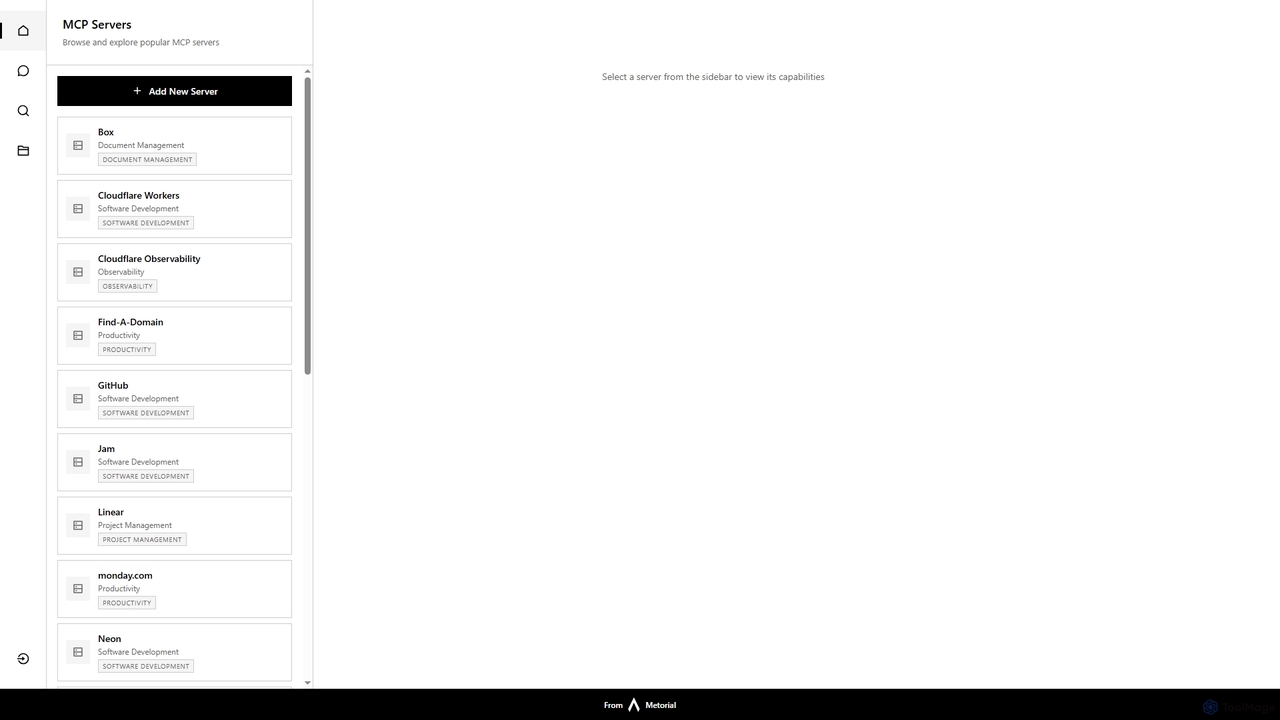
Starbase by Metorial is a comprehensive platform designed to centralize the browsing, exploration, and management of various popular software services. It integrates a wide array of tools across software development, project management, productivity, and infrastructure, offering a unified dashboard to view and interact with their capabilities.

Security
Visits 6.5KFavorites 144Likes 147

About Authentication

Authentication tools are AI-powered systems designed to verify a user's identity with high accuracy and security. These tools go beyond traditional passwords by leveraging machine learning to analyze unique biological and behavioral patterns, such as facial features, voiceprints, or typing cadence. They provide a more robust defense against fraud and unauthorized access while often creating a smoother, frictionless experience for legitimate users. This technology is critical for securing digital transactions, protecting sensitive data, and building trust in online platforms.

Core Features

  • Biometric Verification: Uses unique physical traits like face, fingerprint, or voice for identification.
  • Behavioral Biometrics: Analyzes patterns in user actions, such as typing rhythm, mouse movements, and device handling.
  • Liveness Detection: Distinguishes between a live person and a spoof attempt using photos, videos, or masks.
  • Risk-Based Authentication: Dynamically adjusts verification requirements based on contextual data like location, device, and time.
  • Continuous Authentication: Passively monitors user behavior throughout a session to detect anomalies and potential takeovers.

Use Cases

These tools are widely adopted in sectors handling sensitive information. Financial institutions use them to secure mobile banking and prevent transaction fraud. E-commerce platforms deploy them to stop account takeovers. Healthcare organizations rely on them to protect patient records in compliance with regulations like HIPAA.

How to Choose

When selecting an Authentication tool, evaluate its accuracy, specifically the False Acceptance Rate (FAR) and False Rejection Rate (FRR). Consider its integration capabilities via APIs and SDKs, and ensure it scales to your user base. The user experience is also crucial; the process should be intuitive and fast. Finally, verify compliance with relevant data privacy regulations like GDPR or CCPA.

Authentication use cases

1

Secure Mobile Banking Access

A financial services app integrates AI facial recognition for login. When a user opens the app, it activates the camera and compares their face to the enrolled template. The system includes liveness detection, requiring a slight head movement to ensure it's a live person, not a photo. This eliminates the need for complex passwords on mobile devices, reducing login friction while significantly increasing security against unauthorized access to financial accounts.

2

Prevent E-commerce Account Takeover

An online retailer uses behavioral biometrics to protect customer accounts. The system silently analyzes a user's typing speed, mouse movements, and navigation patterns during a session. If a logged-in user's behavior suddenly deviates from their established profile—for example, by copy-pasting shipping information unusually fast—the system flags the session as high-risk and can trigger a step-up authentication, like a push notification, before allowing a purchase.

3

Streamline Call Center Identity Verification

A telecommunications company uses AI voice biometrics in its customer support call center. When a customer calls, the system compares their voice to their pre-enrolled voiceprint in the first few seconds of conversation. This passive verification confirms the caller's identity without them needing to answer multiple security questions. This reduces average call handling time by over 30 seconds and prevents social engineering attacks aimed at tricking agents.

4

Secure Access to Corporate Resources

A large enterprise implements risk-based authentication for its employee VPN. When an employee tries to log in from a new device or an unfamiliar network, the AI engine assesses the risk level. Based on this risk score, it may grant immediate access, or it might require an additional verification factor, such as a fingerprint scan on their company laptop. This adaptive approach maintains security without inconveniencing employees during routine access.

5

Ensure Integrity in Online Education

A university uses continuous authentication for remote exam proctoring. At the start of an exam, the student verifies their identity with a face scan. Throughout the exam, the system periodically and unobtrusively captures webcam images and analyzes typing patterns. If a different face is detected or if the typing rhythm changes drastically, it alerts the proctor to a potential academic integrity violation, ensuring the registered student is the one completing the test.

6

Protect Sensitive Healthcare Data (HIPAA)

A hospital system uses AI authentication to secure access to Electronic Health Records (EHR). When a doctor logs into a workstation, they use a combination of a password and fingerprint scan. The system also employs continuous authentication by monitoring their interaction with the EHR software. If the usage pattern becomes anomalous, suggesting an unauthorized user has taken over the session, it automatically locks the workstation and requires re-authentication, helping maintain HIPAA compliance.

Authentication FAQ

What are AI Authentication tools?

AI Authentication tools are advanced security systems that use artificial intelligence and machine learning to verify a person's identity. Unlike traditional methods that rely solely on what you know (passwords) or what you have (tokens), these tools focus on what you are (biometrics like face, voice) and how you act (behavioral patterns like typing speed). This multi-layered approach provides significantly stronger protection against identity theft and fraud.

How do I choose the right AI Authentication tool?

To choose the right tool, consider four key factors. First, evaluate its accuracy and security, looking at metrics like False Acceptance Rate (FAR) and liveness detection capabilities. Second, assess its ease of integration with your existing applications via APIs or SDKs. Third, analyze the user experience—it should be fast and frictionless for legitimate users. Finally, ensure the tool complies with industry-specific and regional data privacy regulations like GDPR, HIPAA, or CCPA.

What's the difference between AI Authentication and traditional MFA?

Traditional Multi-Factor Authentication (MFA) typically combines static factors, like a password and a one-time code from an app. AI Authentication is more dynamic and intelligent. It can act as an MFA factor (e.g., a face scan) but its core strength is risk-based adaptation. It continuously analyzes dozens of signals (device, location, behavior) to assess risk in real-time and can decide whether to ask for more verification, making security invisible when risk is low and robust when risk is high.

What are the main features of AI Authentication systems?

Key features include:

  • Biometric Verification: Using face, voice, fingerprint, or iris scans for identification.
  • Behavioral Biometrics: Analyzing unique user behaviors like typing rhythm and mouse movements.
  • Liveness Detection: Preventing spoofing by ensuring the biometric source is a live person.
  • Adaptive Authentication: Adjusting security challenges based on real-time risk assessment of the user's context.
  • Fraud Detection: Identifying and flagging anomalous activities that suggest an account takeover attempt.
Who should use AI Authentication tools?

Any organization that handles sensitive user data or high-value transactions can benefit from AI Authentication. This includes financial institutions (banks, fintech), e-commerce platforms, healthcare providers, government agencies, and large enterprises. They are particularly useful for applications that require strong security without compromising the user experience, such as mobile banking, online shopping checkouts, and remote access to corporate networks.