ToolMage
Sign in

Best 1 Debugging AI tools for Code Assistant

Popular Debugging AI tools in Code Assistant include Third, helping you work more efficiently.

Third
Free

Third

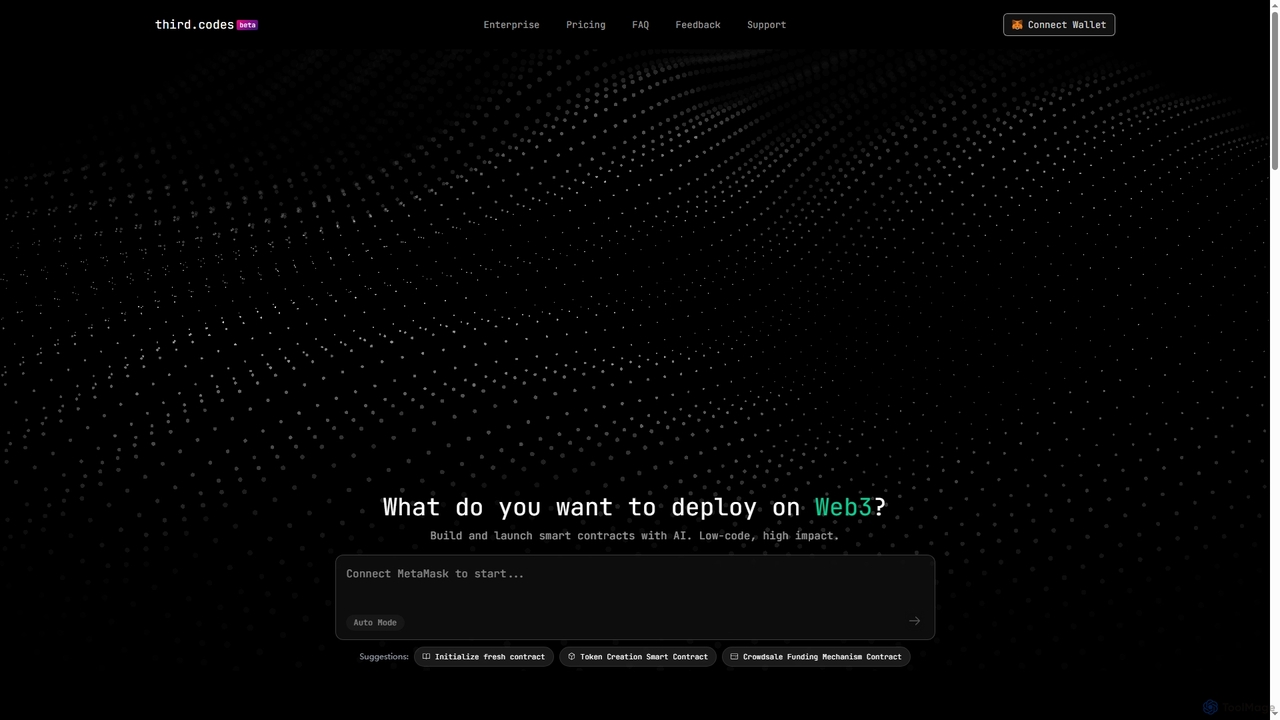
Third is an AI-powered platform for instantly generating, debugging, and deploying Solidity smart contracts across all EVM-compatible blockchains. It simplifies Web3 development, allowing users to create complex contracts like ERC20 tokens, NFTs, DAOs, and DEXs from simple prompts, with one-click deployment.

Web3 Development
Visits 3.3KFavorites 137Likes 128

About Debugging

Debugging tools are AI-powered solutions designed to automatically identify, analyze, and help resolve errors in software code. Leveraging machine learning and advanced pattern recognition, these tools go beyond traditional debuggers by proactively pinpointing potential issues, suggesting root causes, and even proposing code fixes. They significantly streamline the error detection process, reducing development time, improving code quality, and enabling developers to focus on more complex problem-solving rather than tedious manual debugging.

Core Features

  • Automated Error Detection: Proactively scans code for bugs, vulnerabilities, and performance issues.
  • Root Cause Analysis: Identifies the underlying reasons for errors, often across complex systems.
  • Intelligent Fix Suggestions: Recommends specific code changes or refactorings to resolve detected problems.
  • Performance Profiling: Analyzes code execution to identify bottlenecks and optimize resource usage.
  • Test Case Generation: Automatically creates unit tests or integration tests to reproduce and validate bug fixes.

Use Cases

AI debugging tools are invaluable for accelerating development cycles and enhancing software reliability. They are particularly useful in large, complex projects where manual debugging is time-consuming and error-prone, or in continuous integration/continuous deployment (CI/CD) pipelines for early error detection. Developers can leverage these tools to quickly understand unfamiliar codebases, identify subtle runtime errors, and maintain high code quality standards across teams.

How to Choose

When selecting an AI debugging tool, consider its compatibility with your existing tech stack and IDEs, the accuracy and relevance of its error detection and fix suggestions, and its ability to perform root cause analysis across different layers of your application. Evaluate its real-time monitoring capabilities, the clarity of its reporting, and its pricing model. Also, assess the learning curve and the level of integration it offers with your development workflow to ensure a smooth adoption.

Featured tool rankings

Debugging use cases

1

Automated Bug Detection in CI/CD Pipelines

Software development teams integrate AI debugging tools into their CI/CD pipelines to automatically scan new code commits for bugs, security vulnerabilities, and performance regressions before deployment. This proactive approach catches issues early, preventing them from reaching production and significantly reducing the cost and effort of bug fixing. Developers receive instant feedback, allowing for rapid iteration and maintaining a high standard of code quality.

2

Accelerating Root Cause Analysis for Production Incidents

When a critical error occurs in a live production environment, SREs and developers use AI debugging tools to quickly analyze logs, trace execution paths, and identify the precise root cause of the incident. These tools can sift through vast amounts of data, correlate events, and highlight anomalies that human analysis might miss, drastically cutting down the mean time to resolution (MTTR) and minimizing downtime.

3

Optimizing Performance Bottlenecks in Complex Applications

Performance engineers and developers utilize AI debugging tools to pinpoint exact code sections responsible for slow application response times or excessive resource consumption. The tools analyze runtime behavior, memory usage, and CPU cycles, providing actionable insights and suggesting optimizations. This helps in fine-tuning applications for better user experience and reduced infrastructure costs.

4

Assisting Developers with Unfamiliar Codebases

New team members or developers working on legacy systems often struggle to understand complex, undocumented code. AI debugging tools can analyze the codebase, identify potential issues, highlight dependencies, and even explain code sections, making it easier for developers to onboard, contribute effectively, and debug issues in unfamiliar parts of the application without extensive manual exploration.

5

Generating Targeted Unit Tests for Bug Reproduction

To ensure bug fixes are robust and don't introduce new regressions, developers use AI debugging tools to automatically generate specific unit tests that reproduce the identified bug. This ensures the fix addresses the problem effectively and provides a safety net for future code changes. It automates a tedious part of the testing process, improving test coverage and reliability.

6

Real-time Error Monitoring and Predictive Issue Detection

For critical applications, AI debugging tools provide real-time monitoring of application health and error rates. They can detect unusual patterns or spikes in errors, alert development teams instantly, and even predict potential failures based on historical data. This allows teams to intervene proactively, preventing minor issues from escalating into major outages and ensuring continuous service availability.

Debugging FAQ

What are AI Debugging tools?

AI Debugging tools are software solutions that use artificial intelligence, particularly machine learning and natural language processing, to automate and enhance the process of finding and fixing bugs in code. Unlike traditional debuggers that require manual stepping through code, AI tools can proactively identify errors, analyze their root causes, and often suggest intelligent solutions, significantly accelerating the development cycle.

How do AI Debugging tools differ from traditional debuggers?

Traditional debuggers primarily allow developers to step through code, inspect variables, and set breakpoints manually. AI Debugging tools, while sometimes integrating with traditional debugger functionalities, go further by automating error detection, performing predictive analysis, and offering intelligent suggestions for fixes. They leverage AI to understand code context, identify patterns of common errors, and even learn from past debugging efforts, providing a more proactive and efficient approach.

What are the key benefits of using AI-powered debugging?

The primary benefits include significantly reduced debugging time and effort, improved code quality through proactive error detection, and faster time-to-market for software products. AI debugging tools help developers by automating repetitive tasks, providing deeper insights into complex issues, and enabling them to focus on innovation rather than tedious bug hunting. They also enhance team collaboration by standardizing error reporting and resolution.

How do AI Debugging tools fit into the broader 'Code Assistant' category?

AI Debugging tools are a specialized sub-category within the broader 'Code Assistant' ecosystem. While 'Code Assistants' encompass a wide range of AI tools for code generation, refactoring, and documentation, AI Debugging specifically focuses on the critical task of error identification and resolution. They complement other code assistant functionalities by ensuring the generated or refactored code is robust and bug-free, forming an integral part of the complete software development lifecycle.

Can AI Debugging tools suggest actual code fixes?

Yes, many advanced AI Debugging tools are capable of suggesting actual code fixes. By analyzing the identified error, understanding the code's context, and drawing from vast datasets of code patterns and solutions, these tools can propose specific modifications or refactorings. Developers can then review, accept, or modify these suggestions, greatly speeding up the bug resolution process and improving consistency in coding practices.