ToolMage
Sign in

Best 1 Document Sharing AI tools for Collaboration Tools

Popular Document Sharing AI tools in Collaboration Tools include AI Doc Suite, helping you work more efficiently.

AI Doc Suite
Freemium

AI Doc Suite

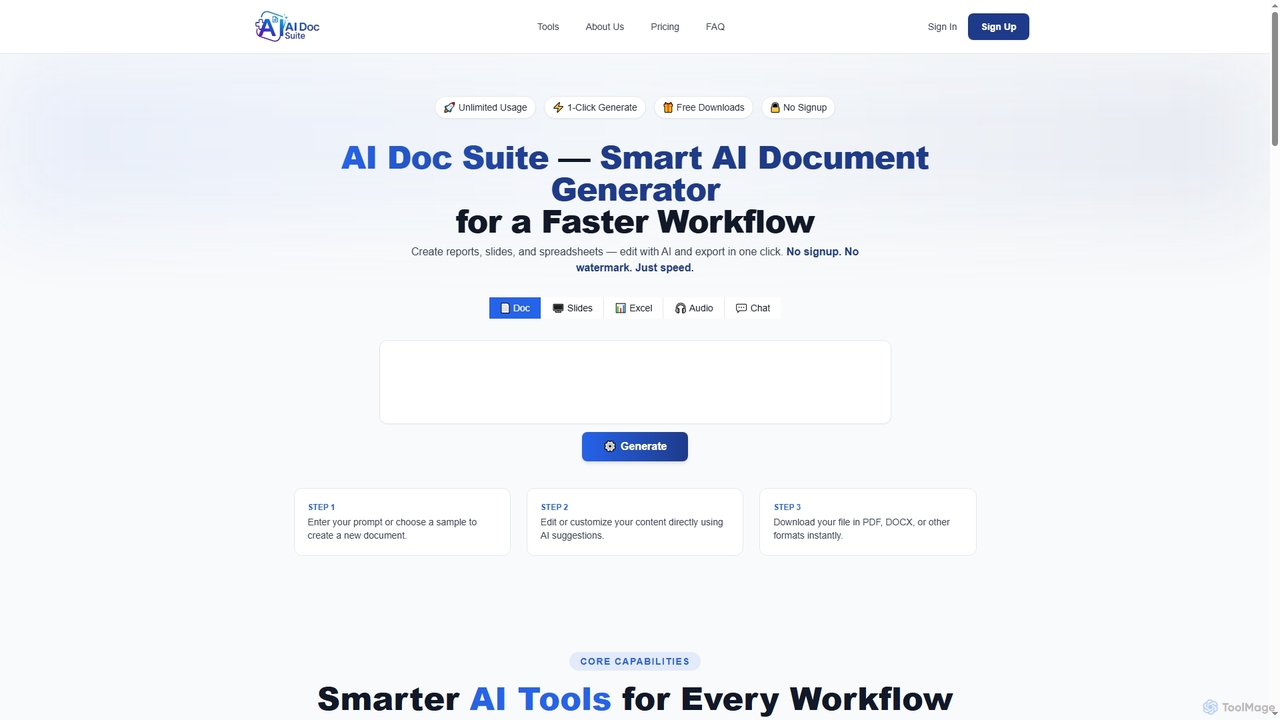
AI Doc Suite is an advanced, browser-based AI workspace for creating, editing, and converting professional documents, slides, spreadsheets, audio, images, and videos. It streamlines content generation with intelligent automation and customizable templates, offering a comprehensive solution for various creative and business needs.

Document Sharing
Visits 12.3KFavorites 94Likes 100

About Document Sharing

Document Sharing tools are AI-enhanced platforms designed to facilitate the secure and efficient distribution, access, and collaborative editing of digital documents among individuals and teams. These tools leverage advanced features like granular access controls, version history, and sometimes AI-driven content analysis to streamline workflows and improve teamwork. They are essential for modern organizations seeking to maintain data integrity, enhance productivity, and ensure seamless information flow within collaborative environments.

Core Features

  • Secure Access Control: Define precise permissions for viewing, editing, or downloading documents for different users or groups.
  • Version History & Recovery: Automatically track all changes, allowing users to revert to previous versions and prevent data loss.
  • Real-time Collaboration: Enable multiple users to view and edit documents simultaneously, often with live cursor tracking and instant updates.
  • Commenting & Feedback: Provide tools for adding comments, annotations, and facilitating discussions directly within documents.
  • Integration Capabilities: Seamlessly connect with other collaboration, project management, and productivity tools.

Applicable Scenarios

Document sharing tools are vital for project teams collaborating on reports, remote workers needing access to centralized company files, and businesses exchanging sensitive proposals with clients. They ensure everyone works from the latest version, reducing confusion and improving decision-making across various departments like marketing, HR, and legal.

How to Choose

When selecting a document sharing tool, consider its security features (encryption, access control), integration with existing software (e.g., Microsoft 365, Google Workspace), storage capacity and scalability, and ease of use for all team members. Evaluate pricing models and ensure it complies with industry-specific regulations if applicable.

Featured tool rankings

Document Sharing use cases

1

Streamlining Team Project Document Collaboration

Project teams use document sharing platforms to centralize all project-related files, from proposals and reports to design mockups. Members can co-edit documents in real-time, leave comments, and track changes, ensuring everyone works on the most current version. This significantly reduces email clutter and accelerates project delivery by fostering efficient teamwork, especially for geographically dispersed teams.

2

Securely Exchanging Documents with Clients

Businesses, such as legal firms, accounting offices, or marketing agencies, utilize document sharing tools to securely exchange sensitive contracts, financial statements, or campaign briefs with clients. Granular access controls ensure only authorized individuals can view or download specific files, enhancing data security and client trust while providing a professional, organized portal for communication.

3

Distributing HR Policies and Internal Documents

Human Resources departments leverage document sharing platforms to distribute company policies, employee handbooks, training materials, and onboarding documents. Features like read receipts and version control ensure employees access the latest information and acknowledge important updates. This centralizes vital internal communications, making information easily accessible and auditable for compliance.

4

Educational Resource Sharing

Educators and academic institutions use document sharing tools to distribute lecture notes, assignments, research papers, and study guides to students. Students can access materials anytime, anywhere, and collaborate on group projects. This facilitates a flexible learning environment, improves resource accessibility, and supports interactive learning experiences beyond the traditional classroom setting.

5

Facilitating Legal Document Review and Approval

Legal teams and corporate legal departments employ document sharing solutions for drafting, reviewing, and approving contracts, agreements, and compliance documents. Features like version comparison, annotation tools, and secure sharing ensure meticulous review processes, track all modifications, and maintain an audit trail. This minimizes errors and accelerates the legal review cycle while upholding confidentiality.

6

Managing Sales Proposals and Contracts Efficiently

Sales teams use document sharing platforms to create, customize, and share sales proposals, quotes, and contracts with prospective clients. Templates can be stored and easily adapted, and secure links ensure documents are delivered professionally. Tracking features can even show when a client has viewed a document, providing valuable insights for follow-up and accelerating the sales cycle.

Document Sharing FAQ

What are Document Sharing tools?

Document Sharing tools are digital platforms that enable users to upload, store, access, and distribute files securely over the internet. They are a subset of collaboration tools, focusing specifically on managing and sharing documents. These platforms typically offer features like access permissions, version control, and real-time collaboration to streamline information exchange and teamwork, ensuring everyone works with the most current and relevant data.

How do Document Sharing tools differ from general cloud storage?

While general cloud storage (like Dropbox or Google Drive) primarily focuses on storing and syncing files, dedicated Document Sharing tools offer more advanced collaboration and management features. They provide granular access controls, robust version history, integrated commenting and feedback loops, and often real-time co-editing capabilities. This makes them more suitable for active team collaboration and complex document workflows, rather than just simple file backup and access.

What are the key benefits of using Document Sharing platforms?

The primary benefits include enhanced collaboration, improved data security, and increased efficiency. They centralize documents, ensuring all team members access the latest versions, reducing confusion and errors. Secure access controls protect sensitive information, while features like version history prevent data loss. By streamlining document workflows, these platforms save time, reduce email attachments, and foster more productive teamwork, especially for remote or distributed teams.

What security features should I look for in a Document Sharing tool?

When evaluating security, prioritize tools offering end-to-end encryption for data in transit and at rest. Look for robust access controls, including role-based permissions and multi-factor authentication (MFA). Audit trails and activity logs are crucial for tracking who accessed what and when. Compliance certifications (e.g., GDPR, HIPAA, ISO 27001) are also important, especially for industries handling sensitive data, ensuring the platform meets stringent security standards.

Can Document Sharing tools integrate with other business applications?

Yes, most modern Document Sharing tools offer extensive integration capabilities. They commonly integrate with popular productivity suites like Microsoft 365 and Google Workspace, project management tools (e.g., Asana, Trello), communication platforms (e.g., Slack, Microsoft Teams), and CRM systems (e.g., Salesforce). These integrations create a seamless workflow, allowing users to share documents directly from other applications, attach files to tasks, or embed them in conversations, enhancing overall productivity and connectivity.