ToolMage
Sign in

Best 1 Feedback AI tools

Popular Feedback AI tools include Memepreneur, helping you work more efficiently.

Memepreneur

Memepreneur

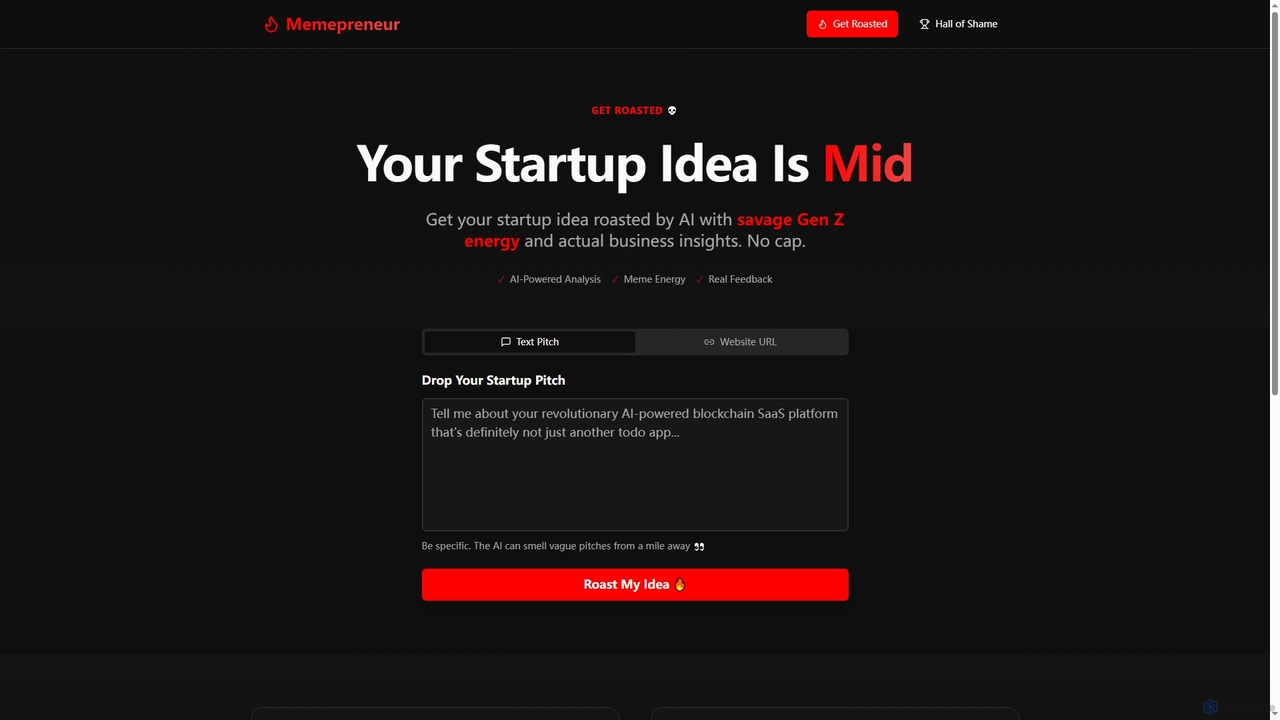
Memepreneur is an AI-powered tool designed for founders to get brutally honest, Gen Z-style feedback on their startup ideas. It combines savage humor with genuine business insights to help entrepreneurs refine their pitches and validate concepts.

Startup Tools
Visits 4KFavorites 110Likes 112

About Feedback

AI Feedback tools are a class of software that leverages artificial intelligence to automatically collect, analyze, and interpret customer and user feedback. They employ technologies like Natural Language Processing (NLP) and sentiment analysis to process large volumes of unstructured data from sources such as surveys, reviews, and support tickets. This enables product teams, marketers, and customer support to quickly identify trends, prioritize issues, and understand user sentiment without manual effort. By transforming qualitative comments into quantitative data, these tools provide actionable insights for product improvement and enhancing customer experience.

Core Features

  • Sentiment Analysis: Automatically determines the emotional tone (positive, negative, neutral) of feedback text.
  • Topic & Keyword Extraction: Identifies and categorizes recurring themes, topics, and keywords mentioned by users.
  • Feedback Aggregation: Gathers feedback from multiple channels like email, social media, and app stores into a single dashboard.
  • Trend Identification: Tracks changes in feedback volume and sentiment over time to spot emerging issues or positive trends.
  • Automated Tagging & Routing: Automatically categorizes feedback and routes it to the relevant teams, such as bug reports to engineering.

Use Cases

These tools are widely used by product management teams to prioritize feature roadmaps based on quantified user requests. Customer support teams utilize them to identify widespread issues and improve service quality by analyzing support conversations. Marketing teams also leverage them to monitor brand perception and analyze campaign feedback across social media and review sites.

How to Choose

When selecting an AI Feedback tool, first consider its data source integration capabilities; ensure it connects to your key channels like Zendesk, App Store, or Twitter. Evaluate the analytical depth, including the accuracy of its sentiment analysis and topic modeling. Also, assess its workflow integration with tools like Jira or Slack for actionability, and confirm it supports the languages and volume of feedback your business handles.

Featured tool rankings

Feedback use cases

1

Prioritizing Product Feature Roadmaps

A product manager is often faced with hundreds of feature requests from various channels like support tickets, surveys, and community forums. Using an AI feedback tool, they can aggregate all this unstructured data into one place. The AI automatically analyzes and categorizes each piece of feedback by theme, such as 'UI improvement' or 'integration request'. It also quantifies the frequency and sentiment for each theme, providing a clear, data-driven view of what users want most. This transforms a chaotic backlog into an organized, prioritized roadmap, ensuring development efforts are focused on features with the highest user impact.

2

Identifying Root Causes of Customer Churn

A customer success manager notices an increase in subscription cancellations but lacks clear insights into the reasons. By feeding exit survey responses, support chat logs, and negative reviews into an AI feedback tool, they can move beyond anecdotal evidence. The AI processes the text to identify recurring complaints and negative sentiment clusters. It might reveal that a significant number of churning customers mention 'slow performance' or 'confusing navigation'. This allows the team to pinpoint specific product areas causing friction and churn, enabling the engineering and UX teams to address the core issues directly and reduce customer attrition.

3

Monitoring Brand Sentiment After a Launch

Following a new product launch or a major campaign, a marketing manager needs to gauge public reception in real-time. An AI feedback tool can be configured to monitor social media mentions, news articles, and review sites for the brand or product name. The tool's dashboard provides a live feed of sentiment trends, showing whether the overall perception is positive, negative, or neutral. It also extracts key topics of discussion, highlighting what features people love or what aspects of the campaign are resonating most. This allows the marketing team to quickly address negative feedback, amplify positive comments, and adjust their messaging strategy on the fly.

4

Improving Customer Support Agent Performance

A head of customer support wants to ensure consistent service quality across a large team. Manually reviewing thousands of support tickets is impractical. An AI feedback tool can analyze all ticket transcripts and survey responses. It identifies conversations with low customer satisfaction scores and flags common issues or agent knowledge gaps. For instance, the AI might detect that multiple negative reviews mention slow response times from a specific agent group or confusion around a certain policy. This provides actionable data for creating targeted training programs, updating internal knowledge bases, and improving support processes to enhance overall customer satisfaction.

5

Validating User Experience (UX) Design Changes

A UX designer releases a redesigned workflow in an application and needs to validate its effectiveness. Instead of relying solely on quantitative metrics like click-through rates, they can use an AI feedback tool to analyze qualitative in-app feedback and user comments. The tool processes comments related to the new design, automatically tagging them with themes like 'confusing', 'easier to use', or 'missing feature'. This provides rapid, scalable qualitative validation, helping the designer understand the 'why' behind user behavior. It can quickly surface specific friction points, such as a mislabeled button or an unintuitive step, enabling faster design iterations based on direct user voice.

6

Analyzing Employee Engagement Survey Results

An HR manager conducts an annual employee engagement survey that yields thousands of open-ended text comments. Manually reading and categorizing this feedback is a monumental task. By using an AI feedback tool, the HR department can process all anonymous comments efficiently. The AI automatically groups the feedback into key themes like 'work-life balance', 'management effectiveness', 'compensation', and 'career growth opportunities', along with the associated sentiment for each. This provides a clear, high-level overview of the main drivers of employee satisfaction and dissatisfaction, enabling HR to develop targeted initiatives that address the most critical areas and improve company culture.

Feedback FAQ

What are AI Feedback tools?

AI Feedback tools are software applications that use artificial intelligence, particularly Natural Language Processing (NLP), to automatically analyze unstructured text data from customers or users. Instead of manual analysis, they process feedback from sources like surveys, app store reviews, support tickets, and social media to identify key themes, track sentiment, and spot trends. The primary goal is to transform large volumes of qualitative feedback into structured, actionable insights that help businesses improve their products, services, and customer experience.

How to choose the right AI Feedback tool?

Choosing the right tool depends on your specific needs. Consider these key factors:

  • Integrations: Does the tool connect seamlessly with the platforms where you collect feedback (e.g., Zendesk, Salesforce, Twitter, app stores)?
  • Analytical Capabilities: Evaluate the accuracy and depth of its NLP, sentiment analysis, and topic modeling. Can it understand industry-specific jargon or multiple languages?
  • Actionability: How easy is it to share insights and integrate them into your workflow? Look for integrations with project management tools like Jira or communication platforms like Slack.
  • Scalability and Pricing: Ensure the tool can handle your current and future volume of feedback and that its pricing model aligns with your budget and usage.
What's the difference between AI Feedback tools and traditional survey tools?

The main difference lies in their core function. Traditional survey tools (like Google Forms or SurveyMonkey) are designed primarily for collecting structured data, such as ratings and multiple-choice answers. AI Feedback tools, on the other hand, are designed for analyzing unstructured, open-ended text data from any source, not just surveys. While survey tools tell you 'what' users think (e.g., a 3-star rating), AI feedback tools help you understand the 'why' behind that rating by analyzing the accompanying text comments at scale.

Who should use AI Feedback analysis tools?

AI Feedback analysis tools are valuable for any role that needs to understand the 'voice of the customer' at scale. Key users include:

  • Product Managers: To prioritize features, validate roadmaps, and understand user needs from feedback channels.
  • UX Researchers & Designers: To analyze qualitative feedback from usability tests and in-app surveys to identify pain points.
  • Customer Success & Support Teams: To identify trends in customer issues, improve support quality, and reduce ticket volume.
  • Marketing & Brand Managers: To monitor brand sentiment, analyze campaign feedback, and understand market perception.
How do AI Feedback tools work?

AI Feedback tools typically follow a four-step process:

  1. Aggregation: They connect to various data sources (like CRMs, social media, review sites) via APIs to pull all feedback into a centralized location.
  2. Processing: The raw text data is cleaned and prepared for analysis.
  3. Analysis: This is the core AI step. Natural Language Processing (NLP) models are used to perform tasks like sentiment analysis (determining if feedback is positive or negative), topic modeling (grouping feedback into themes), and keyword extraction.
  4. Visualization: The analyzed data is presented in user-friendly dashboards with charts and graphs, allowing users to easily spot trends, filter data, and drill down into specific feedback topics.