
ToolMage
Sign in

Best 1 Ai Assistant for Office & Productivity

Popular Ai Assistant in Office & Productivity include SeekMoreAI, helping you work more efficiently.

SeekMoreAI

SeekMoreAI

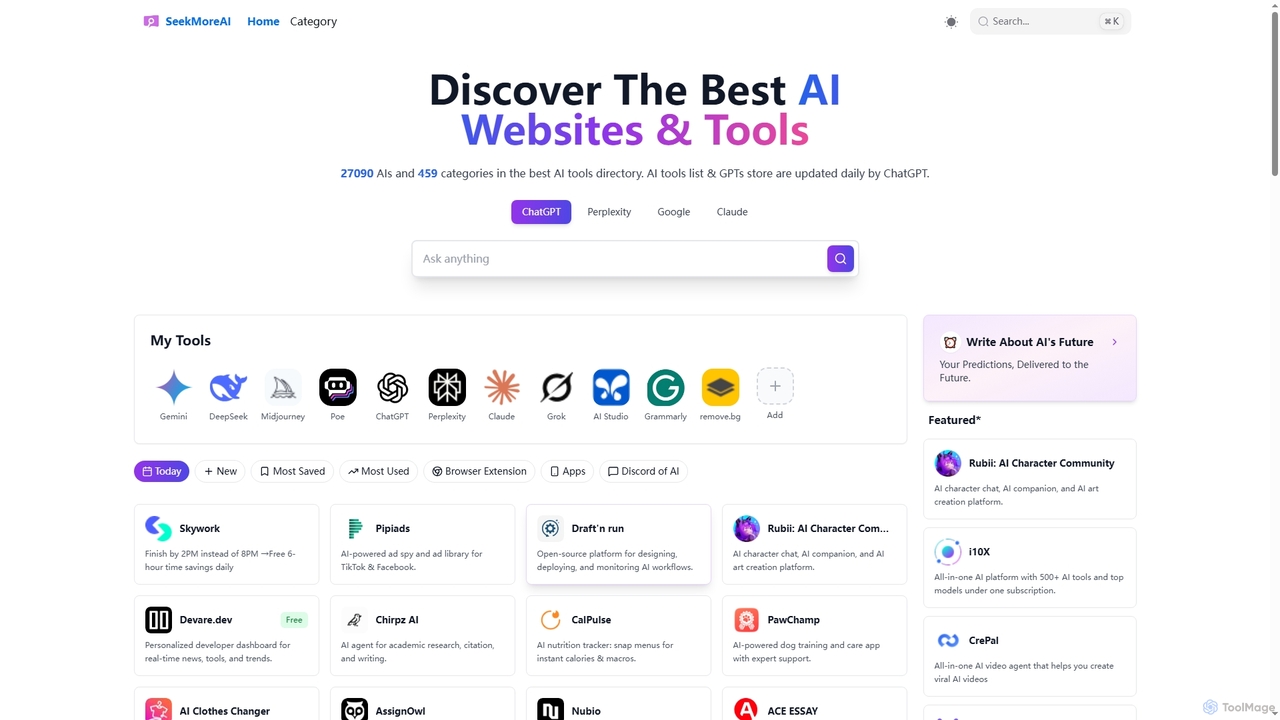
SeekMoreAI is a comprehensive online directory designed to help users discover and explore a vast collection of AI websites and tools. Featuring over 27,000 AI tools across 450+ categories, it's updated daily to ensure users find the most current and relevant AI solutions for various needs, from content creation to data analysis and business management.

Ai Assistant
Visits 5.6KFavorites 96Likes 93

About Ai Assistant

AI Assistants are intelligent software tools designed to automate tasks, provide information, and support decision-making through natural language interaction. Leveraging advanced artificial intelligence, these tools enhance personal and professional productivity by streamlining routine operations and offering instant access to relevant data. They serve as a digital co-pilot, freeing up valuable time for more strategic work within the broader Office & Productivity landscape.

Core Features

  • Natural Language Understanding: Interprets and responds to complex human language queries and commands.
  • Task Automation: Manages scheduling, sets reminders, handles data entry, and automates repetitive workflows.
  • Information Retrieval & Summarization: Quickly finds, processes, and summarizes vast amounts of data from various sources.
  • Content Generation: Assists in drafting emails, reports, social media posts, and other written content.
  • Personalization & Learning: Adapts to user preferences and learns from interactions to offer more relevant support over time.

Use Cases

AI Assistants are invaluable across diverse professional settings, from individual knowledge workers to large enterprises. They are commonly used by executives for managing complex schedules, by content creators for brainstorming and drafting, and by customer service teams for quick information lookup and response generation, significantly boosting operational efficiency.

How to Choose

When selecting an AI Assistant, consider its integration capabilities with your existing software ecosystem, the scope of tasks it can automate, and its data security protocols. Evaluate its customization options to ensure it aligns with your specific workflow needs and assess its natural language processing accuracy for seamless interaction.

Ai Assistant use cases

1

Automating Email & Communication Management

For busy professionals, an AI Assistant can significantly reduce time spent on email. It can draft replies based on context, summarize long email threads, prioritize urgent messages, and even schedule follow-ups. This allows users to maintain clear communication channels without getting bogged down by inbox overload, ensuring timely and relevant responses.

2

Streamlining Meeting Preparation & Summarization

Project managers and team leads can utilize AI Assistants to prepare for meetings by gathering relevant documents and participant information. During the meeting, the assistant can transcribe discussions, identify key action items, and after the meeting, generate concise summaries and distribute notes, ensuring everyone is aligned and follow-ups are tracked.

3

Personalized Research & Information Synthesis

Researchers, students, and analysts can leverage AI Assistants to conduct rapid information gathering across vast datasets. The assistant can identify key themes, summarize complex articles, extract specific data points, and even generate preliminary reports, accelerating the research process and providing comprehensive insights efficiently.

4

Enhancing Customer Service Agent Productivity

Customer service representatives can use AI Assistants as a real-time support tool. The assistant can quickly retrieve product information, suggest relevant FAQs, draft personalized responses to common queries, and even escalate complex issues, enabling agents to provide faster, more accurate, and consistent support to customers.

5

Accelerating Content Creation & Brainstorming

Content creators, marketers, and writers can employ AI Assistants to overcome creative blocks and expedite content generation. The assistant can brainstorm topic ideas, generate outlines for articles or presentations, draft initial versions of social media posts, or refine existing text for clarity and tone, significantly boosting creative output.

6

Assisting with Data Analysis & Report Generation

Business analysts and managers can use AI Assistants to simplify data interpretation. The assistant can process raw data, identify trends, generate visual summaries, and even draft sections of financial or operational reports. This helps in quickly extracting actionable insights and presenting complex information in an understandable format.

Ai Assistant FAQ

What is an AI Assistant?

An AI Assistant is an intelligent software program that uses artificial intelligence, particularly natural language processing (NLP), to understand and respond to human commands and queries. Its primary role is to automate routine tasks, provide quick access to information, and offer personalized support, thereby enhancing productivity and efficiency for individuals and organizations.

How does an AI Assistant differ from a traditional virtual assistant?

The key difference lies in their underlying technology. A traditional virtual assistant (often human or rule-based software) relies on pre-programmed responses or direct human input. An AI Assistant, however, uses advanced AI to learn from interactions, understand context, process natural language, and adapt its responses, offering more dynamic, intelligent, and personalized assistance beyond fixed scripts.

What are the key benefits of using an AI Assistant in the workplace?

Implementing an AI Assistant in the workplace offers numerous benefits, including significant time savings by automating repetitive tasks like scheduling and data entry. It boosts efficiency by providing instant access to information, reduces human error, and allows employees to focus on higher-value, strategic work, ultimately leading to increased productivity and better decision-making.

What should I consider when choosing an AI Assistant for my needs?

When selecting an AI Assistant, evaluate its core functionalities to ensure they align with your specific needs, such as task automation, information retrieval, or content generation. Consider its integration capabilities with your existing software ecosystem, its data security and privacy policies, and the level of customization it offers to adapt to your unique workflows and preferences.

Can AI Assistants handle sensitive information securely?

Many professional AI Assistants are designed with robust security measures to handle sensitive information. This typically includes end-to-end encryption, compliance with industry standards (like GDPR, HIPAA), and strict data governance policies. However, it's crucial to choose reputable providers, understand their data handling practices, and configure privacy settings carefully to ensure the security of your data.