URLcut
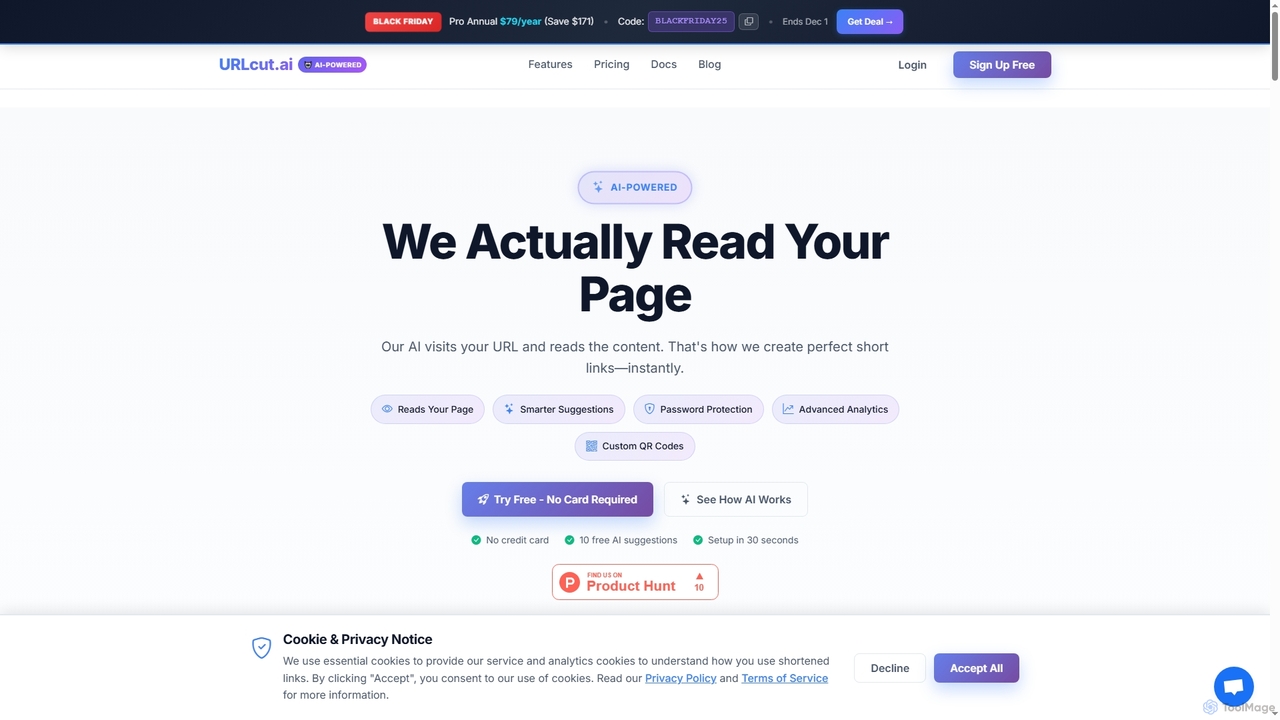
URLcut is an AI-powered URL shortener that intelligently analyzes your page content to generate smart, memorable, and SEO-friendly …
URLcut is an AI-powered URL shortener that intelligently analyzes your page content to generate smart, memorable, and SEO-friendly short links. It offers advanced analytics, custom QR codes, and robust link management features for marketing, social media, and content creators.
About Efficiency Tools
AI Efficiency Tools are a class of software designed to automate repetitive tasks, streamline workflows, and optimize individual or team productivity. These tools leverage AI, such as machine learning and natural language processing, to handle specific functions like intelligent scheduling, automated note-taking, and workflow integration. Their primary value lies in freeing up users' time from mundane administrative work, allowing them to focus on complex problem-solving and strategic initiatives. Unlike broader productivity suites, these tools often target and excel at solving specific, granular efficiency bottlenecks.
Core Features
- Intelligent Automation: Automatically performs tasks like sorting emails, scheduling meetings, or transcribing audio based on user behavior and context.
- Workflow Integration: Connects disparate applications and services to create seamless, automated sequences of actions without manual intervention.
- Predictive Assistance: Analyzes data and habits to anticipate needs, suggest actions, and provide proactive reminders or recommendations.
- Data Processing & Summarization: Quickly extracts key information from large documents, articles, or conversations and presents it in a concise summary.
Use Cases
These tools are widely used by professionals in roles with heavy administrative loads, such as project managers, executives, and sales representatives. They are also valuable for freelancers managing multiple clients and projects, as well as for academic researchers organizing vast amounts of information. For instance, a marketing team might use an efficiency tool to automate social media posting schedules, while a developer could use one to manage notifications and focus time.
How to Choose
When selecting an AI Efficiency Tool, first identify your most significant time-consuming task. Prioritize tools that integrate seamlessly with your existing software ecosystem (e.g., email client, calendar, project management app). Evaluate the tool's learning curve and ease of use—it should save time, not create a new burden. Finally, carefully review the data privacy policy to understand how your information is handled and secured.
Efficiency ToolsUse Cases
Automate Meeting Scheduling Across Time Zones
A global project manager coordinates with teams in different regions. Instead of manually comparing calendars and sending multiple emails, they use an AI scheduling assistant. The manager specifies attendees and meeting length, and the AI analyzes everyone's availability, proposes optimal slots in each person's local time, and automatically sends the invitation once a time is confirmed. This process saves hours of administrative work each week and eliminates scheduling errors.
Automate Meeting Follow-ups and Action Items
For project managers and team leads who spend hours after meetings transcribing notes and assigning tasks, AI efficiency tools offer a powerful solution. By connecting a tool to their meeting software (like Zoom or Google Meet), it can automatically record, transcribe, and summarize the entire conversation. Using natural language processing, the AI identifies key decisions, discussion points, and most importantly, action items with assigned owners and deadlines. The output is a concise summary and a structured task list that can be automatically synced to a project management tool like Asana or Trello, saving up to 90% of post-meeting administrative time.
Automating Customer Support Responses
A customer support agent deals with dozens of similar inquiries daily, such as password resets or shipping status questions. By using an AI efficiency tool with text expansion, they can type a short snippet like "/status" and have it automatically expand into a full, personalized response asking for the customer's order number. This reduces average response time by over 50% and ensures consistency in communication, allowing the agent to focus on more complex customer issues that require critical thinking.
Automate Meeting Summaries and Action Items
A project manager regularly leads hour-long meetings with multiple stakeholders. Instead of manually taking notes and spending another 30-60 minutes afterwards to summarize and distribute action items, they use an AI efficiency tool. The tool connects to their calendar, automatically joins the virtual meeting, records, and transcribes the entire conversation. Within minutes after the meeting ends, it generates a concise summary highlighting key decisions, open questions, and a clear list of action items assigned to specific individuals. This process reduces post-meeting administrative work by over 90% and ensures accurate, consistent follow-ups.
Automate Meeting Summaries and Action Items
For project managers and team leads, post-meeting administration can consume hours each week. An AI Efficiency Tool integrated with their calendar and video conferencing software can automatically join, record, and transcribe meetings. After the meeting, it generates a concise summary highlighting key decisions and creates a list of action items, assigning them to the correct team members in a project management tool like Asana or Jira. This process reduces administrative overhead by over 80%, ensures accountability, and allows leaders to immediately focus on the next strategic task.
Automate Meeting Summaries and Action Items
For project managers and team leads who spend hours in back-to-back meetings, AI efficiency tools can be transformative. An AI meeting assistant can join virtual calls, automatically transcribe the entire conversation in real-time, and identify different speakers. After the meeting, it generates a concise summary highlighting key decisions and discussions. More importantly, it intelligently extracts action items, assigns them to the correct individuals, and can even push these tasks to project management software like Jira or Asana. This process reduces manual note-taking by over 90% and ensures no critical task is forgotten.
Automate Meeting Workflows for Project Teams
A project manager for a distributed team often spends hours coordinating schedules, taking notes, and assigning action items. By using an AI Efficiency Tool, they can automate this entire workflow. The tool integrates with team calendars to find the optimal meeting time instantly. During the meeting, it records and transcribes the conversation in real-time. After the meeting, the AI automatically generates a concise summary, identifies key decisions, and creates a list of action items, even assigning them to the correct team members in their project management software. This reduces administrative overhead by over 80%, freeing the manager to focus on strategy and team guidance.
Automated Meeting Scheduling and Follow-up
A sales manager often spends hours each week coordinating meeting times with potential clients and internal teams. By using an AI scheduling assistant, they can simply share a link or have the AI manage email threads to find a mutually available time. The tool automatically sends calendar invites and reminders. After the meeting, an integrated AI transcriber can generate a summary and identify action items, which are then automatically added to their CRM or project management tool. This automation saves 3-5 hours per week and ensures no critical follow-up actions are missed.
Automate Meeting Summaries and Action Items
A project manager leading multiple teams often spends hours after back-to-back meetings manually transcribing notes and identifying key decisions. By using an AI efficiency tool that integrates with their video conferencing software, the entire meeting is automatically recorded, transcribed, and summarized. The AI identifies action items, assigns them to team members mentioned, and highlights key decisions. This process reduces post-meeting administrative work by over 80%, ensures accuracy, and allows the manager to immediately focus on strategic planning rather than documentation.
Automate Meeting Follow-up and Action Items
Project managers often spend hours after meetings transcribing notes and assigning tasks. An AI Efficiency Tool can automatically join a virtual meeting, generate a full transcript, and create a concise summary with key decisions. It then identifies action items and responsible individuals, automatically creating tasks in project management software like Asana or Jira. This process reduces post-meeting administrative work by over 80%, ensuring accountability and faster project execution.
Automating Customer Support Responses
A customer support agent for an e-commerce company often handles dozens of similar inquiries daily, such as 'Where is my order?' or 'What is your return policy?'. Using an AI Efficiency Tool with text expansion, the agent creates shortcodes like ';track' or ';return'. When typed, these instantly expand into complete, personalized responses. The AI can even pull placeholder data like the customer's name or order number from the CRM. This reduces response time from minutes to seconds, improves consistency, and allows the agent to handle a higher volume of tickets with less stress.
Automate Meeting Scheduling and Follow-ups
For project managers and team leads, coordinating schedules for meetings is a significant time drain. An AI Efficiency Tool can integrate with everyone's calendars (e.g., Google Calendar, Outlook) to find mutual availability instantly. The tool can then send out invitations, handle rescheduling, and send reminders automatically. After the meeting, it can use AI to transcribe the audio recording, generate a concise summary, and identify key action items and assign them to attendees. This automates the entire meeting lifecycle, saving hours of administrative work each week and ensuring no important tasks are missed.
Triage and Prioritize a High-Volume Inbox
A customer support manager receives hundreds of emails daily. An AI email management tool automatically categorizes incoming mail based on content and sender, flagging urgent requests, filtering newsletters, and archiving irrelevant messages. It can also draft standard replies to common queries, allowing the manager to focus only on critical communications that require a personal response. This reduces response times and improves overall team productivity.
Intelligent Email Triage and Response Drafting
Customer support agents and sales professionals often face hundreds of emails daily. An AI efficiency tool can integrate with their inbox (e.g., Gmail, Outlook) to automatically triage incoming messages. It categorizes emails based on urgency, sentiment, and content (e.g., sales inquiry, support ticket, spam). For common queries, the tool can draft context-aware replies based on historical data and knowledge bases, which the agent can then review and send. This workflow reduces response times, ensures important emails are never missed, and allows staff to focus on resolving complex issues rather than managing their inbox.
Streamlining Content Repurposing for Social Media
A social media manager needs to adapt a long-form blog post for multiple platforms. They use an AI efficiency tool to first generate a concise summary of the article. Then, they use its AI writing assistant to create several variations for different channels: a professional post for LinkedIn, a series of engaging tweets, and an image caption for Instagram. This automated workflow transforms a multi-hour task into a 15-minute process, enabling them to maintain a consistent and high-volume presence across all social channels.
Streamline Customer Support with AI-Drafted Replies
A customer support agent handles dozens of similar inquiries daily about product features, billing, and troubleshooting. Using an AI efficiency tool integrated with their helpdesk software, the agent can instantly find answers. When a new ticket arrives, the AI scans the internal knowledge base and past tickets to suggest a complete, accurate reply. The agent simply reviews and personalizes the draft before sending, reducing the average response time from 15 minutes to under 2. This allows them to handle a higher volume of tickets and focus on resolving more complex customer issues.
Intelligent Email Triage and Management
A sales professional receives hundreds of emails daily, from inquiries to follow-ups. An AI efficiency tool can scan their inbox, categorize emails by intent (e.g., 'New Lead', 'Support Request', 'Invoice'), and prioritize them. It can draft replies for common questions using templates and past conversations, allowing the user to review and send them in one click. For new leads, it can automatically extract contact information and create a new entry in the company's CRM. This transforms the inbox from a chaotic list into an organized, actionable work hub, saving up to 1-2 hours per day.
Intelligent Email Triage and Response Drafting
Customer support agents and sales professionals often face an overwhelming volume of emails. An AI efficiency tool can integrate with their inbox to automatically categorize incoming messages based on urgency, sentiment, and topic (e.g., 'Urgent Inquiry', 'Sales Lead', 'Feedback'). It can archive newsletters and non-critical notifications, keeping the primary inbox clean. For common queries, the tool can draft context-aware responses based on historical data and knowledge bases, which the agent can then review and send. This reduces inbox management time by up to 50% and enables faster, more consistent communication with clients.
Intelligent Email Triage for Sales Professionals
Sales representatives receive hundreds of emails daily, from new leads to existing client queries. An AI Efficiency Tool can act as an intelligent inbox assistant. It automatically sorts incoming emails by priority, identifying urgent messages from high-value prospects. The AI can draft personalized replies for common inquiries, schedule follow-up meetings directly into the calendar based on the email's content, and update the corresponding lead's status in the CRM system. This ensures no lead is missed and follow-up times are drastically reduced, allowing the sales rep to spend more time building relationships and closing deals rather than managing their inbox.
Intelligent Email Inbox Management
A project manager receives over 100 project-related emails daily, making it difficult to prioritize and respond promptly. An AI email management tool can automatically sort incoming messages into folders based on project, sender, or urgency. It can also draft replies to common inquiries, summarize long email chains to provide quick context, and flag messages that require immediate attention. This allows the project manager to focus on critical communications, reduce response time by up to 50%, and prevent important information from getting lost in a cluttered inbox.
Streamline Client Scheduling for Consultants
A freelance consultant manages a busy schedule and needs to coordinate calls with potential clients across different time zones. Instead of engaging in lengthy email chains to find a suitable time, they use an AI scheduling assistant. The consultant simply connects their calendar and sets their availability preferences. The AI then handles the entire scheduling process via email, intelligently proposing times and confirming appointments directly on the calendar. This automates a critical but time-consuming task, projecting a professional image and freeing up several hours per week.
Streamline Sales and CRM Data Entry
Sales representatives need to focus on building relationships, not manual data entry. AI Efficiency Tools can connect a salesperson's email and calendar to their CRM (like Salesforce or HubSpot). The tool automatically logs all client communications, updates contact records, and creates follow-up tasks based on email content. This ensures the CRM is always up-to-date without manual effort, providing a clear view of the sales pipeline and freeing up valuable selling time.
Accelerating Software Development with Code Snippets
A software developer frequently writes boilerplate code, such as setting up a new component in a framework or writing a standard database query. An AI Efficiency Tool can store these as intelligent code snippets. By typing a short command like 'react-comp', the tool generates the entire file structure and initial code for a new React component. The AI can also suggest completions for complex functions or API calls in real-time, reducing the need to consult documentation. This significantly speeds up the development cycle, minimizes repetitive typing errors, and allows the developer to focus on logic and functionality.
Manage and Prioritize Email Inbox Overload
Professionals who receive hundreds of emails daily can use an AI Efficiency Tool to reclaim control of their inbox. The tool analyzes incoming emails, automatically categorizing them into folders like 'Urgent', 'Newsletter', or 'Receipts'. It can learn from the user's behavior to draft replies to frequently asked questions, allowing for one-click responses. Furthermore, it can summarize long email threads, highlighting the most critical information so the user doesn't have to read every message. This transforms the inbox from a source of stress into a manageable, prioritized task list.
Quickly Summarize Research Papers and Reports
An academic researcher needs to review extensive literature for a new project. An AI summarization tool allows them to upload multiple documents and receive concise, bullet-point summaries within seconds. This helps them quickly assess the relevance of a paper, extract key findings, and identify trends across various sources without reading every document in its entirety. The process significantly accelerates the research and literature review phase.
Connect Disparate Apps for Seamless Data Flow
Small business owners often use a variety of specialized apps that don't naturally communicate, such as a CRM, an e-commerce platform, and accounting software. An AI efficiency tool acts as a central hub to connect these systems. For example, a user can create a workflow where a 'new sale' on Shopify automatically creates a 'new customer' in Salesforce, generates an invoice in QuickBooks, and adds the customer's email to a Mailchimp mailing list. The AI component can even enrich data, such as finding a customer's company information online and adding it to the CRM record, creating a fully automated and intelligent business process.
Accelerating Software Development with Smart Snippets
A software developer frequently writes boilerplate code for new components or functions. Using an AI-powered efficiency tool integrated into their code editor, they can define smart snippets. For example, typing "react-func" and pressing tab could generate a complete React functional component structure, including imports and prop types. The AI can even suggest variable names based on the file's context. This eliminates minutes of repetitive typing for each new file, reducing errors and allowing the developer to focus on complex logic and functionality.
Accelerate Research by Summarizing Academic Papers
A graduate student is conducting a literature review and needs to analyze over 50 academic papers. Reading each paper thoroughly would take weeks. Instead, they use an AI efficiency tool to process the PDFs. For each paper, the tool generates a structured summary that includes the abstract, methodology, key findings, and conclusions. It also extracts all citations into a formatted list. This allows the student to quickly assess the relevance of each paper, identify key themes across the literature, and gather necessary references in a fraction of the time, transforming a multi-week process into a few days of focused work.
Streamline Complex Appointment Scheduling
A consultant needs to schedule a meeting with five stakeholders from different companies and time zones. Instead of endless email chains to find a suitable time, they use an AI scheduling assistant. The consultant provides the assistant with the attendees' names and the meeting's context. The AI tool then accesses everyone's public calendar availability (or communicates via email), finds the optimal time slots, and sends out a single, consolidated invitation. It can also handle rescheduling automatically if someone declines. This turns a multi-day coordination headache into a task that takes less than five minutes.
Streamline Research and Information Synthesis
For market analysts, academic researchers, and content creators, gathering and synthesizing information is a core task. An AI efficiency tool can act as a research assistant. Users can provide a topic or a set of questions, and the tool can automatically browse the web, academic databases, and internal documents to find relevant information. It then presents the findings in a summarized report, complete with source links and key quotes. This automates the tedious data collection phase, allowing the user to jump directly to analysis and insight generation, accelerating the entire research lifecycle.
Streamline Repetitive Data Entry for Operations Teams
An operations team in a logistics company processes hundreds of shipping invoices and purchase orders daily, a task prone to human error and monotony. An AI Efficiency Tool equipped with Optical Character Recognition (OCR) and Natural Language Processing (NLP) can automate this. Team members simply upload or email the documents to the system. The AI reads the documents, extracts key information like invoice numbers, dates, and amounts, and automatically populates the data into the company's ERP or accounting software. This eliminates manual data entry, reduces errors by over 95%, and accelerates the entire processing cycle, allowing the team to handle higher volumes and focus on exception handling and process improvement.
Streamlining Content Creation Workflows
A content creator's process involves research, writing, editing, and publishing across multiple platforms. An AI workflow automation tool can connect these stages seamlessly. For instance, when a research article is saved to a folder, the AI can automatically generate a summary and key points. Once a draft is written, the tool can send it to a grammar-checking AI, then forward the corrected version to an editor. Upon final approval, it can automatically schedule the post on a blog and create social media announcements, cutting the manual coordination time by over 40%.
Automate Data Entry from Invoices and Receipts
A small business owner or accountant needs to process dozens of invoices and receipts each week. Manually entering data like vendor name, date, and total amount into accounting software is tedious and prone to errors. By using an AI data extraction tool, they can simply upload or email the documents to the system. The AI scans each document, accurately extracts the relevant information using Optical Character Recognition (OCR) and NLP, and automatically populates the fields in the accounting software. This eliminates manual data entry, saves significant time, and improves financial record accuracy.
Manage Personal Productivity and Focus
For busy professionals and students, managing time and avoiding distractions is a major challenge. An AI assistant can analyze your work patterns and calendar to intelligently block out focus time, silencing notifications from non-essential apps. It can also consolidate tasks from email, messaging apps, and note-takers into a single, prioritized daily agenda. This helps users maintain deep work sessions and ensures important tasks are never missed.
Streamlining Content Creation and Publishing
A content marketer needs to draft, format, and publish articles across a blog, LinkedIn, and Twitter. They can build a workflow using an AI Efficiency Tool. The process starts by using a text expansion snippet to create a standardized article template. Once the draft is complete, another automated action sends the text to an AI writing assistant for proofreading. Finally, a single command triggers the workflow to format the content for each platform (e.g., adding hashtags for Twitter, professional tone for LinkedIn) and schedules the posts. This multi-step automation saves hours of manual formatting and context-switching.
Streamline Content Creation and Research
Content creators and researchers often spend a majority of their time gathering and synthesizing information. An AI Efficiency Tool can automate this process by monitoring specified sources (like news sites, academic journals, or social media) for relevant keywords. When new content is found, the tool can automatically generate a summary and extract key data points. This information can be organized into a centralized knowledge base. When it's time to write, the user can simply query this knowledge base in natural language to find facts, quotes, and sources, reducing research time from days to hours.
Automate Data Entry from Invoices to Spreadsheets
A small business owner handles numerous invoices and receipts. An AI efficiency tool with OCR (Optical Character Recognition) can automatically scan these documents, extract relevant data like vendor name, date, and amount, and populate it into a designated spreadsheet or accounting software. This eliminates tedious manual data entry, reduces human error, and keeps financial records up-to-date with minimal effort, freeing up time for business growth activities.
Automated Content Curation and Social Media Scheduling
For content marketers and social media managers, finding relevant articles and consistently posting is a time-consuming task. An AI efficiency tool can monitor RSS feeds, news sites, and social media based on predefined keywords. It then summarizes the most relevant articles and suggests engaging captions for different platforms (e.g., Twitter, LinkedIn). The manager can review these suggestions in a central dashboard, approve them, and the tool will automatically schedule the posts at optimal times. This transforms hours of daily research and writing into a few minutes of review and approval, ensuring a consistent and high-quality content stream.
Managing Meeting Action Items Automatically
A project manager attends multiple meetings daily and struggles to track all decisions and action items. They use an AI efficiency tool that connects to their calendar and video conferencing software. The tool automatically transcribes the meeting, identifies key action items using natural language processing (e.g., "John will follow up on the Q3 budget"), and creates tasks in their project management app (like Asana or Trello), assigning them to the correct person with a due date. This ensures no task is forgotten and saves 30 minutes of manual note-processing after each meeting.
Optimize Daily Tasks with an AI Command Bar
A software developer frequently switches between their code editor, terminal, browser, and communication apps. Each context switch involves multiple clicks and keystrokes. By installing an AI-powered command bar, they can perform actions with a single keyboard shortcut and a simple command. For example, they can type 'search project files for X', 'create new calendar event with Y', or 'translate this text to Japanese' without leaving their current window. This universal remote for their computer minimizes distractions, keeps them in a state of flow, and saves hundreds of small interruptions throughout the day, leading to more productive coding sessions.
Automate Data Extraction from Invoices
An accounting department processes hundreds of PDF invoices each month, a task requiring manual data entry into their accounting software. This is time-consuming and prone to errors. By implementing an AI efficiency tool with OCR (Optical Character Recognition) capabilities, they can create a workflow where all incoming invoices are automatically scanned. The AI identifies and extracts key fields like invoice number, date, vendor name, and total amount, then populates this data directly into the accounting system for review. This eliminates manual entry, reduces processing time per invoice from minutes to seconds, and improves data accuracy.
Automate Repetitive Coding and Documentation Tasks
Software developers often spend significant time on boilerplate code, writing unit tests, and documenting functions. AI-powered efficiency tools, often integrated into code editors, can act as a pair programmer. They provide intelligent, context-aware code completions that go far beyond simple autocompletion, often suggesting entire blocks of code. These tools can also automatically generate unit tests for a given function or create documentation strings based on the code's logic. This frees up developers to focus on complex algorithm design and architectural decisions, boosting overall development velocity and reducing mundane work.
Personalized Time Blocking for Freelancers
Freelancers and solo entrepreneurs juggle multiple projects, client communications, and administrative tasks. An AI Efficiency Tool can function as a personal productivity coach. By connecting to their project management tool, email, and calendar, the AI analyzes their to-do list, deadlines, and communication patterns. Based on this data, it creates an optimized daily schedule using time-blocking techniques, scheduling deep work sessions for high-priority tasks during the user's most productive hours. It can also automatically reschedule less critical tasks if an urgent client request comes in, ensuring the freelancer stays on track with their most important goals without constant manual planning.
Automating Customer Support Ticket Triage
A customer support team lead manually reviews and assigns dozens of new tickets every hour. This process is slow and can lead to delays in response time. By implementing an AI efficiency tool, incoming tickets are automatically analyzed for keywords and sentiment. The AI then categorizes each ticket (e.g., 'Billing Issue', 'Technical Bug', 'Feature Request') and routes it to the appropriate agent or department. This ensures that experts handle relevant issues faster, reducing the first-response time by up to 40% and improving overall customer satisfaction.
Create Automated Workflows Between Apps
A marketing team uses multiple tools: a CRM for leads, an email marketing platform, and a project management tool for tasks. Manually transferring data between these apps is inefficient. They use an AI efficiency tool to build a workflow: when a new lead is marked as 'qualified' in the CRM, it automatically triggers an action to add the contact to a specific 'nurture' campaign in the email platform and simultaneously creates a task in the project management tool for a sales representative to follow up. This connected system ensures no lead is missed and the team operates in sync without manual intervention.
Automate Content Curation and Social Media Scheduling
Content creators and social media managers can use AI Efficiency Tools to build a content pipeline. The tool can monitor specific RSS feeds, keywords, or websites for relevant news and articles. When new content is found, it can automatically summarize it, draft a social media post with relevant hashtags, and add it to a scheduling queue in tools like Buffer or Hootsuite for approval. This automates the discovery and initial drafting process, saving hours each week.
Automating Sales Lead Data Entry into CRM
A sales representative receives new leads via email, each containing a name, company, and contact details. Manually copying this information into the company's CRM is time-consuming and prone to errors. They set up a workflow automation where the AI Efficiency Tool monitors their inbox for emails with specific keywords like 'new inquiry'. When a match is found, the tool uses AI to parse the email body, extract the relevant contact information, and automatically create a new lead record in the CRM, even filling in custom fields. This ensures data is captured instantly and accurately, freeing up the sales rep to focus on building relationships and closing deals.
Automate Data Entry from Documents
For small business owners or administrative staff, manual data entry from invoices, receipts, or forms is tedious and prone to errors. An AI Efficiency Tool equipped with Optical Character Recognition (OCR) can scan these documents (in PDF or image format) and accurately extract key information like vendor names, dates, amounts, and line items. This extracted data can then be automatically populated into accounting software, spreadsheets, or CRM systems. This not only saves significant time but also improves data accuracy and ensures financial records are always up-to-date.
Generate Meeting Minutes and Action Items Instantly
A project manager spends valuable time after meetings writing and distributing notes. An AI meeting assistant can transcribe the entire conversation in real-time, identify different speakers, and automatically generate a structured summary with key decisions and a list of assigned action items. The minutes are ready to be shared immediately after the meeting ends, ensuring alignment, accountability, and faster follow-up on critical tasks.
Generate Personalized Daily Briefings
Knowledge workers often start their day overwhelmed by unread emails, upcoming meetings, and a long to-do list. An AI efficiency tool can act as a personal assistant by creating a customized daily briefing. It scans the user's calendar, email inbox, and task list. It then compiles a single, digestible summary that highlights the day's most critical meetings (with links to relevant documents), urgent emails that need a reply, and the top 3-5 priority tasks. This automated briefing, delivered via email or a messaging app each morning, helps users start their day with focus and clarity, eliminating the initial chaos of information overload.
Optimizing Personal Knowledge Management
A researcher or student constantly saves articles, notes, and web clippings for future reference. An AI efficiency tool with a smart clipboard or web clipper can automatically analyze the saved content. It suggests relevant tags, links it to existing related notes, and even generates a one-paragraph summary. When the user later searches for a topic, the tool retrieves not just exact matches but also conceptually related information from their knowledge base, turning a chaotic collection of data into an organized and searchable personal library.
Manage Email Overload with AI-Powered Sorting
A marketing manager receives over 100 emails per day, ranging from urgent client requests to newsletters and internal updates. An AI efficiency tool for email automatically triages their inbox. It learns to identify and label important messages, archives promotional content, and flags emails that require a response. It also provides one-click buttons to generate draft replies for common questions. This transforms a chaotic inbox into an organized to-do list, saving the manager an hour each day and ensuring no critical communication is missed.
Create Personalized Workflow Automations
A content creator juggles multiple platforms: writing on a blog, posting on social media, and sending newsletters. Using a no-code AI efficiency tool, they can build a custom workflow. For example: 'When a new blog post is published on WordPress, automatically generate three social media post variations using its content, schedule them on Twitter and LinkedIn for the next day, and create a draft newsletter in Mailchimp with a summary of the post.' This interconnected system, powered by AI, ensures consistent content distribution across all channels without the creator having to manually perform each step, saving them hours of repetitive work per post.
Optimize Personal Scheduling and Time Blocking
For busy professionals and freelancers, managing a dynamic calendar is a constant challenge. An AI efficiency tool can connect to their calendar, email, and to-do list apps. It analyzes deadlines, meeting invitations, and task priorities to intelligently suggest an optimal daily or weekly schedule. It can automatically find and book open slots for new meeting requests, block out 'focus time' for deep work based on project deadlines, and reschedule conflicting appointments with minimal user input. This automated time management assistant helps users protect their most productive hours and maintain a balanced schedule without constant manual adjustments.
Create Cross-Application Workflow Automations
A marketing team uses multiple tools: a social media scheduler, a project management board, a team chat app, and cloud storage. Manually updating information across these platforms is time-consuming. An AI Efficiency Tool can create intelligent, cross-application workflows. For example, when a designer uploads a new graphic to a specific cloud storage folder, the AI can trigger a sequence: it automatically creates a new task in the project management tool for the copywriter, posts a notification in the team chat channel with a preview of the image, and adds the asset to the social media scheduler's content library. This connected ecosystem ensures everyone is synchronized and eliminates manual handoffs.
Personal Knowledge Base Curation
A researcher or student constantly gathers articles, papers, and notes from various sources. Organizing this information is a time-consuming task. An AI efficiency tool can act as a personal knowledge assistant. By using a web clipper or integration, the tool automatically saves, tags, and summarizes content. The user can then ask the AI questions in natural language, like 'What are the main arguments about quantum computing from my saved articles?' The AI synthesizes information from across the knowledge base to provide a concise answer, transforming a static collection of documents into a dynamic, queryable resource.
Manage Focus and Block Digital Distractions
A writer or developer needs long, uninterrupted periods of deep work to be productive. However, constant notifications from email, social media, and news sites disrupt their focus. They use an AI-powered focus tool that intelligently learns their work patterns. The tool can automatically block distracting websites and apps during scheduled 'focus sessions', manage notifications by batching them for later review, and even play ambient sounds conducive to concentration. This helps the user maintain a state of flow, significantly improving the quality and quantity of their output.
Simplify Expense Reporting and Receipt Management
The process of filing expense reports is tedious for employees and finance teams. With an AI Efficiency Tool, an employee can simply take a photo of a receipt or forward an email invoice. The AI uses OCR to extract key information like the vendor, date, and amount, then automatically creates an entry in the company's expense software. This eliminates manual data entry, reduces errors, and speeds up the reimbursement cycle.
Managing Research with an Intelligent Clipboard
A researcher or student is gathering information from multiple sources like academic papers, websites, and e-books. Instead of manually copying and pasting each piece of information into a document, they use an AI Efficiency Tool with a smart clipboard manager. Every item they copy (text, images, links) is saved to a searchable history. They can then use the tool's command palette to quickly search for a specific snippet by keyword, tag items by project, and paste multiple items sequentially without switching windows. This transforms the clipboard from a temporary holder into a structured research database, streamlining the entire information-gathering process.
Optimize Personal Task and Time Management
Freelancers and students often struggle with structuring their day for maximum productivity. An AI-powered personal assistant can help by analyzing a to-do list and calendar. Based on deadlines, estimated task duration, and the user's personal energy patterns (e.g., most focused in the morning), the tool can generate an optimized daily schedule. It can also implement time-blocking techniques automatically, scheduling deep work sessions and breaks. This proactive planning helps prevent procrastination and ensures that the most important tasks receive the attention they need, leading to better outcomes and reduced stress.
Create Personalized Email Outreach at Scale
A sales development representative needs to contact many prospects without sounding generic. An AI writing assistant integrated into their email client helps draft personalized emails. By providing a few bullet points about the prospect and the goal, the AI generates a relevant email, referencing the prospect's company or recent activities. This allows the SDR to send highly relevant outreach at scale, improving response rates while saving significant writing time on each email.
Automate Data Entry from Invoices and Receipts
For finance departments and freelancers, manual data entry from invoices and receipts into accounting software is a tedious and error-prone task. An AI efficiency tool with Optical Character Recognition (OCR) capabilities can automate this process entirely. Users can simply upload a photo or a PDF of a receipt. The AI extracts key information like the vendor name, date, total amount, and line items. It then automatically creates a new expense entry in accounting software like Xero or FreshBooks, and even categorizes the expense correctly. This not only saves significant time but also improves accuracy and ensures financial records are always up-to-date.
Automating Sales Outreach and Follow-ups
A sales representative needs to follow up with dozens of leads each day. They set up a workflow in their AI efficiency tool that connects their CRM and email. When a lead's status is updated to "Contacted" in the CRM, the tool automatically triggers a pre-written, personalized email sequence. It can intelligently schedule follow-ups at optimal times and even stop the sequence if the lead replies. This automation ensures timely and persistent follow-up without manual tracking, allowing the sales rep to spend more time on calls and building relationships.
Automate Data Extraction from Invoices and Receipts
An operations assistant is responsible for processing hundreds of vendor invoices and expense receipts each month. Manually entering data like vendor name, date, total amount, and line items into accounting software is tedious and prone to errors. By using an AI efficiency tool, they can simply upload scans or photos of the documents. The AI uses Optical Character Recognition (OCR) and natural language understanding to accurately extract the required information and populate it directly into the accounting system or a spreadsheet. This automates over 80% of the data entry work, improves accuracy, and frees up the assistant's time for more valuable tasks like vendor management and budget analysis.
Proactively Manage Executive Calendars
An executive assistant manages a CEO's packed schedule. An AI efficiency tool connected to the CEO's calendar and email can do more than just schedule meetings. It can analyze travel time between appointments and flag potential conflicts. It can proactively block out 'focus time' based on project deadlines found in emails. Before a big meeting, it can automatically gather relevant documents from cloud storage and attach them to the calendar event. This shifts the assistant's role from reactive scheduling to strategic time management, ensuring the executive's time is always optimized for maximum impact.
Centralize and Search Across Company Knowledge
For teams working across multiple platforms like Slack, Google Drive, Notion, and Confluence, finding information can be a major bottleneck. An AI-powered enterprise search tool acts as a unified knowledge hub. It securely connects to all these data sources and creates a single, searchable index. An employee can ask a natural language question like, 'What was our Q3 revenue in the APAC region?' and the tool will instantly retrieve the relevant slide from a presentation in Google Drive, a message from a Slack channel, and a page from Confluence, ranking them by relevance. This eliminates time wasted searching and empowers employees with instant access to collective knowledge.
Centralize Knowledge for Customer Support Teams
Customer support agents need to find information quickly across various sources like a knowledge base, past support tickets, and internal documentation. An AI Efficiency Tool can provide a unified search interface. When an agent receives a complex query, they can type the question into the AI tool. The tool simultaneously searches all connected data sources, understands the context of the question, and provides a synthesized answer with links to the original documents. This drastically reduces the time spent searching for information, leading to faster response times, higher customer satisfaction, and more consistent answers across the support team.
Automating Financial Data Entry and Reporting
A small business owner manually enters data from invoices and receipts into accounting software, a process prone to errors and delays. An AI efficiency tool can automate this by using optical character recognition (OCR) to scan documents, extract key information (like vendor, amount, and date), and automatically populate the accounting software. Furthermore, it can be configured to generate weekly expense reports and flag unusual spending patterns, providing valuable insights with zero manual effort and ensuring financial records are always up-to-date and accurate.
Triage and Prioritize Customer Support Emails
A customer support team receives hundreds of emails daily, ranging from simple inquiries to urgent technical issues. Manually sorting through this inbox is slow and can delay responses to critical problems. They implement an AI efficiency tool that analyzes incoming emails. Using NLP, the tool categorizes emails by topic (e.g., billing, technical issue, feedback) and sentiment (e.g., urgent, frustrated, positive). It then automatically routes high-priority tickets to senior support staff and assigns standard queries to the appropriate queue, ensuring faster, more organized responses and improving overall customer satisfaction.
Automate Client Onboarding and Communication
Service-based businesses like agencies or consultancies can automate their client onboarding workflow. When a new client signs a contract (the trigger), an AI Efficiency Tool can automatically create a new project folder in Google Drive, set up a private Slack channel, send a welcome email with a questionnaire, and schedule a kickoff meeting. This ensures a consistent, professional onboarding experience for every client and reduces manual setup time to minutes.
Navigating a Digital Workspace with a Command Palette
A project manager works with dozens of applications, files, and browser tabs daily. Finding a specific file or switching to the right app can be a constant interruption. By using an AI Efficiency Tool with a command palette, they can press a single hotkey to bring up a universal search bar. From there, they can type 'open latest project brief' or 'new task in Asana: follow up with client' using natural language. The AI understands the intent, finds the correct file or integrates with Asana to create the task, all without the manager needing to navigate through folders or application menus. This creates a seamless, centralized way to control their entire digital environment.
Centralize and Search Team Knowledge
In remote or distributed teams, information is often scattered across Slack, emails, and various documents. An AI Efficiency Tool can act as a centralized knowledge hub. It integrates with these platforms to automatically index all conversations and documents. Team members can then ask questions in natural language, such as 'What was the decision on the Q3 budget?' The tool will search across all connected sources and provide a direct answer with links to the original documents or messages. This eliminates the need to manually search through different apps, providing instant access to collective team knowledge.