
Productivity Best in category 1 results Financial Tracking AI Tool

Popular AI tools in the Financial Tracking field of Productivity include Aidebttracker, etc., helping you quickly improve efficiency.

Aidebttracker

Aidebttracker

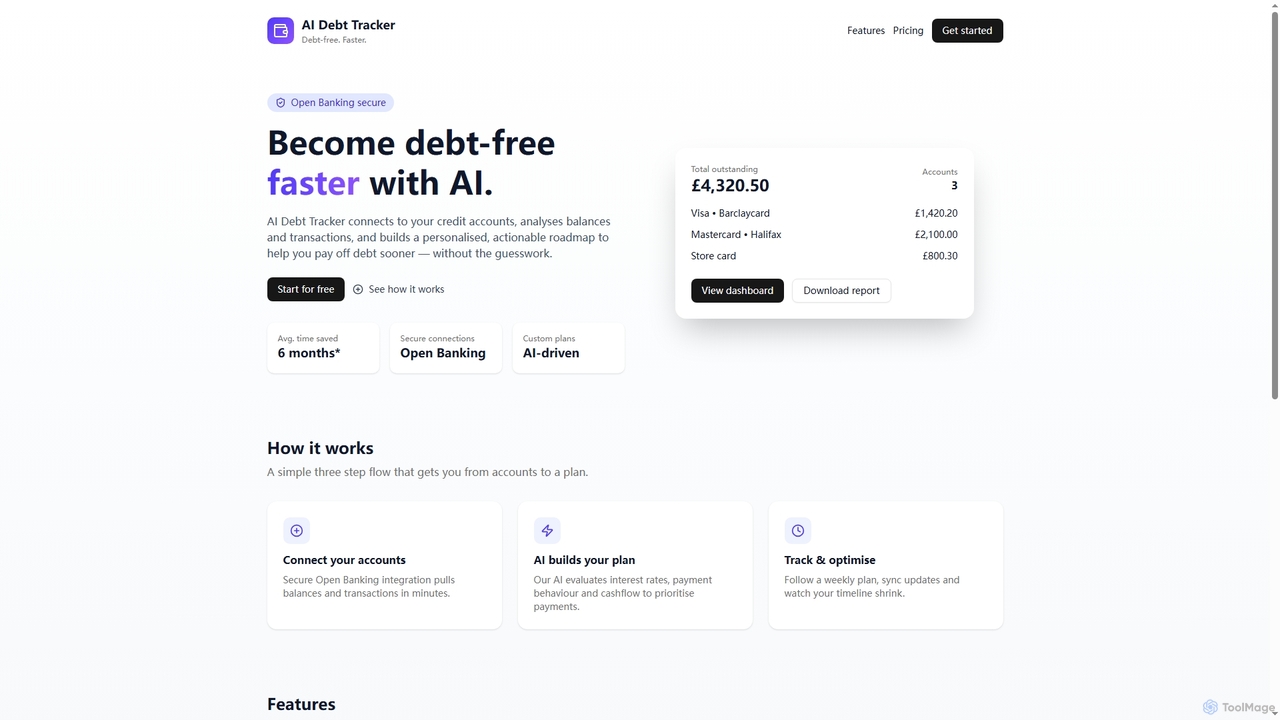
Aidebttracker is an AI-powered personal finance tool designed to help users manage and reduce debt effectively. It securely …

2.9K

About Financial Tracking

AI Financial Tracking tools are applications designed to automate the monitoring, categorization, and analysis of financial data. These tools utilize machine learning and OCR to automatically import transactions from bank accounts, credit cards, and receipts, providing real-time insights into spending patterns and budget performance. As a specialized area within productivity software, they transform complex financial information into clear, actionable reports, simplifying money management for individuals and businesses. This automation significantly reduces the manual effort required for traditional bookkeeping.

Core Features

  • Automated Transaction Categorization: Uses AI to intelligently sort income and expenses into predefined or custom categories.
  • Real-time Financial Dashboards: Provides up-to-the-minute visualizations of cash flow, spending habits, and net worth.
  • Receipt and Invoice Scanning: Employs OCR technology to extract data from photos of receipts and invoices, eliminating manual entry.
  • Budgeting and Goal Setting: Allows users to create budgets, track progress against them, and set financial goals with predictive forecasting.
  • Smart Alerts and Insights: Proactively notifies users of unusual spending, upcoming bills, or low balances.

Use Cases

These tools are widely used by individuals for personal finance management, freelancers for tracking business expenses, and small businesses for monitoring cash flow without the complexity of full-scale accounting software. For example, a freelancer can automatically separate business from personal expenses for tax purposes, while a family can monitor household spending against a monthly budget in real time.

How to Choose

When selecting an AI Financial Tracking tool, consider the scope of bank integrations and data security protocols. Evaluate the accuracy of its automated categorization and the customization options for reports and budgets. Also, consider the user interface's ease of use and whether the pricing model (subscription vs. one-time fee) aligns with your needs and usage frequency.

Financial TrackingUse Cases

1

Personal Budget and Spending Analysis

An individual looking to gain control over their finances connects their bank accounts and credit cards to an AI Financial Tracking tool. The tool automatically imports all transactions and categorizes them into groups like 'Groceries', 'Transport', and 'Entertainment'. Using the dashboard, the user can instantly see where their money is going, identify areas of overspending, and set a monthly budget. The AI provides alerts when they approach their budget limits, helping them stay on track and achieve savings goals more effectively.

2

Streamlining Expense Management for Freelancers

A freelance designer uses an AI Financial Tracking tool to manage business finances. They take photos of receipts for software subscriptions, client lunches, and art supplies. The tool's OCR automatically digitizes and categorizes these expenses. By creating rules, the tool can automatically tag transactions from specific vendors as 'Business Expenses'. At tax time, they can generate a comprehensive expense report with just a few clicks, saving hours of manual sorting and ensuring no deductible expense is missed.

3

Monitoring Small Business Cash Flow

The owner of a small coffee shop uses an AI Financial Tracking tool to get a real-time view of their business's financial health. The tool connects to their business bank account and point-of-sale (POS) system. It automatically tracks daily revenue against expenses like rent, inventory purchases, and payroll. The dashboard visualizes cash flow trends, allowing the owner to quickly identify profitable days or potential cash shortages. This proactive insight helps them make better decisions about staffing, promotions, and inventory management without needing a dedicated bookkeeper.

4

Tracking Shared Expenses for Couples or Roommates

A couple uses a shared AI Financial Tracking account to manage their household finances. They link their joint and individual accounts to get a complete picture of their combined income and expenses. The tool allows them to tag shared expenses like 'Rent', 'Utilities', and 'Groceries'. At the end of each month, they can easily see who paid for what and settle any balances. This transparency reduces financial friction and helps them work together towards common goals, such as saving for a vacation or a down payment on a house.

5

Identifying and Canceling Unwanted Subscriptions

A user suspects they are paying for subscriptions they no longer use. They use an AI Financial Tracking tool that specifically identifies recurring payments. The tool scans their transaction history and presents a clear list of all monthly and annual subscriptions, such as streaming services, software, and gym memberships. The user can quickly review this list, identify services they've forgotten about, and receive direct links or instructions on how to cancel them, potentially saving hundreds of dollars per year.

6

Preparing for Tax Season with Organized Data

A gig economy worker, such as a ride-share driver, uses an AI Financial Tracking tool throughout the year to simplify tax preparation. The tool automatically categorizes income from their driving platform and tracks deductible expenses like fuel, maintenance, and insurance. They can upload receipts for these expenses for digital record-keeping. When tax season arrives, instead of sifting through a year's worth of bank statements and paper receipts, they generate a detailed, categorized report of income and expenses, which can be directly used or shared with an accountant, ensuring accuracy and maximizing deductions.

Financial TrackingFrequently Asked Questions