ToolMage
Sign in

Best 1 Version Control AI tools for Software Development

Popular Version Control AI tools in Software Development include GitusAI, helping you work more efficiently.

GitusAI
Freemium

GitusAI

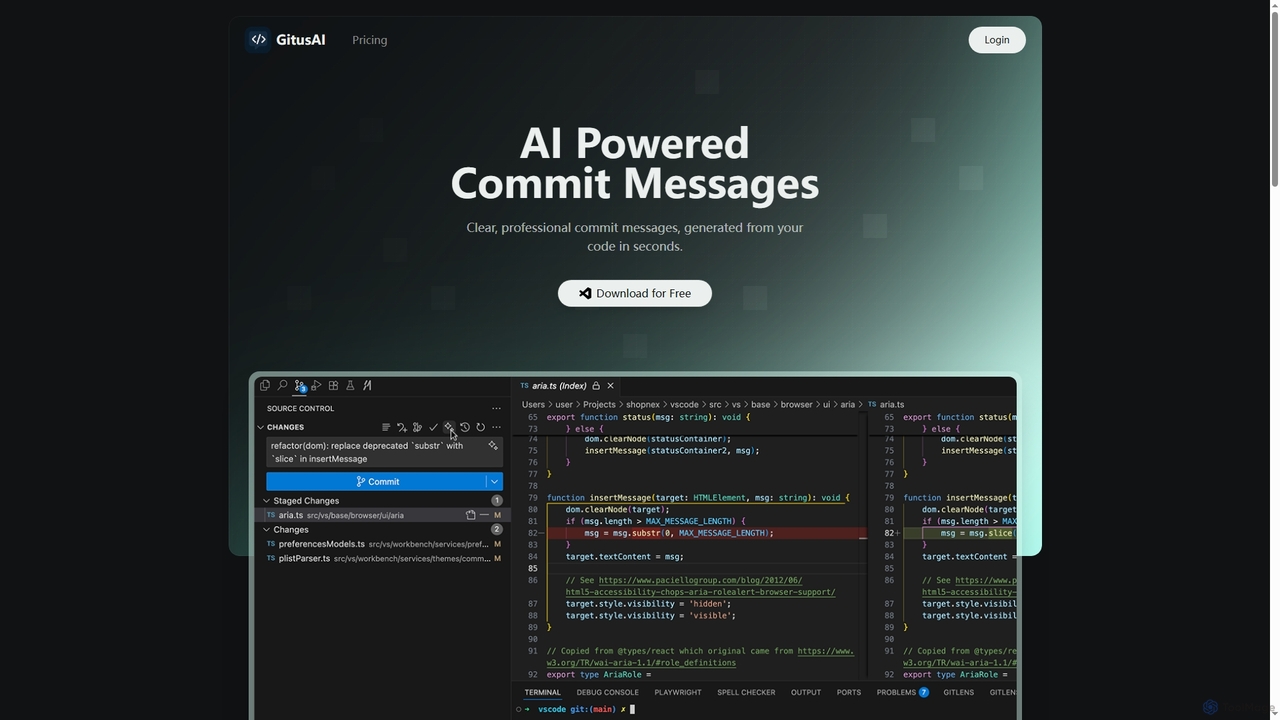
GitusAI is an AI-powered VS Code extension that automates the generation of clear, professional commit messages from your code changes. It helps developers save time, maintain a clean Git history, and ensure consistent commit practices across projects and teams. Ideal for individual developers, freelancers, and large organizations seeking to streamline their development workflow.

Code Generation
Visits 7.2KFavorites 162Likes 183

About Version Control

Version Control systems are essential tools within software development that track and manage changes to files, especially source code, over time. These systems record every modification, allowing developers to revert to previous versions, compare changes, and identify who made specific alterations. By providing a comprehensive history of a project's evolution, version control ensures code integrity, facilitates seamless collaboration among development teams, and supports parallel development efforts without conflicts.

Core Features

  • Change Tracking: Records every modification made to files, including who, what, and when, providing a detailed audit trail.
  • Version History: Maintains a complete chronological record of all project versions, enabling easy retrieval and comparison of past states.
  • Branching & Merging: Allows developers to work on separate features or fixes concurrently in isolated branches and integrate their changes later.
  • Collaboration: Centralizes code repositories, making it easy for multiple team members to contribute, synchronize work, and share updates efficiently.
  • Conflict Resolution: Provides tools and mechanisms to identify and resolve discrepancies when merging different versions of files or code.

Applicable Scenarios

Version control is indispensable for any project involving code or critical documents that undergo frequent changes and require team collaboration. It's widely used by software development teams for managing source code, by data scientists for tracking model iterations and experimental code, and by content creators for managing document revisions in a structured and auditable manner.

How to Choose

When selecting a version control system, consider factors like the project's scale, team size, preferred workflow (e.g., centralized vs. distributed), and integration with existing development tools. Evaluate features such as ease of branching and merging, conflict resolution capabilities, performance with large files, and hosting options (on-premise vs. cloud-based) to find the best fit for your specific needs and technical requirements.

Version Control use cases

1

Managing Collaborative Software Projects

Software development teams use version control to allow multiple developers to work simultaneously on the same codebase. Each developer can commit their changes independently, and the system helps integrate these contributions, preventing overwrites and ensuring a consistent project state. This streamlines teamwork, accelerates development cycles, and maintains code integrity across the team.

2

Implementing Feature Development Branches

Developers create separate branches for new features, experimental work, or bug fixes, isolating changes from the main production code. This allows for iterative development and testing without impacting the stable version. Once a feature is complete and thoroughly tested, it can be seamlessly merged back into the main branch, maintaining code stability and enabling continuous integration.

3

Tracking & Reverting Code Changes

For critical projects, version control provides an immutable history of every code modification. If a new change introduces bugs or breaks functionality, developers can quickly identify the problematic commit and revert to a stable previous version. This capability is crucial for disaster recovery, maintaining application reliability, and ensuring a quick response to unforeseen issues.

4

Facilitating Code Reviews and Audits

Version control systems enable structured code reviews by highlighting specific changes made between versions. Team leads or peers can easily review proposed modifications, provide feedback, and ensure code quality and adherence to standards before integration. This also serves as an invaluable audit trail for compliance requirements and historical analysis of project development.

5

Versioning Infrastructure as Code (IaC)

DevOps teams leverage version control to manage infrastructure configurations as code. This includes server settings, network configurations, and deployment scripts. Treating infrastructure definitions like application code allows for consistent, repeatable deployments, easy rollbacks, and collaborative management of IT environments, significantly reducing manual errors and improving operational efficiency.

6

Managing Content & Documentation Revisions

Beyond source code, version control is highly valuable for managing changes in technical documentation, user manuals, website content, or legal documents. Writers and editors can track every revision, compare different drafts, and collaborate on documents, ensuring accuracy, providing a clear history of content evolution, and facilitating compliance with regulatory requirements.

Version Control FAQ

What is Version Control and why is it important for software development?

Version Control is a system that records changes to files or sets of files over time, allowing you to recall specific versions later. For software development, it's crucial because it enables teams to track every modification to source code, collaborate efficiently without overwriting each other's work, and revert to previous stable states if issues arise. It ensures code integrity, provides a complete project history, and supports parallel development, making it fundamental for modern software practices.

What are the main types of Version Control Systems (VCS)?

There are two primary types: Centralized Version Control Systems (CVCS) and Distributed Version Control Systems (DVCS). CVCS, like SVN, rely on a single central server for all versioned files, requiring an internet connection for most operations. DVCS, like Git, allow clients to fully mirror the repository, including its entire history, enabling offline work, faster operations, and more robust branching and merging capabilities. DVCS offers greater flexibility and resilience for modern development workflows.

What are the key benefits of using a Version Control System?

The key benefits include enhanced collaboration, as multiple developers can work on the same project simultaneously without conflicts. It provides a complete history of changes, allowing for easy tracking, auditing, and rollback to any previous version. Version control also facilitates branching for isolated feature development, improves code quality through structured reviews, and acts as a robust backup mechanism for your project's evolution, ensuring data safety and project continuity.

How do I choose the right Version Control System for my project?

Consider your team's size and experience, project complexity, and specific workflow needs. For small teams or simple projects, a CVCS might suffice, but for larger, distributed teams or open-source projects, a DVCS like Git is generally preferred due to its flexibility, performance, and robust branching model. Evaluate factors such as integration with other tools (IDEs, CI/CD), community support, hosting options (e.g., GitHub, GitLab, Bitbucket), and the learning curve for your team.

What is the difference between Git and SVN?

Git is a Distributed Version Control System (DVCS), meaning each developer has a full copy of the repository history, allowing for offline work and fast operations. SVN (Subversion) is a Centralized Version Control System (CVCS), where a single central server holds the entire project history, and developers check out files from it. Git excels in branching, merging, and handling large projects with complex workflows, while SVN is simpler for basic versioning but less flexible for modern, distributed development practices.