ToolMage
Sign in

Best 1 Session Replay AI tools for Software Testing

Popular Session Replay AI tools in Software Testing include Multiplayer, helping you work more efficiently.

Freemium

Multiplayer

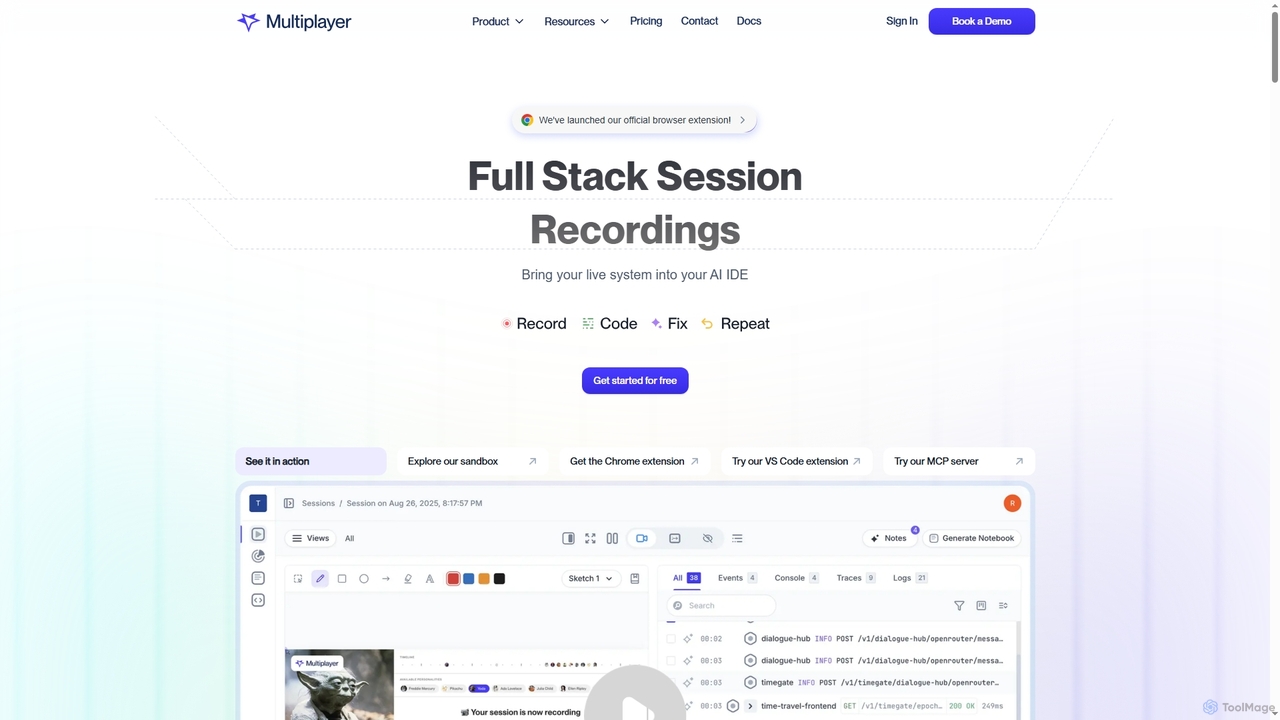
Multiplayer is a full-stack session recording platform that captures frontend and backend data, providing complete context for debugging, testing, and AI-powered feature development. It integrates seamlessly with AI IDEs and engineering workflows to accelerate problem resolution and build new features with confidence.

Ai Integration
Visits 12.1KFavorites 103Likes 101

About Session Replay

Session Replay tools are a class of software that visually captures and reconstructs a user's complete journey on a website or application. Unlike simple screen recordings, these tools log every user interaction—such as mouse movements, clicks, scrolls, and form inputs—to create a high-fidelity, interactive playback. This allows teams to see exactly what users experience, providing critical context for debugging, user experience (UX) analysis, and conversion rate optimization. As a specialized component of software testing and product analytics, Session Replay provides the qualitative 'why' behind quantitative data points.

Core Features

  • High-Fidelity Playback: Recreates user sessions with precision, showing dynamic content, CSS animations, and all user interactions as they happened.
  • Developer Tools Integration: Captures console logs, JavaScript errors, and network request details, synchronizing them with the visual replay for efficient debugging.
  • User Event Tracking: Automatically identifies key events like rage clicks, dead clicks, and U-turn navigation to quickly pinpoint user frustration.
  • Advanced Segmentation: Allows filtering and searching for specific sessions based on user attributes, device, location, or specific actions taken.
  • Privacy and Security Controls: Provides robust features to automatically mask or exclude sensitive user data from recordings, ensuring compliance with GDPR, CCPA, and other regulations.

Use Cases

Session Replay tools are primarily used by product managers to understand feature adoption, UX designers to identify usability friction, software developers and QA engineers to reproduce bugs, and customer support teams to resolve user-reported issues without lengthy back-and-forth communication.

How to Choose

When selecting a Session Replay tool, consider its performance impact on your site's load time. Evaluate the strength of its privacy controls and data masking capabilities. Assess its integration potential with your existing stack, such as analytics platforms and bug trackers. Finally, analyze the power of its search and segmentation engine to ensure you can find relevant insights quickly.

Featured tool rankings

Session Replay use cases

1

Reproducing Intermittent Software Bugs

A QA engineer receives a bug report about a feature failing under specific, hard-to-replicate conditions. Instead of spending hours trying to manually reproduce the issue, the engineer filters session replays for users who encountered the specific JavaScript error. They find a session, watch the exact sequence of user actions leading to the bug, and inspect the synchronized console logs and network requests. This reduces debugging time from hours to minutes and provides developers with a complete, undeniable context to fix the problem.

2

Analyzing Conversion Funnel Drop-offs

A product manager for an e-commerce site notices a high abandonment rate on the payment page. Using a session replay tool, they filter for all sessions that reached the payment page but did not complete a purchase. By watching several replays, they discover a pattern: users on mobile devices are struggling with a date-picker field for the credit card expiration date. The replay shows users repeatedly clicking the wrong area. This qualitative insight leads to a targeted UI fix, which subsequently improves the mobile conversion rate.

3

Improving User Onboarding Flows

A UX designer wants to understand why many new users fail to complete the initial product tour. They segment session replays for 'first-time users' who signed up in the last week but didn't complete the 'onboarding_success' event. Watching these sessions reveals that a pop-up for notification permissions is appearing over a critical instructional tooltip, confusing users and causing them to close the tour. The designer uses this visual evidence to recommend a change in the timing of the permission request, leading to a higher onboarding completion rate.

4

Validating New Feature Adoption

After launching a redesigned dashboard, a product team wants to see how users are interacting with it. They create a segment in their session replay tool for users who have visited the new dashboard page. By watching these sessions, they can observe real user behavior: which new modules are getting the most attention, where users hesitate or seem confused, and which old habits persist. This direct observation is more authentic than survey data and helps the team prioritize future iterations and educational content for the new feature.

5

Resolving Customer Support Tickets Faster

A customer support agent receives a ticket saying, "The 'Export Report' button is broken." Instead of asking the user for screenshots or browser details, the agent finds the user's recent session in the replay tool. The replay shows the user clicking the button, but a network error (a 500 Internal Server Error) occurs in the background, which is invisible to the user. The agent can then confidently tell the user that the team is aware of a server issue and is working on it, while simultaneously attaching the session replay link to an escalated engineering ticket for immediate context.

6

Conducting Unmoderated Usability Testing

A UX research team wants to test a new checkout flow design but lacks the resources for extensive moderated user interviews. They deploy the new design to 5% of their users and use a session replay tool to collect data. They filter for sessions that interacted with the new flow and watch dozens of replays to identify common paths, points of hesitation (indicated by erratic mouse movements), and drop-off points. This method allows them to gather rich, qualitative usability insights at scale, complementing their quantitative A/B test results and informing design refinements.

Session Replay FAQ

What is a Session Replay tool?

A Session Replay tool is a type of analytics and debugging software that records and visually plays back user interactions on a website or application. It captures actions like mouse movements, clicks, scrolling, and form entries. Unlike a video recording, it reconstructs the user's session from event data, which allows it to also capture technical details like console errors and network requests. This makes it invaluable for developers, UX designers, and product managers to understand the true user experience and diagnose issues.

How is Session Replay different from traditional analytics tools?

Traditional analytics tools (like Google Analytics) provide quantitative data, telling you what happened (e.g., '50% of users dropped off at checkout'). Session Replay tools provide qualitative data, showing you why it happened by replaying the actual user experience. They are complementary: analytics help you identify problems at scale, while session replays provide the visual context needed to understand and solve those specific problems. Session Replay bridges the gap between numbers and real human behavior.

How do Session Replay tools handle user privacy and sensitive data?

Reputable Session Replay tools prioritize user privacy through several mechanisms. They offer automatic data masking to block out sensitive information like passwords, credit card numbers, and personal details from ever being recorded. Administrators can also manually configure the tool to exclude specific fields, elements, or entire pages from capture. These features are essential for complying with data privacy regulations like GDPR and CCPA. When choosing a tool, always verify its privacy features and data handling policies.

Do Session Replay tools negatively impact website performance?

Modern Session Replay tools are designed to be lightweight and have a minimal impact on performance. They typically use a small, asynchronous JavaScript snippet that loads independently of your site's main content. This prevents it from blocking page rendering. However, the performance impact can vary between providers. It is a good practice to choose a tool known for its efficiency and to monitor your site's performance metrics (like Core Web Vitals) before and after implementation to ensure there are no significant negative effects.

Who benefits most from using Session Replay tools?

Several roles across a company can benefit significantly from Session Replay tools:

  • Product Managers: To understand how users interact with new features and identify areas for improvement in the user journey.
  • UX/UI Designers: To gain qualitative insights into user behavior, identify usability issues, and validate design hypotheses.
  • Developers & QA Engineers: To quickly reproduce and debug complex bugs by seeing the exact steps and technical context of an error.
  • Customer Support Teams: To resolve user issues faster by seeing what the user actually experienced, reducing the need for back-and-forth communication.