ToolMage
Sign in

Best 1 Web Testing AI tools for Testing

Popular Web Testing AI tools in Testing include Browserman, helping you work more efficiently.

Browserman

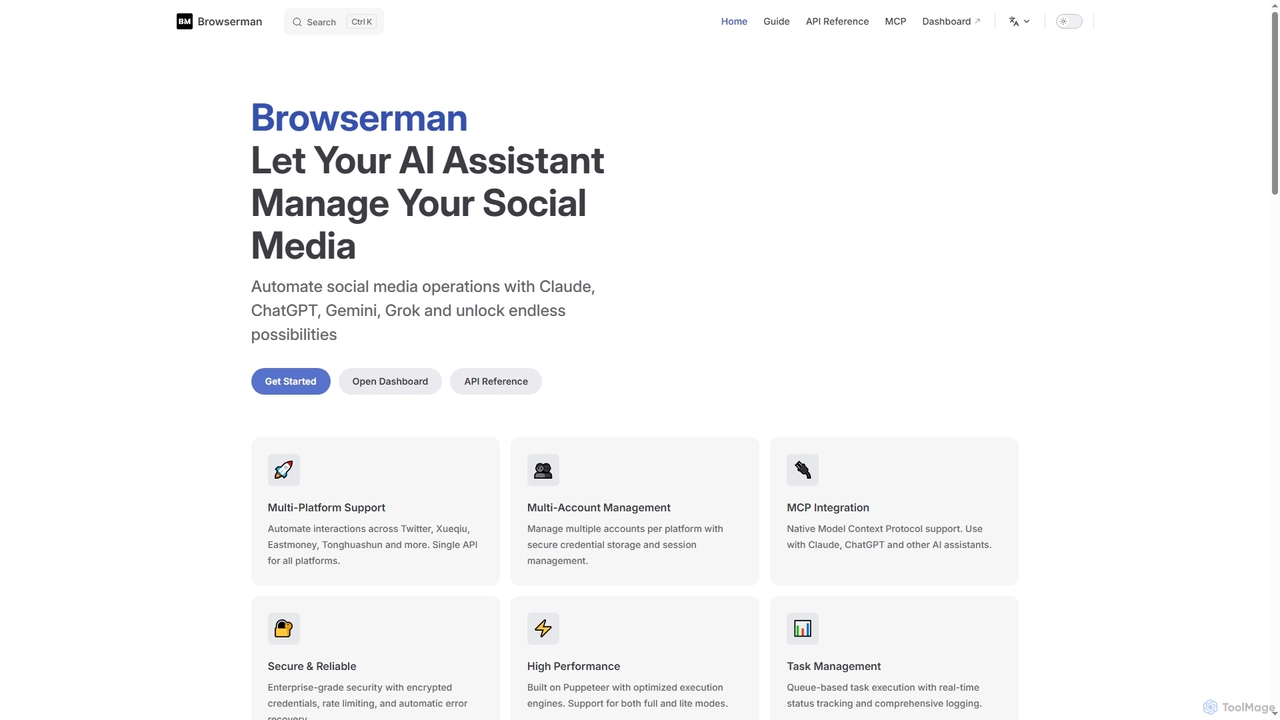
Browserman is an advanced browser automation platform designed to empower AI assistants like Claude, ChatGPT, Gemini, and Grok to manage social media operations. It offers multi-platform and multi-account support, a robust REST API, and native Model Context Protocol (MCP) integration for seamless, scalable, and secure automation workflows.

Integration
Visits 3.4KFavorites 123Likes 117

About Web Testing

Web Testing tools are AI-powered solutions designed to automate and enhance the quality assurance process for web applications. These tools leverage artificial intelligence and machine learning to generate intelligent test cases, identify defects, and analyze user behavior patterns. They significantly accelerate the testing lifecycle, improve test coverage, and ensure a robust, high-performing user experience across various browsers and devices.

Core Features

  • Automated Test Case Generation: AI algorithms analyze application code and user flows to automatically create comprehensive test scripts, reducing manual effort.
  • Self-Healing Tests: Tools adapt to UI changes, automatically updating test scripts to prevent frequent test failures due to minor modifications.
  • Visual Regression Testing: AI compares current UI screenshots with baseline versions, detecting subtle visual discrepancies that human eyes might miss.
  • Performance Bottleneck Identification: AI analyzes load test results to pinpoint performance issues and suggest optimization strategies.
  • Predictive Defect Analytics: Machine learning models predict potential areas of failure based on historical data, allowing proactive bug fixing.

Use Cases

These tools are invaluable for software development teams, QA engineers, and product managers seeking to deliver high-quality web applications efficiently. They are particularly useful in agile development environments where continuous integration and continuous delivery (CI/CD) pipelines require rapid and reliable testing.

How to Choose

When selecting a Web Testing tool, consider its compatibility with your existing tech stack, the level of AI-driven automation offered, ease of integration into CI/CD pipelines, and reporting capabilities. Evaluate its support for different browsers and devices, scalability for growing projects, and the clarity of its defect reporting and analytics.

Featured tool rankings

Web Testing use cases

1

Automating End-to-End UI Testing

QA engineers in a fast-paced agile team use AI-powered web testing tools to automatically generate and execute end-to-end UI tests for new features. The AI learns user interaction patterns, identifies critical paths, and creates robust test scripts that self-heal when minor UI changes occur, reducing manual script maintenance by up to 70% and accelerating release cycles.

2

Automating Regression Tests in CI/CD

Development teams integrate AI Web Testing tools into their Continuous Integration/Continuous Deployment (CI/CD) pipelines. With every code commit, the AI automatically triggers a suite of regression tests across the web application. This ensures that new features or bug fixes do not introduce unintended side effects or break existing functionalities, allowing for rapid and confident deployments without manual intervention.

3

Detecting Visual Regressions Across Devices

A web development agency needs to ensure pixel-perfect consistency of client websites across various browsers and mobile devices. They employ AI visual testing tools to automatically capture screenshots, compare them against approved baselines, and highlight any visual discrepancies, ensuring brand integrity and a consistent user experience without extensive manual checks.

4

Cross-Browser and Device Compatibility Testing

QA engineers utilize AI Web Testing tools to verify the responsiveness and functionality of web applications across a multitude of browsers (Chrome, Firefox, Edge, Safari) and devices (desktops, tablets, smartphones). The AI can simulate various screen sizes, operating systems, and browser versions, automatically identifying layout issues, broken elements, or inconsistent behavior, ensuring a consistent user experience for all visitors.

5

Validating Complex User Journeys and Workflows

Product managers and business analysts employ AI Web Testing tools to validate critical user journeys, such as e-commerce checkout flows, account registration processes, or complex data entry forms. The AI can simulate realistic user interactions, navigate through multi-step workflows, and verify data integrity and system responses at each stage, ensuring a smooth and error-free path for end-users.

6

Optimizing Web Application Performance

E-commerce platforms experience high traffic during peak seasons, requiring robust performance. DevOps teams utilize AI web testing tools to simulate high user loads, identify performance bottlenecks in real-time, and receive AI-driven recommendations for code optimization or infrastructure scaling, preventing downtime and ensuring smooth transactions.

7

Performance and Load Testing for Scalability

DevOps engineers and performance testers leverage AI Web Testing tools to conduct performance and load tests. The AI can simulate thousands or even millions of concurrent users accessing the web application, identifying bottlenecks, slow response times, and potential scalability issues under heavy traffic. This proactive testing helps ensure the application remains stable and responsive even during peak usage periods.

8

Enhancing Security Vulnerability Scanning

Financial institutions developing online banking portals require stringent security. AI-enhanced web testing tools perform dynamic application security testing (DAST) by intelligently crawling the application, identifying potential vulnerabilities like SQL injection or cross-site scripting, and prioritizing critical flaws for developers to address before deployment.

9

Accelerating Cross-Browser Compatibility Testing

A SaaS company launches a new feature that must work flawlessly on Chrome, Firefox, Edge, and Safari. AI web testing platforms automatically execute the same test suite across multiple browser versions and operating systems simultaneously, quickly pinpointing compatibility issues and providing detailed reports, drastically reducing the time spent on manual cross-browser checks.

10

Detecting Visual UI Inconsistencies

UI/UX designers and front-end developers use AI Web Testing tools for visual regression testing. The AI automatically captures screenshots of web pages across different environments or builds and compares them pixel by pixel. It highlights subtle visual discrepancies, such as misaligned elements, incorrect fonts, or color changes, ensuring that the application's user interface remains consistent with design specifications and brand guidelines after updates.

11

Automated Security Vulnerability Scanning

Security engineers and developers employ AI Web Testing tools to proactively scan web applications for common security vulnerabilities. The AI can identify potential threats like SQL injection, cross-site scripting (XSS), insecure direct object references (IDOR), and misconfigurations. By automating these scans, teams can integrate security checks early into the development lifecycle, reducing the risk of exploitable weaknesses in production.

12

Predictive Maintenance for Production Websites

Site reliability engineers (SREs) monitor live web applications for potential issues. AI web testing tools continuously run synthetic monitoring tests against the production environment, learning normal behavior patterns. When anomalies are detected, the AI predicts potential outages or performance degradations before they impact users, enabling proactive intervention.

Web Testing FAQ

What are Web Testing tools?

Web Testing tools are specialized software solutions that automate and assist in the quality assurance of web applications. They leverage AI and machine learning to perform tasks like automated test case generation, visual regression detection, performance analysis, and security scanning, ensuring web applications function correctly, perform optimally, and are secure across different environments.

What are AI-powered Web Testing tools?

AI-powered Web Testing tools are software solutions that use artificial intelligence and machine learning to automate and enhance the testing of web applications. They go beyond traditional automation by intelligently generating test cases, adapting to UI changes, and identifying complex issues. These tools aim to improve test coverage, reduce manual effort, and accelerate the delivery of high-quality web experiences across various platforms and devices.

How do AI Web Testing tools differ from traditional automation frameworks?

Traditional automation frameworks rely on explicit scripting and manual maintenance, making them brittle to UI changes and time-consuming to update. AI Web Testing tools, however, leverage AI to understand application context, self-heal broken tests, and even generate new test cases based on user behavior or design specifications. This results in more resilient tests, faster test creation, and significantly reduced maintenance overhead compared to conventional methods.

How do AI-powered Web Testing tools differ from traditional testing frameworks?

Traditional web testing frameworks often require extensive manual scripting and maintenance, and are reactive to changes. AI-powered Web Testing tools, however, can intelligently generate test cases, self-heal scripts when UI changes, detect visual regressions with high accuracy, and even predict potential defects. This significantly reduces manual effort, increases test coverage, and accelerates the overall testing process compared to purely script-based or manual approaches.

What types of web applications can be tested with AI Web Testing tools?

AI Web Testing tools are versatile and can test a wide range of web applications, including complex enterprise portals, e-commerce platforms, single-page applications (SPAs), progressive web apps (PWAs), and traditional multi-page websites. They are effective for applications built with various front-end frameworks (React, Angular, Vue) and back-end technologies, as their AI capabilities focus on user-facing interactions and system responses rather than specific underlying code.

What are the key benefits of using AI in Web Testing?

Integrating AI into web testing offers several key benefits. It dramatically speeds up test creation and execution, reduces the maintenance burden of test scripts through self-healing capabilities, and improves test accuracy by detecting subtle visual or functional regressions. AI also enables predictive analytics for defect identification and optimizes resource allocation by focusing testing efforts on high-risk areas, leading to faster releases and higher quality web applications.

Who primarily uses Web Testing tools?

Web Testing tools are primarily used by Quality Assurance (QA) engineers, software developers, DevOps teams, and product managers. QA engineers use them for comprehensive test execution and defect identification. Developers integrate them into CI/CD pipelines for continuous testing. DevOps teams leverage them for performance and security testing, while product managers rely on the insights to ensure a high-quality user experience before product launches.

What are the key benefits of using AI for Web Testing?

The primary benefits of using AI for Web Testing include significantly faster test creation and execution, improved test coverage by identifying edge cases that manual or traditional automation might miss, and reduced test maintenance due to self-healing capabilities. AI also enhances the accuracy of defect detection, provides deeper insights into application behavior, and ultimately accelerates the delivery of high-quality, reliable web applications to market.

How can AI Web Testing tools help with test maintenance?

AI Web Testing tools significantly reduce test maintenance through features like self-healing tests and intelligent element locators. When UI elements change (e.g., a button's ID or location), the AI can automatically detect these changes and update the test scripts accordingly, preventing tests from breaking. This eliminates the need for manual script adjustments, saving considerable time and resources for QA teams, especially in agile development environments with frequent UI updates.

How to choose the best Web Testing tool for my project?

Choosing the right Web Testing tool involves evaluating several factors. Consider its compatibility with your technology stack (e.g., JavaScript frameworks, cloud platforms), the types of testing it supports (functional, performance, security, visual), and its integration capabilities with your CI/CD pipeline. Also, assess its ease of use, reporting features, scalability, and pricing model to ensure it aligns with your team's needs and budget.