
ToolMage
Sign in

Best 1 3D Rendering AI tools for Visualization

Popular 3D Rendering AI tools in Visualization include Interiorly, helping you work more efficiently.

Interiorly

Interiorly

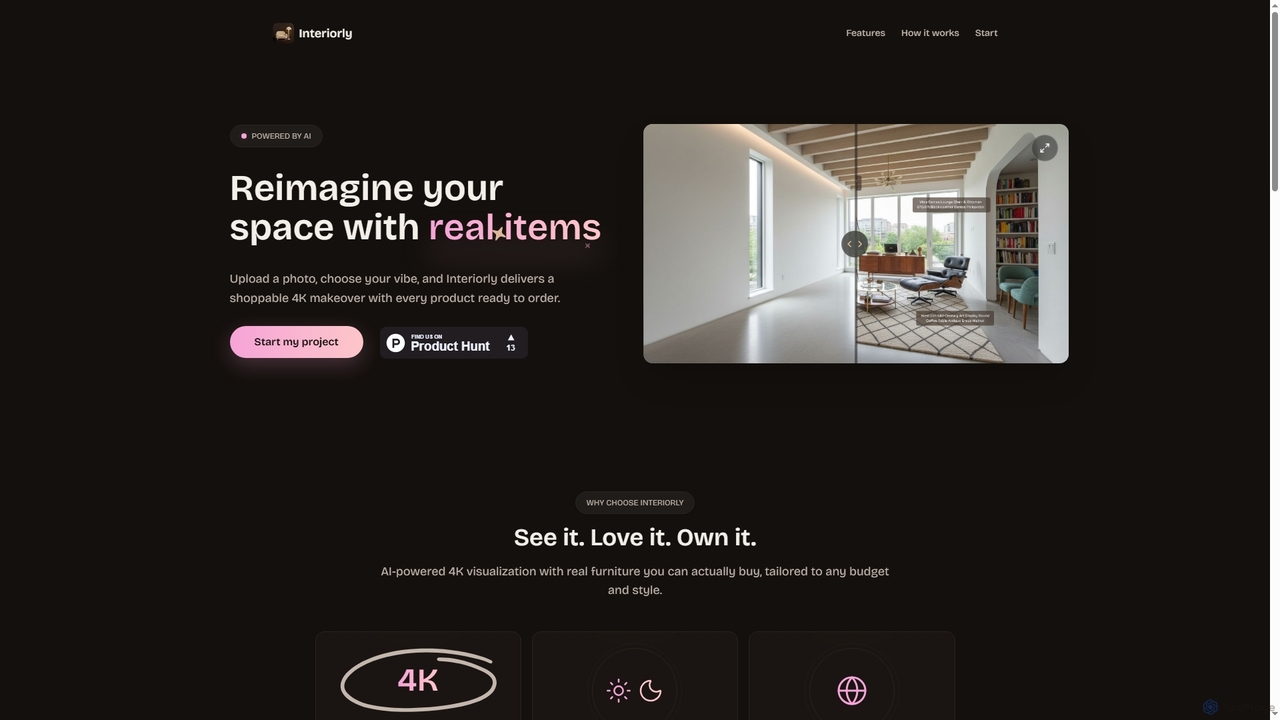
Interiorly is an AI-powered design tool that transforms your room photos into stunning 4K photorealistic visualizations with real, shoppable furniture. It allows users to explore various styles and budgets, generating day and night versions of their redesigned spaces with localized product recommendations.

Interior Design
Visits 6.5KFavorites 147Likes 164

About 3D Rendering

3D Rendering tools are AI-powered software solutions that transform 3D models into photorealistic or stylized images and animations. Leveraging advanced algorithms, these tools simulate light, materials, and textures to create visually compelling outputs. They are essential for architects, product designers, game developers, and filmmakers to visualize concepts before physical creation. AI integration further streamlines the rendering process, optimizing quality and and accelerating speed.

Core Features

  • Photorealistic Output: Generate highly detailed and lifelike images and videos from 3D models.
  • Material & Texture Simulation: Accurately simulate how light interacts with various surfaces like glass, metal, wood, and fabric.
  • Lighting & Environment Control: Manipulate virtual light sources, shadows, and environmental settings for desired mood and realism.
  • Animation & Walkthroughs: Produce dynamic sequences, virtual tours, and motion graphics from 3D scenes.
  • AI-Powered Optimization: Utilize AI to accelerate rendering times, denoise images, or suggest optimal settings.

Use Cases

3D Rendering tools are indispensable across various industries. Architects and interior designers use them to create stunning visualizations of proposed buildings and spaces, helping clients envision the final result. Product designers leverage rendering to produce high-quality marketing images and prototypes without physical manufacturing. Game and film studios rely on these tools for crafting immersive environments, characters, and special effects, bringing digital worlds to life.

How to Choose

Selecting a 3D rendering tool requires evaluating several factors. Consider the rendering engine type (e.g., real-time vs. offline) based on your project's speed and quality demands. Assess its integration capabilities with your existing 3D modeling software. Evaluate the material library and asset availability for diverse design needs. Finally, review the pricing model and hardware requirements to ensure it fits your budget and technical setup.

3D Rendering use cases

1

Architectural Visualization for Property Development

Architects and real estate developers use 3D rendering to create photorealistic images and animated walkthroughs of unbuilt properties. This helps clients, investors, and city planners visualize designs, assess aesthetics, and make informed decisions before construction begins, significantly reducing design iteration costs and time. The detailed visuals allow for early identification of potential issues and better communication of the design intent.

2

Product Prototyping and Marketing Visuals

Product designers and manufacturers leverage 3D rendering to generate high-fidelity virtual prototypes and marketing visuals for new products. This eliminates the need for expensive physical prototypes in early stages and allows for creating diverse product shots, color variations, and lifestyle imagery for e-commerce and advertising campaigns quickly. It enables rapid iteration and presentation of concepts to stakeholders without physical production.

3

Game Development and Environment Design

Game artists and developers utilize 3D rendering to create immersive game environments, characters, and assets. By rendering scenes with realistic lighting and textures, they can visualize how game elements will appear in-engine, optimize visual fidelity, and produce cinematic cutscenes, enhancing the overall player experience. This process is crucial for bringing digital worlds to life with high levels of detail and atmosphere.

4

Film and Animation Production for Special Effects

Filmmakers and animators employ 3D rendering for special effects, CGI elements, and entire animated features. Complex scenes, fantastical creatures, and dynamic simulations are brought to life through meticulous rendering, allowing for creative freedom and the creation of visuals that would be impossible or too costly to achieve practically. This technology is fundamental to modern cinematic storytelling and visual spectacle.

5

Interior Design and Space Planning Presentations

Interior designers use 3D rendering to present detailed visual concepts of proposed interior spaces to clients. This includes furniture placement, material choices, lighting schemes, and color palettes, enabling clients to explore different design options and provide feedback in a highly realistic virtual environment before any physical work begins. It significantly enhances client understanding and satisfaction with the design.

6

Industrial Design and Engineering Review

Industrial designers and engineers use 3D rendering to visualize complex machinery, automotive parts, or industrial components. This aids in design review, identifying potential flaws, and presenting technical concepts clearly. Realistic renderings help in communicating design intent to stakeholders and for creating high-quality technical documentation and marketing materials for complex products, streamlining the development cycle.

3D Rendering FAQ

What are 3D Rendering tools?

3D Rendering tools are software applications that convert 3D models into 2D images or animations by simulating light, materials, and camera perspectives. They are crucial for visualizing digital creations in a realistic or stylized manner. Key features include advanced lighting models, material editors, and the ability to produce high-resolution outputs for various media, making complex designs accessible and understandable.

How do AI-powered 3D Rendering tools differ from traditional ones?

AI-powered 3D Rendering tools integrate artificial intelligence to enhance and accelerate the rendering process. This often includes AI denoising to clean up noisy renders faster, AI-driven upscaling for higher resolution outputs, or AI-assisted material and lighting suggestions. Traditional renderers rely solely on computational power and manual adjustments, making AI versions potentially faster, more efficient, and capable of achieving higher quality with less manual effort for certain tasks.

Who typically uses 3D Rendering software?

A wide range of professionals utilize 3D rendering software. This includes architects for building visualizations, product designers for virtual prototypes, game developers for creating immersive environments, filmmakers for special effects and animation, and marketing professionals for compelling visual content. Anyone needing to present 3D concepts realistically benefits from these tools, from individual artists to large design studios and engineering firms.

What factors should I consider when choosing a 3D Rendering tool?

When selecting a 3D rendering tool, consider its rendering engine type (e.g., CPU, GPU, or hybrid) based on your project's speed and quality demands. Evaluate its compatibility with your existing 3D modeling software and operating system. Assess the material library and asset availability, as well as the ease of use for your skill level. Finally, review the pricing model (subscription, perpetual license) and hardware requirements to ensure it fits your budget and technical setup.

Can 3D Rendering tools create animations as well as still images?

Yes, most professional 3D Rendering tools are fully capable of creating both high-quality still images and complex animations. They allow users to define camera paths, object movements, and lighting changes over time, then render these sequences frame by frame to produce dynamic video content. This is essential for architectural walkthroughs, product demonstrations, and cinematic productions, offering a comprehensive visualization solution.