ToolMage
Sign in

AI TOOL COMPARISON

Audioconvert vs Transcriptly

What is the difference, and which fits your workflow? Compare features, usage, pricing models and traffic side by side.

Jump to key differences

Product overview

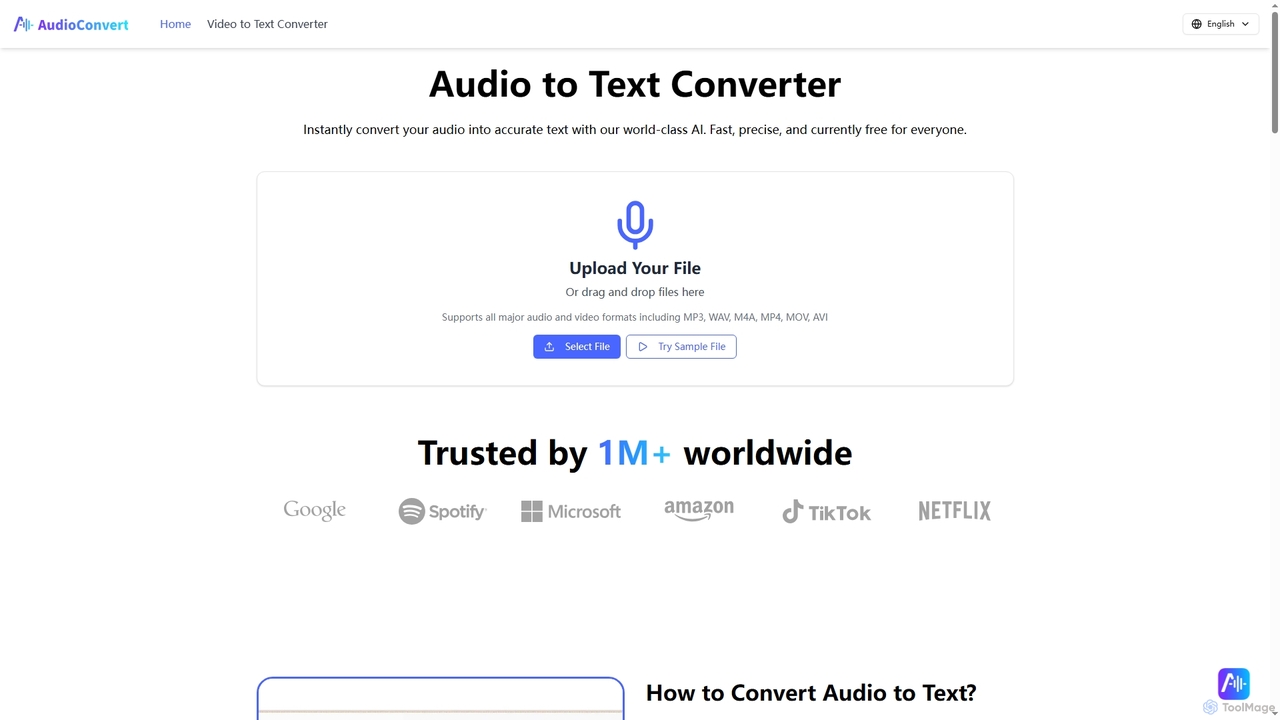
Audioconvert Product overview

Audioconvert is an AI-powered tool that swiftly and accurately converts audio and video files into text transcripts. It supports major formats, identifies multiple speakers, provides precise timestamps, and offers various export options like TXT, DOCX, and SRT, all currently available for free.

Preview

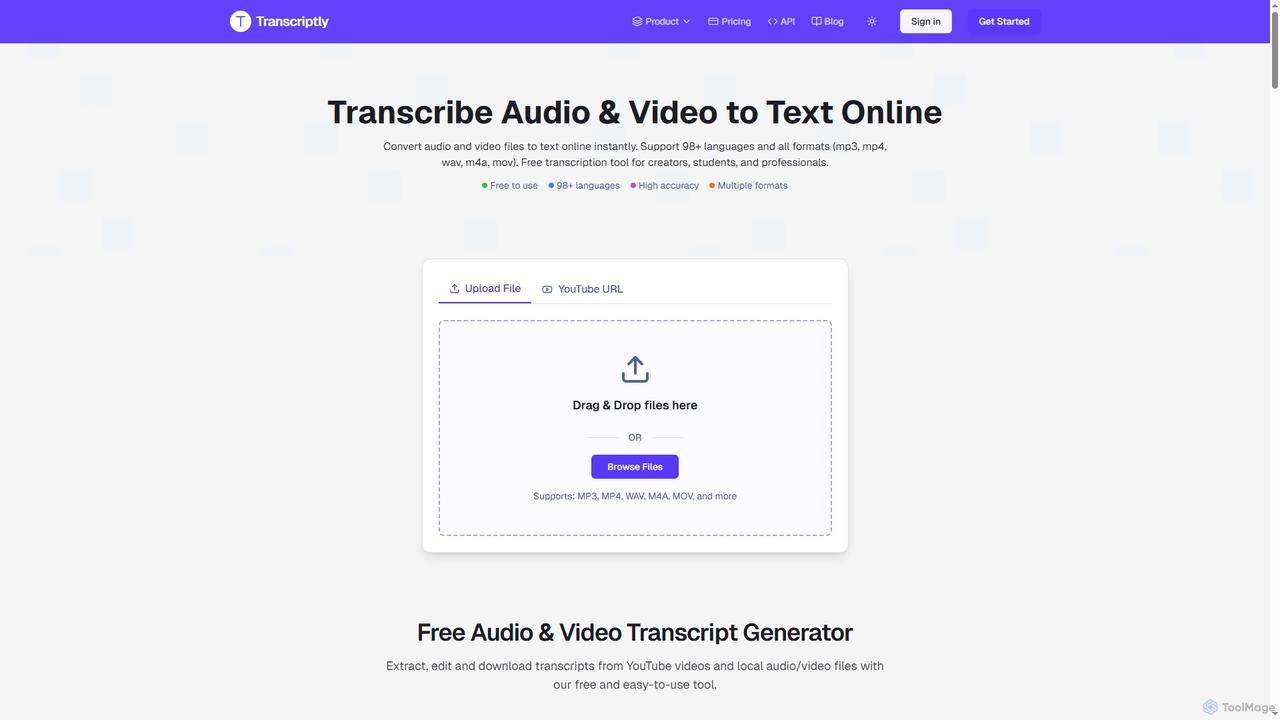
Transcriptly Product overview

Transcriptly is an AI-powered online platform that converts audio and video files into accurate text transcripts. Supporting over 98 languages and various formats, it offers fast processing, AI insights, and multiple export options for students, creators, professionals, and businesses.

Preview

Quick facts

Compare product focus, pricing models and audiences. Highlighted rows indicate different listed information; unknown pricing does not mean free.

Audioconvert VS Transcriptly — Quick facts
Quick factsAudioconvertTranscriptly
Pricing modelFreeFreemium
Product typeWebWeb
Primary focusMeeting ManagementMarket Research
Audience and rolesAcademic · Content Creator · Educator · E-learning Platform · Event Organizer · Journalist · Knowledge Manager · Marketer · Podcaster · Product Manager · Professional · Project Manager · Sales Representative · Student · Training Specialist · UX Researcher · YouTuberBusiness Professional · Content Creator · Developer · Journalist · Language Learner · Marketing Director · Podcaster · Researcher · Student · Writer
CategoriesMeeting Management · Video Editing · Learning Tools · TranscriptionMarket Research · Learning Tools · Transcription
AddedOct 26, 2025Oct 25, 2025
UpdatedNov 19, 2026Nov 19, 2026

Features, usage and use cases

Explore the listed product descriptions, features and workflows. Taxonomy labels alone are not feature evaluations.

Audioconvert

Audioconvert is a cutting-edge AI tool designed to transform both audio and video content into highly accurate text transcripts with remarkable speed and efficiency. Leveraging world-class artificial intelligence, it streamlines the transcription process, eliminating the need for manual typing and significantly boosting productivity for a wide range of users.

How to use Audioconvert

Using Audioconvert is a straightforward three-step process designed for simplicity and speed:

  1. Upload Your File: Easily drag and drop your audio or video file (supporting formats like MP3, WAV, M4A, MP4, MOV, AVI, MKV) directly onto the platform. For video, you can also upload recordings from platforms like Zoom or Teams, or for audio, paste a social media link.
  2. AI Transcription: Once uploaded, Audioconvert's advanced AI engine automatically processes your file. It intelligently detects and labels different speakers, transcribing speech with incredible precision, even handling background noise and diverse accents. This step is fully automated and fast.
  3. Review & Download Transcript: After transcription, you can review the generated text on the platform. Once satisfied, download your transcript in your preferred format, including plain text (.txt), Microsoft Word document (.docx), or subtitle files (.srt, .vtt) for video editing.

Core Features of Audioconvert

  • Industry-Leading AI Engine: Powered by one of the most advanced speech-to-text models, ensuring superior transcription quality and high accuracy even with background noise and diverse accents.
  • Multi-Speaker Identification: Automatically detects and labels different speakers in your audio or video, organizing transcripts cleanly for easy follow-up in conversations, interviews, and meetings.
  • Multiple Export Formats: Offers flexibility to download transcripts as plain text (.txt), Microsoft Word documents (.docx), or subtitle files (.srt, .vtt) to fit various workflows.
  • Precise Timestamps: Provides timestamps accurate down to the millisecond or frame-accurate, making it simple to navigate and find specific moments within your original content.

Use Cases for Audioconvert

Audioconvert is a versatile tool that supports a broad spectrum of professional and personal needs:

  • Content Creation: Generate accurate subtitles (SRT files) for YouTube videos and social media content to boost SEO and accessibility. Extract quotes for compelling social posts.
  • Academic & Research: Convert lectures, research interviews, and discussions into searchable text for easy review, analysis, and citation with precise timestamps.
  • Podcasting & Journalism: Produce full transcripts for podcasts (show notes) to enhance listener engagement and rapidly convert interviews into text to meet deadlines.
  • Business & Meetings: Transcribe user interviews, team meetings, sales calls, and usability tests to analyze feedback, capture decisions, update CRMs, and create searchable archives.
  • Education & E-learning: Transform lecture recordings and tutorial videos into student reference materials, creating searchable course texts that enhance learning accessibility.
  • Personal Productivity: Convert voice memos, ideas, and reminders into organized, searchable text, ensuring no thought is lost.

Advantages of Audioconvert

Audioconvert offers significant advantages that enhance productivity and content management:

  • Exceptional Accuracy: The AI model delivers near-human levels of accuracy, adept at handling complex terminology, multiple speakers, and challenging audio conditions, minimizing the need for corrections.
  • Time-Saving Efficiency: What once took hours of manual transcription is reduced to minutes, allowing users to focus on analysis, content creation, or research.
  • Enhanced Accessibility & SEO: By transforming audio/video into searchable text and subtitles, it boosts content SEO, makes content accessible to a wider audience, and allows for easy extraction of key information.
  • Professional-Grade Features for Free: Users gain access to high-end capabilities like multi-speaker identification and diverse export formats without any cost, providing a powerful tool accessible to everyone.
  • Broad Compatibility: Supports all major audio and video formats, ensuring seamless integration into existing workflows.

Pricing and Plans

Audioconvert is currently free for everyone. All high-end features, including multi-speaker identification and multiple export formats, are accessible without any cost. The service provides a professional-grade tool that is accessible to everyone, currently for free, with zero cost for enterprise features.

Transcriptly

Transcriptly is a cutting-edge online transcription platform designed to convert audio and video content into highly accurate text. Leveraging advanced AI, including OpenAI's Whisper, it supports over 98 languages and a wide array of file formats, making it an indispensable tool for anyone needing to transform spoken words into written text quickly and efficiently. From academic lectures and research interviews to podcasts and business meetings, Transcriptly streamlines the process of extracting, analyzing, and repurposing valuable information from multimedia content.

How to use Transcriptly

1. Upload or Paste URL: Users can either drag and drop local audio/video files (MP3, MP4, WAV, M4A, MOV, etc.) or paste a YouTube video URL directly onto the platform.
2. Select Language: Choose the desired transcription language from over 98 supported options, or let the AI automatically detect it.
3. Generate Transcript: The AI-powered engine processes the file or YouTube captions rapidly, generating a text transcript with timestamps and punctuation.
4. Review and Edit: The transcript can be reviewed and edited directly within the built-in editor to ensure perfect accuracy.
5. Export and Analyze: Download the transcript in various formats (SRT, VTT, TXT, CSV, PDF, DOCX) or use AI features to summarize content, extract key points, and generate insights.

Core Features of Transcriptly

  • Multi-Language Support: Transcribe in 98+ languages for both YouTube videos and local files.
  • High Accuracy: Achieves up to 99% accuracy for clear audio, powered by OpenAI Whisper, with proper punctuation and timestamps.
  • Versatile File Support: Processes major audio (MP3, WAV, M4A, AAC, FLAC, OGG, OPUS, AIFF, WebM Audio) and video formats (MP4, MOV, AVI, MKV, WMV, FLV, WebM Video, MPEG, 3GP).
  • YouTube Integration: Extracts transcripts from YouTube videos using public API, supporting both auto-generated and manual captions.
  • Multiple Export Formats: Download transcripts in SRT, VTT, TXT, CSV, PDF, DOCX, and more.
  • AI-Powered Insights: Chat with transcripts to summarize content, extract key points, and generate actionable insights.
  • Fast Processing: Converts files and YouTube videos to text in seconds to minutes, depending on length and server load.
  • API Support: Dedicated APIs for developers to batch process YouTube video transcripts for high-volume needs.
  • Speaker Diarization: Available for select languages and premium users to label different speakers.
  • Built-in Editor: Allows for direct review and editing of generated transcripts.

Use Cases for Transcriptly

  • Students & Researchers: Convert lectures, interviews, and tutorials into study material, quickly search for key concepts, translate transcripts, and create research materials.
  • Content Creators & Podcasters: Generate accurate subtitles/captions, repurpose video dialogues into blog posts or social media content, analyze competitor content, and reach wider audiences.
  • Journalists & Writers: Instantly pull direct quotes from interviews, search transcripts for relevant insights, streamline content production, and create accurate citations.
  • Businesses & Marketers: Analyze industry trends, capture key takeaways from discussions and webinars, extract insights from product demos, create searchable video archives, and improve SEO.

Advantages of Transcriptly

  • Exceptional Accuracy: Leverages advanced AI (OpenAI Whisper) for highly precise transcriptions.
  • Broad Language Coverage: Supports a vast number of languages, catering to a global user base.
  • Speed and Efficiency: Delivers fast transcription results, saving significant time compared to manual methods.
  • Cost-Effective: Offers a generous free plan and competitive premium options, making it accessible for various budgets.
  • Comprehensive Functionality: Beyond basic transcription, it provides AI insights, multiple export options, and API access.
  • User-Friendly Interface: Designed for ease of use, allowing quick and straightforward transcription.
  • Data Security: Ensures user data and files are protected with industry-standard encryption and privacy practices.

Pricing and Plans

Transcriptly offers flexible pricing plans, including a free tier and premium options for more extensive use.

  • Free Plan: Provides 10 free credits per month, allowing users to transcribe 10 YouTube videos (unlimited duration) or 30 minutes of local files. Includes basic transcript format, all language support, fast processing, and community support.
  • Hobby Plan: Priced at $59.99/year (equivalent to $5/month with a 50% annual discount) or $5.00/month. This plan includes 1000 credits per month, covering 1000 YouTube videos or 1000 minutes of local files. It offers all transcript formats, multiple language support, faster processing, AI Insights, API access, and email support.
  • Pro Plan: Available for $119.99/year (equivalent to $10/month with a 50% annual discount) or $10.00/month. Users receive 3000 credits per month for 3000 YouTube videos or 3000 minutes of local files. This plan includes all features of the Hobby plan with increased quotas.
  • One-Time Plans: Users can purchase credits valid for one year, ideal for non-recurring needs.
  • Custom Enterprise Plans: Tailored solutions are available for businesses with specific high-volume or unique requirements upon contact.

Note: Subscriptions are non-refundable due to the availability of a free trial.

Positioning

Their taxonomy shows where the products overlap and where each one has a more distinct focus. Unknown fields are shown explicitly and are never filled with assumptions.

Categories

Shared
Learning ToolsTranscription
Only Audioconvert
Meeting ManagementVideo Editing
Only Transcriptly
Market Research

Tags

Shared
AI transcriptionaudio to textcaptionscontent repurposingspeech to textsubtitlestranscriptionvideo to text
Only Audioconvert
accessibilitydocxfree transcriptionLecturemeeting notespodcastresearchspeaker identificationsrttimestampsTXTvtt
Only Transcriptly
academic toolsAPIbusiness insightsmedia analysismulti-languageOpenAI WhisperYouTube transcription

Audience and roles

Shared
Content CreatorJournalistPodcasterStudent
Only Audioconvert
AcademicEducatorE-learning PlatformEvent OrganizerKnowledge ManagerMarketerProduct ManagerProfessionalProject ManagerSales RepresentativeTraining SpecialistUX ResearcherYouTuber
Only Transcriptly
Business ProfessionalDeveloperLanguage LearnerMarketing DirectorResearcherWriter

Traffic comparison

Traffic is shown on the same scale so differences in market visibility are not visually understated.

How to interpret the traffic data

Both charts share the same months and vertical scale. Each tool identifies its latest reporting month; missing months are left blank, not counted as zero. Regional and source visit counts are estimates calculated from the reported shares.

Audioconvert monthly traffic:

Latest traffic · 2026-05

Monthly visits
433.9K
Avg. visit duration
1:16
Pages per visit
1.77
Bounce rate
50.28%
Data updated 2026-06-15

Monthly traffic trend

  • 2026-01: 23.9K
  • 2026-02: 79.8K
  • 2026-03: 213.4K
  • 2026-04: 321.3K
  • 2026-05: 433.9K

Top regions

Top 5 countries/regions
Country/regionPercentageEstimated visits
🇺🇸United States28.23%122.5K
🇻🇳Vietnam22.37%97.1K
🇮🇳India21.19%91.9K
🇨🇳China15.59%67.6K
🇲🇲Myanmar12.62%54.8K

Traffic sources

Source typePercentageEstimated visits
Direct86.38%374.8K
Referral12.43%53.9K
Email1.19%5.2K

Search keywords

audio to text converteraudio to text freemp3 convertermp4 to mp3mp4 to mp3 converter

Transcriptly monthly traffic:

Latest traffic · 2026-05

Monthly visits
74.5K
Avg. visit duration
0:20
Pages per visit
2.58
Bounce rate
36.81%
Data updated 2026-06-15

Monthly traffic trend

  • 2026-01: 36.2K
  • 2026-02: 45K
  • 2026-03: 60.3K
  • 2026-04: 71.6K
  • 2026-05: 74.5K

Top regions

Top 5 countries/regions
Country/regionPercentageEstimated visits
🇺🇸United States28.03%20.9K
🇦🇿Azerbaijan21.2%15.8K
🇻🇳Vietnam20.88%15.6K
🇳🇬Nigeria17.22%12.8K
🇮🇳India12.67%9.4K

Traffic sources

Source typePercentageEstimated visits
Direct70.65%52.6K
Referral29.35%21.9K

Search keywords

audio to srthow to srt from mp4mp3 to csvmp4 to csvvideo to srt

Community signals

Ratings, comments, favorites, and likes are community signals—not a substitute for product fit.

Audioconvert

Rating
No data available
Comments
0
Favorites
202
Likes
177

Transcriptly

Rating
No data available
Comments
0
Favorites
154
Likes
155

Audioconvert vs Transcriptly · Comparison FAQ

What do Audioconvert and Transcriptly have in common?
Both tools are listed under Learning Tools、Transcription. These categories indicate overlapping use cases; compare their detailed descriptions for workflows, capabilities and limitations.
Are Audioconvert and Transcriptly free?
Listed pricing models: Audioconvert — Free; Transcriptly — Freemium. Missing pricing is not proof of a free plan, and freemium does not mean every feature is free. Check official sites for current plans, limits and trials.
How should I choose between Audioconvert and Transcriptly?
The primary listed category is Meeting Management for Audioconvert, and Market Research for Transcriptly. Compare features, steps and use cases, then verify pricing, data permissions and deployment needs. This page does not include hands-on testing and does not declare a winner from traffic or tags.

Audioconvert · Comparison FAQ

What is Audioconvert?

Audioconvert is an AI-powered tool that instantly converts your audio and video files into accurate text transcripts. It's designed for speed and simplicity, making content searchable and accessible.

How accurate is Audioconvert's transcription?

Audioconvert's AI model provides near-human levels of accuracy. It is capable of capturing complex terminology, distinguishing between speakers, and handling challenging audio conditions like background noise and diverse accents with exceptional precision.

Can Audioconvert handle multiple speakers and background noise?

Yes, Audioconvert's advanced AI automatically detects and labels different speakers in your audio and video files, organizing transcripts cleanly. It also ensures high accuracy even with background noise and diverse accents.

What audio and video formats does Audioconvert support?

Audioconvert supports all major audio and video formats, including MP3, WAV, M4A, MP4, MOV, AVI, and MKV. You can also upload recordings from platforms like Zoom or Teams.

Is Audioconvert truly free?

Yes, Audioconvert is currently free for everyone. You can access all high-end features, such as multi-speaker identification and multiple export formats, without any cost. It provides a professional-grade tool that is accessible to all users for free.

Transcriptly · Comparison FAQ

How does the YouTube transcription service work?

Our service uses YouTube's public API to extract and process video subtitles. Simply paste the YouTube video URL, select your preferred language, and get accurate transcriptions within seconds. We support both auto-generated captions and manual subtitles. If a video has auto-generated captions enabled by the creator, we can extract those. If no captions are available at all, we unfortunately cannot provide transcription for that video. In such cases, you can download the video and upload it as a local file for transcription.

What languages are supported for YouTube transcripts?

We support all languages available through YouTube's caption system. This includes major languages like English, Spanish, Chinese, Japanese, and many more. The availability of languages depends on the video's original captions or auto-generated subtitles.

Is there a limit on video length for YouTube text extraction?

No, there is no limit on video length for YouTube videos. You can transcribe videos of any duration. However, for very long videos, the processing time might be slightly longer.

How does local file transcription work?

For local files, you can upload audio or video files directly to our platform. We support formats like MP3, MP4, WAV, M4A, MOV, and more. Our AI-powered transcription engine processes your files and generates accurate text with timestamps. Files are automatically converted and processed securely.

What file formats are supported for local transcription?

We support a wide range of audio and video formats including MP3, MP4, WAV, M4A, MOV, AAC, FLAC, AVI, MKV, WMV, FLV, WebM Video, MPEG, 3GP, AIFF, OGG, OPUS, WebM Audio. We recommend using high-quality audio files for best transcription accuracy.

Sources and comparison methodology

This page is assembled from ToolMage product listings, taxonomy, traffic statistics and on-site user feedback. It is not a hands-on test or an independent review.

  • Feature and plan descriptions reflect information in the listings, not real-time guarantees. Verify pricing, quotas, availability and privacy terms on the official sites.
  • Traffic uses the reporting months shown. Missing statistics do not mean zero visits, and different periods do not establish growth or superiority. Regional and source visit counts are estimates based on shares.
  • Different tags indicate differences in the listings, not proof that the other product lacks a capability. Ratings, favorites and visits are not used to declare a winner.

Related comparisons