ToolMage
Sign in

AI TOOL COMPARISON

AuthorAI vs HyperWrite

What is the difference, and which fits your workflow? Compare features, usage, pricing models and traffic side by side.

Jump to key differences

Product overview

AuthorAI Product overview

AuthorAI is an advanced AI-powered writing assistant designed for authors, marketers, and content creators. It helps you overcome writer's block, generate high-quality content, structure narratives, and refine your writing style. From crafting compelling stories to producing effective marketing copy, AuthorAI is your all-in-one partner for creative and professional writing.

Preview

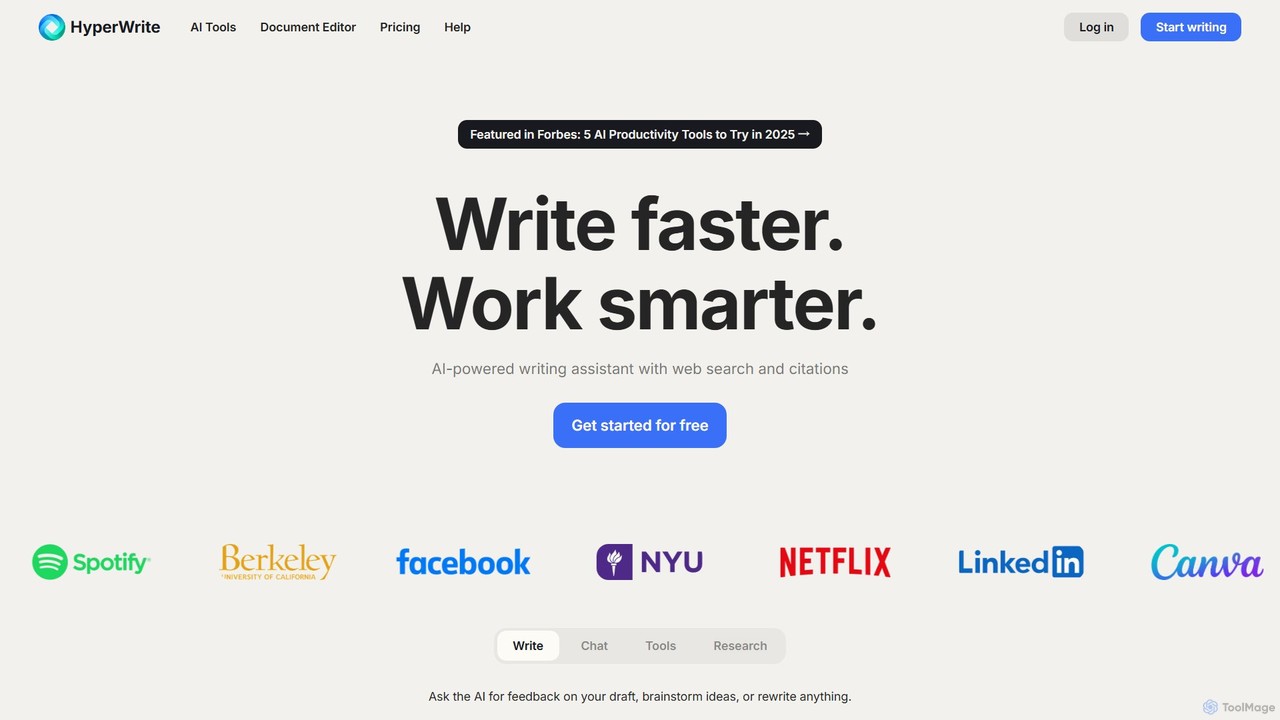
HyperWrite Product overview

HyperWrite is an advanced AI writing assistant designed to enhance productivity for students, marketers, and professionals. It offers hundreds of tools for writing, research, summarization, and content creation. Key features include real-time academic research with citations, customizable 'Personas' to match your writing style, and a seamless Chrome extension for workflow integration.

Preview

Quick facts

Compare product focus, pricing models and audiences. Highlighted rows indicate different listed information; unknown pricing does not mean free.

AuthorAI VS HyperWrite — Quick facts
Quick factsAuthorAIHyperWrite
Pricing modelFreemiumFreemium
Product typeWebWeb
Primary focusResearchResearch
Audience and rolesNo data availableNo data available
CategoriesResearch · Content Creation · WritingResearch · Content Creation · Writing
AddedAug 11, 2025Aug 2, 2025
UpdatedNov 19, 2026Nov 19, 2026

Features, usage and use cases

Explore the listed product descriptions, features and workflows. Taxonomy labels alone are not feature evaluations.

AuthorAI

AuthorAI is a next-generation writing platform that harnesses the power of artificial intelligence to assist writers of all kinds. Whether you're a novelist working on your next bestseller, a marketer crafting compelling campaigns, or a blogger creating engaging posts, AuthorAI provides the tools you need to streamline your workflow and elevate your content. It's more than just a text generator; it's a comprehensive creative partner designed to understand context, tone, and narrative structure, helping you transform your ideas into polished, impactful prose.

The platform is built on a sophisticated language model trained on a vast corpus of literature, professional writing, and marketing materials. This allows AuthorAI to not only generate text but also to offer intelligent suggestions for plot development, character arcs, and persuasive arguments. It aims to eliminate writer's block by providing endless inspiration and helping you structure your thoughts coherently, making the writing process faster, more efficient, and more enjoyable.

How to use AuthorAI

Using AuthorAI is an intuitive and straightforward process designed to integrate seamlessly into your writing routine:

  1. Choose Your Project Type: Start by selecting a template that matches your goal, such as 'Blog Post', 'Novel Chapter', 'Marketing Email', or 'Social Media Ad'.
  2. Provide Your Prompt: Give the AI a starting point. This can be a simple topic, a detailed outline, a character description, or a few sentences of an idea you want to expand. The more context you provide, the more relevant the output will be.
  3. Generate and Iterate: AuthorAI will generate a draft based on your input. You can then use the built-in editor to refine the text, ask the AI to rewrite specific sections, change the tone, or expand on certain points.
  4. Structure and Organize: Use the outlining and story-plotting tools to organize your narrative or article. Drag and drop sections, create character profiles, and build a coherent structure for your work.
  5. Polish and Export: Once you're satisfied with your content, use the advanced grammar and style checker to polish your final draft. You can then export your work in various formats, such as .docx, .pdf, or plain text.

Core Features of AuthorAI

  • Advanced Content Generation: Create original, high-quality content for any purpose, including articles, stories, essays, ad copy, and emails.
  • Narrative & Plot Development: Specialized tools for fiction writers to generate plot ideas, create detailed character backstories, and outline entire story arcs.
  • Intelligent Research Assistant: Ask the AI to research topics, summarize articles, and provide factual data with citations, directly within your writing environment.
  • Tone and Style Editor: Easily adjust the tone of your writing to be professional, casual, witty, persuasive, or any other style you require.
  • Multi-language Capabilities: Generate and translate content in over 25 languages, making it a powerful tool for global creators and businesses.
  • Plagiarism Checker: Ensure the originality of your content with an integrated plagiarism checker that scans against billions of web pages.
  • Collaborative Workspace: Invite team members to collaborate on documents in real-time, share feedback, and manage writing projects together.

Use Cases for AuthorAI

For Novelists and Fiction Writers: Develop complex characters, brainstorm plot twists, write compelling dialogue, and overcome writer's block when drafting chapters.

For Content Marketers: Quickly generate SEO-optimized blog posts, engaging social media updates, persuasive landing page copy, and effective email marketing campaigns.

For Students and Academics: Assist with research by summarizing sources, help structure essays and research papers, and paraphrase complex information to improve understanding and avoid plagiarism.

For Business Professionals: Draft professional reports, clear and concise emails, compelling presentations, and other business communications with ease.

Advantages of AuthorAI

AuthorAI stands out by offering a holistic writing environment. Its primary advantage is the fusion of creative generation with structural tools. Unlike basic AI writers, it provides specialized features for long-form narrative construction, making it invaluable for authors. Furthermore, its ability to adapt its voice and style, combined with a powerful research assistant, saves users countless hours of work. The collaborative features also make it an excellent choice for marketing teams and agencies looking to maintain a consistent brand voice across all content.

Pricing and Plans

AuthorAI operates on a freemium model, ensuring accessibility for everyone.

  • Free Plan: Perfect for getting started. Includes access to basic writing tools and a monthly quota of 5,000 generated words.
  • Pro Plan ($29/month): Designed for individual professionals and authors. Offers unlimited word generation, access to all advanced features like the plot developer and style editor, priority support, and an increased plagiarism check limit.
  • Teams Plan ($59/user/month): Built for collaboration. Includes all Pro features, plus a shared workspace, team management tools, centralized billing, and dedicated support.

HyperWrite

HyperWrite is a comprehensive AI-powered writing assistant that serves as a versatile partner for a wide range of writing and research tasks. Developed by OthersideAI, it leverages cutting-edge models like GPT-4 and a custom Llama 3 70B to help users work smarter and faster. Whether you're drafting an academic paper, creating marketing copy, or simply responding to emails, HyperWrite integrates seamlessly into your workflow to refine your ideas and bring your words to life. It's more than just a text generator; it's a research tool, an editor, and a creative collaborator all in one.

How to use HyperWrite

Getting started with HyperWrite is straightforward. Users can sign up for a free account to explore its basic features. The primary way to interact with the tool is through its web-based document editor or the powerful Chrome Extension, which brings AI assistance to any website you visit.

  1. Choose Your Tool: Access a library of hundreds of specialized tools directly on the HyperWrite website, such as the Summarizer, AI Speech Writer, or Email Responder.
  2. Use the Chrome Extension: Install the extension to get contextual AI assistance across the web. A key feature is 'TypeAheads,' which provides real-time sentence completions and suggestions as you type in Gmail, Google Docs, and more.
  3. Generate and Refine: Provide a prompt, an outline, or existing text. HyperWrite will generate original content, rewrite existing text, or offer suggestions. You can then use the 'Magic Editor' to adjust the tone, style, and clarity.
  4. Leverage Research: For academic or factual content, use 'Scholar AI' to find peer-reviewed articles and get accurate, citation-backed results in real-time.
  5. Personalize Your AI: Set up 'Personas' to teach the AI your unique writing style, ensuring the output sounds authentically like you.

Core Features of HyperWrite

  • Hundreds of AI Tools: A vast library of pre-made tools for any use-case, from writing blog posts and social media copy to crafting legal documents and creative stories.
  • AutoWrite & AI Writer: Generate high-quality, original content on any topic and in any format based on a simple description.
  • Scholar AI: A powerful research assistant that searches millions of scholarly articles and papers to provide accurate, up-to-date, and citation-backed information.
  • Content Rewriter & Summarizer: Effortlessly rewrite content to improve clarity or change the tone, and summarize long texts to extract key points.
  • Magic Editor & Email Responder: Edit documents to enhance clarity, tone, and style. Automatically generate professional email replies based on the original message and a brief instruction.
  • Custom Personas: Create up to 10 custom personas to make the AI adopt your specific voice, style, and tone, moving beyond generic AI-generated text.
  • TypeAhead Suggestions: The Chrome extension provides intelligent, as-you-type suggestions to help you write faster and overcome writer's block.
  • Seamless Chrome Extension: Integrates HyperWrite's capabilities into virtually any website, including Gmail, Google Docs, social media platforms, and more.

Use Cases for HyperWrite

HyperWrite is trusted by a diverse range of users to improve efficiency and quality:

  • Students: Accelerate academic research, write structured essays, simplify complex topics, and generate citations.
  • Marketers & Content Creators: Create SEO-friendly blog posts, persuasive ad copy, engaging social media updates, and compelling marketing emails.
  • Business Professionals: Draft professional emails, write detailed reports and proposals, generate speech outlines, and automate communication tasks.
  • Job Seekers: Craft tailored resumes and cover letters, and prepare for interviews by generating potential questions and answers.
  • Startup Founders: Quickly create business plans, investor pitches, and website copy, allowing them to focus on core business activities.

Advantages of HyperWrite

HyperWrite stands out by offering a combination of power, personalization, and practicality. Its main advantages include a significant productivity boost by automating repetitive writing tasks, enhanced writing quality through advanced editing and style suggestions, and access to factual, current information with its real-time research capabilities. The 'Personas' feature provides unparalleled personalization, while the Chrome extension ensures a frictionless experience, making powerful AI assistance available wherever you work.

Pricing and Plans

HyperWrite offers a flexible pricing structure to suit different needs:

  • Free Plan: Provides limited monthly credits and access to basic AI features, perfect for casual users.
  • Premium Plan: Priced at $19.99/month or $16/month when billed annually. It includes 250 AI messages per month, access to advanced AI models, citations and real-time info, 3 custom personas, and unlimited TypeAheads.
  • Ultra Plan: Priced at $44.99/month or $29/month when billed annually. It offers everything in Premium plus unlimited AI messages, 10 custom personas, and priority access to new experimental features.

Discounts: HyperWrite offers a 50% student discount for users with a valid .edu email address. New users can also get 50% off their first month with the code TRYHYPERWRITE.

Positioning

Their taxonomy shows where the products overlap and where each one has a more distinct focus. Unknown fields are shown explicitly and are never filled with assumptions.

Categories

Shared
ResearchContent CreationWriting
Only AuthorAI
No listed items
Only HyperWrite
No listed items

Tags

Shared
ai writercontent generationwriting assistant
Only AuthorAI
authoring toolcopywritingcreative writingmarketing copynovelist toolstorytelling
Only HyperWrite
academic researchchrome extensionemail assistantgpt-4marketingproductivityrewritersummarizer

Audience and roles

Shared
No listed items
Only AuthorAI
No listed items
Only HyperWrite
No listed items

Traffic comparison

Traffic is shown on the same scale so differences in market visibility are not visually understated.

How to interpret the traffic data

Both charts share the same months and vertical scale. Each tool identifies its latest reporting month; missing months are left blank, not counted as zero. Regional and source visit counts are estimates calculated from the reported shares.

AuthorAI

No data available

HyperWrite monthly traffic:

Latest traffic · 2026-05

Monthly visits
314.5K
Avg. visit duration
1:52
Pages per visit
5.8
Bounce rate
36.83%
Data updated 2026-06-11

Monthly traffic trend

  • 2025-09: 564K
  • 2026-01: 354.7K
  • 2026-02: 359.5K
  • 2026-03: 365.1K
  • 2026-04: 330K
  • 2026-05: 314.5K

Top regions

Top 5 countries/regions
Country/regionPercentageEstimated visits
🇺🇸United States73.81%232.1K
🇬🇧United Kingdom11.24%35.3K
🇮🇳India5.96%18.7K
🇨🇳China4.55%14.3K
🇹🇭Thailand4.44%14K

Traffic sources

Source typePercentageEstimated visits
Direct87%273.6K
Referral11.2%35.2K
Email1.8%5.7K

Search keywords

ai writerbest ai to find quotes on pageshyperwritehyperwrite aiplain language tranlator

Community signals

Ratings, comments, favorites, and likes are community signals—not a substitute for product fit.

AuthorAI

Rating
No data available
Comments
0
Favorites
197
Likes
209

HyperWrite

Rating
No data available
Comments
0
Favorites
196
Likes
176

AuthorAI vs HyperWrite · Comparison FAQ

What do AuthorAI and HyperWrite have in common?
Both tools are listed under Research、Content Creation、Writing. These categories indicate overlapping use cases; compare their detailed descriptions for workflows, capabilities and limitations.
Are AuthorAI and HyperWrite free?
Listed pricing models: AuthorAI — Freemium; HyperWrite — Freemium. Missing pricing is not proof of a free plan, and freemium does not mean every feature is free. Check official sites for current plans, limits and trials.
How should I choose between AuthorAI and HyperWrite?
The primary listed category is Research for AuthorAI, and Research for HyperWrite. Compare features, steps and use cases, then verify pricing, data permissions and deployment needs. This page does not include hands-on testing and does not declare a winner from traffic or tags.

Sources and comparison methodology

This page is assembled from ToolMage product listings, taxonomy, traffic statistics and on-site user feedback. It is not a hands-on test or an independent review.


  • Feature and plan descriptions reflect information in the listings, not real-time guarantees. Verify pricing, quotas, availability and privacy terms on the official sites.
  • Traffic uses the reporting months shown. Missing statistics do not mean zero visits, and different periods do not establish growth or superiority. Regional and source visit counts are estimates based on shares.
  • Different tags indicate differences in the listings, not proof that the other product lacks a capability. Ratings, favorites and visits are not used to declare a winner.

Related comparisons