ToolMage
Sign in

AI TOOL COMPARISON

Blink vs Databutton

What is the difference, and which fits your workflow? Compare features, usage, pricing models and traffic side by side.

Jump to key differences

Product overview

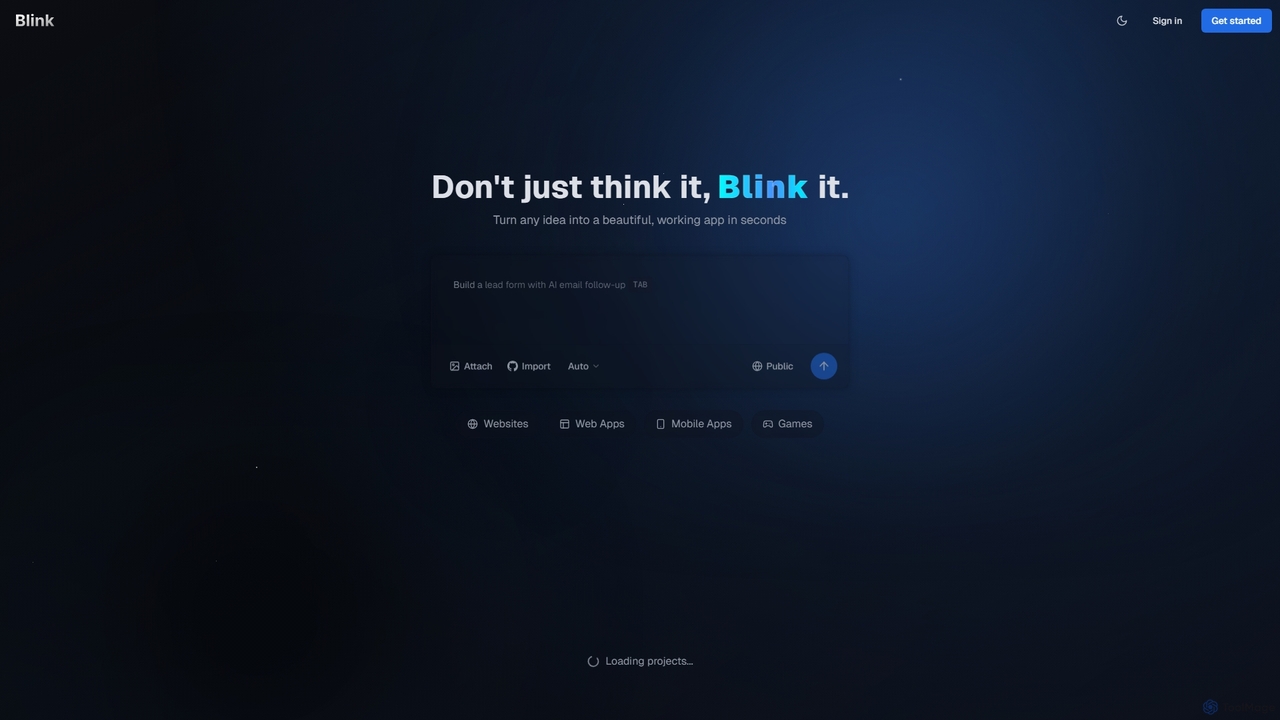
Blink Product overview

Blink is an AI-powered app developer that allows you to build websites, web apps, and mobile applications using plain English. No coding required. Simply describe your idea, and Blink's AI agent writes the code, sets up databases, and deploys your project automatically. It's designed for entrepreneurs and businesses to launch their ideas quickly and affordably.

Preview

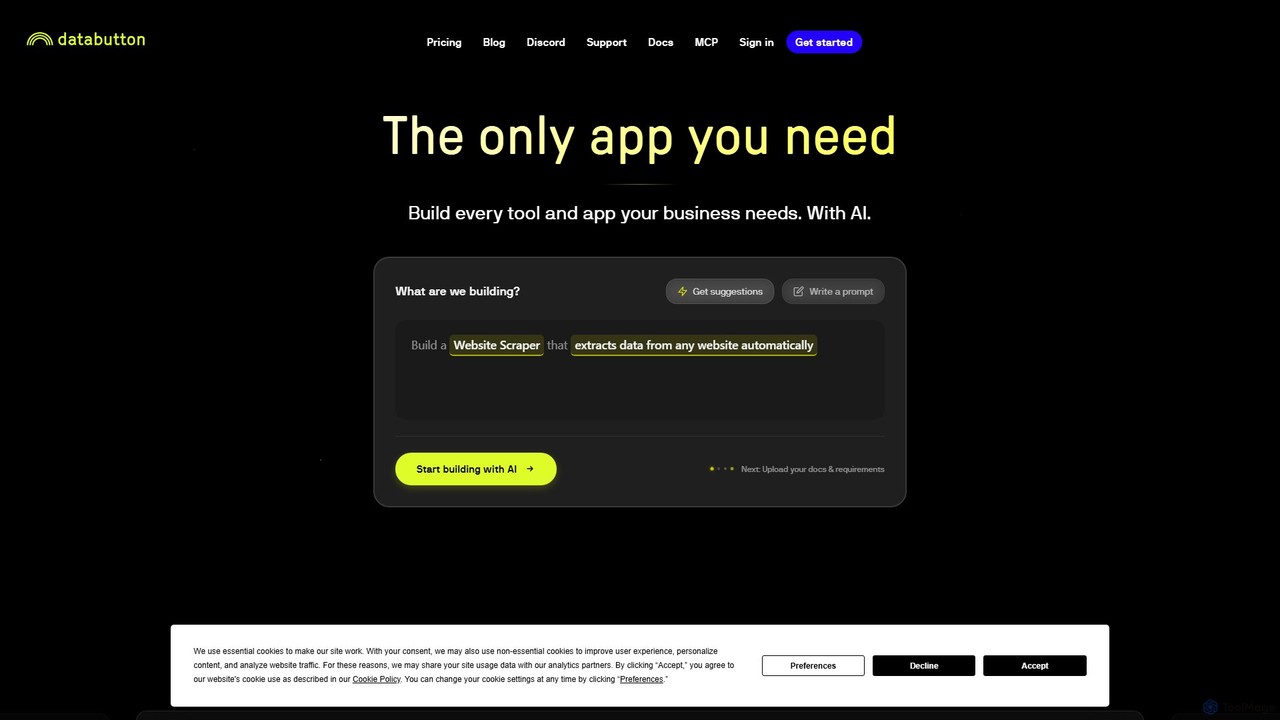
Databutton Product overview

Databutton is an AI-powered app builder that empowers non-technical users and entrepreneurs to create and deploy fully functional web applications. Through a conversational AI agent, you can describe your app idea, and Databutton will generate the frontend, backend, and database, allowing for rapid iteration and one-click deployment without writing a single line of code.

Preview

Quick facts

Compare product focus, pricing models and audiences. Highlighted rows indicate different listed information; unknown pricing does not mean free.

Blink VS Databutton — Quick facts
Quick factsBlinkDatabutton
Pricing modelFreemiumFreemium
Product typeWebWeb
Primary focusNo Code & Low CodeStartup Tools
Audience and rolesEntrepreneur · Founder · Marketing Manager · Product Manager · Small Business Owner · Software Developer · UI/UX DesignerNo data available
CategoriesNo Code & Low Code · App Builder · Website BuilderStartup Tools · No Code & Low Code · Automation
AddedSep 20, 2025Aug 15, 2025
UpdatedNov 19, 2026Nov 19, 2026

Features, usage and use cases

Explore the listed product descriptions, features and workflows. Taxonomy labels alone are not feature evaluations.

Blink

Blink is a revolutionary AI-powered development platform that empowers anyone to build custom websites, web applications, and mobile apps without writing a single line of code. It acts as an intelligent AI coding agent, translating your ideas, described in plain English, into fully functional, production-ready software. Designed for entrepreneurs, startups, and businesses, Blink dramatically accelerates the development process, allowing you to go from concept to launch in a fraction of the time and cost of traditional methods. Whether you're looking to build a minimum viable product (MVP), an internal tool, or a sophisticated web service, Blink provides the infrastructure, code generation, and deployment capabilities to bring your vision to life.

How to use Blink

Getting started with Blink is designed to be intuitive and straightforward, even for those with no technical background. The process is centered around natural language communication with the AI agent:

  1. Sign Up: Create a free account using your email, Google, or GitHub account to get started.
  2. Describe Your Project: In the project creation interface, simply describe the application you want to build. Be as detailed as possible. For example, instead of "a task app," try "a to-do list application where users can sign up, create tasks with due dates and priorities, and mark them as complete."
  3. AI Generation: Blink's AI agent will analyze your description, ask clarifying questions if needed, and then begin generating the necessary components: front-end code (UI/UX), back-end logic, and database schemas.
  4. Review and Iterate: Once the initial version is built, you can review it. If you need changes or new features, you can provide further instructions in plain English, such as "Add a dark mode toggle" or "Integrate a payment gateway." The AI will iterate on the existing codebase.
  5. Deploy: With a single click, Blink handles the entire deployment process. It sets up hosting, configures the server, and makes your application live on the web. Paid plans allow you to connect a custom domain for a professional touch.

Core Features of Blink

  • AI-Powered Code Generation: Leverages advanced AI models to write clean, efficient, and scalable code for front-end, back-end, and databases based on natural language prompts.
  • Full-Stack Application Development: Capable of building complete applications, including user interfaces, server-side logic, user authentication, and database management.
  • No-Code/Low-Code Interface: Eliminates the need for traditional coding, making software development accessible to everyone, regardless of their technical expertise.
  • Automated Deployment & Hosting: Simplifies the launch process by automatically handling server setup, deployment, and hosting, with all plans including hosting services.
  • Code Ownership and Export: On paid plans, you have full ownership of the generated code and can download the entire source code, preventing vendor lock-in and allowing for custom modifications or migration to other platforms.
  • Iterative Development Cycle: Easily add features, fix bugs, or change the design by providing new text-based instructions to the AI.
  • Project Collaboration: The Pro plan and higher allow multiple users to collaborate on the same project, making it suitable for teams.
  • Custom Domain Support: Connect your own domain name to your application for a branded, professional online presence.

Use Cases for Blink

Blink is a versatile tool suitable for a wide range of projects, including:

  • Minimum Viable Products (MVPs): Entrepreneurs and startups can rapidly build and launch MVPs to test market demand and gather user feedback without significant upfront investment.
  • Internal Business Tools: Create custom applications for internal use, such as project management dashboards, employee directories, inventory trackers, or custom CRMs.
  • Websites and Landing Pages: Build dynamic websites, marketing landing pages, and lead generation forms with integrated follow-up sequences.
  • Small E-commerce Platforms: Develop simple online stores or booking systems to sell products or services.
  • Functional Prototypes: Product managers and designers can create high-fidelity, functional prototypes to demonstrate user flows and features to stakeholders.

Advantages of Blink

Using Blink offers several key advantages over traditional development or other no-code platforms:

  • Unprecedented Speed: Reduce development timelines from months to mere days or even hours.
  • Significant Cost Savings: Avoid the high costs associated with hiring developers, designers, and DevOps engineers.
  • Democratization of Technology: Empowers non-technical founders and business professionals to build their own software solutions.
  • Flexibility and Scalability: Unlike many closed no-code systems, the ability to export your code means your application can grow and scale beyond the platform's initial capabilities.
  • Focus on Idea, Not Implementation: Allows you to concentrate on your business idea and user experience, while the AI handles the technical implementation details.

Pricing and Plans

Blink offers a flexible pricing structure to suit different needs, from hobbyists to power users. All plans operate on a credit system, where credits are used for AI generation tasks.

  • Free Plan ($0/month): Perfect for getting started and exploring the platform. Includes 10 credits per month, public projects, and community support.
  • Starter Plan ($20/month): Ideal for hobby projects and small applications. Includes 100 credits per month, private projects, custom domains, the ability to download code, and removal of the Blink badge.
  • Pro Plan ($50/month): Designed for active development and professional use. Includes 250 credits per month, everything in Starter, plus access to advanced AI models, priority support, and project collaboration features.
  • Max Plan ($200/month): The best value for power users and businesses. Includes 1,200 credits per month, everything in Pro, plus early access to beta features and premium support.

You can upgrade, downgrade, or cancel your plan at any time, providing complete flexibility as your project's needs evolve.

Databutton

Databutton is a revolutionary AI development platform designed to democratize software creation. It acts as an AI developer, specifically tailored for entrepreneurs, business owners, and individuals without a technical background. The core mission of Databutton is to bridge the gap between a great idea and a fully functional, deployed web application. By leveraging a sophisticated AI agent, users can build complex software simply by describing their needs in natural language. This eliminates the traditional barriers of coding, technical infrastructure, and high development costs, making it possible for anyone to bring their digital products to life.

The platform is built on an agentic framework, where the AI doesn't just generate code snippets but understands the user's intent to build, modify, and maintain a complete application. It handles the entire development lifecycle, from creating the user interface (frontend) and server-side logic (backend) to managing databases and deploying the final product. This holistic approach ensures a seamless and integrated development experience, allowing creators to focus on their vision and user needs rather than technical complexities.

How to use Databutton

Using Databutton is an intuitive, conversational process designed for simplicity and speed:

  1. Describe Your Idea: Start by explaining your application concept to the Databutton AI agent in plain English. You can describe the features, target users, and desired design.
  2. AI-Powered Generation: The AI agent interprets your request and automatically generates the necessary code for the frontend, backend, and database. You can see the app take shape in real-time.
  3. Iterate and Refine: Review the generated application. If you need changes or new features, simply provide further instructions to the AI. For example, you can say "Add a user login page" or "Change the color of the main button to blue." The AI will make the modifications instantly.
  4. Integrate Services: If your app needs to connect to external services like GPT-4 for AI features or Stripe for payments, you can easily add your API keys within the application's code, which the AI helps you manage.
  5. One-Click Deployment: Once you are satisfied with your app, you can deploy it with a single click. Databutton provides free hosting on a `[username].databutton.app` subdomain, with options to deploy to a custom domain on paid plans.
  6. Get Support: If you encounter any challenges, Databutton offers world-class support through an in-product chat, a dedicated Discord community, weekly office hours, and even dedicated human developer teams for premium users.

Core Features of Databutton

  • AI Agent Developer: A conversational AI that understands natural language prompts to build and modify full-stack applications.
  • Full-Stack Generation: Automatically creates all components of a web app, including the frontend UI, backend logic, and database schema.
  • One-Click Deployment & Hosting: Seamlessly deploy applications to the web. Frontend hosting is free, and backend usage is based on a pay-as-you-go model.
  • Full Code and IP Ownership: Users retain complete ownership of their application's code and intellectual property. Databutton is a facilitator, not an owner.
  • Third-Party API Integration: Easily incorporate external services (e.g., OpenAI, ElevenLabs, Stripe) into your application by adding your own API keys.
  • Comprehensive Support System: Access to a vibrant community on Discord, weekly office hours, and direct support from the Databutton team, including human developer assistance.
  • Custom Domain Support: Paid plans allow you to launch your app on your own custom domain for professional branding.

Use Cases for Databutton

Databutton is versatile enough to build a wide range of applications, as demonstrated by its community of creators:

  • Internal Business Tools: Automate internal workflows, such as building a custom CRM or a due diligence tool for a paper-based industry like mortgage debt.
  • Niche SaaS Products: Create and launch specialized software-as-a-service platforms, like a real-time currency strength analytics tool for financial traders.
  • MVPs for Startups: Quickly build and test a Minimum Viable Product (MVP) to validate a business idea and attract initial users without a large upfront investment.
  • Educational & Community Apps: Develop platforms for learning and community engagement, such as a safe, controlled environment for children to experiment with AI.
  • Personal Projects & Prototypes: Bring personal ideas to life, whether it's a simple utility app or a prototype for a larger concept.

Advantages of Databutton

Databutton offers significant advantages over traditional development and other no-code platforms:

  • Accessibility: It dramatically lowers the barrier to entry for software development, empowering non-coders to build sophisticated applications.
  • Speed and Agility: The AI-driven process allows for incredibly fast development cycles, enabling users to go from idea to a deployed app in a fraction of the time.
  • Cost-Effectiveness: Avoid the high costs associated with hiring developers or a full agency. The pricing model is designed to be affordable and scalable.
  • Empowerment and Control: Users are not locked into a proprietary system. They own their code and have the flexibility to extend or migrate their application as needed.
  • Unparalleled Support: The combination of an AI agent and human support ensures that users are never stuck and can successfully launch and grow their applications.

Pricing and Plans

Databutton's pricing is designed to be flexible and scale with your needs. The model is primarily based on credits and tiered plans:

  • Hosting: Frontend hosting is provided for free. Backend hosting is charged based on compute usage at a rate of 2 credits per compute-hour. This means you only pay for what your app actually uses.
  • Plans: While specific tiers may vary, the structure includes plans tailored for different stages. The "Launch" plan, at $50/month, includes key features like deployment to custom domains. This suggests the existence of a free or lower-cost entry-level tier for building and testing.
  • AI Builder Usage: The use of the Databutton AI app developer to build your app is covered by your credit usage. You do not need to bring your own LLM keys for the building process itself.
  • App Launch Program: For users who want a fully managed experience, Databutton offers a dedicated program starting from $5000. An expert team will build the first version of your app and provide ongoing support.

Positioning

Their taxonomy shows where the products overlap and where each one has a more distinct focus. Unknown fields are shown explicitly and are never filled with assumptions.

Categories

Shared
No Code & Low Code
Only Blink
App BuilderWebsite Builder
Only Databutton
Startup ToolsAutomation

Tags

Shared
AI developerapp builderlow-codeMVPno-codesoftware development
Only Blink
AI coding agentcode generationmobile app developmentprototypeweb appwebsite builder
Only Databutton
automationentrepreneurfull-stackstartupweb application

Audience and roles

Shared
No listed items
Only Blink
EntrepreneurFounderMarketing ManagerProduct ManagerSmall Business OwnerSoftware DeveloperUI/UX Designer
Only Databutton
No listed items

Traffic comparison

Traffic is shown on the same scale so differences in market visibility are not visually understated.

How to interpret the traffic data

Both charts share the same months and vertical scale. Each tool identifies its latest reporting month; missing months are left blank, not counted as zero. Regional and source visit counts are estimates calculated from the reported shares.

Blink monthly traffic:

Latest traffic · 2026-05

Monthly visits
1.1M
Avg. visit duration
1:40
Pages per visit
3.14
Bounce rate
44.92%
Data updated 2026-06-15

Monthly traffic trend

  • 2025-09: 310K
  • 2026-01: 557.2K
  • 2026-02: 563.5K
  • 2026-03: 749.8K
  • 2026-04: 750.8K
  • 2026-05: 1.1M

Top regions

Top 5 countries/regions
Country/regionPercentageEstimated visits
🇺🇸United States58.15%616.6K
🇫🇷France13.01%137.9K
🇮🇳India12.83%136K
🇨🇦Canada9.32%98.8K
🇬🇧United Kingdom6.69%70.9K

Traffic sources

Source typePercentageEstimated visits
Direct83.12%881.3K
Referral13.83%146.6K
Email3.05%32.3K

Search keywords

1flexblinkblink aimotionmuseskillspring.app

Databutton monthly traffic:

Latest traffic · 2026-05

Monthly visits
3.9K
Avg. visit duration
0:00
Pages per visit
1.01
Bounce rate
50.33%
Data updated 2026-06-15

Monthly traffic trend

  • 2025-09: 96.1K
  • 2026-01: 16.6K
  • 2026-02: 16.2K
  • 2026-03: 13.7K
  • 2026-04: 6.1K
  • 2026-05: 3.9K

Top regions

Top 5 countries/regions
Country/regionPercentageEstimated visits
🇻🇳Vietnam68.93%2.7K
🇩🇪Germany19.04%746
🇮🇳India8.39%329
🇲🇽Mexico3.64%143

Search keywords

data buttondatabuttondatabutton iadatabuttonviral shahdatabutton website

Community signals

Ratings, comments, favorites, and likes are community signals—not a substitute for product fit.

Blink

Rating
No data available
Comments
0
Favorites
183
Likes
186

Databutton

Rating
No data available
Comments
0
Favorites
169
Likes
168

Blink vs Databutton · Comparison FAQ

What do Blink and Databutton have in common?
Both tools are listed under No Code & Low Code. These categories indicate overlapping use cases; compare their detailed descriptions for workflows, capabilities and limitations.
Are Blink and Databutton free?
Listed pricing models: Blink — Freemium; Databutton — Freemium. Missing pricing is not proof of a free plan, and freemium does not mean every feature is free. Check official sites for current plans, limits and trials.
How should I choose between Blink and Databutton?
The primary listed category is No Code & Low Code for Blink, and Startup Tools for Databutton. Compare features, steps and use cases, then verify pricing, data permissions and deployment needs. This page does not include hands-on testing and does not declare a winner from traffic or tags.

Sources and comparison methodology

This page is assembled from ToolMage product listings, taxonomy, traffic statistics and on-site user feedback. It is not a hands-on test or an independent review.

  • Feature and plan descriptions reflect information in the listings, not real-time guarantees. Verify pricing, quotas, availability and privacy terms on the official sites.
  • Traffic uses the reporting months shown. Missing statistics do not mean zero visits, and different periods do not establish growth or superiority. Regional and source visit counts are estimates based on shares.
  • Different tags indicate differences in the listings, not proof that the other product lacks a capability. Ratings, favorites and visits are not used to declare a winner.

Related comparisons