ToolMage
Sign in

AI TOOL COMPARISON

ChatKit vs mfuniko

What is the difference, and which fits your workflow? Compare features, usage, pricing models and traffic side by side.

Jump to key differences

Product overview

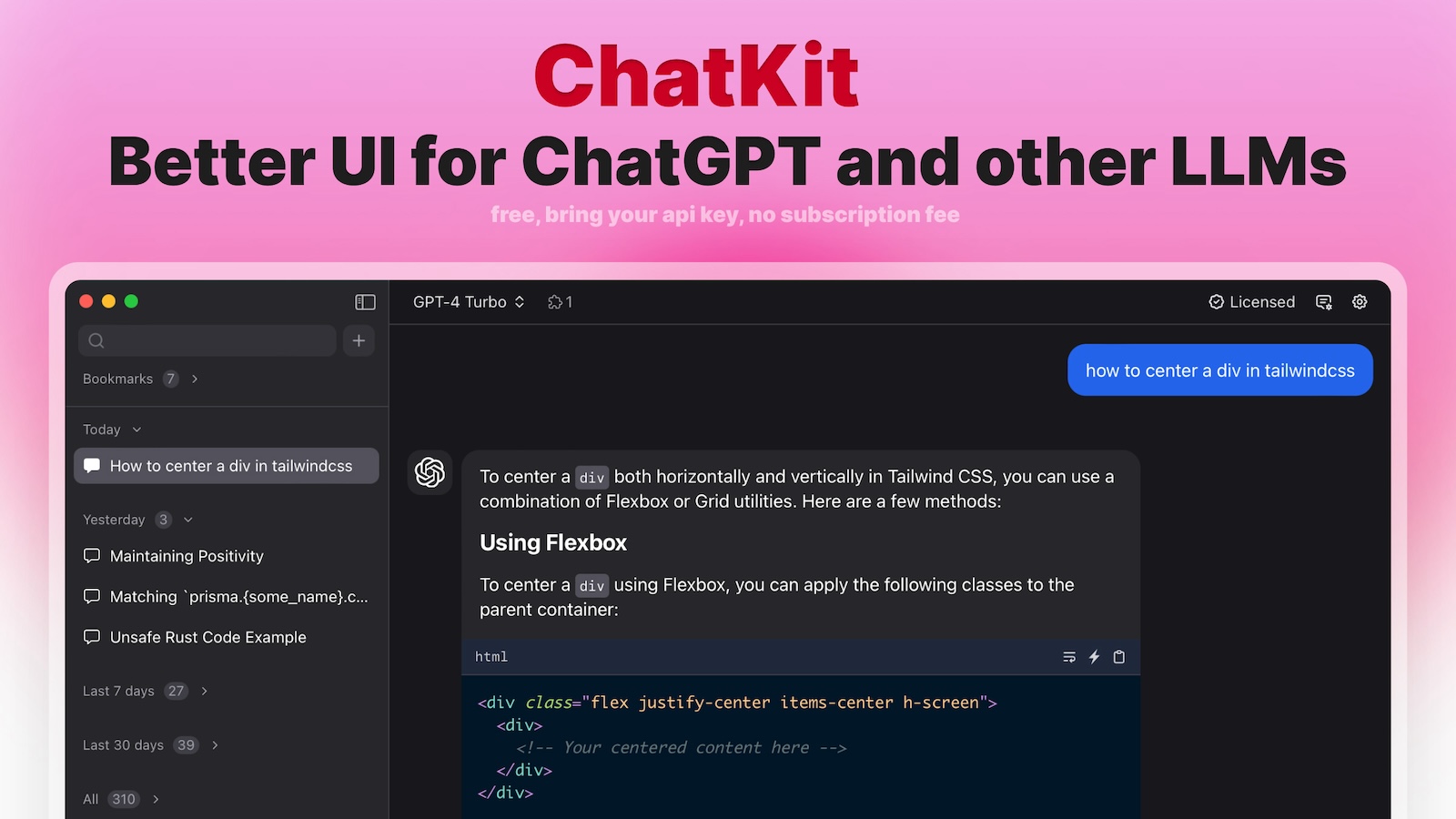
ChatKit Product overview

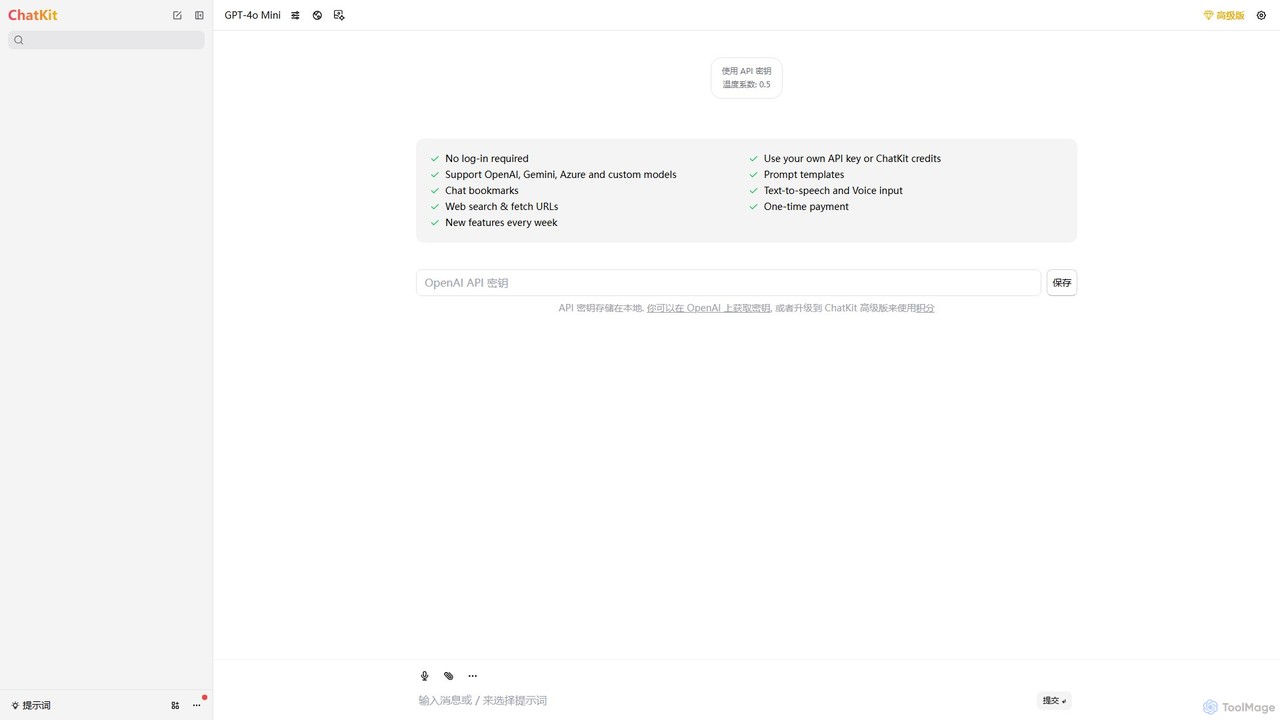
ChatKit is a refined, unified chat interface for top AI models like OpenAI, Gemini, and Azure. It enhances your workflow with features like web search, prompt templates, voice input, and chat bookmarks, all while prioritizing user privacy with local API key storage and no required login.

Preview

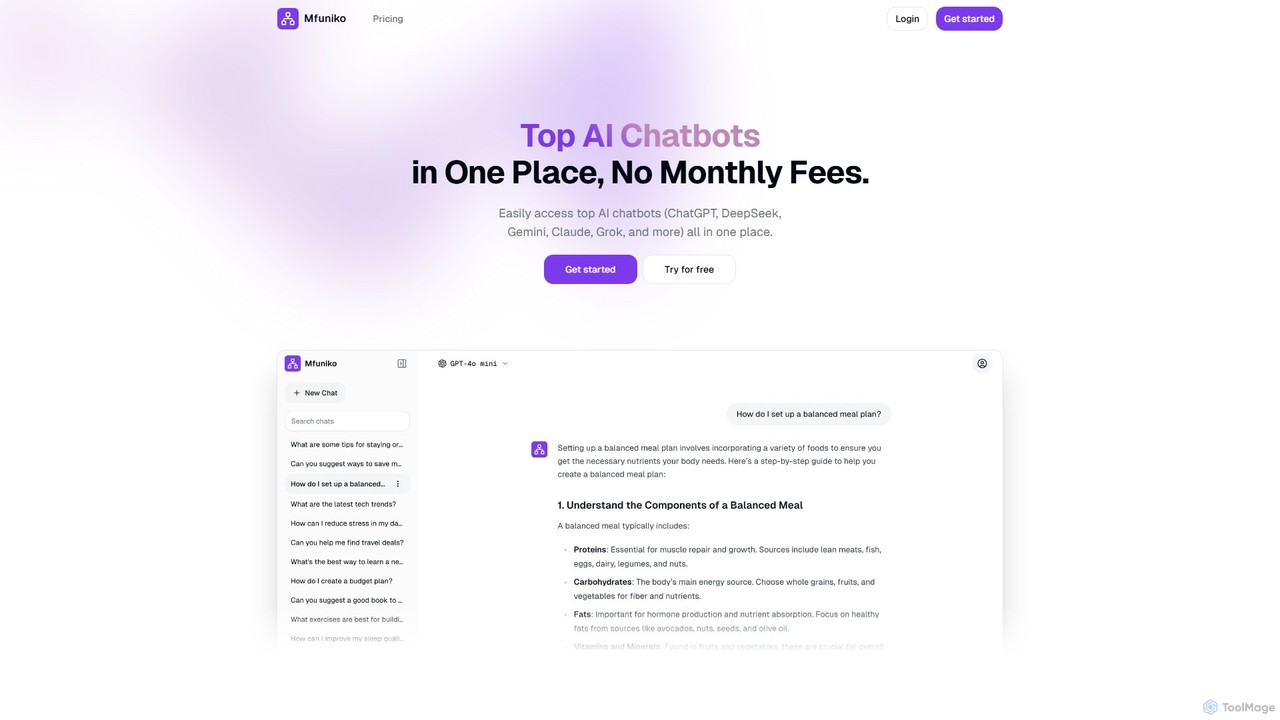
mfuniko Product overview

Mfuniko is a unified AI chat interface that allows you to access top AI models like ChatGPT, Gemini, Claude, and Grok in one place. It operates on a 'bring your own API key' model with a one-time payment for lifetime access, eliminating monthly subscription fees. It offers advanced features like file and image chat, chat organization, and text-to-speech to streamline your AI workflow.

Preview

Quick facts

Compare product focus, pricing models and audiences. Highlighted rows indicate different listed information; unknown pricing does not mean free.

ChatKit VS mfuniko — Quick facts
Quick factsChatKitmfuniko
Pricing modelFreemiumPaid
Product typeWebWeb
Primary focusApi ManagementApi Management
Audience and rolesNo data availableNo data available
CategoriesApi Management · Chatbot · Writing AssistantApi Management · Chatbot · Writing Assistant
AddedAug 9, 2025Aug 13, 2025
UpdatedNov 19, 2026Nov 19, 2026

Features, usage and use cases

Explore the listed product descriptions, features and workflows. Taxonomy labels alone are not feature evaluations.

ChatKit

ChatKit is a sophisticated and versatile AI chat client designed to streamline your interaction with a variety of leading large language models (LLMs). It serves as a single, powerful interface for models from OpenAI (including ChatGPT), Google Gemini, Microsoft Azure, and even custom models. By consolidating access, ChatKit eliminates the need to switch between different platforms, creating a more efficient and productive workflow for developers, writers, researchers, and general users alike.

The core philosophy of ChatKit revolves around user control, privacy, and an enhanced feature set. Unlike many other services, it offers a 'Bring Your Own Key' (BYOK) model, allowing you to use your personal API keys directly. These keys are stored locally in your browser, ensuring they are never transmitted to ChatKit's servers, providing a high level of security and privacy. For those who prefer a simpler approach or don't have their own keys, ChatKit also offers a credit-based system with a one-time payment.

How to use ChatKit

Getting started with ChatKit is designed to be simple and flexible:

  1. Navigate to the ChatKit web application at chatkit.app.
  2. Select your preferred AI model from the available options (e.g., GPT-4, Gemini Pro).
  3. Option 1 (Bring Your Own Key): Go to the settings menu and enter your API key from a provider like OpenAI or Azure. Your key will be saved securely in your browser's local storage for future use. You will only be billed by your API provider for your usage.
  4. Option 2 (Use ChatKit Credits): If you don't have an API key, you can purchase ChatKit credits via a one-time payment. This allows you to use the supported models without any external setup.
  5. Begin your conversation. You can type your queries, use voice input, or leverage advanced features.
  6. To get real-time information, use the web search feature by prefixing your query. You can also provide a URL for the AI to fetch and analyze its content.
  7. Fine-tune the AI's output by adjusting parameters like 'temperature' to control creativity.
  8. Organize your workflow by creating and using prompt templates for recurring tasks and bookmarking important conversations for easy retrieval.

Core Features of ChatKit

  • Multi-Model Support: Seamlessly switch between major AI models, including OpenAI's GPT series, Google's Gemini, Microsoft Azure, and custom-configured models.
  • Enhanced Privacy (BYOK): Use your own API key, which is stored locally on your device. No login is required, ensuring your data and keys remain private.
  • Web Search & URL Fetching: Grant the AI access to the live internet to get up-to-date answers and summarize content from any webpage.
  • Prompt Templates: Create, save, and manage a library of your most-used prompts to accelerate your workflow and ensure consistent outputs.
  • Chat Bookmarks: Easily save and categorize important or insightful conversations, creating a personal knowledge base.
  • Voice-to-Text and Text-to-Speech: Interact with the AI using your voice for input and listen to the responses, offering a hands-free experience.
  • Parameter Control: Adjust model parameters like temperature to fine-tune the balance between factual accuracy and creative freedom in the AI's responses.
  • Credit-Based System: An alternative to BYOK, offering a simple one-time payment for credits to use the platform's full capabilities.

Use Cases for ChatKit

ChatKit is a versatile tool suitable for a wide range of professionals and enthusiasts:

  • Content Creators & Marketers: Use prompt templates to rapidly generate blog posts, social media content, and ad copy. Compare outputs from different models like Gemini and GPT-4 to find the best result.
  • Developers & Programmers: Debug code, write documentation, and prototype with different AI models in a single, unified interface without constant context switching.
  • Researchers & Academics: Leverage the web search feature to gather and synthesize information from the latest research papers, articles, and news sources.
  • Students: Summarize long articles or web pages for study notes, use text-to-speech to review materials, and get help with complex topics.
  • Business Professionals: Draft professional emails, create presentation outlines, analyze reports, and brainstorm ideas with enhanced privacy and control.

Advantages of ChatKit

ChatKit stands out by offering several key benefits:

  • Unified Platform: Saves time and effort by providing access to multiple top-tier LLMs in one clean interface.
  • User-Centric Privacy: The local storage of API keys and no-login requirement puts you in full control of your data.
  • Cost-Efficiency: The BYOK model means you only pay for what you use from your API provider. The one-time payment for credits offers a clear, predictable alternative.
  • Productivity Boost: Advanced features like templates, bookmarks, and web search are specifically designed to streamline common tasks and save you time.
  • Flexibility and Customization: The ability to switch models and tweak parameters allows you to tailor the AI's performance to your specific needs.

Pricing and Plans

ChatKit operates on a flexible freemium model:

  • Free Plan (BYOK): Users can use the platform for free by connecting their own API key from services like OpenAI, Google AI, or Azure. In this model, users are responsible for the costs incurred on their own API accounts.
  • Premium Plan (Credits): For users without an API key or those who prefer a consolidated payment, ChatKit offers a premium option. This involves a one-time payment that provides a specific amount of credits. These credits can be used to access the various AI models through the ChatKit platform. For the most current pricing and credit package details, please visit the official website.

mfuniko

Mfuniko is a powerful and cost-effective platform designed to centralize your interactions with various leading AI chatbots. It serves as a single, unified interface, eliminating the need to switch between multiple tabs and services to access models like OpenAI's ChatGPT, Google's Gemini, Anthropic's Claude, xAI's Grok, and DeepSeek. The core philosophy of Mfuniko is to provide flexibility and control to the user, operating on a unique 'Bring Your Own API Key' (BYOK) model combined with a one-time purchase for lifetime access to the platform's features.

This approach means you are not tied to recurring monthly subscriptions. You pay once for the Mfuniko application and then only pay the respective AI providers (like OpenAI or Google) for your actual usage, giving you complete transparency and control over your expenses. Mfuniko enhances the standard chat experience by adding a layer of powerful productivity features on top of these models.

How to use mfuniko

Getting started with Mfuniko is a straightforward process designed for both technical and non-technical users:

  1. Choose Your Plan: Select one of the one-time payment plans (Starter, Standard, or Pro) based on the features you need.
  2. Obtain API Keys: Get your personal API keys from the AI model providers you wish to use (e.g., from your OpenAI, Google AI, or Anthropic account).
  3. Configure Mfuniko: Enter your API keys into the secure settings panel within the Mfuniko application.
  4. Start Chatting: Begin your conversations. You can easily select which AI model to use for any chat, allowing you to compare responses or use the best model for a specific task.
  5. Utilize Advanced Features: Upload documents for analysis, use images as prompts (with vision-enabled models), organize your chats into folders, and share them with others.

Core Features of mfuniko

  • Multi-Model Integration: Seamlessly access and switch between top-tier AI models including ChatGPT, Gemini, Claude, Grok, DeepSeek, and more from a single dashboard.
  • Bring Your Own API Key (BYOK): Connect your personal API keys to maintain control over your data and pay for usage directly, avoiding platform markups.
  • One-Time Payment: Forget monthly fees. Purchase a lifetime license to the Mfuniko platform and its features with a single payment.
  • Chat with Files: Upload documents (PDFs, DOCX, etc.) and have the AI analyze, summarize, or answer specific questions about their content.
  • Chat with Images (Vision): Use images as part of your prompts with compatible vision models to analyze visual data, describe scenes, or generate related text.
  • Advanced Chat Management: Organize your conversations with folders, search through your entire chat history, save important chats, and share them easily across devices.
  • Text-to-Speech: Convert the AI's text responses into spoken audio, perfect for multitasking or accessibility.

Use Cases for mfuniko

Mfuniko is a versatile tool suitable for a wide range of professionals and enthusiasts:

  • Content Creators & Marketers: Generate and compare blog posts, ad copy, and social media content from different models to find the most creative and effective results.
  • Developers & Programmers: Get coding assistance, debug code, and compare solutions from various AI models to accelerate development cycles.
  • Researchers & Academics: Upload research papers or datasets to quickly summarize findings, extract key information, and generate hypotheses.
  • Students & Educators: Analyze lecture notes, get help with homework, and use the text-to-speech feature to listen to study materials on the go.
  • Business Professionals: Summarize long reports, draft emails, and analyze business documents to improve productivity and decision-making.

Advantages of mfuniko

The primary advantages of using Mfuniko include:

  • Cost-Effectiveness: The one-time payment model is significantly more affordable in the long run compared to monthly subscriptions. You only pay for what you use at the base API rate.
  • Unparalleled Flexibility: Effortlessly test and compare outputs from the world's best AI models for any prompt, ensuring you always get the highest quality result.
  • Centralized & Organized Workflow: Keep all your AI interactions in one clean, searchable, and organized interface, boosting your efficiency.
  • Future-Proof: As new AI models emerge, Mfuniko aims to integrate them, ensuring you always have access to the latest technology through one platform.

Pricing and Plans

Mfuniko offers a simple, one-time payment structure for lifetime access. There are no recurring monthly or annual fees for the platform itself.

  • STARTER ($29.99): Includes basic chat functionalities, access to multiple AI models, chat search/save/share, chat with documents, and text-to-speech.
  • STANDARD ($49.99): Includes all features in Starter, plus advanced chat functionalities and the ability to chat with images (vision).
  • PRO ($69.99): Includes all features in Standard, with more advanced chat functionalities planned for future updates.

Positioning

Their taxonomy shows where the products overlap and where each one has a more distinct focus. Unknown fields are shown explicitly and are never filled with assumptions.

Categories

Shared
Api ManagementChatbotWriting Assistant
Only ChatKit
No listed items
Only mfuniko
No listed items

Tags

Shared
AI chatBYOKgeminiproductivity
Only ChatKit
azurechatgpt clientdeveloper toolsllm interfaceOpenAIprivacyprompt engineeringtext to speechweb search
Only mfuniko
AI aggregatorchatbot interfacechatgptClaudedocument analysisGrokllmpay as you govision model

Audience and roles

Shared
No listed items
Only ChatKit
No listed items
Only mfuniko
No listed items

Traffic comparison

Traffic is shown on the same scale so differences in market visibility are not visually understated.

How to interpret the traffic data

Both charts share the same months and vertical scale. Each tool identifies its latest reporting month; missing months are left blank, not counted as zero. Regional and source visit counts are estimates calculated from the reported shares.

ChatKit monthly traffic:

Latest traffic · 2026-05

Monthly visits
3.4K
Avg. visit duration
0:00
Pages per visit
1.17
Bounce rate
51.3%
Data updated 2026-06-15

Monthly traffic trend

  • 2025-09: 1.5K
  • 2026-01: 8.6K
  • 2026-02: 3.5K
  • 2026-03: 4.4K
  • 2026-04: 5.1K
  • 2026-05: 3.4K

Top regions

Top 5 countries/regions
Country/regionPercentageEstimated visits
🇺🇸United States96.64%3.3K
🇩🇪Germany3.36%115

Search keywords

chatkitemoji finderemojifinderopenai chatkitpplx

mfuniko

No data available

Community signals

Ratings, comments, favorites, and likes are community signals—not a substitute for product fit.

ChatKit

Rating
No data available
Comments
0
Favorites
178
Likes
187

mfuniko

Rating
No data available
Comments
0
Favorites
145
Likes
158

ChatKit vs mfuniko · Comparison FAQ

What do ChatKit and mfuniko have in common?
Both tools are listed under Api Management、Chatbot、Writing Assistant. These categories indicate overlapping use cases; compare their detailed descriptions for workflows, capabilities and limitations.
Are ChatKit and mfuniko free?
Listed pricing models: ChatKit — Freemium; mfuniko — Paid. Missing pricing is not proof of a free plan, and freemium does not mean every feature is free. Check official sites for current plans, limits and trials.
How should I choose between ChatKit and mfuniko?
The primary listed category is Api Management for ChatKit, and Api Management for mfuniko. Compare features, steps and use cases, then verify pricing, data permissions and deployment needs. This page does not include hands-on testing and does not declare a winner from traffic or tags.

Sources and comparison methodology

This page is assembled from ToolMage product listings, taxonomy, traffic statistics and on-site user feedback. It is not a hands-on test or an independent review.

  • Feature and plan descriptions reflect information in the listings, not real-time guarantees. Verify pricing, quotas, availability and privacy terms on the official sites.
  • Traffic uses the reporting months shown. Missing statistics do not mean zero visits, and different periods do not establish growth or superiority. Regional and source visit counts are estimates based on shares.
  • Different tags indicate differences in the listings, not proof that the other product lacks a capability. Ratings, favorites and visits are not used to declare a winner.

Related comparisons