ToolMage
Sign in

AI TOOL COMPARISON

Chatwoot vs SolidChat

What is the difference, and which fits your workflow? Compare features, usage, pricing models and traffic side by side.

Jump to key differences

Product overview

Chatwoot Product overview

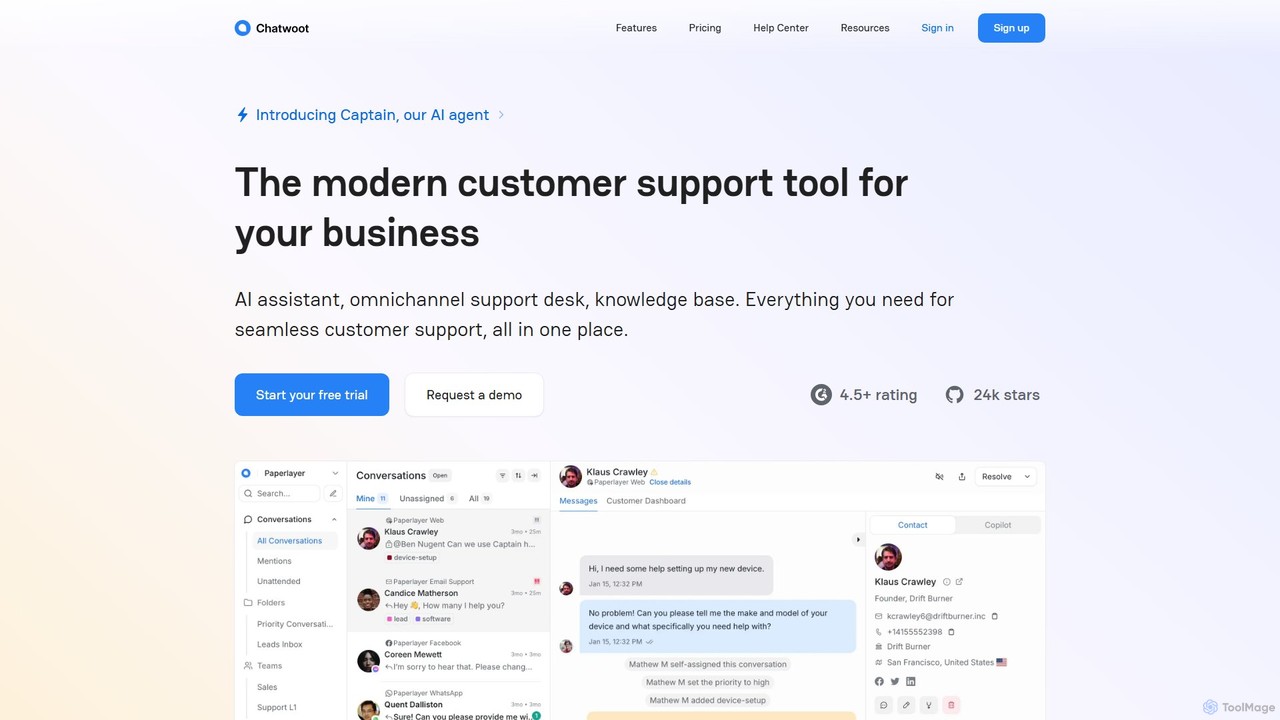
Chatwoot is an open-source, omnichannel customer support platform powered by an AI assistant, Captain. It centralizes conversations from your website, email, and social media into one dashboard, enabling teams to deliver faster, smarter, and more personalized support as a powerful alternative to Intercom and Zendesk.

Preview

SolidChat Product overview

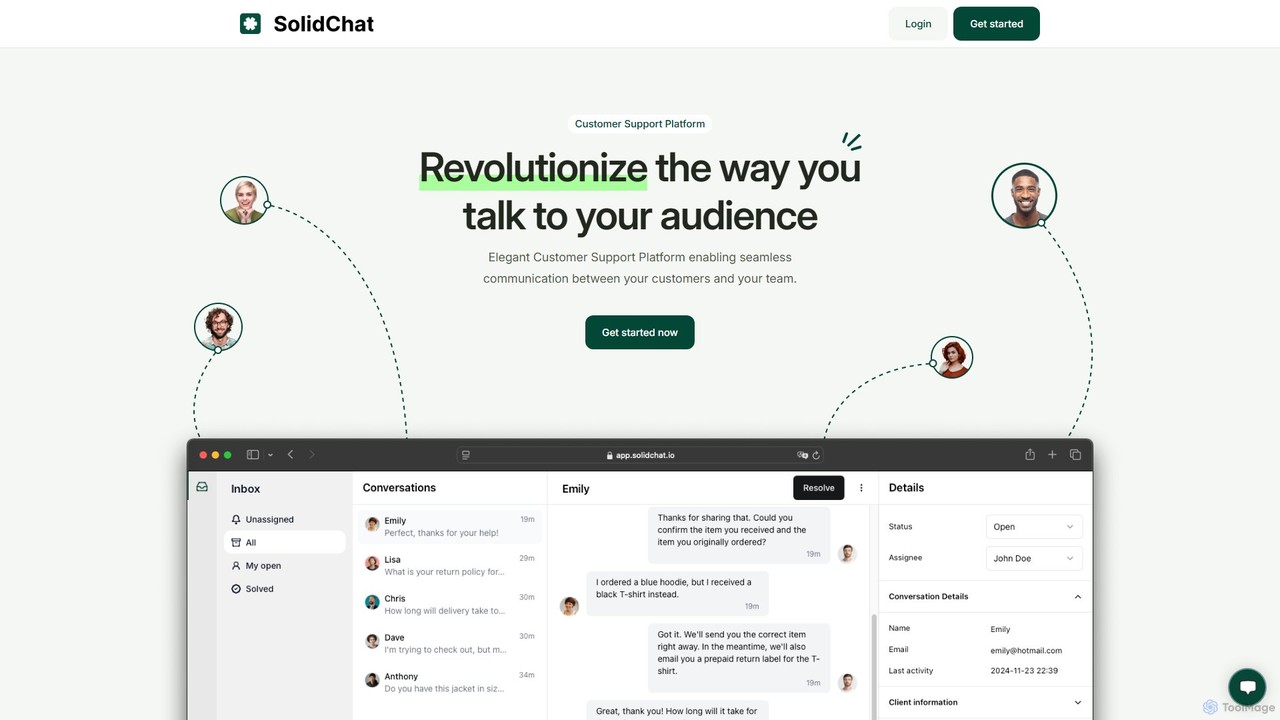
SolidChat is an AI-powered customer support platform designed to enhance customer engagement and streamline communication. It offers a live chat widget, intelligent chatbots for 24/7 support, and a collaborative team inbox. By enabling instant responses and proactive engagement, SolidChat helps businesses convert more visitors, improve customer satisfaction, and boost operational efficiency.

Preview

Quick facts

Compare product focus, pricing models and audiences. Highlighted rows indicate different listed information; unknown pricing does not mean free.

Chatwoot VS SolidChat — Quick facts
Quick factsChatwootSolidChat
Pricing modelFreemiumFreemium
Product typeWebWeb
Primary focusCrmLive Chat
Audience and rolesNo data availableNo data available
CategoriesCrm · Live Chat · CollaborationLive Chat · Lead Generation · Collaboration · Customer Relationship Management
AddedAug 17, 2025Aug 5, 2025
UpdatedNov 19, 2026Nov 19, 2026

Features, usage and use cases

Explore the listed product descriptions, features and workflows. Taxonomy labels alone are not feature evaluations.

Chatwoot

Chatwoot is a modern, open-source customer engagement suite that serves as a powerful alternative to proprietary platforms like Intercom and Zendesk. It is designed to provide businesses with a unified, omnichannel support solution, consolidating customer conversations from various channels into a single, intuitive dashboard. At its core, Chatwoot is enhanced by its AI agent, Captain, which automates support, assists human agents, and breaks down language barriers, enabling a seamless and efficient customer service experience.

Whether you choose the flexibility of the self-hosted version to own your data completely or opt for the convenience of the cloud-hosted solution, Chatwoot empowers your team to connect with customers wherever they are. It integrates with your website live chat, email, and popular social media and messaging platforms like Facebook, Instagram, WhatsApp, Telegram, and Line, ensuring no customer query is missed.

How to use Chatwoot

Getting started with Chatwoot is a straightforward process designed for flexibility and ease of use:

  1. Deployment Choice: Begin by choosing your deployment model. You can self-host the open-source Community Edition on your own infrastructure for full data control, or sign up for a cloud-hosted plan for quick setup and maintenance-free operation.
  2. Connect Channels: Integrate all your customer communication channels. Add the live chat widget to your website, connect your support email inboxes, and link your business accounts for Facebook, Instagram, WhatsApp, and other messaging apps.
  3. Customize Your Brand: Tailor the live chat widget's appearance, including colors, text, and language, to align perfectly with your brand identity for an authentic customer interaction.
  4. Build a Knowledge Base: Set up your Help Center by creating articles, FAQs, and guides. This allows customers to find answers on their own, 24/7, and also serves as the foundation for the AI assistant.
  5. Activate the AI Assistant: Enable Captain, the AI agent, to learn from your knowledge base and past conversations. Configure it to automate responses to common questions, reducing the workload on your support team.
  6. Collaborate with Your Team: Invite your support agents to the platform, assign them to specific teams or inboxes, and start managing conversations collaboratively.
  7. Enhance Agent Productivity: Leverage the AI Copilot feature, which provides agents with smart response suggestions, instant conversation summaries, and quick lookups from the Help Center, all within the conversation view.
  8. Extend with APIs: For custom needs, use Chatwoot's developer APIs to build unique integrations and workflows that fit your specific business processes.

Core Features of Chatwoot

  • AI Assistant (Captain): An intelligent agent that learns from your help center and chats to automate responses, handle common queries, and reduce overall support volume.
  • AI Copilot for Agents: An assistant for your support team that suggests replies, translates conversations in real-time, summarizes long threads, and helps find relevant help articles instantly.
  • Omnichannel Inbox: A unified dashboard to manage conversations from website live chat, email, Facebook, Instagram, WhatsApp, Telegram, Line, and more.
  • Customizable Live Chat: Design a live chat widget that matches your brand's look and feel, providing a seamless user experience on your website.
  • Self-Service Knowledge Base: Create and manage a comprehensive Help Center with AI-powered search, allowing customers to find answers quickly and reducing inbound tickets.
  • Open-Source & Self-Hostable: Gain complete ownership of your customer data and ensure compliance with regulatory standards by hosting Chatwoot on your own servers.
  • Developer-Friendly API: A robust API allows for deep customization and integration with other business tools like CRM, e-commerce platforms, and more.
  • Security and Compliance: SOC 2 Type II compliant, ensuring that your data is protected with strict security protocols and best practices.
  • Mobile Apps: Manage customer conversations on the go with dedicated mobile apps for both iOS and Android.

Use Cases for Chatwoot

Chatwoot is versatile and can be adapted for various industries and business sizes:

  • E-commerce & Retail: Provide real-time support during the purchasing process, manage order inquiries from social media, and automate answers to questions about shipping, returns, and product availability.
  • SaaS Companies: Onboard new users with proactive chat, offer technical support through a centralized inbox, and build a detailed knowledge base for product documentation.
  • Startups and Small Businesses: Implement a professional, cost-effective customer support system without the high costs of proprietary software, leveraging the free open-source version.
  • Enterprises with a Focus on Data Privacy: Utilize the self-hosted option to maintain full control over sensitive customer data and comply with strict data protection regulations like GDPR.

Advantages of Chatwoot

Chatwoot offers significant advantages for businesses looking to elevate their customer support:

  • Unified Customer View: Consolidating all interactions into one place provides a holistic view of the customer journey and history.
  • Increased Team Efficiency: AI automation, canned responses, and the AI Copilot dramatically reduce response times and manual effort for agents.
  • Improved Customer Satisfaction: Fast, accurate, and personalized support in the customer's preferred language leads to a better overall experience.
  • Full Data Ownership: The self-hosted option eliminates reliance on third-party vendors and gives you complete control over your data.
  • Scalability and Flexibility: The platform grows with your business, from a free open-source solution to a feature-rich enterprise plan, with extensive customization via its API.
  • Cost-Effective: Provides enterprise-grade features at a fraction of the cost of competitors, with a completely free option for those willing to self-host.

Pricing and Plans

Chatwoot offers a flexible pricing structure to suit different needs:

  • Self-Hosted (Community Edition): A free, open-source version that you can host on your own infrastructure. It includes core features and is ideal for startups and developers who want maximum control.
  • Cloud-Hosted Plans: For businesses that prefer a managed solution, Chatwoot offers several paid tiers, typically including:
    • Start: Aimed at startups and small teams, offering essential features to get started.
    • Business: Designed for growing businesses, with more advanced features, higher limits, and priority support.
    • Enterprise: A custom plan for large organizations requiring advanced security, custom integrations, and dedicated support.

A free trial is available for the cloud-hosted plans, allowing you to test the platform before committing.

SolidChat

SolidChat is a comprehensive, AI-driven customer support platform built to help businesses of all sizes deliver exceptional, real-time service. It bridges the gap between companies and their website visitors, turning passive browsing into active, meaningful conversations. By integrating a powerful live chat system with intelligent AI chatbots, SolidChat ensures that no customer query goes unanswered, day or night. The platform is designed for simplicity and power, allowing teams to manage all customer interactions from a unified dashboard, fostering collaboration and improving response times.

The core philosophy behind SolidChat is to make advanced customer communication tools accessible and easy to use. It empowers businesses to proactively engage visitors, offer instant support, and gather valuable insights to drive growth. Whether you're in e-commerce, SaaS, or any other online industry, SolidChat provides the tools you need to build stronger customer relationships and increase conversions.

How to use SolidChat

Getting started with SolidChat is a straightforward process designed for quick implementation:

  1. Sign Up & Create an Account: Register for a SolidChat account on their website. Choose the plan that best fits your business needs.
  2. Customize the Chat Widget: Navigate to the settings dashboard to customize the appearance of your chat widget. You can change colors, text, and agent avatars to match your brand's identity.
  3. Install on Your Website: SolidChat will provide a small JavaScript snippet. Simply copy and paste this code into the HTML of your website before the closing `` tag. No complex coding is required.
  4. Configure AI Chatbots: Set up automated responses and conversation flows for your AI chatbot. You can train it to answer frequently asked questions, qualify leads by asking specific questions, and route complex issues to human agents.
  5. Invite Your Team: Add your customer support agents to the platform. You can assign roles and permissions to manage access and responsibilities within the shared inbox.
  6. Start Engaging: Once the widget is live, you can start chatting with your website visitors in real-time. Use the dashboard to monitor conversations, track analytics, and optimize your support strategy.

Core Features of SolidChat

  • AI-Powered Chatbots: Deploy intelligent chatbots to provide 24/7 automated support, answer common questions, and qualify leads, freeing up your human agents for more complex issues.
  • Live Chat: Engage with website visitors in real-time through a sleek and customizable chat widget.
  • Shared Team Inbox: A collaborative inbox allows multiple agents to view, assign, and respond to customer conversations, ensuring seamless teamwork and faster resolution times.
  • Push Notifications: Receive instant alerts for new messages on both desktop and mobile, enabling immediate responses and ensuring you never miss a conversation.
  • Proactive Engagement: Set up automated chat invitations (triggers) based on visitor behavior, such as time on page, specific URLs visited, or exit intent, to proactively start conversations.
  • Canned Responses: Create and save pre-written answers to frequently asked questions to significantly speed up response times and ensure consistency.
  • Analytics and Reporting: Access a detailed dashboard with key metrics like chat volume, response times, customer satisfaction ratings (CSAT), and agent performance to make data-driven decisions.
  • Integrations: Seamlessly connect SolidChat with your existing CRM, helpdesk, and e-commerce platforms to create a unified customer data ecosystem.

Use Cases for SolidChat

E-commerce: Proactively assist shoppers by answering product questions, helping with size selection, and offering discounts to reduce cart abandonment. Use chatbots to handle order status inquiries 24/7.

SaaS Companies: Onboard new users by guiding them through key features, provide instant technical support, and collect valuable user feedback directly through the chat interface.

Lead Generation: Engage anonymous website visitors, use chatbots to qualify them as leads by asking targeted questions, and automatically schedule demos or calls for your sales team.

Customer Service: Provide a fast and efficient channel for customers to resolve issues, ask questions, and get help, leading to higher customer satisfaction and loyalty.

Advantages of SolidChat

Improved Conversion Rates: By proactively engaging visitors and providing instant answers, SolidChat helps convert more browsers into customers and leads.

Enhanced Customer Satisfaction: Immediate, 24/7 support ensures customers feel valued and heard, significantly boosting their satisfaction and loyalty.

Increased Operational Efficiency: AI chatbots and canned responses handle a large volume of routine inquiries, reducing the workload on your support team and lowering operational costs.

Valuable Customer Insights: The platform collects data on common questions, pain points, and customer feedback, providing actionable insights for product and service improvements.

Pricing and Plans

SolidChat offers a flexible freemium pricing model to suit businesses of all sizes. While specific pricing is available on the official website, the plans are typically structured as follows:

  • Free Plan: Ideal for individuals or small startups, offering basic live chat functionality for one agent and a limited number of monthly conversations.
  • Pro Plan: Designed for growing businesses, this plan includes multiple agent seats, AI chatbot features, canned responses, and basic integrations.
  • Business Plan: A comprehensive solution for established teams, offering advanced features like detailed analytics, proactive chat triggers, full customization options, and priority support.

Positioning

Their taxonomy shows where the products overlap and where each one has a more distinct focus. Unknown fields are shown explicitly and are never filled with assumptions.

Categories

Shared
Live ChatCollaboration
Only Chatwoot
Crm
Only SolidChat
Lead GenerationCustomer Relationship Management

Tags

Shared
AI assistantchatbotcustomer supporthelpdesklive chat
Only Chatwoot
CRMintercom alternativeomnichannelopen sourceself-hostedzendesk alternative
Only SolidChat
customer engagementlead generationSaaSteam collaboration

Audience and roles

Shared
No listed items
Only Chatwoot
No listed items
Only SolidChat
No listed items

Traffic comparison

Traffic is shown on the same scale so differences in market visibility are not visually understated.

How to interpret the traffic data

Both charts share the same months and vertical scale. Each tool identifies its latest reporting month; missing months are left blank, not counted as zero. Regional and source visit counts are estimates calculated from the reported shares.

Chatwoot monthly traffic:

Latest traffic · 2026-05

Monthly visits
578.8K
Avg. visit duration
5:39
Pages per visit
5.69
Bounce rate
42.61%
Data updated 2026-06-15

Monthly traffic trend

  • 2025-09: 553K
  • 2026-01: 550.6K
  • 2026-02: 529.9K
  • 2026-03: 603.8K
  • 2026-04: 571.1K
  • 2026-05: 578.8K

Top regions

Top 5 countries/regions
Country/regionPercentageEstimated visits
🇨🇴Colombia27.56%159.5K
🇺🇸United States24.6%142.4K
🇷🇺Russia17.69%102.4K
🇧🇷Brazil16.14%93.4K
🇮🇳India14.01%81.1K

Traffic sources

Source typePercentageEstimated visits
Direct86.43%500.2K
Referral11.65%67.4K
Email1.92%11.1K

Search keywords

app.chatwootchatwoodchatwootchatwoot apichatwoot changelog

SolidChat

No data available

Community signals

Ratings, comments, favorites, and likes are community signals—not a substitute for product fit.

Chatwoot

Rating
No data available
Comments
0
Favorites
197
Likes
198

SolidChat

Rating
No data available
Comments
0
Favorites
209
Likes
194

Chatwoot vs SolidChat · Comparison FAQ

What do Chatwoot and SolidChat have in common?
Both tools are listed under Live Chat、Collaboration. These categories indicate overlapping use cases; compare their detailed descriptions for workflows, capabilities and limitations.
Are Chatwoot and SolidChat free?
Listed pricing models: Chatwoot — Freemium; SolidChat — Freemium. Missing pricing is not proof of a free plan, and freemium does not mean every feature is free. Check official sites for current plans, limits and trials.
How should I choose between Chatwoot and SolidChat?
The primary listed category is Crm for Chatwoot, and Live Chat for SolidChat. Compare features, steps and use cases, then verify pricing, data permissions and deployment needs. This page does not include hands-on testing and does not declare a winner from traffic or tags.

Sources and comparison methodology

This page is assembled from ToolMage product listings, taxonomy, traffic statistics and on-site user feedback. It is not a hands-on test or an independent review.

  • Feature and plan descriptions reflect information in the listings, not real-time guarantees. Verify pricing, quotas, availability and privacy terms on the official sites.
  • Traffic uses the reporting months shown. Missing statistics do not mean zero visits, and different periods do not establish growth or superiority. Regional and source visit counts are estimates based on shares.
  • Different tags indicate differences in the listings, not proof that the other product lacks a capability. Ratings, favorites and visits are not used to declare a winner.

Related comparisons