ToolMage
Sign in

AI TOOL COMPARISON

CircleChat vs Slack

What is the difference, and which fits your workflow? Compare features, usage, pricing models and traffic side by side.

Jump to key differences

Product overview

CircleChat Product overview

CircleChat is an AI-powered communication platform that unifies internal team collaboration and external customer support. It leverages AI to summarize conversations, detect tasks, analyze sentiment, and automate workflows, creating a single, intelligent hub for all business communication.

Preview

Slack Product overview

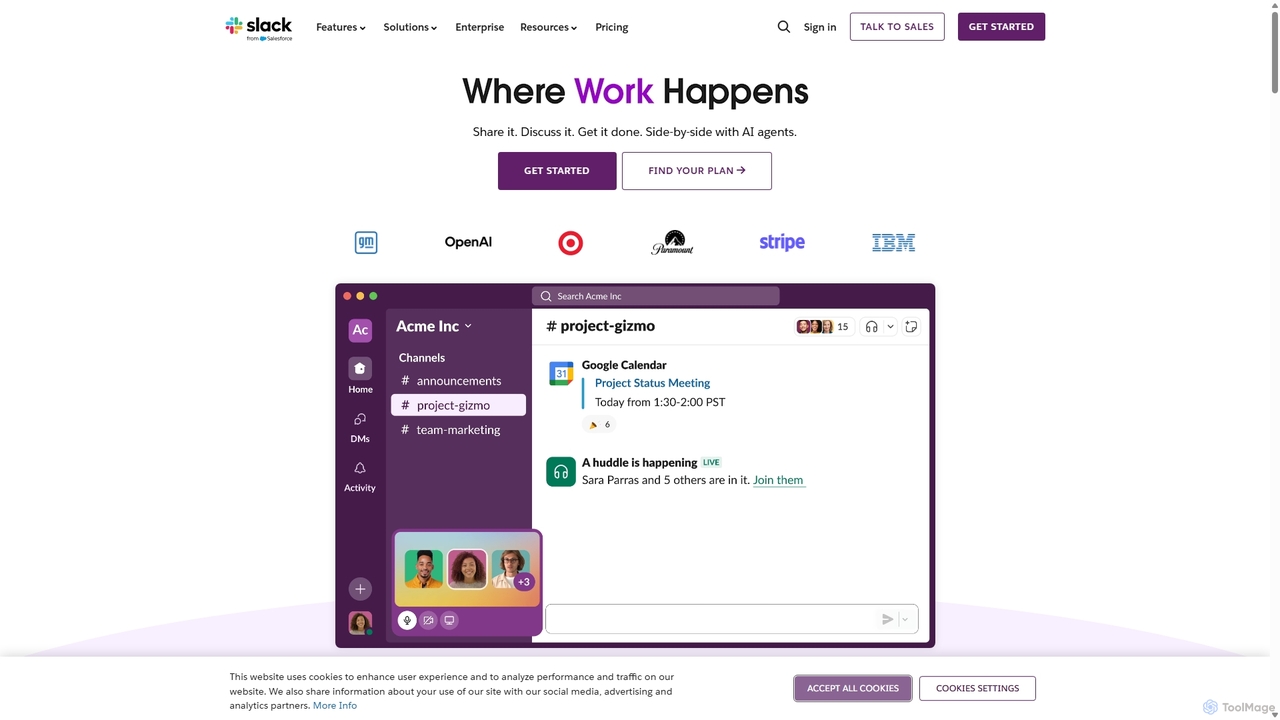
Slack is an AI-powered collaboration hub that connects your people, partners, and tools. It replaces email with faster, better-organized communication through channels. With integrated AI, workflow automation, and thousands of apps, Slack centralizes your work to boost productivity and streamline project management.

Preview

Quick facts

Compare product focus, pricing models and audiences. Highlighted rows indicate different listed information; unknown pricing does not mean free.

CircleChat VS Slack — Quick facts
Quick factsCircleChatSlack
Pricing modelFreemiumFreemium
Product typeWebWeb
Primary focusTeam ChatProject Management
Audience and rolesNo data availableCustomer Support · Data Analyst · Graphic Designer · HR Manager · Marketing Manager · Product Manager · Project Manager · Sales Representative · Software Developer · Team Lead
CategoriesTeam Chat · Live Chat · CollaborationProject Management · Team Chat · Collaboration
AddedAug 9, 2025Sep 17, 2025
UpdatedNov 19, 2026Nov 19, 2026

Features, usage and use cases

Explore the listed product descriptions, features and workflows. Taxonomy labels alone are not feature evaluations.

CircleChat

CircleChat is a revolutionary AI-driven communication platform designed to streamline and unify all facets of business interaction. In today's fragmented digital landscape, teams often juggle multiple applications for internal chat, project management, and customer support, leading to information silos and reduced efficiency. CircleChat addresses this challenge by providing a single, cohesive environment where internal team collaboration and external customer engagement coexist seamlessly.

At its core, CircleChat uses advanced artificial intelligence to enhance communication. The platform can intelligently analyze conversations in real-time, providing automated summaries of long discussions, which saves valuable time and ensures everyone stays informed without having to read through every message. This is particularly beneficial for remote teams and busy executives who need to catch up on project progress quickly.

How to use CircleChat

Getting started with CircleChat is a straightforward process designed for rapid adoption:

  1. Sign Up & Create Workspace: Register for an account on the CircleChat website and set up your organization's dedicated workspace.
  2. Create 'Circles': Organize your communications by creating 'Circles,' which are dedicated channels for specific projects, departments (e.g., 'Marketing Team'), or customer segments (e.g., 'VIP Customers').
  3. Integrate Your Tools: Connect CircleChat with your existing ecosystem of tools, such as CRMs (Salesforce, HubSpot), project management software (Jira, Trello), and knowledge bases to create a truly integrated workflow.
  4. Invite Members & Configure Widgets: Invite your team members to their respective Circles. For customer communication, customize and embed the CircleChat live chat widget onto your website or app.
  5. Leverage AI Features: Let the AI get to work. It will automatically start summarizing key conversations, identifying potential tasks, and providing sentiment analysis on interactions.
  6. Customize & Automate: Fine-tune the AI's behavior and set up automated workflow rules. For example, automatically route a customer query with negative sentiment to a senior support agent or create a Jira ticket from a bug report mentioned in a team chat.

Core Features of CircleChat

  • Unified Communication Hub: Combines internal team chat and external customer live chat into a single, intuitive interface.
  • AI-Powered Conversation Summaries: Automatically generates concise, accurate summaries of long threads, meetings, and discussions, highlighting key decisions and outcomes.
  • Intelligent Task & Action Item Detection: The AI scans conversations to identify and suggest tasks, assignees, and deadlines, which can be added to your project management tool with a single click.
  • Real-time Sentiment Analysis: Gauges the emotional tone of conversations to help you understand customer satisfaction and team morale, allowing for proactive intervention.
  • Automated Workflows: Build powerful, no-code automations to route conversations, send notifications, create tasks in other apps, and handle routine queries.
  • Integrated Knowledge Base: The AI can access your internal or external knowledge base to provide instant, accurate answers to both team members and customers.
  • Multi-language Translation: Real-time, AI-powered translation within chats, breaking down language barriers for global teams and international customers.
  • Advanced Analytics & Reporting: Gain deep insights into communication patterns, team performance, customer satisfaction metrics, and peak query times.

Use Cases for CircleChat

CircleChat is versatile and can be adapted for various business functions:

  • Project Management: Centralize all project-related discussions. Use AI summaries to track progress, and let the AI automatically identify action items from brainstorming sessions.
  • Customer Support: Deploy an AI-powered chatbot on your website for 24/7 support. The AI handles common questions and seamlessly escalates complex issues to human agents within the same platform, providing them with the full conversation context.
  • Sales & Marketing Teams: Track conversations with leads, analyze their sentiment to gauge interest, and automate follow-up reminders. Use Circles to collaborate on marketing campaigns.
  • Remote & Hybrid Teams: Combat meeting fatigue and information overload with asynchronous communication. AI summaries ensure that team members across different time zones are always up-to-date.
  • Executive Leadership: Obtain high-level, summarized overviews of key projects and departmental sentiment without needing to be in every channel.

Advantages of CircleChat

By integrating CircleChat into your operations, you gain a significant competitive edge:

  • Drastic Productivity Boost: Reduces time spent on administrative tasks, attending catch-up meetings, and searching for information.
  • Elimination of Information Silos: Creates a single source of truth, ensuring that teams like engineering, support, and sales are always aligned.
  • Superior Customer Experience: Delivers faster, more consistent, and more accurate support, leading to higher customer satisfaction and loyalty.
  • Data-Driven Decision Making: Provides actionable insights from your communication data to inform strategy and operations.
  • Scalable & Secure: Built to grow with your business, offering enterprise-grade security and compliance features.

Pricing and Plans

CircleChat offers a flexible pricing model to suit teams of all sizes:

  • Free Plan: Ideal for small teams or startups, offering core chat functionalities, a limited number of users, and basic AI features.
  • Pro Plan: A per-user monthly fee designed for growing businesses. Includes advanced AI capabilities, more integrations, and priority support.
  • Business Plan: Tailored for larger organizations, this plan offers enhanced security features like SSO, advanced analytics, and dedicated account management.
  • Enterprise Plan: A custom-priced plan for large corporations requiring bespoke solutions, on-premise deployment options, and full customization.

Slack

Slack is a revolutionary, AI-powered platform designed to be the digital headquarters for modern businesses. It transforms how organizations communicate by moving conversations out of siloed email inboxes and into organized, searchable channels. Slack brings together all of your team members, external partners, applications, and data into a single, unified workspace, making work simpler, more pleasant, and more productive. With the recent integration of powerful AI capabilities, Slack not only facilitates communication but also actively helps you find answers, summarize information, and automate tasks, allowing your team to focus on what matters most.

How to use Slack

Getting started with Slack is intuitive. The core of the platform revolves around a few key concepts:

  • Channels: Create public or private channels for specific projects, teams, topics, or departments. This keeps conversations focused and organized. New members can simply join a channel and scroll up to get full context on past discussions.
  • Messaging: Engage in real-time conversations, use threads to keep replies organized, mention specific colleagues to get their attention, and react with emojis for quick feedback.
  • Huddles & Clips: Instantly start a live audio or video conversation with Huddles for quick discussions, or record and share audio/video Clips to provide updates without scheduling a meeting.
  • Slack Connect: Securely extend channel-based communication to people outside your company, such as clients, vendors, and partners, replacing inefficient email chains.
  • Integrations: Connect Slack with over 2,600 apps you already use, like Google Drive, Salesforce, Jira, and Office 365. This brings notifications and actions from other tools directly into your workflow, reducing context switching.
  • Workflow Builder: Automate routine tasks and processes without writing any code. Create custom workflows for things like welcoming new team members, approving requests, or sending regular updates.
  • Canvas: Use Canvas as a collaborative surface within any channel or DM to create, organize, and share information. Embed files, create to-do lists, and draft project plans. AI can even help you draft content directly within a canvas.
  • Slack AI & Agentforce: Leverage AI to instantly get summaries of long conversations, search for answers across your company's entire message history, and receive daily recaps. Agentforce allows you to deploy AI agents to perform tasks like updating sales proposals or resolving IT issues.

Core Features of Slack

  • Organized Channels: Dedicated spaces for every project, topic, and team.
  • Slack Connect: Secure collaboration with external organizations.
  • Huddles and Clips: Spontaneous audio/video conversations and recordings.
  • Workflow Builder: No-code automation for routine processes.
  • Extensive App Integrations: Connect with over 2,600 services to centralize work.
  • Slack AI: AI-powered search, channel recaps, and thread summaries to save time.
  • Agentforce: Action-taking AI agents to automate complex tasks.
  • Canvas: A collaborative workspace for curating and sharing information.
  • Enterprise-Grade Security: Comprehensive security features and compliance certifications (SOC 2, ISO/IEC 27001, GDPR, HIPAA).
  • Advanced Search: Powerful search functionality to find messages, files, and people instantly.

Use Cases for Slack

Slack is versatile and used by companies of all sizes, from startups to Fortune 100 enterprises like OpenAI and Spotify.

  • Project Management: Teams can create a channel for each project to share updates, files, and feedback, keeping everyone aligned from start to finish.
  • Sales Teams: Integrate with Salesforce to get account updates, manage opportunities, and collaborate on deals directly within Slack.
  • Engineering & IT: Use channels for incident response, code reviews, and deployment notifications, integrating with tools like Jira and GitHub.
  • Marketing: Collaborate on campaigns, share creative assets, and track performance by integrating with marketing automation and analytics tools.
  • Customer Support: Create channels to triage customer issues, collaborate on solutions, and share knowledge across the support team.
  • Remote & Hybrid Work: Serve as the central digital office, keeping distributed teams connected, engaged, and informed regardless of their location.

Advantages of Slack

Slack offers significant advantages over traditional communication methods like email. Users report a 47% increase in productivity and save an average of 97 minutes per week with Slack AI. Key benefits include:

  • Centralized Knowledge: All conversations and files are archived and searchable, creating a valuable repository of company knowledge.
  • Increased Transparency: Public channels provide visibility into what different teams are working on, breaking down silos.
  • Enhanced Efficiency: Workflow automation and app integrations reduce manual work and context switching.
  • Faster Decision-Making: Real-time communication allows for quicker discussions and resolutions.
  • Superior Security: More secure than email, protecting against spam and phishing while offering enterprise-grade data protection.
  • Improved Team Cohesion: Fosters a more connected and collaborative culture, especially for remote teams.

Pricing and Plans

Slack offers a freemium model with several tiers to suit different needs:

  • Free Plan: Ideal for small teams trying out Slack. Includes access to the last 90 days of message history, 10 app integrations, and one-on-one Huddles.
  • Pro Plan: Designed for small and medium-sized businesses. Offers unlimited message history, unlimited app integrations, group Huddles with screen sharing, and Workflow Builder.
  • Business+ Plan: For larger businesses requiring advanced tools. Includes everything in Pro, plus SAML-based single sign-on (SSO), data exports for all messages, and 99.99% guaranteed uptime.
  • Enterprise Grid: Tailored for very large and complex organizations. Provides unlimited workspaces, enterprise-grade security and compliance (including HIPAA support), and centralized administrative controls.

Slack AI is available as a paid add-on for Pro, Business+, and Enterprise Grid plans.

Positioning

Their taxonomy shows where the products overlap and where each one has a more distinct focus. Unknown fields are shown explicitly and are never filled with assumptions.

Categories

Shared
Team ChatCollaboration
Only CircleChat
Live Chat
Only Slack
Project Management

Tags

Shared
AI assistantcollaborationproductivityteam communication
Only CircleChat
chatbotcustomer supportlive chatmeeting summarysentiment analysistask automationworkflow
Only Slack
business messagingenterprise softwareintegrationknowledge managementproject managementremote workworkflow automation

Audience and roles

Shared
No listed items
Only CircleChat
No listed items
Only Slack
Customer SupportData AnalystGraphic DesignerHR ManagerMarketing ManagerProduct ManagerProject ManagerSales RepresentativeSoftware DeveloperTeam Lead

Traffic comparison

Traffic is shown on the same scale so differences in market visibility are not visually understated.

How to interpret the traffic data

Both charts share the same months and vertical scale. Each tool identifies its latest reporting month; missing months are left blank, not counted as zero. Regional and source visit counts are estimates calculated from the reported shares.

CircleChat

No data available

Slack monthly traffic:

Latest traffic · 2026-05

Monthly visits
129.1M
Avg. visit duration
15:45
Pages per visit
8.23
Bounce rate
28.2%
Data updated 2026-06-15

Monthly traffic trend

  • 2025-09: 133.2M
  • 2026-01: 127M
  • 2026-02: 122.4M
  • 2026-03: 139M
  • 2026-04: 136.1M
  • 2026-05: 129.1M

Top regions

Top 5 countries/regions
Country/regionPercentageEstimated visits
🇺🇸United States50.24%64.9M
🇯🇵Japan31.8%41.1M
🇮🇳India8.46%10.9M
🇬🇧United Kingdom5.07%6.5M
🇵🇭Philippines4.43%5.7M

Traffic sources

Source typePercentageEstimated visits
Direct92.92%120M
Referral3.9%5M
Email3.18%4.1M

Search keywords

슬랙slackslack downloadslack loginスラック

Community signals

Ratings, comments, favorites, and likes are community signals—not a substitute for product fit.

CircleChat

Rating
No data available
Comments
0
Favorites
168
Likes
177

Slack

Rating
No data available
Comments
0
Favorites
171
Likes
155

CircleChat vs Slack · Comparison FAQ

What do CircleChat and Slack have in common?
Both tools are listed under Team Chat、Collaboration. These categories indicate overlapping use cases; compare their detailed descriptions for workflows, capabilities and limitations.
Are CircleChat and Slack free?
Listed pricing models: CircleChat — Freemium; Slack — Freemium. Missing pricing is not proof of a free plan, and freemium does not mean every feature is free. Check official sites for current plans, limits and trials.
How should I choose between CircleChat and Slack?
The primary listed category is Team Chat for CircleChat, and Project Management for Slack. Compare features, steps and use cases, then verify pricing, data permissions and deployment needs. This page does not include hands-on testing and does not declare a winner from traffic or tags.

Sources and comparison methodology

This page is assembled from ToolMage product listings, taxonomy, traffic statistics and on-site user feedback. It is not a hands-on test or an independent review.


  • Feature and plan descriptions reflect information in the listings, not real-time guarantees. Verify pricing, quotas, availability and privacy terms on the official sites.
  • Traffic uses the reporting months shown. Missing statistics do not mean zero visits, and different periods do not establish growth or superiority. Regional and source visit counts are estimates based on shares.
  • Different tags indicate differences in the listings, not proof that the other product lacks a capability. Ratings, favorites and visits are not used to declare a winner.

Related comparisons