ToolMage
Sign in

AI TOOL COMPARISON

CodeConvert vs CodingFleet

What is the difference, and which fits your workflow? Compare features, usage, pricing models and traffic side by side.

Jump to key differences

Product overview

CodeConvert Product overview

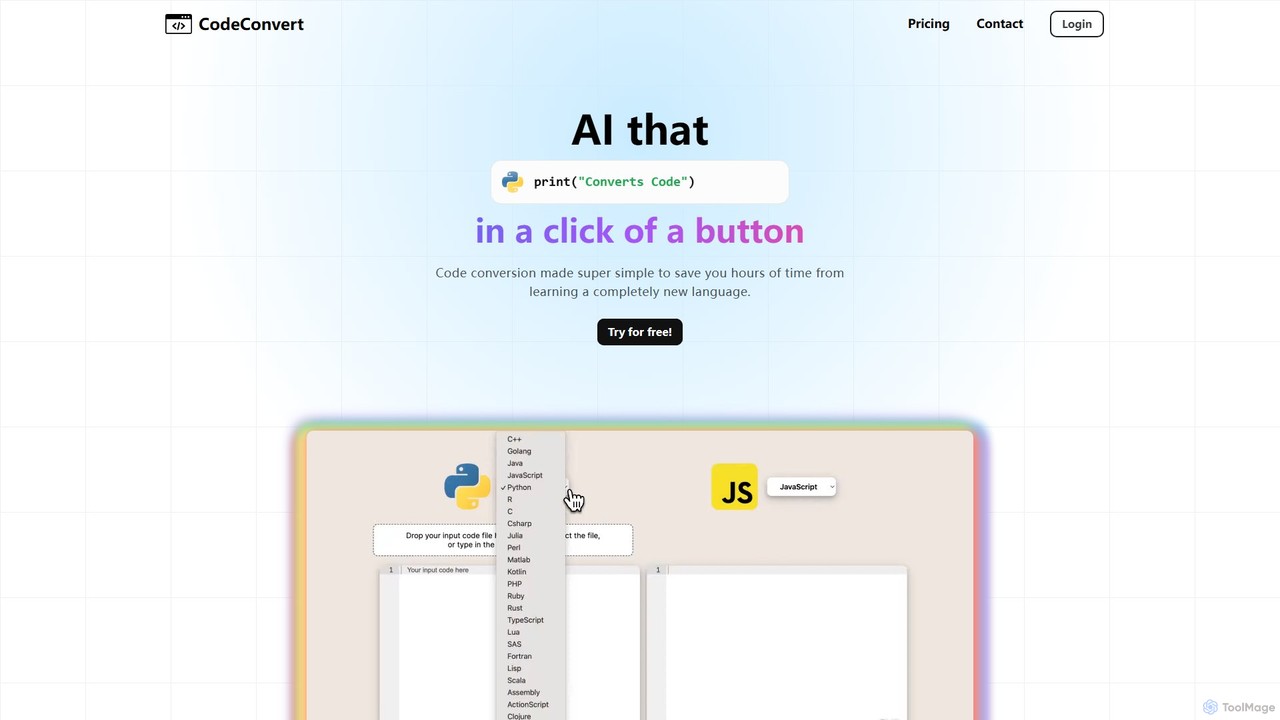
CodeConvert is an AI-powered tool that instantly translates code snippets between over 50 programming languages. It helps developers save hours of manual rewriting, learn new languages, and migrate projects efficiently. Features include high-accuracy conversion, code generation, and code explanation.

Preview

CodingFleet Product overview

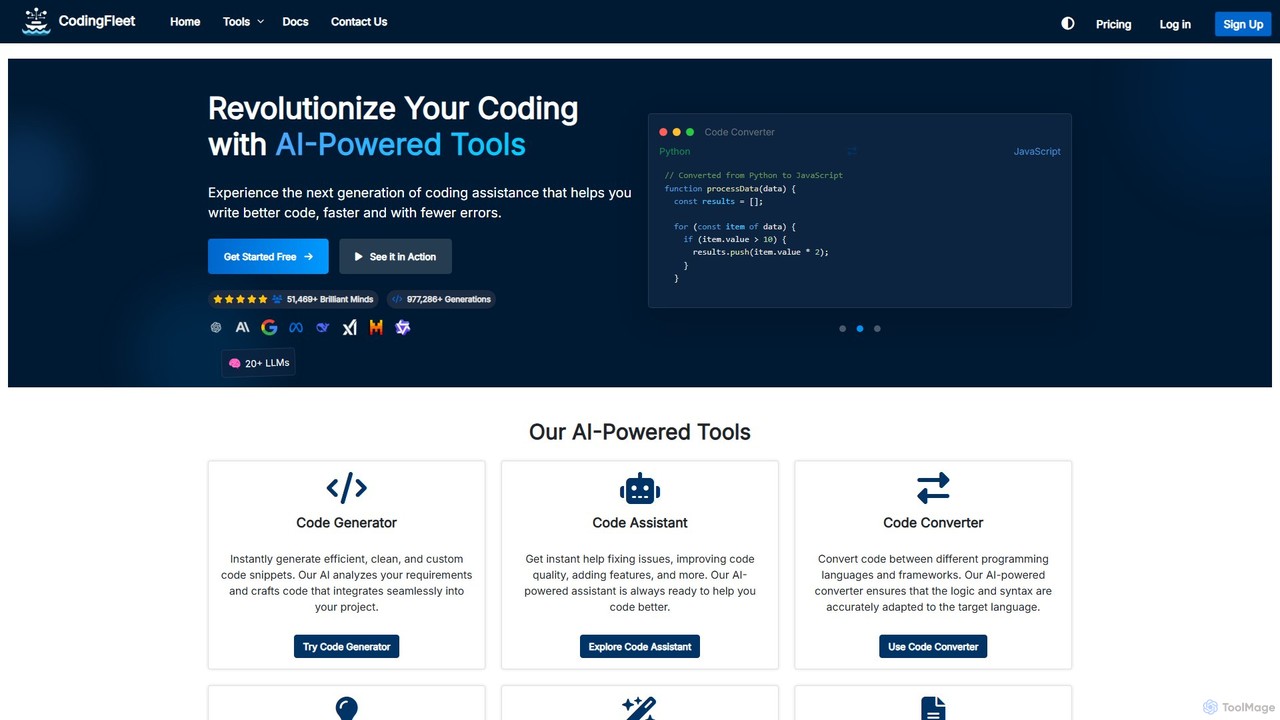
CodingFleet is a comprehensive AI-powered platform designed to revolutionize the coding workflow for developers. It offers a suite of tools including a code generator, assistant, converter, and explainer, supporting over 90 programming languages. By leveraging advanced AI models, it helps programmers write better, cleaner code faster, automate tedious tasks, and reduce errors, ultimately boosting productivity and fostering innovation.

Preview

Quick facts

Compare product focus, pricing models and audiences. Highlighted rows indicate different listed information; unknown pricing does not mean free.

CodeConvert VS CodingFleet — Quick facts
Quick factsCodeConvertCodingFleet
Pricing modelFreemiumFreemium
Product typeWebWeb
Primary focusCode AssistantCode Assistant
Audience and rolesNo data availableNo data available
CategoriesCode Assistant · AutomationCode Assistant · Code Generation · Automation
AddedAug 14, 2025Aug 13, 2025
UpdatedNov 19, 2026Nov 19, 2026

Features, usage and use cases

Explore the listed product descriptions, features and workflows. Taxonomy labels alone are not feature evaluations.

CodeConvert

CodeConvert is a powerful and user-friendly AI tool designed to simplify the process of code conversion for developers, students, and tech professionals. It leverages advanced AI models to translate code across a vast spectrum of over 50 programming languages, from modern languages like Python, JavaScript, and Go to legacy systems like COBOL and Fortran. This tool is built to save countless hours of manual work, reduce errors, and accelerate development cycles, making it an indispensable asset for any programmer's toolkit.

The platform is entirely web-based, requiring no downloads or complex setup. Users can get started immediately, making it highly accessible. Beyond simple translation, paid plans for CodeConvert unlock advanced features like a code generation tool, which can create new code from natural language prompts, and a code explanation tool, which breaks down complex code snippets into easy-to-understand descriptions. The service also prioritizes user privacy, stating that it does not store or retain any of the user's input or the generated output code.

How to use CodeConvert

Using CodeConvert is designed to be a straightforward and intuitive process. There's no need for any installation or configuration. Follow these simple steps:

  1. Navigate to the CodeConvert website.
  2. On the converter page, you will see two dropdown menus. Select the source language (the language your code is currently in) and the target language (the language you want to convert it to).
  3. You can either paste your code directly into the provided text area or upload a code file from your computer.
  4. Click the "Convert" button.
  5. The AI will process your request and generate the equivalent code in the target language in the output area. For paid users, the response is often streamed for a faster experience.

Core Features of CodeConvert

  • Extensive Language Support: Convert code between more than 50 programming and query languages, including C++, Go, Java, JavaScript, Python, R, C#, Rust, TypeScript, SQL, COBOL, and many more.
  • High-Quality AI Conversion: Utilizes advanced AI models to ensure the highest possible accuracy and quality in code translation, preserving logic and structure.
  • Code Generation: Paid plans include a tool to generate code from plain English descriptions, helping to scaffold new functions or scripts quickly.
  • Code Explanation: Understand unfamiliar or complex code with the AI-powered explanation feature, which describes what the code does in simple terms.
  • No Setup Required: As a web-based tool, it works directly in your browser without any need for downloads, installations, or dependencies.
  • Privacy and Security: The platform is designed with privacy in mind, with a policy of not retaining user input or output code on its servers.
  • Unlimited Usage: All paid plans offer unlimited conversions, allowing for extensive use without worrying about quotas.

Use Cases for CodeConvert

CodeConvert is versatile and can be applied in various scenarios:

  • Legacy Code Modernization: Migrating old codebases (e.g., from COBOL, VB6, or Fortran) to modern languages like Python or Java.
  • Learning New Languages: Students and developers can paste code they are familiar with to see how it's written in a new language, accelerating the learning process.
  • Cross-Platform Development: Quickly translating a function or algorithm from one language (e.g., Swift for iOS) to another (e.g., Kotlin for Android).
  • Code Refactoring: Assisting in rewriting or restructuring existing code to improve its readability and maintainability.
  • Using Online Snippets: Converting code examples found online (e.g., in a Stack Overflow answer) into the specific language required for a project.

Advantages of CodeConvert

The primary advantage of CodeConvert is the massive amount of time and effort it saves. Manually converting code is tedious, error-prone, and requires expertise in both languages. CodeConvert automates this process with high accuracy. Its web-based nature makes it instantly accessible, and the free tier allows anyone to test its capabilities. For professional users, the advanced features like code generation and explanation, combined with higher character limits and unlimited usage, provide significant value and boost productivity.

Pricing and Plans

CodeConvert operates on a freemium model, offering plans for different levels of usage. All paid plans come with a 14-day money-back guarantee.

  • Free Plan: $0/month. Includes 5 conversions per day with a limit of 4,000 characters per conversion and standard email support. No credit card is required to get started.
  • Pro Plan: $10/month (with a 50% discount for yearly billing). Offers unlimited conversions, a higher limit of 25,000 characters per conversion, faster conversions with streamed responses, the code generation tool, the code explanation tool, and priority email support.
  • Premium Plan: $20/month (with a 50% discount for yearly billing). Includes all features of the Pro plan but increases the character limit to 100,000 per conversion, making it suitable for larger files and more complex applications.

CodingFleet

CodingFleet is an advanced AI-powered platform, launched in 2023, dedicated to empowering programmers and developers worldwide. Its core mission is to save valuable time and unleash creativity by automating routine tasks and simplifying complex coding challenges. The platform integrates a comprehensive suite of tools designed to assist in every phase of the development lifecycle, making it an indispensable asset for both novice programmers and seasoned professionals.

By leveraging over 20 cutting-edge Large Language Models (LLMs), including GPT-4.1, Gemini 2.5 Pro, and Claude 3.5/4, CodingFleet provides intelligent, context-aware solutions that are not just fast but also highly accurate and reliable. It supports an extensive range of over 90 programming languages and frameworks, ensuring versatility across various projects and technology stacks.

How to use CodingFleet

Getting started with CodingFleet is designed to be a seamless and intuitive experience:

  1. Explore Freely: You can begin using the tools immediately without any sign-up required. This allows you to get a feel for the platform's power and how it can integrate into your workflow.
  2. Sign Up for More: Register for a free account to unlock additional monthly credits and enhanced features. This gives you more extensive access to the CodingFleet community and its capabilities.
  3. Choose Your Tool: Dive into a diverse range of specialized AI tools. Whether you need to generate a new code snippet, convert a file, understand a complex function, or create unit tests, there's a dedicated tool for your specific need.
  4. Start Coding Smarter: Provide your input—be it a natural language prompt, a piece of existing code, or even a URL—and let the AI handle the heavy lifting. Elevate your coding experience with intelligent assistance that boosts efficiency and accuracy, allowing you to focus on innovation rather than reinventing the wheel.

Core Features of CodingFleet

  • Code Generator: Instantly creates efficient, clean, and custom code snippets from simple text descriptions.
  • Code Assistant: Acts as an AI pair programmer, offering real-time help to fix bugs, improve code quality, and implement new features.
  • Code Converter: Seamlessly translates code between 90+ programming languages and frameworks, ensuring logic and syntax are accurately adapted.
  • Code Explainer: Demystifies complex code snippets by providing clear, detailed, and easy-to-understand explanations.
  • Code Enhancer: Automatically analyzes your code, suggests intelligent improvements and potential bug fixes, and implements them with your approval.
  • Comment Generator: Automates the documentation process by generating insightful comments and docstrings for your code.
  • Unit Test Generator: Analyzes your code and automatically creates comprehensive unit tests to ensure its integrity and reliability.
  • AI Chat: An interactive chatbot that provides instant answers to your coding queries and assists with problem-solving.
  • Code Comparison: A built-in feature to visually compare newly generated code with the original version, making it easy to spot differences.

Use Cases for CodingFleet

CodingFleet is versatile enough to handle a wide array of development tasks:

  • Rapid Prototyping: Quickly generate boilerplate code or entire functional components, such as a responsive navigation bar or a complex UI element like an interactive planet simulator, from a simple prompt.
  • Legacy Code Modernization: Convert outdated codebases to modern languages or frameworks (e.g., migrating a project from Python 2 to Python 3, or refactoring a vanilla JavaScript application into React).
  • Learning and Onboarding: New developers can use the Code Explainer to quickly get up to speed with an unfamiliar codebase or to learn new programming concepts and syntaxes.
  • Code Refactoring and Quality Assurance: Employ the Code Enhancer for automatic code improvements and the Unit Test Generator to build a robust test suite, ensuring that new changes don't introduce regressions.
  • Automated Documentation: Save countless hours of manual effort by using the Comment Generator to automatically document functions, classes, and modules across your entire project.

Advantages of CodingFleet

CodingFleet stands out with several key advantages:

  • Multi-Model AI Engine: Users can choose from over 20 top-tier LLMs to find the perfect model for their specific task, ensuring optimal performance and output quality.
  • Extensive Language Support: With support for over 90 languages and frameworks, it is one of the most versatile AI coding platforms available.
  • All-in-One Toolset: It consolidates multiple development tools into a single, cohesive platform, streamlining the workflow from code creation to testing and documentation.
  • User-Centric and Private: The platform is designed with a user-friendly interface. For paid users, all generations are completely private, ensuring the security of your proprietary code.
  • Flexible Pricing: It offers a generous free plan, affordable subscriptions, and a one-time credit purchase option, catering to different usage needs and budgets.

Pricing and Plans

CodingFleet offers a flexible pricing structure to suit individual developers and teams:

  • Free Plan: $0/month. Includes 10 credits per month, access to standard models, and public generations.
  • Pro Plan: $10/month. Offers 100-1000 monthly credits (user's choice) that roll over and never expire. Includes access to advanced models, private generations, and the AI Chat tool.
  • Unlimited Plan: $25/month. Provides unlimited usage with a generous quota of 400 weekly premium credits, higher input limits, and all Pro features.
  • Elite Plan: $45/month. The ultimate plan with unlimited usage, 1,000 weekly premium credits, the highest input limits, access to all available AI models (including premium ones like Claude 4 Opus), and unlimited file uploads.
  • One-Time Purchase: For users who prefer not to subscribe, credits can be purchased in a one-time transaction, which also includes a 30-day pass for Pro plan features.

Positioning

Their taxonomy shows where the products overlap and where each one has a more distinct focus. Unknown fields are shown explicitly and are never filled with assumptions.

Categories

Shared
Code AssistantAutomation
Only CodeConvert
No listed items
Only CodingFleet
Code Generation

Tags

Shared
code converterdeveloper toolsprogrammingrefactoring
Only CodeConvert
AI developerc++code generationcode translationjavajavascriptpython
Only CodingFleet
AI codingcode assistantcode documentationcode explanationcode generatorunit test

Audience and roles

Shared
No listed items
Only CodeConvert
No listed items
Only CodingFleet
No listed items

Traffic comparison

Traffic is shown on the same scale so differences in market visibility are not visually understated.

How to interpret the traffic data

Both charts share the same months and vertical scale. Each tool identifies its latest reporting month; missing months are left blank, not counted as zero. Regional and source visit counts are estimates calculated from the reported shares.

CodeConvert monthly traffic:

Latest traffic · 2026-05

Monthly visits
291K
Avg. visit duration
0:58
Pages per visit
2.32
Bounce rate
49.17%
Data updated 2026-06-15

Monthly traffic trend

  • 2025-09: 203.1K
  • 2026-01: 278.8K
  • 2026-02: 194.4K
  • 2026-03: 217.8K
  • 2026-04: 228.9K
  • 2026-05: 291K

Top regions

Top 5 countries/regions
Country/regionPercentageEstimated visits
🇮🇳India53.25%155K
🇺🇸United States24.41%71K
🇬🇧United Kingdom7.77%22.6K
🇩🇪Germany7.49%21.8K
🇵🇰Pakistan7.08%20.6K

Traffic sources

Source typePercentageEstimated visits
Direct68.11%198.2K
Referral30.86%89.8K
Email1.03%3K

Search keywords

code to pdfjs to pdfjsx to pdfpython to pdfpy to pdf

CodingFleet monthly traffic:

Latest traffic · 2026-05

Monthly visits
64.4K
Avg. visit duration
0:43
Pages per visit
2.12
Bounce rate
46.03%
Data updated 2026-06-15

Monthly traffic trend

  • 2025-09: 73.6K
  • 2026-01: 85.1K
  • 2026-02: 60.1K
  • 2026-03: 65K
  • 2026-04: 69.2K
  • 2026-05: 64.4K

Top regions

Top 5 countries/regions
Country/regionPercentageEstimated visits
🇮🇳India39.04%25.1K
🇺🇸United States29.22%18.8K
🇧🇷Brazil15.34%9.9K
🇳🇬Nigeria8.37%5.4K
🇫🇷France8.03%5.2K

Traffic sources

Source typePercentageEstimated visits
Direct93.58%60.3K
Referral6.42%4.1K

Search keywords

chtml to javahtml to vbapython to php convertertraductor cobol a kotlin

Community signals

Ratings, comments, favorites, and likes are community signals—not a substitute for product fit.

CodeConvert

Rating
No data available
Comments
0
Favorites
158
Likes
164

CodingFleet

Rating
No data available
Comments
0
Favorites
190
Likes
200

CodeConvert vs CodingFleet · Comparison FAQ

What do CodeConvert and CodingFleet have in common?
Both tools are listed under Code Assistant、Automation. These categories indicate overlapping use cases; compare their detailed descriptions for workflows, capabilities and limitations.
Are CodeConvert and CodingFleet free?
Listed pricing models: CodeConvert — Freemium; CodingFleet — Freemium. Missing pricing is not proof of a free plan, and freemium does not mean every feature is free. Check official sites for current plans, limits and trials.
How should I choose between CodeConvert and CodingFleet?
The primary listed category is Code Assistant for CodeConvert, and Code Assistant for CodingFleet. Compare features, steps and use cases, then verify pricing, data permissions and deployment needs. This page does not include hands-on testing and does not declare a winner from traffic or tags.

Sources and comparison methodology

This page is assembled from ToolMage product listings, taxonomy, traffic statistics and on-site user feedback. It is not a hands-on test or an independent review.

  • Feature and plan descriptions reflect information in the listings, not real-time guarantees. Verify pricing, quotas, availability and privacy terms on the official sites.
  • Traffic uses the reporting months shown. Missing statistics do not mean zero visits, and different periods do not establish growth or superiority. Regional and source visit counts are estimates based on shares.
  • Different tags indicate differences in the listings, not proof that the other product lacks a capability. Ratings, favorites and visits are not used to declare a winner.

Related comparisons