ToolMage
Sign in

AI TOOL COMPARISON

CodeFlying vs Momen

What is the difference, and which fits your workflow? Compare features, usage, pricing models and traffic side by side.

Jump to key differences

Product overview

CodeFlying Product overview

CodeFlying is an AI-powered development platform that automatically generates software, mini-programs, and web applications from a single sentence. It empowers innovators and non-technical users to build and deploy functional apps using natural language, drastically reducing development time and complexity.

Preview

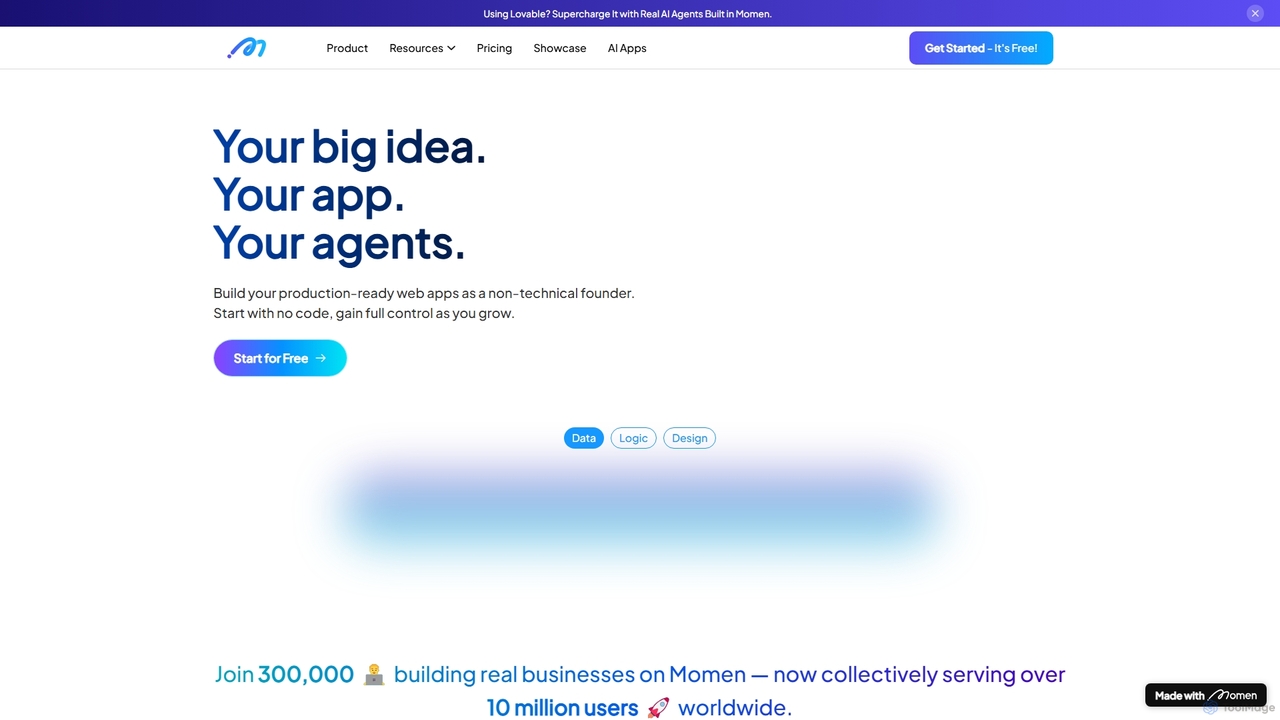
Momen Product overview

Momen is a powerful no-code platform for building, launching, and scaling production-ready web applications and AI agents. It empowers non-technical founders and developers with a visual interface, AI workflow automation, robust scalability for millions of users, and built-in monetization tools. Momen offers the flexibility to start without code and later integrate custom JavaScript or React components, making it an ideal solution for projects of any size, from MVPs to complex business applications.

Preview

Quick facts

Compare product focus, pricing models and audiences. Highlighted rows indicate different listed information; unknown pricing does not mean free.

CodeFlying VS Momen — Quick facts
Quick factsCodeFlyingMomen
Pricing modelFreemiumFreemium
Product typeWebWeb
Primary focusApp BuilderAi App Builders
Audience and rolesNo data availableEntrepreneur · Founder · Marketing Manager · Product Manager · Small Business Owner · Software Developer · UI/UX Designer
CategoriesApp Builder · No Code · AutomationAi App Builders · No Code · Automation
AddedAug 15, 2025Sep 18, 2025
UpdatedNov 19, 2026Nov 19, 2026

Features, usage and use cases

Explore the listed product descriptions, features and workflows. Taxonomy labels alone are not feature evaluations.

CodeFlying

CodeFlying, also known as 码上飞, is a revolutionary AI application development platform designed to transform ideas into functional software with unprecedented speed and simplicity. By leveraging advanced large language models for code generation, CodeFlying allows users to create mini-programs, native APPs, and H5 web applications simply by describing their needs in natural language. This no-code/low-code approach democratizes software development, making it accessible to entrepreneurs, designers, business managers, and anyone with an innovative idea, without requiring any programming knowledge.

The platform is built on the core principle of "Speak in your language, create an application." It interprets user prompts to design, code, and deploy applications, handling everything from the user interface (UI) to the backend logic and database structure. This enables rapid prototyping and the creation of Minimum Viable Products (MVPs) in a fraction of the time and cost of traditional development methods.

How to use CodeFlying

Using CodeFlying is an intuitive, conversational process. The platform guides users from concept to a fully functional application in a few simple steps:

  1. Describe Your Idea: Start by typing a clear, concise sentence or paragraph describing the application you want to build. For example, "Create a Pomodoro timer app to help users focus" or "Build an online store for selling handmade snacks with a shopping cart and user reviews."
  2. AI Generation: CodeFlying's AI engine analyzes your request. It understands the core features, required data, and user flows, then automatically generates the necessary frontend and backend code, database schema, and APIs.
  3. Review and Refine: The platform presents an initial version of your application. You can test its functionality and appearance. If you need changes or additional features, you can provide further instructions in natural language, such as "Add a user rating system" or "Change the color scheme to blue and white."
  4. Deploy and Share: Once you are satisfied with the application, you can deploy it with a single click. CodeFlying provides you with a shareable link for your H5 web app or instructions for publishing your mini-program or native APP.

Core Features of CodeFlying

  • Natural Language to App Generation: The primary feature allowing users to create complex applications from simple text prompts.
  • Multi-Platform Output: Simultaneously generates code for H5 web pages, mini-programs (like WeChat), and mobile APPs.
  • AI-Powered Full-Stack Development: The AI handles both the visual frontend and the complex backend logic, including databases and server-side operations.
  • Rapid Prototyping and Iteration: Go from idea to a testable MVP in minutes, and easily iterate on the design and functionality with conversational feedback.
  • Template and Example Gallery: Offers a wide range of pre-built application examples (like e-commerce stores, productivity tools, learning platforms) that can be used as a starting point.
  • No-Code/Low-Code Environment: Eliminates the need for manual coding, making app development accessible to everyone, regardless of technical skill.

Use Cases for CodeFlying

CodeFlying is versatile and can be used to build a wide variety of applications across different industries:

  • E-commerce: Quickly launch online stores, such as an "Online Snack Shop" or a "Shopping Assistant" to recommend products.
  • Productivity Tools: Create personal or team tools like a "Pomodoro Timer," "Task Management Platform," or an "Attendance Management System."
  • Educational Apps: Develop learning aids like a "Vocabulary Quiz App," a "Knowledge Subscription Platform," or a dedicated "Learning Platform."
  • Business & Utilities: Build internal tools like a "Smart Recruitment Platform," a "Vehicle Document Check" tool, or a "City Services Platform."
  • Entertainment & Lifestyle: Create fun apps like a "Fantasy Novel Generator," a "Cyber Fortune Teller," or an "AI Wardrobe Stylist."

Advantages of CodeFlying

CodeFlying offers significant advantages over traditional development approaches:

  • Unmatched Speed: Reduce development cycles from months to mere hours or even minutes.
  • Cost Efficiency: Drastically lowers the cost of software development, making it affordable for startups and individuals.
  • Democratization of Technology: Empowers non-technical founders and creators to bring their digital products to life without hiring a large development team.
  • Fosters Innovation: Allows for quick testing and validation of business ideas, reducing risk and encouraging experimentation.
  • Simplicity and Ease of Use: The natural language interface is the most intuitive way to interact with a computer, removing technical barriers.

Pricing and Plans

CodeFlying likely operates on a freemium model. This typically includes a free plan that allows users to experience the core features and build basic applications, possibly with CodeFlying branding and certain limitations. Paid plans would offer advanced features, more resources (e.g., more apps, higher usage limits), custom domains, no branding, and priority support. For the most accurate and up-to-date pricing information, it is recommended to visit the official CodeFlying website.

Momen

Momen is a comprehensive no-code development platform designed to empower entrepreneurs, founders, and developers to bring their digital ideas to life without writing a single line of code. It positions itself as a robust solution for building production-ready web applications and sophisticated AI agents. The platform is engineered for scalability, capable of supporting up to a million daily active users and handling massive datasets, making it suitable for businesses that anticipate significant growth. Momen bridges the gap between simplicity and power, offering a visual, intuitive building experience while providing the depth and control needed for complex, real-world applications.

How to use Momen

Building an application on Momen follows a streamlined, five-step visual process, turning a concept into a live app efficiently:

  1. Design the Interface (UI/UX): Start by using the drag-and-drop visual editor to design your application's user interface. You can create pixel-perfect layouts, customize components, and ensure your app is fully responsive across all devices.
  2. Structure the Data: Visually define your application's database. Create data tables, establish relationships, and manage your data models without needing to understand complex database languages.
  3. Build the Logic: Define how your application behaves using the visual workflow builder. Create complex business logic, user authentication flows, and backend processes by connecting nodes and actions in an intuitive flowchart-style interface.
  4. Integrate AI Agents: This is a standout feature. Visually combine logic, memory, and actions to build powerful AI workflows. You can create anything from smart form processing and data extraction to dynamic, personalized user experiences and advanced RAG-based (Retrieval-Augmented Generation) search assistants.
  5. Launch and Monetize: Deploy your application with a single click. Momen provides built-in SEO tools to help your app get discovered. When you're ready to monetize, you can seamlessly activate Stripe to manage payments, subscriptions, and billing.

Core Features of Momen

  • No-Code Visual Builder: An intuitive drag-and-drop interface for designing both the frontend and backend of your web application.
  • AI Agent & Workflow Automation: A visual canvas to build, train, and deploy custom AI agents. Combine logic, memory, and actions to automate complex tasks and create intelligent features.
  • High Scalability: The architecture is designed to handle high traffic and large volumes of data, supporting up to 1 million daily active users.
  • Full-Stack Control for Developers: For those who need more power, Momen offers access to fully searchable logs, the ability to integrate custom React components, use JavaScript for complex logic, and a self-documenting GraphQL API.
  • Built-in Monetization: Seamless integration with Stripe allows for easy setup of payment gateways, subscription plans, and transaction management.
  • Integrated SEO Tools: Optimize your application's visibility on search engines with built-in features for managing metadata, sitemaps, and other SEO elements.
  • Visual Database Management: Easily create, manage, and connect data tables within the platform, making data handling straightforward for non-technical users.

Use Cases for Momen

Momen's versatility makes it suitable for a wide range of applications:

  • Marketplaces: Build two-sided marketplaces like the featured 'Minicollector', a card collection app with millions of SKUs and automated inventory management.
  • AI-Powered Communities: Create online communities with advanced features, such as the 'Futurise Community' which uses a RAG-based AI search assistant to help members find information.
  • SaaS Products: Develop and launch custom Software-as-a-Service applications with user accounts, dashboards, and subscription billing.
  • Internal Business Tools: Build custom CRMs, project management systems, or internal dashboards to streamline company operations.
  • Minimum Viable Products (MVPs): Quickly prototype, test, and launch new business ideas to validate market demand before investing in a full-scale development team.

Advantages of Momen

Momen stands out in the crowded no-code market with several key advantages:

  • Hybrid No-Code/Low-Code Approach: It caters to both non-technical founders and experienced developers. Start with a purely visual interface and extend functionality with code (React, JavaScript) as your application grows in complexity.
  • Built for Scale: Unlike many no-code tools focused solely on MVPs, Momen is engineered for production use and high-growth scenarios from day one.
  • Deep AI Integration: The platform's ability to create stateful AI agents and complex workflows visually is a significant differentiator, enabling the creation of truly intelligent applications.
  • All-in-One Solution: It provides a unified environment for front-end, back-end, database, AI, and monetization, reducing the need for multiple tools and services.

Pricing and Plans

Momen operates on a freemium model, offering various tiers to suit different needs:

  • Free Plan: Ideal for individuals learning the platform, building hobby projects, or creating a simple MVP. This plan typically has limitations on database records, user capacity, and features.
  • Starter Plan: Aimed at startups and small businesses, this plan offers higher capacity, the ability to use a custom domain, and access to more core features.
  • Pro Plan: Designed for growing businesses that require greater scalability, more advanced AI capabilities, and higher performance.
  • Enterprise Plan: A custom-tailored plan for large organizations with specific requirements for security, compliance, dedicated support, and unlimited scalability.

Each paid plan offers progressively more resources, such as database rows, file storage, and API call limits, allowing you to scale your plan as your user base and business grow.

Positioning

Their taxonomy shows where the products overlap and where each one has a more distinct focus. Unknown fields are shown explicitly and are never filled with assumptions.

Categories

Shared
No CodeAutomation
Only CodeFlying
App Builder
Only Momen
Ai App Builders

Tags

Shared
app builderlow-codeno-code
Only CodeFlying
AI developmentcode generationH5 generatormini-program generatornatural language processingrapid prototypingsoftware development
Only Momen
AI agentautomationdatabasemarketplace builderSaaS buildervisual developmentweb applicationworkflow automation

Audience and roles

Shared
No listed items
Only CodeFlying
No listed items
Only Momen
EntrepreneurFounderMarketing ManagerProduct ManagerSmall Business OwnerSoftware DeveloperUI/UX Designer

Traffic comparison

Traffic is shown on the same scale so differences in market visibility are not visually understated.

How to interpret the traffic data

Both charts share the same months and vertical scale. Each tool identifies its latest reporting month; missing months are left blank, not counted as zero. Regional and source visit counts are estimates calculated from the reported shares.

CodeFlying monthly traffic:

Latest traffic · 2026-05

Monthly visits
33.9K
Avg. visit duration
0:37
Pages per visit
1.79
Bounce rate
67.33%
Data updated 2026-06-15

Monthly traffic trend

  • 2025-09: 115.9K
  • 2026-01: 58.6K
  • 2026-02: 60.2K
  • 2026-03: 58.6K
  • 2026-04: 43.5K
  • 2026-05: 33.9K

Top regions

Top 5 countries/regions
Country/regionPercentageEstimated visits
🇨🇳China94.84%32.1K
🇮🇳India1.73%586
🇵🇰Pakistan1.52%515
🇺🇸United States1.1%373
🇧🇩Bangladesh0.81%274

Traffic sources

Source typePercentageEstimated visits
Direct74.65%25.3K
Referral25.35%8.6K

Search keywords

codeflyingcodeflying ai码上飞码上飞codeflying码上飞 营销 专家

Momen monthly traffic:

Latest traffic · 2026-05

Monthly visits
50K
Avg. visit duration
0:22
Pages per visit
2.24
Bounce rate
37.4%
Data updated 2026-06-15

Monthly traffic trend

  • 2025-09: 76.3K
  • 2026-01: 95.9K
  • 2026-02: 66.4K
  • 2026-03: 64.8K
  • 2026-04: 63.6K
  • 2026-05: 50K

Top regions

Top 5 countries/regions
Country/regionPercentageEstimated visits
🇺🇸United States33.88%16.9K
🇳🇬Nigeria21.08%10.5K
🇮🇳India18.73%9.4K
🇻🇳Vietnam13.78%6.9K
🇧🇷Brazil12.53%6.3K

Traffic sources

Source typePercentageEstimated visits
Direct87.65%43.8K
Referral12.35%6.2K

Search keywords

ai tools directorymomenmomen pricingreddit marketing botwill moten trip planner

Community signals

Ratings, comments, favorites, and likes are community signals—not a substitute for product fit.

CodeFlying

Rating
No data available
Comments
0
Favorites
147
Likes
132

Momen

Rating
No data available
Comments
0
Favorites
162
Likes
169

CodeFlying vs Momen · Comparison FAQ

What do CodeFlying and Momen have in common?
Both tools are listed under No Code、Automation. These categories indicate overlapping use cases; compare their detailed descriptions for workflows, capabilities and limitations.
Are CodeFlying and Momen free?
Listed pricing models: CodeFlying — Freemium; Momen — Freemium. Missing pricing is not proof of a free plan, and freemium does not mean every feature is free. Check official sites for current plans, limits and trials.
How should I choose between CodeFlying and Momen?
The primary listed category is App Builder for CodeFlying, and Ai App Builders for Momen. Compare features, steps and use cases, then verify pricing, data permissions and deployment needs. This page does not include hands-on testing and does not declare a winner from traffic or tags.

Sources and comparison methodology

This page is assembled from ToolMage product listings, taxonomy, traffic statistics and on-site user feedback. It is not a hands-on test or an independent review.


  • Feature and plan descriptions reflect information in the listings, not real-time guarantees. Verify pricing, quotas, availability and privacy terms on the official sites.
  • Traffic uses the reporting months shown. Missing statistics do not mean zero visits, and different periods do not establish growth or superiority. Regional and source visit counts are estimates based on shares.
  • Different tags indicate differences in the listings, not proof that the other product lacks a capability. Ratings, favorites and visits are not used to declare a winner.

Related comparisons