ToolMage
Sign in

AI TOOL COMPARISON

CodeFriends vs Zzzcode

What is the difference, and which fits your workflow? Compare features, usage, pricing models and traffic side by side.

Jump to key differences

Product overview

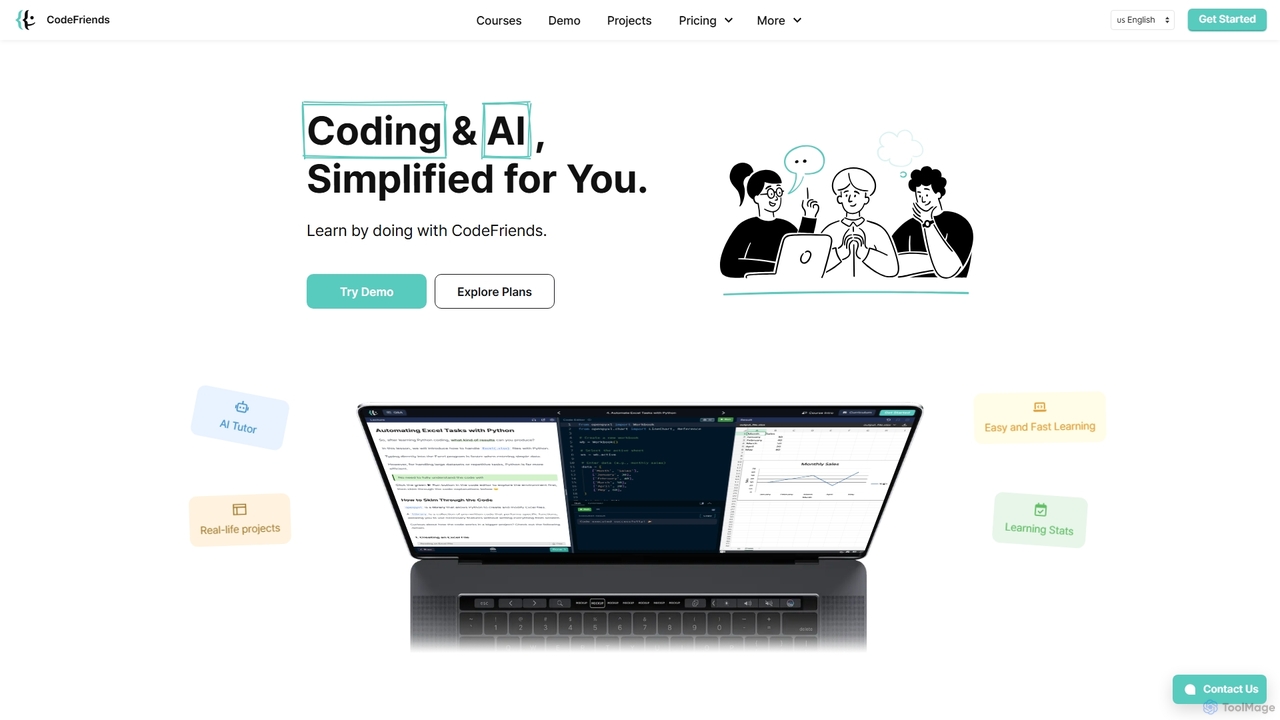
CodeFriends Product overview

CodeFriends is an interactive, browser-based learning platform designed to teach coding and AI through hands-on projects. It features a real-time code editor, an AI tutor for instant feedback, and one-click project deployment. Suitable for beginners, professionals, and educational institutions, it simplifies the learning process without requiring any software installation.

Preview

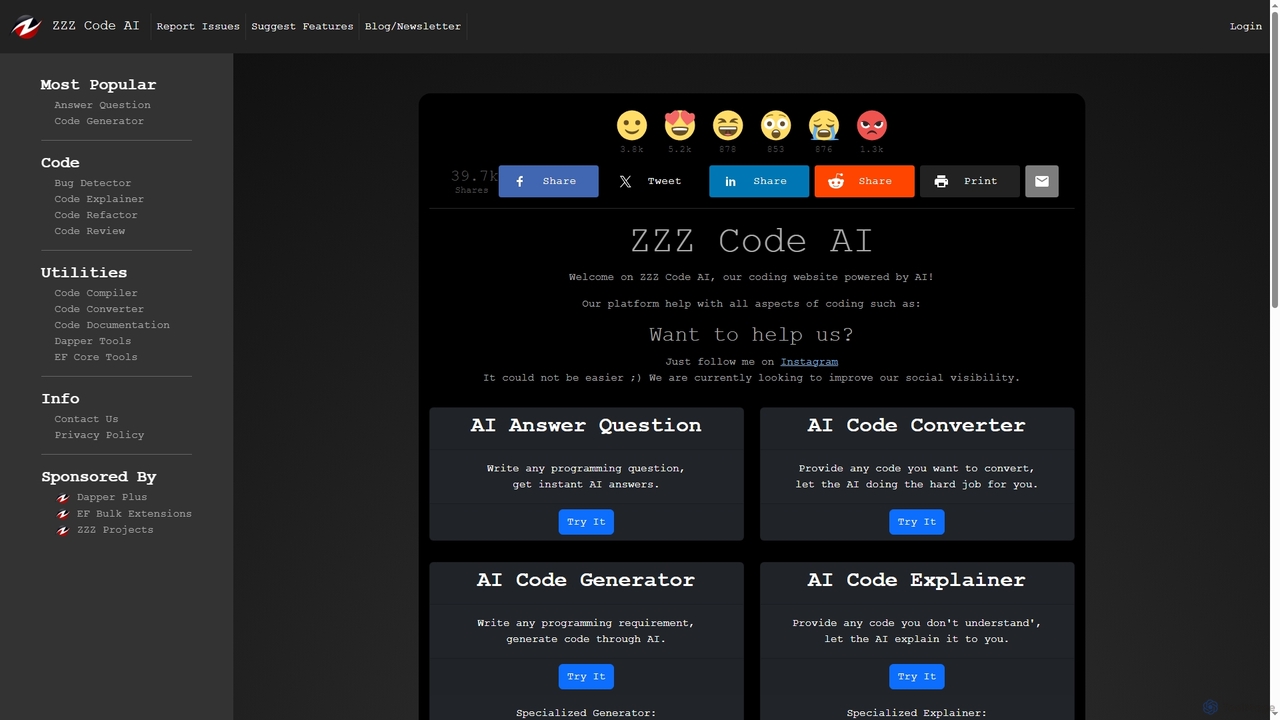
Zzzcode Product overview

Zzzcode is a free, AI-powered online platform offering a comprehensive suite of coding tools for developers. It can generate, explain, debug, refactor, review, document, and convert code across numerous programming languages, and provide instant answers to programming questions.

Preview

Quick facts

Compare product focus, pricing models and audiences. Highlighted rows indicate different listed information; unknown pricing does not mean free.

CodeFriends VS Zzzcode — Quick facts
Quick factsCodeFriendsZzzcode
Pricing modelFreemiumFree
Product typeWebWeb
Primary focusLearning PlatformsCode Assistant
Audience and rolesData Analyst · Educator · HR Manager · IT Manager · Product Manager · Software Developer · Startup Founder · Student · Web DeveloperData Analyst · DevOps Engineer · QA Engineer · Software Developer · Student · Web Developer
CategoriesLearning Platforms · Programming · EducationCode Assistant · Programming · Developer Tools
AddedSep 19, 2025Oct 22, 2025
UpdatedNov 19, 2026Nov 19, 2026

Features, usage and use cases

Explore the listed product descriptions, features and workflows. Taxonomy labels alone are not feature evaluations.

CodeFriends

CodeFriends is a comprehensive, interactive online platform dedicated to making coding and AI education accessible and practical for everyone. Operated by Geek Haus, its core philosophy is "learn by doing." Instead of traditional, theory-heavy lectures, CodeFriends immerses users in a hands-on environment where they can build real-world projects directly in their browser. This approach is designed for all skill levels, from absolute beginners starting their coding journey to experienced developers looking to upskill in areas like AI and data analysis.

The platform eliminates the initial friction of learning to code by removing the need for complex software installations or environment setups. Everything, from writing code in the real-time editor to receiving guidance and deploying a live project, happens seamlessly within the browser. This makes it incredibly easy to get started and focus on what truly matters: learning and building.

How to use CodeFriends

Getting started with CodeFriends is straightforward and intuitive. First, users can explore the platform through interactive demos to get a feel for the learning environment. Once ready, they can choose a specific course or subscribe to the Plus Membership for full access. The learning process follows a structured path:

  1. Choose a Course: Select from a variety of courses like 'Python Programming 101', 'Introduction to AI', 'Web Development (HTML, CSS, JavaScript)', or 'Automating Tasks with Python and AI'.
  2. Learn with Interactive Lectures: Follow step-by-step lectures that combine clear explanations with practical exercises in the integrated code editor.
  3. Get AI-Powered Assistance: Whenever you're stuck, the 24/7 AI Tutor provides instant feedback, code suggestions, and explanations, acting as a personal guide.
  4. Build Real Projects: Apply your knowledge by creating tangible projects, such as an online resume, a data collection program, or an automation tool.
  5. Deploy with One Click: Publish your finished project to the web instantly with a single click. CodeFriends generates a live, shareable link, perfect for building a portfolio.
  6. Manage and Iterate: Use the project versioning feature to track changes, roll back to previous versions, and download your code for offline use or backup.

Core Features of CodeFriends

  • Hands-on Learning Environment: An interactive, browser-based code editor with real-time execution results.
  • 24/7 AI Tutor: Get instant, AI-powered feedback, code generation, and guidance whenever you need it.
  • Real-World Projects: Curriculum focused on building practical projects that can be added to a professional portfolio.
  • One-Click Hosting: Deploy websites and applications instantly without any server setup or configuration.
  • Comprehensive Course Catalog: Expert-designed courses covering Python, Web Development, AI, Prompt Engineering, and more.
  • Project Versioning: Easily track and manage different versions of your code, allowing you to experiment without fear of losing work.
  • Code Download: Export your complete project code for use in your portfolio, for backups, or for offline development.
  • Solutions for Institutions: Custom curricula, white-labeling options, and an advanced admin dashboard with AI-powered analytics for schools and businesses.

Use Cases for CodeFriends

CodeFriends is versatile and serves a wide range of users:

  • Absolute Beginners: Individuals with no prior coding experience can start with foundational courses and build confidence through guided projects.
  • Students & Educators: Universities and schools can integrate CodeFriends into their curricula, offering students a modern, hands-on learning tool. The admin dashboard helps track student progress effectively.
  • Career Changers: Professionals looking to transition into tech can acquire in-demand skills in web development, data analysis, and AI in a structured and practical way.
  • Corporate Training: Businesses can use CodeFriends for employee onboarding and upskilling, with custom training programs tailored to their specific needs. Partners like Delivery Hero use it for IT training.
  • Startup Founders: Non-technical founders and small teams can learn essential coding skills to build and ship their products without heavy reliance on external developers.

Advantages of CodeFriends

The platform stands out by focusing on simplicity, practicality, and comprehensive support. Key advantages include:

  • Accessibility: No software installation is required, allowing users to learn from any device with a browser.
  • Practical Skill Development: The project-based approach ensures that learners gain real-world skills they can immediately apply.
  • Affordability: Offers a cost-effective alternative to expensive coding bootcamps, with flexible subscription plans.
  • Integrated Workflow: Combines learning, coding, debugging, and deployment into a single, seamless platform.
  • AI-Powered Support: The AI tutor provides personalized, on-demand assistance, making the learning process more efficient and less frustrating.

Pricing and Plans

CodeFriends offers flexible pricing options for individuals and institutions:

  • Free Trial/Demo: Users can try interactive demos to experience the platform before committing.
  • Pay Per Course: Option to purchase individual courses, typically starting from $30+.
  • Plus Membership (All-Access): Provides unlimited access to all courses, projects, and the AI tutor.
    • 3 Months: $20/month (billed as $59)
    • 6 Months: $15/month (billed as $89)
    • 1 Year: $11/month (billed as $129)
  • For Institutions: Custom plans with personalized solutions, including volume-based pricing, white-labeling, and a dedicated admin dashboard. Interested organizations can contact CodeFriends for a demo and tailored pricing.

Zzzcode

Zzzcode is a versatile and completely free AI-powered website designed to assist developers and programmers with a wide range of coding tasks. The platform integrates multiple AI tools to streamline the entire development lifecycle, from writing new code to understanding and optimizing existing codebases. It supports a vast array of programming languages and technologies, making it a valuable resource for students, hobbyists, and professional developers alike.

How to use Zzzcode

Using Zzzcode is straightforward. First, navigate to the homepage and select the specific tool you need, such as 'Code Generator', 'Code Explainer', or 'Bug Detector'. Next, specify the programming language or software relevant to your task (e.g., Python, C#, SQL Server). Enter your code or describe your requirements in the provided text area. You can then customize the output by selecting a desired tone (e.g., Professional, Friendly) and format. Finally, click the 'Execute' button to receive an AI-generated response. If the result isn't perfect, you can refine your input and try again.

Core Features of Zzzcode

  • AI Code Generator: Generates code snippets in various languages based on natural language descriptions.
  • AI Code Explainer: Provides detailed explanations for complex or unfamiliar code.
  • AI Bug Detector: Identifies and explains bugs within a piece of code.
  • AI Code Refactor: Suggests improvements and refactors code for better readability and performance.
  • AI Code Review: Performs a comprehensive review of your code, offering feedback and suggestions.
  • AI Code Converter: Translates code from one programming language to another.
  • AI Code Documentation: Automatically adds comments and documentation to your code.
  • AI Question Answering: Answers any programming-related questions instantly.
  • Specialized Tools: Includes dedicated utilities for frameworks like Dapper and Entity Framework Core.

Use Cases for Zzzcode

Zzzcode is ideal for developers looking to accelerate their workflow. It can be used for learning a new programming language by explaining code examples, generating boilerplate code for new projects, debugging tricky functions, refactoring legacy code to modern standards, and ensuring code quality through automated reviews. It's also a great tool for students who need help understanding complex algorithms or getting answers to specific coding questions.

Advantages of Zzzcode

The primary advantage of Zzzcode is that it is completely free to use, supported by sponsors. It offers a comprehensive suite of essential coding tools on a single platform, eliminating the need for multiple separate services. The support for a wide variety of programming languages and the ability to customize output in numerous human languages make it highly versatile and accessible to a global audience.

Positioning

Their taxonomy shows where the products overlap and where each one has a more distinct focus. Unknown fields are shown explicitly and are never filled with assumptions.

Categories

Shared
Programming
Only CodeFriends
Learning PlatformsEducation
Only Zzzcode
Code AssistantDeveloper Tools

Tags

Shared
javascriptpython
Only CodeFriends
AI educationAI tutorcode learninginteractive learninglearn to codeno-code setuponline codingprogramming coursesweb development
Only Zzzcode
AI codingc++code assistantcode debuggercode explainercode generatorcode refactoringdeveloper toolsprogrammingsql generator

Audience and roles

Shared
Data AnalystSoftware DeveloperStudentWeb Developer
Only CodeFriends
EducatorHR ManagerIT ManagerProduct ManagerStartup Founder
Only Zzzcode
DevOps EngineerQA Engineer

Traffic comparison

Traffic is shown on the same scale so differences in market visibility are not visually understated.

How to interpret the traffic data

Both charts share the same months and vertical scale. Each tool identifies its latest reporting month; missing months are left blank, not counted as zero. Regional and source visit counts are estimates calculated from the reported shares.

CodeFriends monthly traffic:

Latest traffic · 2026-05

Monthly visits
6.5K
Avg. visit duration
0:18
Pages per visit
1.75
Bounce rate
32.54%
Data updated 2026-06-15

Monthly traffic trend

  • 2025-09: 9.6K
  • 2026-01: 8.4K
  • 2026-02: 7.8K
  • 2026-03: 8.2K
  • 2026-04: 7.2K
  • 2026-05: 6.5K

Top regions

Top 5 countries/regions
Country/regionPercentageEstimated visits
🇰🇷Korea, Republic of100%6.5K

Search keywords

할루시네이션파이썬 코드 예시font-weightimage paddig프롬프트 vs 파인튜닝

Zzzcode monthly traffic:

Latest traffic · 2026-05

Monthly visits
195.5K
Avg. visit duration
1:25
Pages per visit
2.48
Bounce rate
41.65%
Data updated 2026-06-11

Monthly traffic trend

  • 2025-09: 247.3K
  • 2026-01: 277.4K
  • 2026-02: 242.9K
  • 2026-03: 180.6K
  • 2026-04: 195.6K
  • 2026-05: 195.5K

Top regions

Top 5 countries/regions
Country/regionPercentageEstimated visits
🇺🇸United States57.77%112.9K
🇮🇳India21.97%43K
🇵🇭Philippines7.85%15.3K
🇬🇧United Kingdom7.15%14K
🇩🇪Germany5.26%10.3K

Traffic sources

Source typePercentageEstimated visits
Direct86.18%168.5K
Referral9.69%18.9K
Email4.13%8.1K

Search keywords

zzz codezzzcodezzz code aizzz codeszzzod

Community signals

Ratings, comments, favorites, and likes are community signals—not a substitute for product fit.

CodeFriends

Rating
No data available
Comments
0
Favorites
164
Likes
157

Zzzcode

Rating
No data available
Comments
0
Favorites
160
Likes
162

CodeFriends vs Zzzcode · Comparison FAQ

What do CodeFriends and Zzzcode have in common?
Both tools are listed under Programming. These categories indicate overlapping use cases; compare their detailed descriptions for workflows, capabilities and limitations.
Are CodeFriends and Zzzcode free?
Listed pricing models: CodeFriends — Freemium; Zzzcode — Free. Missing pricing is not proof of a free plan, and freemium does not mean every feature is free. Check official sites for current plans, limits and trials.
How should I choose between CodeFriends and Zzzcode?
The primary listed category is Learning Platforms for CodeFriends, and Code Assistant for Zzzcode. Compare features, steps and use cases, then verify pricing, data permissions and deployment needs. This page does not include hands-on testing and does not declare a winner from traffic or tags.

Zzzcode · Comparison FAQ

Is Zzzcode free to use?

Yes, Zzzcode is completely free. The website's title is 'FREE Online AI Tools for Coding' and it mentions it costs over $50 per day to keep the service free, which is covered by sponsors like Dapper Plus and EF Bulk Extensions.

What are the character limits for the tools?

According to the tool pages, the input character limit is temporarily set to 10,000 characters for guest users. For logged-in users, the limit is increased to 20,000 characters. This measure was implemented to prevent abuse.

What programming languages does Zzzcode support?

Zzzcode supports a wide range of languages and technologies. The website explicitly lists specialized generators and explainers for Android, C, C++, C#, CSS, Excel Formula, HTML, Java, JavaScript, jQuery, MySQL, PHP, Python, Regex, SQL, SQL Server, and VB.NET.

Can I get output in a language other than English?

Yes, most tools feature an 'Output in' dropdown menu that allows you to select from a vast list of languages for the generated response, including Español, Français, Deutsch, Italiano, Português, 中文 (Chinese), 日本語 (Japanese), 한국어 (Korean), and many others.

What should I do if the tool is unresponsive?

The website states that the API can occasionally become unresponsive, which often happens during a daily server reset. If you encounter this issue, it is recommended to 'Please try again in 5 minutes'.

Sources and comparison methodology

This page is assembled from ToolMage product listings, taxonomy, traffic statistics and on-site user feedback. It is not a hands-on test or an independent review.

  • Feature and plan descriptions reflect information in the listings, not real-time guarantees. Verify pricing, quotas, availability and privacy terms on the official sites.
  • Traffic uses the reporting months shown. Missing statistics do not mean zero visits, and different periods do not establish growth or superiority. Regional and source visit counts are estimates based on shares.
  • Different tags indicate differences in the listings, not proof that the other product lacks a capability. Ratings, favorites and visits are not used to declare a winner.

Related comparisons