ToolMage
Sign in

AI TOOL COMPARISON

codefy.ai vs GitWit

What is the difference, and which fits your workflow? Compare features, usage, pricing models and traffic side by side.

Jump to key differences

Product overview

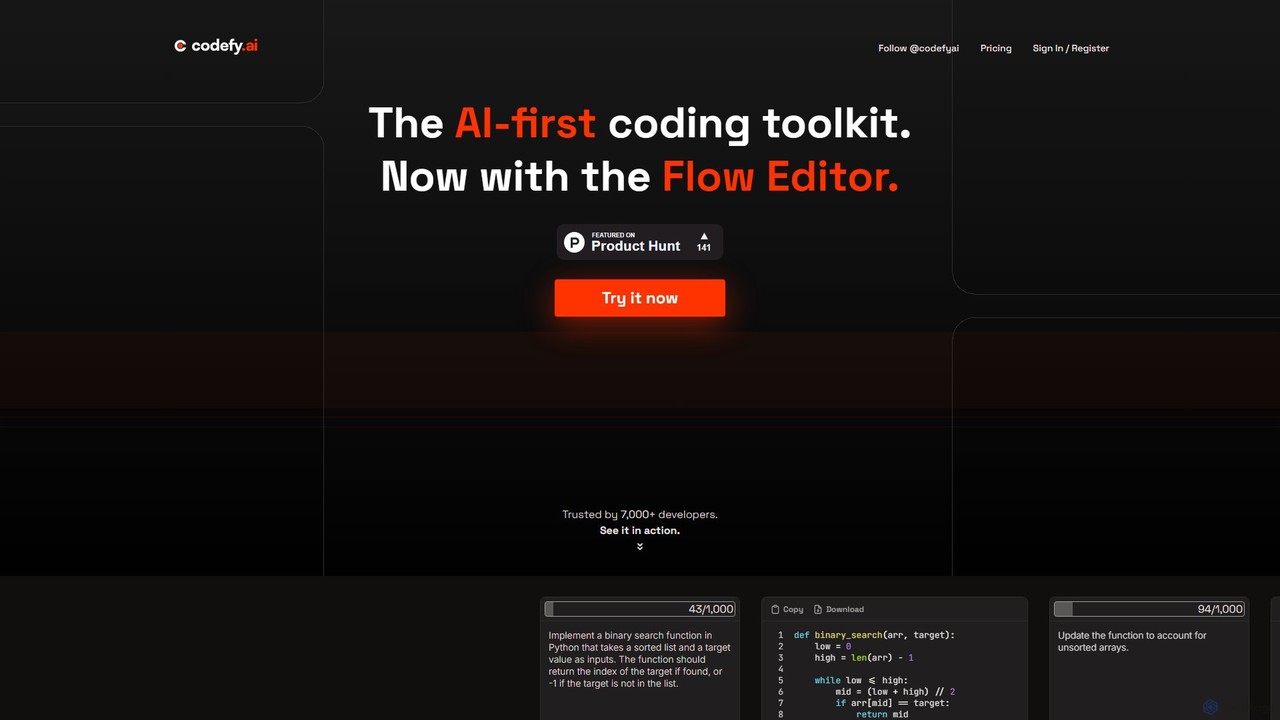
codefy.ai Product overview

codefy.ai is an AI-first coding toolkit designed for developers. It features over 20 specialized tools, including the innovative Flow Editor, to streamline tasks like code generation, debugging, translation, and optimization. By handling prompt engineering, it allows developers to get accurate results quickly through intuitive, pre-programmed interfaces, significantly boosting productivity and simplifying the development workflow.

Preview

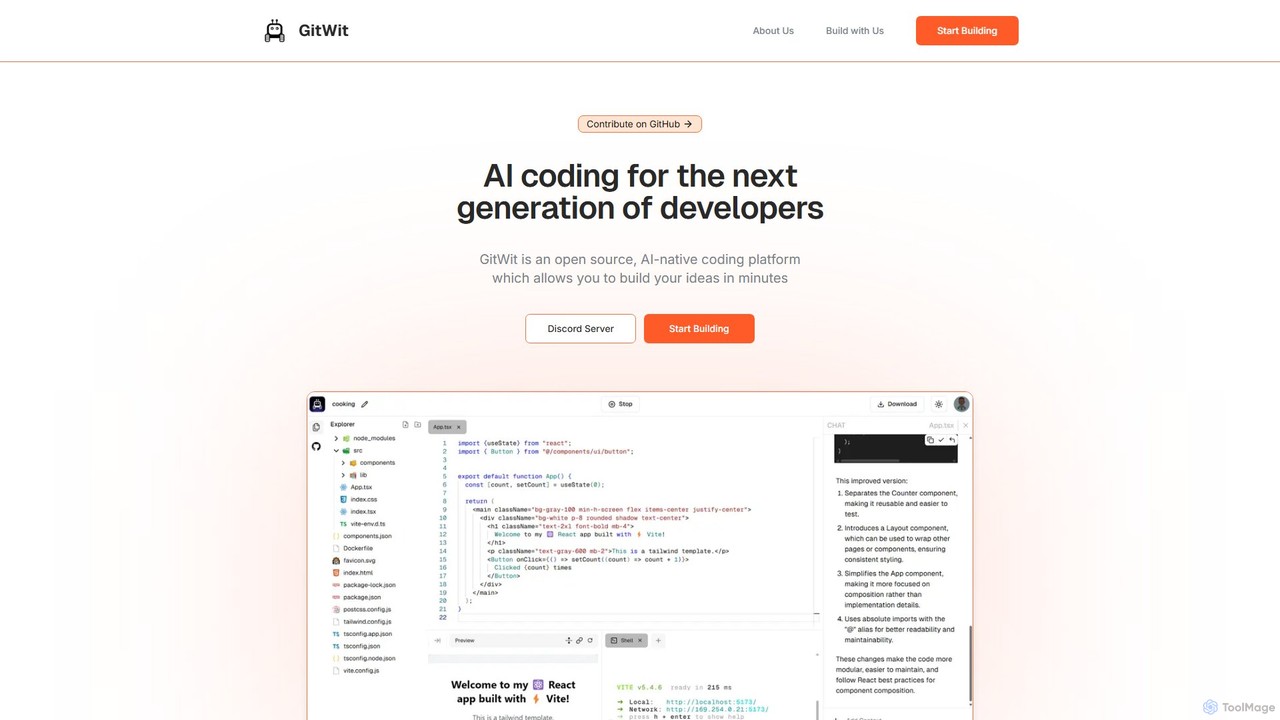
GitWit Product overview

GitWit is an open-source, AI-powered coding assistant designed for the next generation of developers. It accelerates the development workflow by generating, refactoring, and explaining code. With a strong community focus, GitWit is built collaboratively through live streams and public meetings, offering both a powerful tool and a learning platform.

Preview

Quick facts

Compare product focus, pricing models and audiences. Highlighted rows indicate different listed information; unknown pricing does not mean free.

codefy.ai VS GitWit — Quick facts
Quick factscodefy.aiGitWit
Pricing modelFreemiumFreemium
Product typeWebWeb
Primary focusCode AssistantCode Assistant
Audience and rolesNo data availableNo data available
CategoriesCode Assistant · Learning · AutomationCode Assistant · Learning · Automation
AddedAug 14, 2025Aug 16, 2025
UpdatedNov 19, 2026Nov 19, 2026

Features, usage and use cases

Explore the listed product descriptions, features and workflows. Taxonomy labels alone are not feature evaluations.

codefy.ai

codefy.ai positions itself as 'The AI-first coding toolkit,' a comprehensive suite of intelligent developer tools designed to accelerate and enhance the entire software development lifecycle. Trusted by a growing community of over 7,000 developers, it offers a diverse collection of more than 20 specialized widgets that simplify complex coding tasks. The platform's core philosophy is to manage the complexities of prompt engineering on behalf of the user, providing beautiful, pre-programmed forms that guide developers to get the best results from large language models (LLMs) without needing to write long, repetitive prompts.

At the heart of codefy.ai is the innovative Flow Editor, a new paradigm for coding with LLMs. It creates an interactive and efficient environment where developers can iteratively build, refine, and debug code. The Flow Editor is designed for speed and efficiency, featuring a real-time token counter to avoid limit surprises, lightning-fast keyboard shortcuts, and a token-optimized query system that only sends the necessary context. This results in a workflow that eliminates unnecessary explanatory text and focuses purely on generating functional code.

How to use codefy.ai

Using codefy.ai is straightforward and designed for immediate productivity:

  1. Sign Up: Create an account by choosing a plan that fits your needs, starting with a generous free tier.
  2. Select a Tool: Browse the extensive toolbox and select the specific tool for your task. Whether you need to write new code, debug an existing function, translate a snippet to another language, or generate regular expressions, there's a dedicated tool for it.
  3. Provide Input: Enter your code, problem description, or requirements into the tool's structured interface. The platform is engineered to guide you in providing the right context.
  4. Generate and Refine: Let the AI process your request and generate the output. You can then copy, download, or further refine the result using the Flow Editor or other tools. The iterative process allows for continuous improvement until the code is perfect.

Core Features of codefy.ai

  • Flow Editor: An interactive, token-optimized coding environment that streamlines the process of working with LLMs, featuring real-time token tracking and a focus on pure code output.
  • Comprehensive Tool Suite: Over 20 specialized tools including Code Writer, Code Explainer, Code Debugger, Regex Generator, Code Translator, Code Optimizer, Code Comparer, Topic Explainer, Test Generator, and Database Query Generator.
  • Pre-Engineered Prompts: The platform handles the prompt engineering, ensuring users get high-quality, relevant results from the AI without needing to be experts in prompt design.
  • Token Optimization: Smart design ensures that queries are efficient, saving on token usage and costs, especially in the Flow Editor.
  • Privacy-Focused: All user queries are private by default, with the option to share via a custom link. The platform guarantees it will never sell or share user data.
  • Multi-Language Support: Tools like the Code Translator and Code Writer are capable of working with a wide array of popular programming languages.

Use Cases for codefy.ai

codefy.ai is versatile and can be applied across various development scenarios:

  • Rapid Prototyping: Quickly scaffold new applications or features using the Code Writer and Flow Editor, as demonstrated by the 'Snake game in Python' example.
  • Learning and Onboarding: Use the Topic Explainer and Code Explainer to quickly understand new programming concepts, libraries, or unfamiliar codebases.
  • Code Maintenance and Refactoring: Improve the quality of existing code with tools like Code Optimizer, Code Refactoring, and Variable Renamer.
  • Debugging and Quality Assurance: Efficiently identify and fix bugs with the Code Debugger and ensure code robustness by creating unit tests with the Test Generator.
  • Cross-Language Development: Seamlessly port algorithms or components from one programming language to another using the Code Translator.

Advantages of codefy.ai

Developers choose codefy.ai for its distinct advantages:

  • Enhanced Productivity: By automating routine and time-consuming tasks, it frees up developers to focus on high-level logic and creative problem-solving.
  • Accessibility: Makes the power of advanced LLMs accessible to all developers, regardless of their experience with prompt engineering.
  • All-in-One Solution: Consolidates the functionality of numerous separate tools into a single, cohesive platform, streamlining the developer's workflow.
  • Cost-Effective: Offers a free tier for getting started and affordable paid plans with generous token limits, providing a high return on investment.

Pricing and Plans

codefy.ai offers a flexible pricing structure to suit different levels of usage:

  • Starter Plan (Free): Includes 5,000 tokens per month, ideal for trying out the platform and for developers with light usage needs.
  • Basic Plan ($9/mo): Offers 500,000 tokens per month (~100k lines of code), a 4,000 token input limit, and is perfect for most individual developers and regular use.
  • Pro Plan ($19/mo): Provides unlimited tokens and lines of code (subject to a fair use policy), an 8,000 token input limit, and is designed for power users and professionals with high-volume needs.

Enterprise plans with discounted rates are also available upon request. Subscriptions can be canceled at any time.

GitWit

GitWit is a revolutionary AI-powered coding tool designed to enhance and accelerate the software development lifecycle for developers. As an open-source project, it stands out by fostering a vibrant community where users are not just consumers but also contributors to the tool's evolution. GitWit is built in public, with weekly live streams and sync meetings on YouTube, promoting transparency and collaborative learning.

The core mission of GitWit is to integrate artificial intelligence seamlessly into the daily coding workflow. It acts as an intelligent partner, capable of understanding natural language prompts to generate code, refactor complex functions, explain intricate algorithms, and even help in debugging. By leveraging advanced AI models, GitWit helps reduce repetitive tasks, allowing developers to focus on high-level problem-solving and creative design.

How to use GitWit

Getting started with GitWit is designed to be flexible and developer-friendly. Users can engage with the tool in several ways:

  1. Web Interface: Access GitWit's features directly through its web-based platform for quick code generation and analysis without any local setup.
  2. Self-Hosting: For maximum control, privacy, and customization, developers can deploy their own instance of GitWit. The project provides comprehensive guides, such as the step-by-step tutorial for setting it up on AWS, empowering teams to run GitWit within their own infrastructure.
  3. Community Engagement: A unique way to learn and use GitWit is by joining the community. Participate in the weekly 'GitWit Sync' meetings and live coding sessions on YouTube. This not only helps you master the tool but also allows you to contribute to its development and learn from the core team and other developers in real-time.
  4. Integration (Future): As an evolving developer tool, expect future integrations with popular IDEs like VS Code, further embedding its AI capabilities directly into your coding environment.

Core Features of GitWit

  • AI-Powered Code Generation: Create code snippets, functions, classes, and even entire application scaffolds from simple text descriptions.
  • Intelligent Code Refactoring: Improve the quality of existing code by automatically refactoring it for better readability, performance, or adherence to modern best practices.
  • Code Explanation: Demystify complex code. Select a block of code and ask GitWit to explain what it does in plain, easy-to-understand language.
  • Open Source & Community-Driven: The entire project is open source, allowing for full transparency, customization, and community contributions. The development process is public.
  • Self-Hosting Capability: Provides the option to deploy on your own servers (e.g., AWS), ensuring data privacy and control over the tool's environment.
  • Debugging Assistance: Helps identify potential bugs and suggests possible fixes, speeding up the debugging process.
  • Educational Platform: Through live streams and public meetings, GitWit serves as a valuable resource for learning about AI in software development.

Use Cases for GitWit

GitWit is versatile and can be applied in various scenarios:

  • Rapid Prototyping: Quickly build and iterate on new ideas by generating boilerplate code and functional components.
  • Learning & Education: Students and developers new to a language or framework can use GitWit to understand code examples and accelerate their learning curve.
  • Legacy Code Modernization: Safely refactor and improve old codebases, making them more maintainable and efficient.
  • Automating Tedious Tasks: Automate the creation of unit tests, documentation, and other repetitive coding tasks.
  • Collaborative Projects: Use GitWit in team settings to maintain a consistent code style and to help onboard new team members by explaining the existing codebase.

Advantages of GitWit

GitWit offers several key advantages over other AI coding tools:

  • Transparency and Trust: Being open-source means you can inspect the code, understand how it works, and trust it with your projects.
  • Community Collaboration: Users have a direct impact on the tool's features and direction, creating a product that is truly built for developers, by developers.
  • Ultimate Control & Privacy: The self-hosting option is a major differentiator, appealing to enterprises and individuals with strict data privacy requirements.
  • Cost-Effective: The open-source nature suggests a free or low-cost model, making advanced AI tools accessible to a wider audience.
  • Focus on Learning: GitWit is more than a tool; it's an ecosystem for growth, encouraging continuous learning through its community activities.

Pricing and Plans

GitWit is fundamentally an open-source project, making its core technology free to use, especially for those who choose to self-host it on their own infrastructure. While there are no formal paid plans listed on the website, the typical model for such projects includes:

  • Free Self-Hosted Version: Complete access to the tool's features by deploying it on your own servers.
  • Potential Future Offerings: The project may introduce optional paid services in the future, such as a managed cloud version for convenience, dedicated enterprise support, or access to more powerful proprietary AI models.

Currently, developers can get started for free by engaging with the open-source repository and community.

Positioning

Their taxonomy shows where the products overlap and where each one has a more distinct focus. Unknown fields are shown explicitly and are never filled with assumptions.

Categories

Shared
Code AssistantLearningAutomation
Only codefy.ai
No listed items
Only GitWit
No listed items

Tags

Shared
AI codingcode refactoringsoftware development
Only codefy.ai
code assistantcode generatorcode translationdebuggingdeveloper toolsprogrammingregex generatortest generation
Only GitWit
code generationcommunity-drivendeveloper toolopen sourceprogramming assistantself-hosted

Audience and roles

Shared
No listed items
Only codefy.ai
No listed items
Only GitWit
No listed items

Traffic comparison

Traffic is shown on the same scale so differences in market visibility are not visually understated.

How to interpret the traffic data

Both charts share the same months and vertical scale. Each tool identifies its latest reporting month; missing months are left blank, not counted as zero. Regional and source visit counts are estimates calculated from the reported shares.

codefy.ai monthly traffic:

Latest traffic · 2026-05

Monthly visits
616
Avg. visit duration
0:00
Pages per visit
1.05
Bounce rate
32.99%
Data updated 2026-06-15

Monthly traffic trend

  • 2025-09: 338
  • 2026-01: 1.8K
  • 2026-02: 2.3K
  • 2026-03: 545
  • 2026-04: 683
  • 2026-05: 616

Search keywords

codefy

GitWit monthly traffic:

Latest traffic · 2026-05

Monthly visits
512
Avg. visit duration
0:00
Pages per visit
1.04
Bounce rate
32.92%
Data updated 2026-06-15

Monthly traffic trend

  • 2025-09: 322
  • 2026-01: 1.3K
  • 2026-02: 1.3K
  • 2026-03: 2.2K
  • 2026-04: 1.1K
  • 2026-05: 512

Search keywords

gibhuhgithyvopenwitwts git

Community signals

Ratings, comments, favorites, and likes are community signals—not a substitute for product fit.

codefy.ai

Rating
No data available
Comments
0
Favorites
137
Likes
143

GitWit

Rating
No data available
Comments
0
Favorites
208
Likes
189

codefy.ai vs GitWit · Comparison FAQ

What do codefy.ai and GitWit have in common?
Both tools are listed under Code Assistant、Learning、Automation. These categories indicate overlapping use cases; compare their detailed descriptions for workflows, capabilities and limitations.
Are codefy.ai and GitWit free?
Listed pricing models: codefy.ai — Freemium; GitWit — Freemium. Missing pricing is not proof of a free plan, and freemium does not mean every feature is free. Check official sites for current plans, limits and trials.
How should I choose between codefy.ai and GitWit?
The primary listed category is Code Assistant for codefy.ai, and Code Assistant for GitWit. Compare features, steps and use cases, then verify pricing, data permissions and deployment needs. This page does not include hands-on testing and does not declare a winner from traffic or tags.

Sources and comparison methodology

This page is assembled from ToolMage product listings, taxonomy, traffic statistics and on-site user feedback. It is not a hands-on test or an independent review.

  • Feature and plan descriptions reflect information in the listings, not real-time guarantees. Verify pricing, quotas, availability and privacy terms on the official sites.
  • Traffic uses the reporting months shown. Missing statistics do not mean zero visits, and different periods do not establish growth or superiority. Regional and source visit counts are estimates based on shares.
  • Different tags indicate differences in the listings, not proof that the other product lacks a capability. Ratings, favorites and visits are not used to declare a winner.

Related comparisons