ToolMage
Sign in

AI TOOL COMPARISON

Devin vs GitWit

What is the difference, and which fits your workflow? Compare features, usage, pricing models and traffic side by side.

Jump to key differences

Product overview

Devin Product overview

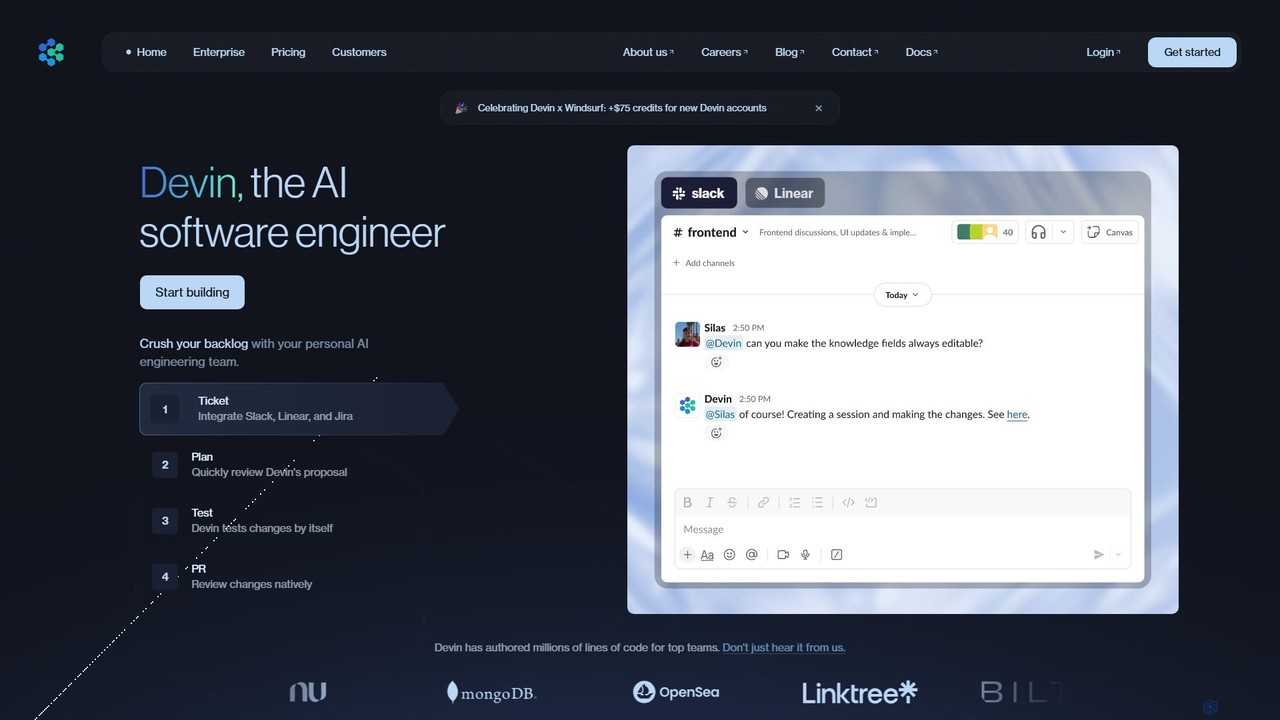
Devin is the world's first AI software engineer, designed by Cognition to autonomously handle complex engineering tasks. It can plan and execute entire software development projects, from writing code and fixing bugs to large-scale migrations, significantly boosting team productivity and reducing development costs.

Preview

GitWit Product overview

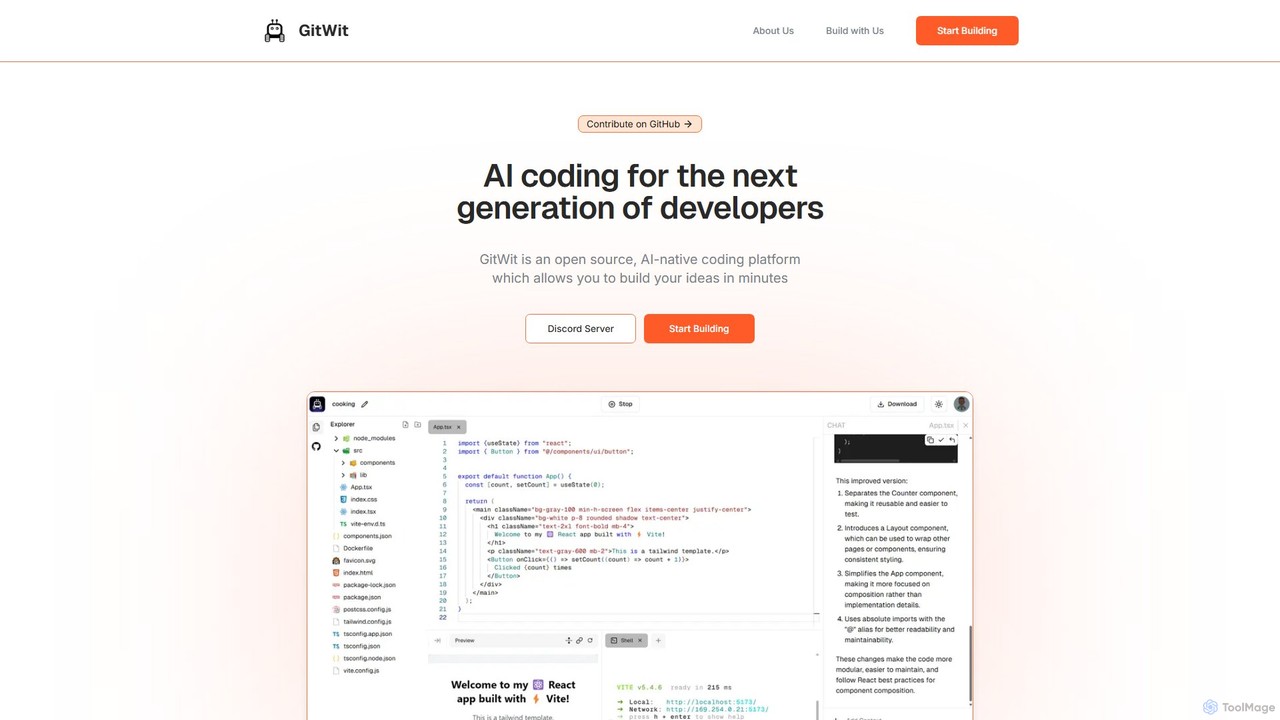
GitWit is an open-source, AI-powered coding assistant designed for the next generation of developers. It accelerates the development workflow by generating, refactoring, and explaining code. With a strong community focus, GitWit is built collaboratively through live streams and public meetings, offering both a powerful tool and a learning platform.

Preview

Quick facts

Compare product focus, pricing models and audiences. Highlighted rows indicate different listed information; unknown pricing does not mean free.

Devin VS GitWit — Quick facts
Quick factsDevinGitWit
Pricing modelPaidFreemium
Product typeWebWeb
Primary focusSoftware DevelopmentCode Assistant
Audience and rolesNo data availableNo data available
CategoriesSoftware Development · Code Assistant · AutomationCode Assistant · Learning · Automation
AddedAug 16, 2025Aug 16, 2025
UpdatedNov 19, 2026Nov 19, 2026

Features, usage and use cases

Explore the listed product descriptions, features and workflows. Taxonomy labels alone are not feature evaluations.

Devin

Devin is a revolutionary AI tool developed by Cognition, positioned as the world's first fully autonomous AI software engineer. It is designed to function as a tireless, skilled teammate for engineering teams, capable of handling complex and long-running development tasks from start to finish. Unlike traditional code assistants that suggest snippets, Devin can take a high-level prompt, such as a feature request or a bug report from a project management tool, and independently formulate a step-by-step plan, write the necessary code, test its own work, and address any issues that arise during the process. This end-to-end autonomy allows human engineers to delegate entire tasks, freeing them to focus on more creative and strategic aspects of product development.

Devin operates within its own sandboxed environment, complete with a command line, code editor, and browser, mimicking a human developer's workflow. It has demonstrated remarkable proficiency in various engineering tasks, including building and deploying full applications, finding and fixing bugs in unfamiliar codebases, and even training and fine-tuning other AI models. Its ability to learn from context and improve over time makes it an increasingly valuable asset for any development team.

How to use Devin

Using Devin is designed to be a seamless integration into existing development workflows. The process typically follows these steps:

  1. Task Integration: Connect Devin to your project management tools like Jira, Linear, or Slack. You can assign tasks to Devin simply by creating a ticket or sending a message.
  2. Autonomous Planning: Once a task is assigned, Devin analyzes the request and creates a detailed, step-by-step execution plan. This plan is presented to the human engineer for review and approval, ensuring alignment before any work begins.
  3. Execution and Testing: After approval, Devin gets to work. It writes code, accesses documentation, runs tests, and debugs its own output. It proactively identifies and resolves errors, much like a human engineer would. The entire process is transparent, allowing users to monitor its progress in real-time.
  4. Pull Request and Review: Upon completing the task, Devin submits a pull request with all the relevant code changes and a summary of its work. The human engineer's final role is to review the completed work, make any minor adjustments if needed, and merge the changes into the main codebase.

Core Features of Devin

  • Autonomous Task Completion: Handles end-to-end software development tasks, from planning and coding to testing and debugging.
  • Advanced Reasoning and Planning: Capable of long-term reasoning and breaking down complex problems into manageable steps.
  • Self-Improvement: Learns from each task and interaction, continuously improving its performance, speed, and reliability on similar future tasks.
  • Integrated Development Environment (Devin IDE): Works within a fully equipped, sandboxed environment that includes a shell, editor, and browser.
  • Seamless Integrations: Connects with popular development tools like Jira, Slack, and Linear for easy task management.
  • Custom Fine-Tuning (Enterprise): Can be fine-tuned on proprietary codebases and specific use cases to become a specialized expert for an organization.
  • Enterprise-Grade Security: Offers options for deployment in a virtual private cloud (VPC) to ensure code and data remain secure and private.
  • API Access: The Devin API (available on Team and Enterprise plans) allows for programmatic integration and automation of development workflows.

Use Cases for Devin

Devin has been successfully deployed by leading tech companies to tackle a wide range of challenges:

  • Large-Scale Code Migration & Refactoring: As demonstrated with Nubank, Devin can automate the migration of millions of lines of code, a task that would typically take thousands of engineering hours, completing it in a fraction of the time and cost.
  • Clearing Technical Debt: Companies like Ramp use Devin to systematically address and fix technical debt, allowing their engineers to focus on building new features that deliver customer value.
  • Accelerating Feature Development: Linktree utilizes Devin to expand platform coverage and ship new features faster, overcoming developer's block and accelerating complex projects.
  • Bug Fixing and Maintenance: Devin can be assigned bug reports, where it will investigate the issue in the codebase, identify the root cause, implement a fix, and submit a PR for review.
  • Open Source Contributions: Gumroad has leveraged Devin to become a top contributor to their repository, with over 1,500 merged pull requests handled by the AI.

Advantages of Devin

The primary advantage of Devin is the massive leap in engineering efficiency it provides. By automating tedious and time-consuming tasks, it delivers significant benefits:

  • Drastic Efficiency Gains: Case studies show 8-12x improvements in engineering time efficiency.
  • Significant Cost Savings: By reducing the man-hours required for development tasks, Devin can slash project costs by over 20x.
  • Increased Developer Productivity: It frees human engineers from monotonous work, allowing them to focus on high-impact, creative problem-solving and innovation.
  • Faster Time-to-Market: Projects that would take months or years can be completed in weeks, giving companies a critical competitive edge.
  • Improved Code Quality and Consistency: Devin performs tasks in a stable, repeatable manner, reducing the potential for human error in complex refactoring or migration projects.

Pricing and Plans

Devin offers a tiered pricing structure to suit different needs:

  • Core Plan: A pay-as-you-go model starting at $20. Usage is billed based on Agent Compute Units (ACUs), a normalized measure of resources used. This plan includes unlimited users, up to 10 concurrent Devin sessions, and core features like the Devin IDE and Ask Devin.
  • Team Plan: Priced at $500/month, this plan includes everything in Core, plus API access, early access to new features, unlimited concurrent sessions, and 250 ACUs included monthly. It also offers dedicated support via a Slack Connect channel.
  • Enterprise Plan: Offers custom pricing for large organizations. It includes all Team features plus access to the most capable Devin Enterprise model, custom fine-tuned Devins, VPC deployment for enhanced security, SAML/OIDC SSO, and a dedicated account team.

GitWit

GitWit is a revolutionary AI-powered coding tool designed to enhance and accelerate the software development lifecycle for developers. As an open-source project, it stands out by fostering a vibrant community where users are not just consumers but also contributors to the tool's evolution. GitWit is built in public, with weekly live streams and sync meetings on YouTube, promoting transparency and collaborative learning.

The core mission of GitWit is to integrate artificial intelligence seamlessly into the daily coding workflow. It acts as an intelligent partner, capable of understanding natural language prompts to generate code, refactor complex functions, explain intricate algorithms, and even help in debugging. By leveraging advanced AI models, GitWit helps reduce repetitive tasks, allowing developers to focus on high-level problem-solving and creative design.

How to use GitWit

Getting started with GitWit is designed to be flexible and developer-friendly. Users can engage with the tool in several ways:

  1. Web Interface: Access GitWit's features directly through its web-based platform for quick code generation and analysis without any local setup.
  2. Self-Hosting: For maximum control, privacy, and customization, developers can deploy their own instance of GitWit. The project provides comprehensive guides, such as the step-by-step tutorial for setting it up on AWS, empowering teams to run GitWit within their own infrastructure.
  3. Community Engagement: A unique way to learn and use GitWit is by joining the community. Participate in the weekly 'GitWit Sync' meetings and live coding sessions on YouTube. This not only helps you master the tool but also allows you to contribute to its development and learn from the core team and other developers in real-time.
  4. Integration (Future): As an evolving developer tool, expect future integrations with popular IDEs like VS Code, further embedding its AI capabilities directly into your coding environment.

Core Features of GitWit

  • AI-Powered Code Generation: Create code snippets, functions, classes, and even entire application scaffolds from simple text descriptions.
  • Intelligent Code Refactoring: Improve the quality of existing code by automatically refactoring it for better readability, performance, or adherence to modern best practices.
  • Code Explanation: Demystify complex code. Select a block of code and ask GitWit to explain what it does in plain, easy-to-understand language.
  • Open Source & Community-Driven: The entire project is open source, allowing for full transparency, customization, and community contributions. The development process is public.
  • Self-Hosting Capability: Provides the option to deploy on your own servers (e.g., AWS), ensuring data privacy and control over the tool's environment.
  • Debugging Assistance: Helps identify potential bugs and suggests possible fixes, speeding up the debugging process.
  • Educational Platform: Through live streams and public meetings, GitWit serves as a valuable resource for learning about AI in software development.

Use Cases for GitWit

GitWit is versatile and can be applied in various scenarios:

  • Rapid Prototyping: Quickly build and iterate on new ideas by generating boilerplate code and functional components.
  • Learning & Education: Students and developers new to a language or framework can use GitWit to understand code examples and accelerate their learning curve.
  • Legacy Code Modernization: Safely refactor and improve old codebases, making them more maintainable and efficient.
  • Automating Tedious Tasks: Automate the creation of unit tests, documentation, and other repetitive coding tasks.
  • Collaborative Projects: Use GitWit in team settings to maintain a consistent code style and to help onboard new team members by explaining the existing codebase.

Advantages of GitWit

GitWit offers several key advantages over other AI coding tools:

  • Transparency and Trust: Being open-source means you can inspect the code, understand how it works, and trust it with your projects.
  • Community Collaboration: Users have a direct impact on the tool's features and direction, creating a product that is truly built for developers, by developers.
  • Ultimate Control & Privacy: The self-hosting option is a major differentiator, appealing to enterprises and individuals with strict data privacy requirements.
  • Cost-Effective: The open-source nature suggests a free or low-cost model, making advanced AI tools accessible to a wider audience.
  • Focus on Learning: GitWit is more than a tool; it's an ecosystem for growth, encouraging continuous learning through its community activities.

Pricing and Plans

GitWit is fundamentally an open-source project, making its core technology free to use, especially for those who choose to self-host it on their own infrastructure. While there are no formal paid plans listed on the website, the typical model for such projects includes:

  • Free Self-Hosted Version: Complete access to the tool's features by deploying it on your own servers.
  • Potential Future Offerings: The project may introduce optional paid services in the future, such as a managed cloud version for convenience, dedicated enterprise support, or access to more powerful proprietary AI models.

Currently, developers can get started for free by engaging with the open-source repository and community.

Positioning

Their taxonomy shows where the products overlap and where each one has a more distinct focus. Unknown fields are shown explicitly and are never filled with assumptions.

Categories

Shared
Code AssistantAutomation
Only Devin
Software Development
Only GitWit
Learning

Tags

Shared
code generationcode refactoringdeveloper toolprogramming assistantsoftware development
Only Devin
AI software engineerautomationautonomous agentbug fixingCognition AItechnical debt
Only GitWit
AI codingcommunity-drivenopen sourceself-hosted

Audience and roles

Shared
No listed items
Only Devin
No listed items
Only GitWit
No listed items

Traffic comparison

Traffic is shown on the same scale so differences in market visibility are not visually understated.

How to interpret the traffic data

Both charts share the same months and vertical scale. Each tool identifies its latest reporting month; missing months are left blank, not counted as zero. Regional and source visit counts are estimates calculated from the reported shares.

Devin monthly traffic:

Latest traffic · 2026-05

Monthly visits
1.6M
Avg. visit duration
6:54
Pages per visit
8.09
Bounce rate
31.85%
Data updated 2026-06-15

Monthly traffic trend

  • 2025-09: 553.1K
  • 2026-01: 616.7K
  • 2026-02: 660.3K
  • 2026-03: 834.4K
  • 2026-04: 1.1M
  • 2026-05: 1.6M

Top regions

Top 5 countries/regions
Country/regionPercentageEstimated visits
🇺🇸United States52.03%837.8K
🇮🇳India14.1%227K
🇷🇺Russia12%193.2K
🇯🇵Japan11.04%177.8K
🇮🇩Indonesia10.83%174.4K

Traffic sources

Source typePercentageEstimated visits
Direct80.84%1.3M
Referral17.76%286K
Email1.4%22.5K

Search keywords

claude codecursor aideepwikidevindevin ai

GitWit monthly traffic:

Latest traffic · 2026-05

Monthly visits
512
Avg. visit duration
0:00
Pages per visit
1.04
Bounce rate
32.92%
Data updated 2026-06-15

Monthly traffic trend

  • 2025-09: 322
  • 2026-01: 1.3K
  • 2026-02: 1.3K
  • 2026-03: 2.2K
  • 2026-04: 1.1K
  • 2026-05: 512

Search keywords

gibhuhgithyvopenwitwts git

Community signals

Ratings, comments, favorites, and likes are community signals—not a substitute for product fit.

Devin

Rating
No data available
Comments
0
Favorites
126
Likes
144

GitWit

Rating
No data available
Comments
0
Favorites
208
Likes
189

Devin vs GitWit · Comparison FAQ

What do Devin and GitWit have in common?
Both tools are listed under Code Assistant、Automation. These categories indicate overlapping use cases; compare their detailed descriptions for workflows, capabilities and limitations.
Are Devin and GitWit free?
Listed pricing models: Devin — Paid; GitWit — Freemium. Missing pricing is not proof of a free plan, and freemium does not mean every feature is free. Check official sites for current plans, limits and trials.
How should I choose between Devin and GitWit?
The primary listed category is Software Development for Devin, and Code Assistant for GitWit. Compare features, steps and use cases, then verify pricing, data permissions and deployment needs. This page does not include hands-on testing and does not declare a winner from traffic or tags.

Sources and comparison methodology

This page is assembled from ToolMage product listings, taxonomy, traffic statistics and on-site user feedback. It is not a hands-on test or an independent review.

  • Feature and plan descriptions reflect information in the listings, not real-time guarantees. Verify pricing, quotas, availability and privacy terms on the official sites.
  • Traffic uses the reporting months shown. Missing statistics do not mean zero visits, and different periods do not establish growth or superiority. Regional and source visit counts are estimates based on shares.
  • Different tags indicate differences in the listings, not proof that the other product lacks a capability. Ratings, favorites and visits are not used to declare a winner.

Related comparisons