ToolMage
Sign in

AI TOOL COMPARISON

Conductor vs Factory

What is the difference, and which fits your workflow? Compare features, usage, pricing models and traffic side by side.

Jump to key differences

Product overview

Conductor Product overview

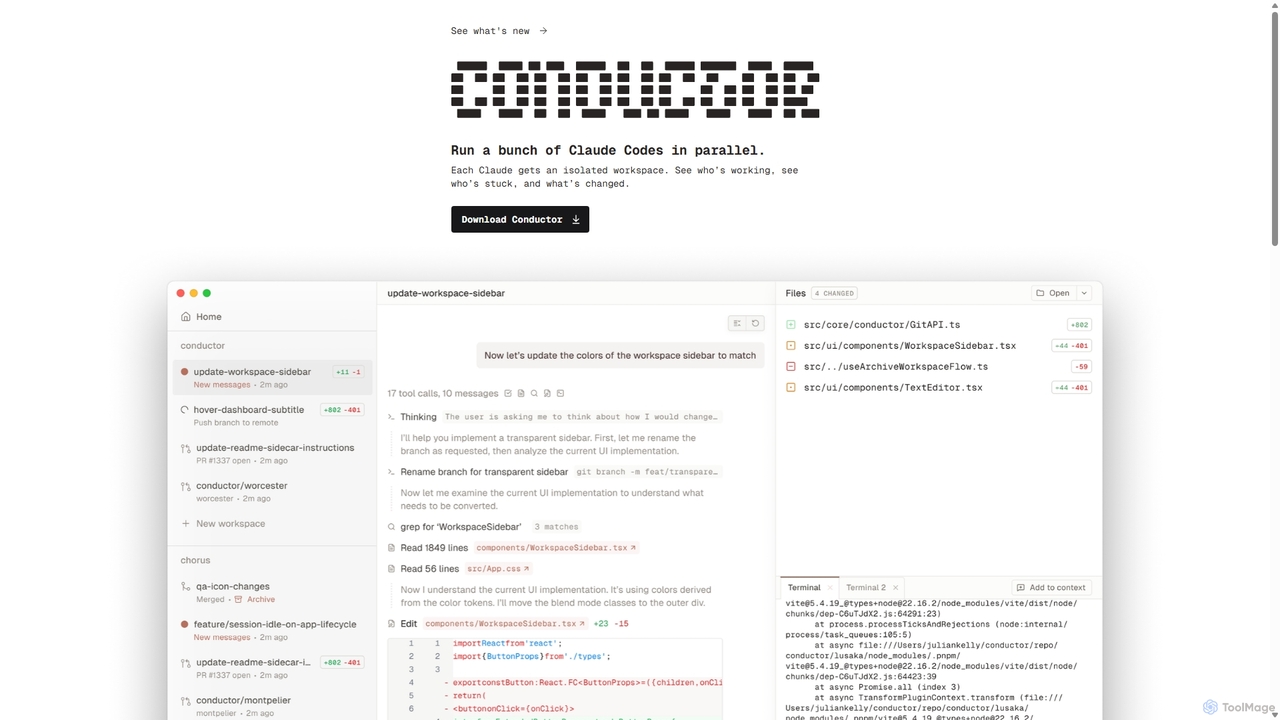
A powerful Mac application for orchestrating multiple AI coding agents. Run parallel instances of Claude Code in isolated workspaces to accelerate software development, monitor progress, and review code through a beautiful, intuitive UI.

Preview

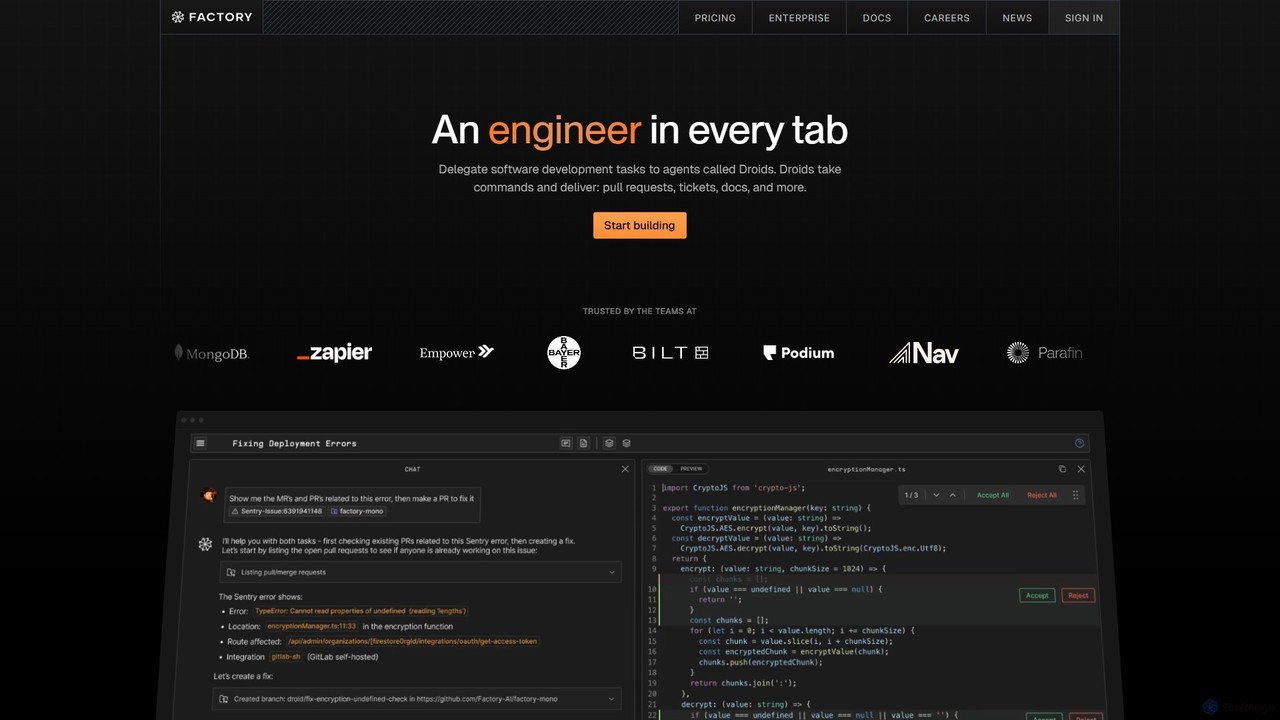
Factory Product overview

Factory is an AI-powered software development platform that uses autonomous agents called 'Droids' to automate the entire Software Development Lifecycle (SDLC). From planning and coding to incident response and documentation, Droids handle complex tasks, delivering merge-ready pull requests, detailed reports, and rapid fixes. It's designed to work alongside engineering teams, boosting productivity, accelerating development cycles, and clearing backlogs within a secure, enterprise-grade environment.

Preview

Quick facts

Compare product focus, pricing models and audiences. Highlighted rows indicate different listed information; unknown pricing does not mean free.

Conductor VS Factory — Quick facts
Quick factsConductorFactory
Pricing modelFreemiumPaid
Product typeAppWeb
Primary focusCode AssistantCode Assistant
Audience and rolesAI Engineer · DevOps Engineer · Engineering Manager · Product Manager · Software Developer · Tech LeadNo data available
CategoriesCode Assistant · Version Control · AutomationCode Assistant · Devops · Automation
AddedSep 25, 2025Aug 9, 2025
UpdatedNov 19, 2026Nov 19, 2026

Features, usage and use cases

Explore the listed product descriptions, features and workflows. Taxonomy labels alone are not feature evaluations.

Conductor

Conductor is a revolutionary desktop application for macOS designed to orchestrate and manage multiple AI coding agents simultaneously. In an era where AI is transforming software development, Conductor acts as the central command center, allowing developers to deploy an 'orchestra' of Claude Code agents to work on a codebase in parallel. This approach represents a significant paradigm shift from single-prompt coding assistance to a more scalable, managed, and efficient AI-driven development workflow. The tool is built with a local-first philosophy, ensuring that your code remains secure on your machine while leveraging the power of cloud-based AI models.

How to use Conductor

Getting started with Conductor is designed to be a straightforward, three-step process that integrates seamlessly into existing development workflows:

  1. Add Your Repository: Begin by adding your local Git repository to Conductor. The application clones it and performs all operations on your Mac, ensuring your source code never leaves your local environment. This local-first approach is critical for privacy and security.
  2. Deploy Agents: Once your repository is set up, you can deploy multiple Claude Code agents. Each agent is assigned its own isolated workspace, which Conductor cleverly manages using git worktrees. This means each agent can work on a different task, branch, or feature without interfering with others, maintaining a clean and organized project structure.
  3. Conduct and Review: With your agents at work, the Conductor UI provides a comprehensive overview of all activity. You can see which agents are actively working, which might be stuck or require attention, and what changes they are making in real-time. This allows you to review the generated code, provide feedback, and merge completed tasks, effectively acting as the Conductor of your AI development team.

Core Features of Conductor

  • Parallel Agent Orchestration: The flagship feature of Conductor is the ability to run numerous Claude Code agents at the same time, dramatically speeding up tasks like feature development, bug fixing, and refactoring.
  • Isolated Workspaces: By leveraging `git worktree`, Conductor ensures that each AI agent operates in a completely isolated environment. This prevents conflicts and allows for clean, atomic commits for each task.
  • Real-time Monitoring UI: A beautifully designed and intuitive user interface provides a bird's-eye view of all agent activities. Track progress, identify bottlenecks, and manage your AI workforce efficiently.
  • Local-First Security: All operations are performed on your local machine. Your code is never uploaded to a third-party server, providing maximum security and confidentiality.
  • Seamless Claude Integration: Conductor integrates with your existing Claude account. Whether you use a Pro, Max, or API key plan, Conductor utilizes it for agent operations, so there's no separate billing or setup required for the AI model itself.
  • Future-Proof: While currently supporting Claude Code, the platform is designed to incorporate other coding agents in the future, making it a versatile tool for AI-assisted development.

Use Cases for Conductor

Conductor unlocks new levels of productivity for various development scenarios:

  • Accelerated Feature Development: Assign different features or components of a project to multiple agents to have them developed in parallel.
  • Large-Scale Refactoring: Deploy agents to refactor different parts of a legacy codebase simultaneously, applying new patterns or updating dependencies across the entire project in a fraction of the time.
  • Comprehensive Bug Squashing: Run multiple agents to investigate and fix a list of bugs, with each agent tackling a different issue in its own branch.
  • A/B Testing & Prototyping: Have different agents implement the same feature with slightly different approaches or technologies to quickly compare and contrast solutions.

Advantages of Conductor

The primary advantage of Conductor is the massive productivity boost it offers. It transforms the role of a developer from a sole coder to a manager of AI agents, enabling them to accomplish more complex tasks faster. Its elegant UI simplifies the complexity of managing multiple agents, while the robust `git worktree` integration ensures that the development process remains clean and organized. The local-first architecture is a critical advantage for professionals and enterprises concerned with intellectual property and data security.

Pricing and Plans

Conductor is a downloadable application for macOS. The pricing for the Conductor application itself is not explicitly detailed on the website, suggesting it may be free during its initial launch phase or operate on a freemium model. However, the operational cost is tied to your use of the AI model. Conductor uses your existing Claude login and subscription (e.g., Claude Pro, Claude Max, or an API key). This means that any costs associated with the AI's processing and code generation are billed directly through your Anthropic account, providing transparency and control over your spending.

Factory

Factory is a revolutionary AI platform designed to serve as a command center for software development, effectively placing an engineer in every browser tab. It leverages advanced AI agents, known as 'Droids', to assist and automate tasks across the entire Software Development Lifecycle (SDLC). These Droids are not just code autocompleters; they are autonomous agents capable of understanding complex requirements, planning solutions, and delivering complete, merge-ready work. The platform is built to collaborate with human engineers, augmenting their capabilities and freeing them to focus on high-level architecture and innovation rather than repetitive tasks.

How to use Factory

Using Factory is an intuitive process designed to integrate seamlessly into existing developer workflows. Users delegate tasks to Droids through natural language commands or by providing context like issue tickets or alert details. For example, a developer can assign a backlog item to a Droid. The Droid will then analyze the requirements, plan the implementation steps, write the necessary code, generate tests, and submit a merge-ready pull request for human review. In an incident scenario, an engineer can feed the Droid exception details from an alert. The Droid will trace the root cause, post a Root Cause Analysis (RCA), and open a pull request with a proposed fix, often before the on-call pager has cooled down.

Core Features of Factory

  • Autonomous Droids: AI agents that can independently handle end-to-end software development tasks, from planning to pull request delivery.
  • Full SDLC Automation: Assists with every stage, including understanding requirements, planning, coding, testing, documentation, and incident response.
  • Merge-Ready Pull Requests: Droids generate high-quality, tested code that is ready for review and merging, significantly reducing iteration time.
  • Automated Incident Response: Rapidly diagnoses production issues, identifies root causes, and generates fixes, drastically reducing Mean Time to Resolution (MTTR).
  • Intelligent Documentation: Unpacks complex systems to produce polished, professional-quality documents like architecture deep-dives and RFC-ready reports.
  • Parallel Task Execution: Users can spin up multiple Droids simultaneously in different browser tabs to work on tasks in parallel, maximizing team velocity.
  • Terminal Execution & Cloud Environments: Droids can run CLI commands for testing, linting, and interacting with cloud infrastructure within secure, customizable cloud development environments.
  • Learning & Memory: Droids learn over time about your organization's codebase, processes, and preferences to become more effective with each task.
  • Enterprise-Grade Security: Offers self-hosting options, SSO/SAML integration, and complies with SOC II, GDPR, ISO 42001, and CCPA standards to protect intellectual property.

Use Cases for Factory

Accelerating Feature Development: Teams can clear their backlogs faster by delegating feature tickets and bug fixes to Droids. This turns the queue into shipped code, allowing human engineers to focus on more strategic initiatives.

Streamlining Incident Management: When a production alert fires, Factory can be used to immediately investigate. As demonstrated by Empower, it can reduce incident response times by up to 40% by quickly identifying the problematic change and generating a fix.

Onboarding and System Understanding: New engineers can get up to speed quickly by asking a Droid to generate a detailed architectural overview of a complex service. This is also invaluable for planning large-scale refactoring projects.

Automating Repetitive Chores: Droids can handle tedious tasks like dependency updates, code refactoring, or writing boilerplate code, freeing up valuable engineering time.

Advantages of Factory

Factory provides a significant competitive edge by directly tackling engineering productivity bottlenecks. It leads to a faster development cycle, a substantial reduction in code churn, and an estimated saving of thousands of dollars per engineer annually. By automating the full task, it goes beyond simple code suggestions to deliver tangible outcomes. Its focus on security, with self-hosting and compliance certifications, makes it a trusted partner for enterprises. The ability to run Droids in parallel and integrate with over 100 frameworks and tools ensures it scales with your organization's needs.

Pricing and Plans

Factory offers tailored plans for different team sizes:

  • Team Plan: Priced at $40 per month for the first seat, and $10 per additional seat. This plan is designed for agile, collaborative teams of up to 50 members. It includes 20 million standard tokens shared across the team, indexing for up to 25 cloud repositories, AI-generated architecture analysis, and integrations across the engineering system.
  • Enterprise Plan: Custom pricing is available upon contacting sales. This plan includes all features of the Team plan, plus unlimited repository indexing, enterprise-scale codebase analysis, custom token limits, advanced security features like SSO and SAML, audit logs, and premium support with a dedicated account manager and SLAs.

Positioning

Their taxonomy shows where the products overlap and where each one has a more distinct focus. Unknown fields are shown explicitly and are never filled with assumptions.

Categories

Shared
Code AssistantAutomation
Only Conductor
Version Control
Only Factory
Devops

Tags

Shared
AI agentcode assistantcode generationdeveloper productivitysoftware development
Only Conductor
agent orchestrationClaudeGitmac appparallel programmingversion control
Only Factory
automationdevopsenterprise AIincident responsepull requestsldc

Audience and roles

Shared
No listed items
Only Conductor
AI EngineerDevOps EngineerEngineering ManagerProduct ManagerSoftware DeveloperTech Lead
Only Factory
No listed items

Traffic comparison

Traffic is shown on the same scale so differences in market visibility are not visually understated.

How to interpret the traffic data

Both charts share the same months and vertical scale. Each tool identifies its latest reporting month; missing months are left blank, not counted as zero. Regional and source visit counts are estimates calculated from the reported shares.

Conductor

No data available

Factory monthly traffic:

Latest traffic · 2026-05

Monthly visits
354.9K
Avg. visit duration
1:46
Pages per visit
3.37
Bounce rate
40.97%
Data updated 2026-06-15

Monthly traffic trend

  • 2025-09: 253.3K
  • 2026-01: 444.2K
  • 2026-02: 328.8K
  • 2026-03: 437.9K
  • 2026-04: 437.7K
  • 2026-05: 354.9K

Top regions

Top 5 countries/regions
Country/regionPercentageEstimated visits
🇺🇸United States52.83%187.5K
🇨🇳China18.42%65.4K
🇮🇳India10.63%37.7K
🇬🇧United Kingdom9.44%33.5K
🇻🇳Vietnam8.68%30.8K

Traffic sources

Source typePercentageEstimated visits
Direct85.52%303.5K
Referral12.4%44K
Email2.08%7.4K

Search keywords

droiddroid aifactoryfactory aifactory droid

Community signals

Ratings, comments, favorites, and likes are community signals—not a substitute for product fit.

Conductor

Rating
No data available
Comments
0
Favorites
170
Likes
154

Factory

Rating
No data available
Comments
0
Favorites
183
Likes
194

Conductor vs Factory · Comparison FAQ

What do Conductor and Factory have in common?
Both tools are listed under Code Assistant、Automation. These categories indicate overlapping use cases; compare their detailed descriptions for workflows, capabilities and limitations.
Are Conductor and Factory free?
Listed pricing models: Conductor — Freemium; Factory — Paid. Missing pricing is not proof of a free plan, and freemium does not mean every feature is free. Check official sites for current plans, limits and trials.
How should I choose between Conductor and Factory?
The primary listed category is Code Assistant for Conductor, and Code Assistant for Factory. Compare features, steps and use cases, then verify pricing, data permissions and deployment needs. This page does not include hands-on testing and does not declare a winner from traffic or tags.

Sources and comparison methodology

This page is assembled from ToolMage product listings, taxonomy, traffic statistics and on-site user feedback. It is not a hands-on test or an independent review.

  • Feature and plan descriptions reflect information in the listings, not real-time guarantees. Verify pricing, quotas, availability and privacy terms on the official sites.
  • Traffic uses the reporting months shown. Missing statistics do not mean zero visits, and different periods do not establish growth or superiority. Regional and source visit counts are estimates based on shares.
  • Different tags indicate differences in the listings, not proof that the other product lacks a capability. Ratings, favorites and visits are not used to declare a winner.

Related comparisons