ToolMage
Sign in

AI TOOL COMPARISON

Conductor vs GitHub

What is the difference, and which fits your workflow? Compare features, usage, pricing models and traffic side by side.

Jump to key differences

Product overview

Conductor Product overview

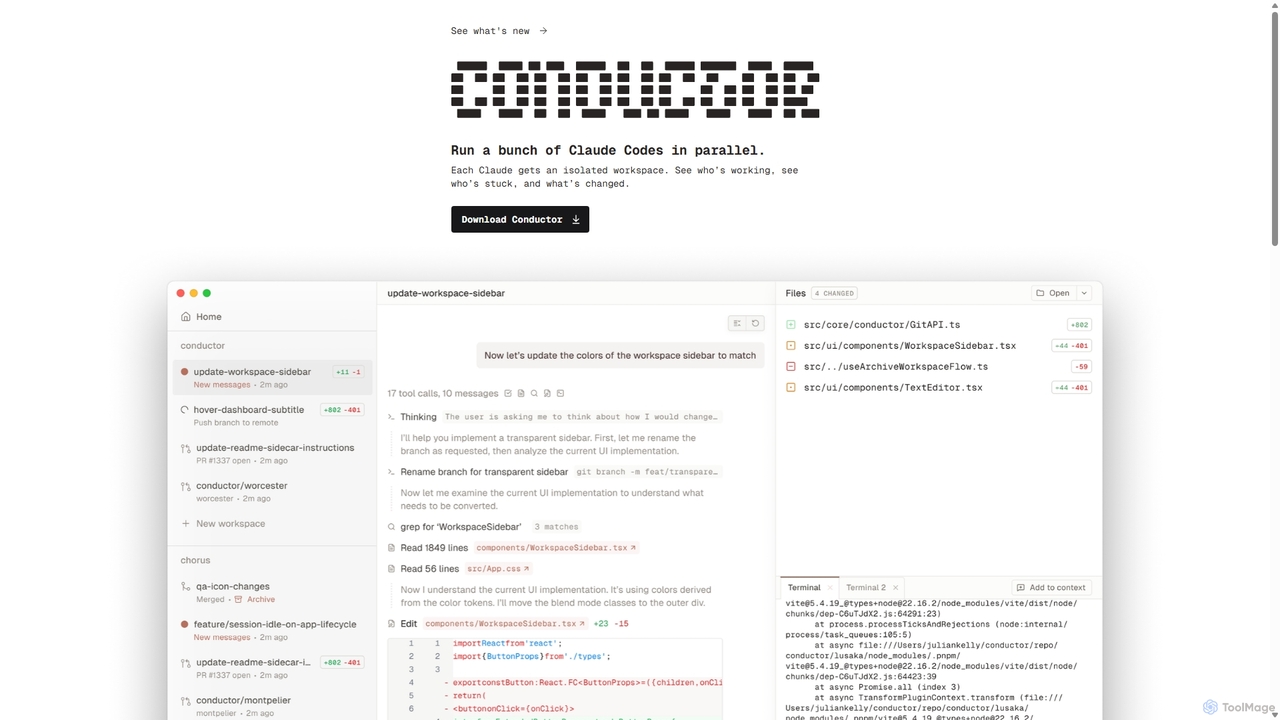
A powerful Mac application for orchestrating multiple AI coding agents. Run parallel instances of Claude Code in isolated workspaces to accelerate software development, monitor progress, and review code through a beautiful, intuitive UI.

Preview

GitHub Product overview

GitHub is the world's leading AI-powered developer platform for building, shipping, and maintaining software. It provides Git-based version control, collaborative tools, and a complete DevOps lifecycle, supercharged by GitHub Copilot, an advanced AI code assistant that accelerates development and enhances code quality.

Preview

Quick facts

Compare product focus, pricing models and audiences. Highlighted rows indicate different listed information; unknown pricing does not mean free.

Conductor VS GitHub — Quick facts
Quick factsConductorGitHub
Pricing modelFreemiumFreemium
Product typeAppWeb
Primary focusCode AssistantCode Assistant
Audience and rolesAI Engineer · DevOps Engineer · Engineering Manager · Product Manager · Software Developer · Tech LeadNo data available
CategoriesCode Assistant · Version Control · AutomationCode Assistant · Devops · Version Control · Collaboration
AddedSep 25, 2025Aug 5, 2025
UpdatedNov 19, 2026Nov 19, 2026

Features, usage and use cases

Explore the listed product descriptions, features and workflows. Taxonomy labels alone are not feature evaluations.

Conductor

Conductor is a revolutionary desktop application for macOS designed to orchestrate and manage multiple AI coding agents simultaneously. In an era where AI is transforming software development, Conductor acts as the central command center, allowing developers to deploy an 'orchestra' of Claude Code agents to work on a codebase in parallel. This approach represents a significant paradigm shift from single-prompt coding assistance to a more scalable, managed, and efficient AI-driven development workflow. The tool is built with a local-first philosophy, ensuring that your code remains secure on your machine while leveraging the power of cloud-based AI models.

How to use Conductor

Getting started with Conductor is designed to be a straightforward, three-step process that integrates seamlessly into existing development workflows:

  1. Add Your Repository: Begin by adding your local Git repository to Conductor. The application clones it and performs all operations on your Mac, ensuring your source code never leaves your local environment. This local-first approach is critical for privacy and security.
  2. Deploy Agents: Once your repository is set up, you can deploy multiple Claude Code agents. Each agent is assigned its own isolated workspace, which Conductor cleverly manages using git worktrees. This means each agent can work on a different task, branch, or feature without interfering with others, maintaining a clean and organized project structure.
  3. Conduct and Review: With your agents at work, the Conductor UI provides a comprehensive overview of all activity. You can see which agents are actively working, which might be stuck or require attention, and what changes they are making in real-time. This allows you to review the generated code, provide feedback, and merge completed tasks, effectively acting as the Conductor of your AI development team.

Core Features of Conductor

  • Parallel Agent Orchestration: The flagship feature of Conductor is the ability to run numerous Claude Code agents at the same time, dramatically speeding up tasks like feature development, bug fixing, and refactoring.
  • Isolated Workspaces: By leveraging `git worktree`, Conductor ensures that each AI agent operates in a completely isolated environment. This prevents conflicts and allows for clean, atomic commits for each task.
  • Real-time Monitoring UI: A beautifully designed and intuitive user interface provides a bird's-eye view of all agent activities. Track progress, identify bottlenecks, and manage your AI workforce efficiently.
  • Local-First Security: All operations are performed on your local machine. Your code is never uploaded to a third-party server, providing maximum security and confidentiality.
  • Seamless Claude Integration: Conductor integrates with your existing Claude account. Whether you use a Pro, Max, or API key plan, Conductor utilizes it for agent operations, so there's no separate billing or setup required for the AI model itself.
  • Future-Proof: While currently supporting Claude Code, the platform is designed to incorporate other coding agents in the future, making it a versatile tool for AI-assisted development.

Use Cases for Conductor

Conductor unlocks new levels of productivity for various development scenarios:

  • Accelerated Feature Development: Assign different features or components of a project to multiple agents to have them developed in parallel.
  • Large-Scale Refactoring: Deploy agents to refactor different parts of a legacy codebase simultaneously, applying new patterns or updating dependencies across the entire project in a fraction of the time.
  • Comprehensive Bug Squashing: Run multiple agents to investigate and fix a list of bugs, with each agent tackling a different issue in its own branch.
  • A/B Testing & Prototyping: Have different agents implement the same feature with slightly different approaches or technologies to quickly compare and contrast solutions.

Advantages of Conductor

The primary advantage of Conductor is the massive productivity boost it offers. It transforms the role of a developer from a sole coder to a manager of AI agents, enabling them to accomplish more complex tasks faster. Its elegant UI simplifies the complexity of managing multiple agents, while the robust `git worktree` integration ensures that the development process remains clean and organized. The local-first architecture is a critical advantage for professionals and enterprises concerned with intellectual property and data security.

Pricing and Plans

Conductor is a downloadable application for macOS. The pricing for the Conductor application itself is not explicitly detailed on the website, suggesting it may be free during its initial launch phase or operate on a freemium model. However, the operational cost is tied to your use of the AI model. Conductor uses your existing Claude login and subscription (e.g., Claude Pro, Claude Max, or an API key). This means that any costs associated with the AI's processing and code generation are billed directly through your Anthropic account, providing transparency and control over your spending.

GitHub

GitHub stands as the central hub for the global software development community, offering a comprehensive, AI-powered platform designed to streamline every phase of the development lifecycle. It is fundamentally built on Git, the distributed version control system, allowing millions of developers and companies to host and review code, manage projects, and build software together. With the integration of powerful AI through GitHub Copilot, the platform has evolved from a code repository into an intelligent partner that actively assists in writing, securing, and deploying code.

The platform is designed for collaboration at its core. Whether you are part of a large enterprise, a small startup, or an open-source project, GitHub provides the tools necessary for seamless teamwork. It facilitates everything from initial planning and coding to automated testing and secure deployment, making it the single source of truth for development projects. Millions of repositories, including those for the world's most critical open-source software, call GitHub home, creating a vibrant ecosystem for learning, sharing, and innovation.

How to use GitHub

Getting started with GitHub involves a straightforward workflow that scales with project complexity:

  1. Create a Repository: Begin by creating a new repository (repo) to house your project's files, code, and revision history. You can also fork an existing repository to contribute to another project.
  2. Write and Commit Code: Write code on your local machine or directly in the cloud with GitHub Codespaces. As you work, use GitHub Copilot for real-time code suggestions, function generation, and complex problem-solving via chat. Commit your changes with descriptive messages to track your progress.
  3. Push Changes: Push your committed changes from your local machine to the remote repository on GitHub to back them up and share them with collaborators.
  4. Collaborate with Pull Requests: When you're ready to merge your changes, open a Pull Request. This initiates a discussion and code review process, allowing teammates to comment, suggest improvements, and approve the changes before they are merged into the main codebase.
  5. Automate with GitHub Actions: Implement Continuous Integration and Continuous Deployment (CI/CD) by creating workflows with GitHub Actions. Automate builds, run tests, and deploy your application to any cloud environment upon a push or pull request.
  6. Manage and Secure: Use GitHub Issues to track bugs and feature requests, and GitHub Projects for high-level planning. Leverage GitHub Advanced Security to automatically scan for vulnerabilities, detect leaked secrets, and use Copilot Autofix to remediate issues quickly.

Core Features of GitHub

  • GitHub Copilot: An AI pair programmer that offers intelligent code completions, translates natural language prompts into code, provides in-editor chat, and helps refactor and debug code, boosting productivity by over 55%.
  • Version Control and Code Hosting: Secure, reliable, and scalable Git-based hosting for unlimited public and private repositories.
  • GitHub Actions: A powerful workflow automation engine to build, test, and deploy code directly from GitHub with CI/CD.
  • GitHub Advanced Security: A suite of security tools including code scanning (CodeQL), secret scanning, dependency review, and AI-powered autofixes to secure the software supply chain.
  • GitHub Codespaces: Instant, cloud-based development environments that can be spun up in seconds, pre-configured for any project.
  • Collaboration Suite: Includes Pull Requests for code review, GitHub Issues for task management, GitHub Discussions for community conversations, and GitHub Projects for agile planning.
  • GitHub Packages & Marketplace: A package registry for hosting software packages and a marketplace to discover and integrate thousands of third-party tools and apps, including Copilot Extensions.
  • GitHub Mobile: A mobile application to manage projects, review code, and interact with GitHub Copilot from anywhere.

Use Cases for GitHub

GitHub is versatile and supports a wide range of development scenarios:

  • Enterprise Software Development: Companies like Mercedes-Benz and Figma use GitHub to standardize their development processes, enhance security, and facilitate collaboration across global teams.
  • Open Source Projects: It is the de facto platform for the open-source community, hosting millions of projects and enabling worldwide collaboration.
  • DevOps and CI/CD: Teams implement robust automation pipelines using GitHub Actions to accelerate their release cycles and improve software quality.
  • AI-Accelerated Development: Organizations like Duolingo leverage GitHub Copilot to significantly increase developer speed and efficiency, allowing them to build features faster.
  • Security-First Development (DevSecOps): Integrating GitHub Advanced Security into workflows allows teams to shift security left, finding and fixing vulnerabilities early in the development process.

Advantages of GitHub

The key advantages of using GitHub include:

  • Unified Platform: It brings together version control, collaboration, project management, CI/CD, and security into a single, integrated experience.
  • AI-Driven Productivity: GitHub Copilot acts as a force multiplier for developers, reducing menial tasks and solving complex problems faster.
  • Robust Security: Proactive and automated security features help prevent vulnerabilities and protect against supply chain attacks.
  • Scalability and Reliability: Trusted by millions, from individual hobbyists to the world's largest corporations, with proven scalability and uptime.
  • Vibrant Ecosystem: Access to a massive global community, extensive integrations, and the heart of the open-source world.

Pricing and Plans

GitHub offers a tiered pricing model to suit different needs:

  • Free: Aimed at individuals and open-source projects. Includes unlimited public and private repositories, issue and project tracking, and a monthly quota of GitHub Actions and Packages storage.
  • Team: A per-user, per-month plan designed for teams and businesses. It includes all Free features plus protected branches, code owners, and increased Actions and Packages quotas.
  • Enterprise: A custom-priced plan for large organizations requiring advanced security, compliance, and administrative features. This plan includes GitHub Advanced Security, centralized management, and dedicated support.
  • GitHub Copilot: Available as a separate subscription for individuals, businesses, and enterprises, unlocking the full suite of AI-powered development features.

Positioning

Their taxonomy shows where the products overlap and where each one has a more distinct focus. Unknown fields are shown explicitly and are never filled with assumptions.

Categories

Shared
Code AssistantVersion Control
Only Conductor
Automation
Only GitHub
DevopsCollaboration

Tags

Shared
code assistantGitversion control
Only Conductor
agent orchestrationAI agentClaudecode generationdeveloper productivitymac appparallel programmingsoftware development
Only GitHub
CI/CDcode securitycollaborationdeveloper platformdevopsGitHub Copilotopen sourceproject management

Audience and roles

Shared
No listed items
Only Conductor
AI EngineerDevOps EngineerEngineering ManagerProduct ManagerSoftware DeveloperTech Lead
Only GitHub
No listed items

Traffic comparison

Traffic is shown on the same scale so differences in market visibility are not visually understated.

How to interpret the traffic data

Both charts share the same months and vertical scale. Each tool identifies its latest reporting month; missing months are left blank, not counted as zero. Regional and source visit counts are estimates calculated from the reported shares.

Conductor

No data available

GitHub monthly traffic:

Latest traffic · 2026-05

Monthly visits
636.1M
Avg. visit duration
6:23
Pages per visit
5.92
Bounce rate
36.46%
Data updated 2026-06-15

Monthly traffic trend

  • 2025-09: 471.5M
  • 2026-01: 542.6M
  • 2026-02: 534.8M
  • 2026-03: 634.3M
  • 2026-04: 631M
  • 2026-05: 636.1M

Top regions

Top 5 countries/regions
Country/regionPercentageEstimated visits
🇺🇸United States36.14%229.9M
🇨🇳China22.96%146M
🇮🇳India17.41%110.7M
🇷🇺Russia15.84%100.8M
🇩🇪Germany7.65%48.7M

Traffic sources

Source typePercentageEstimated visits
Direct82.14%522.5M
Referral16.14%102.7M
Email1.72%10.9M

Search keywords

githubgithub copilothermes agentzapretзапрет

Community signals

Ratings, comments, favorites, and likes are community signals—not a substitute for product fit.

Conductor

Rating
No data available
Comments
0
Favorites
170
Likes
154

GitHub

Rating
No data available
Comments
0
Favorites
189
Likes
153

Conductor vs GitHub · Comparison FAQ

What do Conductor and GitHub have in common?
Both tools are listed under Code Assistant、Version Control. These categories indicate overlapping use cases; compare their detailed descriptions for workflows, capabilities and limitations.
Are Conductor and GitHub free?
Listed pricing models: Conductor — Freemium; GitHub — Freemium. Missing pricing is not proof of a free plan, and freemium does not mean every feature is free. Check official sites for current plans, limits and trials.
How should I choose between Conductor and GitHub?
The primary listed category is Code Assistant for Conductor, and Code Assistant for GitHub. Compare features, steps and use cases, then verify pricing, data permissions and deployment needs. This page does not include hands-on testing and does not declare a winner from traffic or tags.

Sources and comparison methodology

This page is assembled from ToolMage product listings, taxonomy, traffic statistics and on-site user feedback. It is not a hands-on test or an independent review.
  • Feature and plan descriptions reflect information in the listings, not real-time guarantees. Verify pricing, quotas, availability and privacy terms on the official sites.
  • Traffic uses the reporting months shown. Missing statistics do not mean zero visits, and different periods do not establish growth or superiority. Regional and source visit counts are estimates based on shares.
  • Different tags indicate differences in the listings, not proof that the other product lacks a capability. Ratings, favorites and visits are not used to declare a winner.

Related comparisons