ToolMage
Sign in

AI TOOL COMPARISON

Dagger.io vs Morph

What is the difference, and which fits your workflow? Compare features, usage, pricing models and traffic side by side.

Jump to key differences

Product overview

Dagger.io Product overview

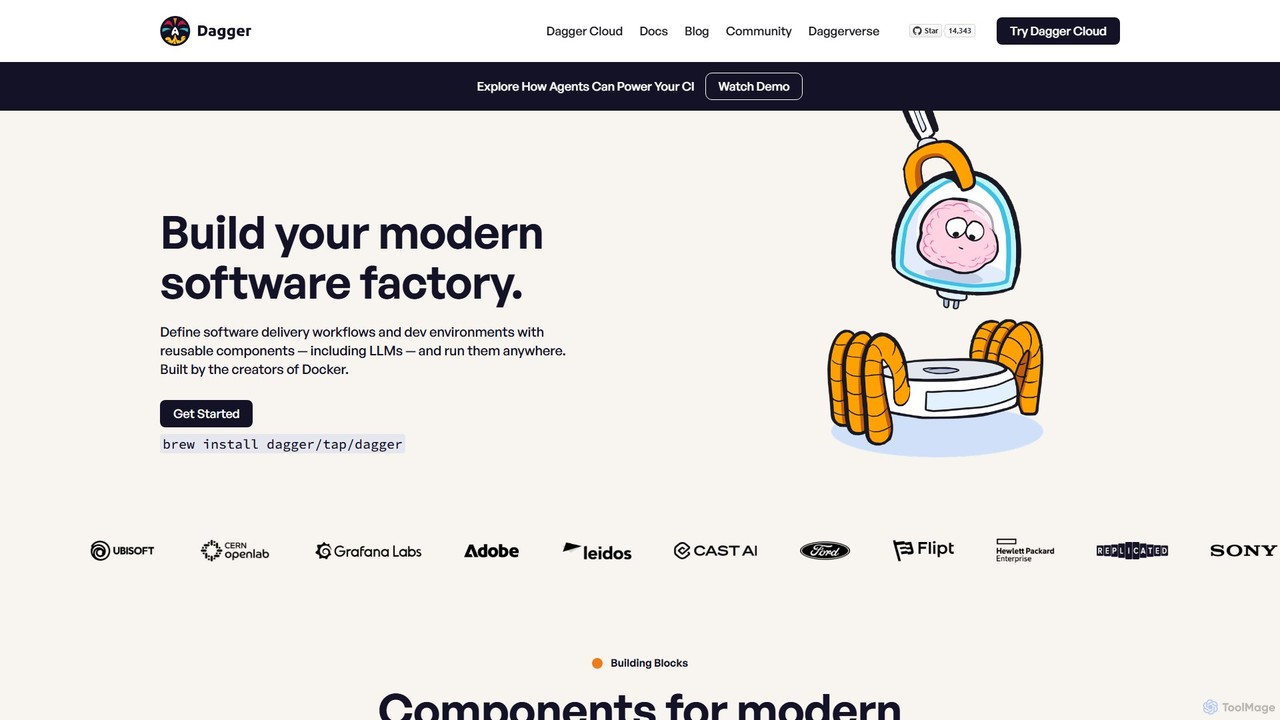
Dagger.io is a programmable CI/CD engine that allows developers to build powerful automation pipelines as code in languages like Go, Python, and TypeScript. It leverages containers to ensure workflows are portable, reproducible, and run consistently everywhere. Dagger also provides a secure environment for integrating LLMs and AI agents into your software development lifecycle.

Preview

Morph Product overview

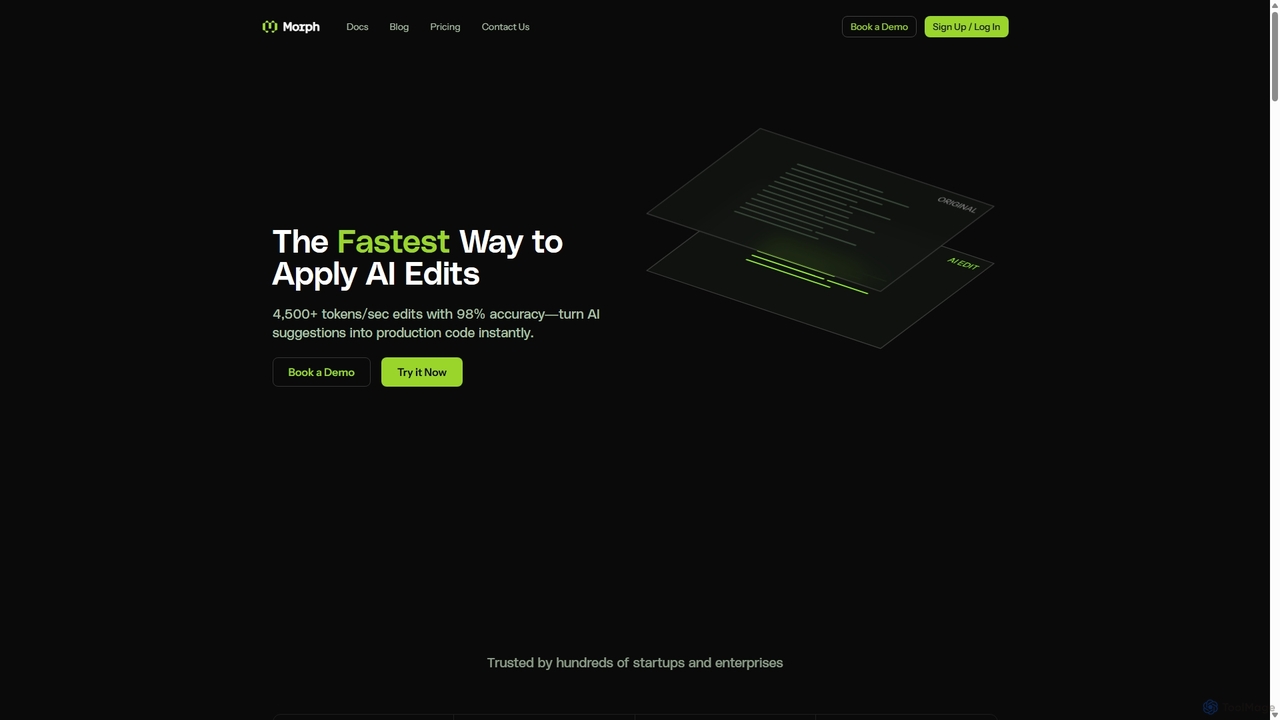
Morph is an API-first platform for developers, providing the fastest and most accurate way to apply AI-generated edits to code and files. With speeds of 4,500+ tokens/sec and 98% accuracy, it empowers AI agents to perform reliable, semantic modifications, bridging the gap between AI suggestions and production-ready implementation.

Preview

Quick facts

Compare product focus, pricing models and audiences. Highlighted rows indicate different listed information; unknown pricing does not mean free.

Dagger.io VS Morph — Quick facts
Quick factsDagger.ioMorph
Pricing modelFreemiumFreemium
Product typeWebWeb
Primary focusCi CdInfrastructure
Audience and rolesNo data availableAI Engineer · DevOps Engineer · Product Manager · Software Developer · Technical Writer
CategoriesCi Cd · Code Assistant · DevopsInfrastructure · Code Assistant · Automation
AddedAug 5, 2025Sep 13, 2025
UpdatedNov 19, 2026Nov 19, 2026

Features, usage and use cases

Explore the listed product descriptions, features and workflows. Taxonomy labels alone are not feature evaluations.

Dagger.io

Dagger.io is a revolutionary platform that transforms CI/CD pipelines from complex YAML configurations into programmable, portable code. Developed by the creators of Docker, Dagger allows developers to define their entire automation workflow using familiar programming languages such as Go, Python, TypeScript, Java, and PHP. This "pipeline as code" approach makes development workflows more powerful, testable, and maintainable.

The core of Dagger is its containerized execution engine, which ensures that every step of a pipeline runs in a clean, isolated environment. This eliminates the common "it works on my machine" problem, guaranteeing that pipelines behave identically on a local developer machine and in any CI environment. The engine features intelligent caching, which automatically skips rebuilding components that haven't changed, dramatically speeding up build and test cycles.

A standout feature of Dagger is its seamless integration with Large Language Models (LLMs) and AI agents. It provides a sandboxed environment where AI agents can safely perform tasks like debugging code, optimizing Dockerfiles, writing tests, or even fixing bugs by submitting pull requests. This empowers teams to leverage the power of AI to automate complex development tasks without compromising security or system stability. The platform also includes Dagger Cloud, an observability service that offers detailed tracing, logging, and operational insights into every pipeline run, simplifying debugging and collaboration.

How to use Dagger.io

Using Dagger.io involves writing your CI/CD logic in a supported programming language using the Dagger SDK. The process is straightforward:

  1. Install the Dagger CLI: The command-line interface is the primary tool for interacting with the Dagger Engine.
  2. Choose an SDK: Select the SDK for your preferred language (e.g., Go, Python, TypeScript).
  3. Define Your Pipeline: Write functions that define the steps of your workflow. You can chain functions to build, test, and deploy your application. For example, you can create a function to compile your code, another to run tests inside a container with a database service, and a final one to publish the resulting artifact.
  4. Run Locally: Execute your pipeline directly from your terminal using the Dagger CLI. This allows for rapid testing and debugging before pushing code.
  5. Integrate with CI: Once your pipeline is working locally, you can run the same Dagger commands in your existing CI provider (like GitHub Actions, Jenkins, or GitLab CI). The pipeline will execute identically.
  6. Leverage Daggerverse: Explore the Daggerverse, a community-driven repository of pre-built modules, to reuse common automation patterns and accelerate your development.

Core Features of Dagger.io

  • Pipeline as Code: Write CI/CD pipelines in Go, Python, TypeScript, Java, and PHP, replacing brittle YAML and shell scripts.
  • Containerized Execution Engine: Runs all pipelines in isolated containers, ensuring consistency and reproducibility across all environments.
  • Intelligent Caching: Automatically caches every function's result, only re-running what has changed, leading to significantly faster pipelines.
  • AI Agent & LLM Integration: Provides a secure, sandboxed environment for AI agents to execute tasks, from code generation to automated debugging.
  • Daggerverse Module System: A public registry of reusable and shareable pipeline components, allowing you to build on the work of the community.
  • Dagger Cloud Observability: A companion service that provides deep visibility into pipeline execution with traces, logs, and operational insights.
  • Cross-Platform & Multi-Language: Works with any compute platform, tech stack, and integrates components from different language ecosystems.
  • Type Safety: Offers a consistent, type-safe API across all supported languages for a better developer experience.

Use Cases for Dagger.io

Dagger.io is versatile and can be applied to a wide range of software development and automation scenarios:

  • CI/CD Automation: Standardize and automate build, test, and deployment processes for any application.
  • AI-Powered Development: Create AI agents that can automatically debug failing tests, optimize Dockerfiles, summarize technical content, or write new feature code.
  • Reproducible Builds: Ensure that software builds are 100% reproducible, a critical requirement for security and compliance in the software supply chain.
  • Platform Engineering: Build a standardized set of reusable pipeline components for your entire organization, enabling developers to self-serve their CI needs.
  • Local Development & Testing: Run complex integration tests that require multiple services (like databases or APIs) directly on your local machine with a single command.
  • Monorepo Management: Efficiently manage complex CI workflows in monorepos with Dagger's first-class support.

Advantages of Dagger.io

Dagger.io offers significant advantages over traditional CI/CD tools:

  • Portability: Pipelines are not locked into a specific CI vendor. They can run anywhere Dagger is installed.
  • Improved Developer Experience: Developers can use the languages and tools they already know and love, making pipeline development more intuitive and efficient.
  • Consistency: Solves the "works on my machine" problem by ensuring pipelines run the same way locally, in CI, and everywhere else.
  • Speed: Layered caching at the function level dramatically reduces wait times for developers.
  • Reusability & Scalability: The Daggerverse module system prevents reinventing the wheel and allows teams to scale their automation efforts effectively.
  • Enhanced Security: The sandboxed environment for AI agents and reproducible builds strengthens the security of the software supply chain.

Pricing and Plans

Dagger.io's pricing is structured around its Dagger Cloud service, while the core Dagger Engine is open-source and free to use.

  • Individual Plan: Free. This plan is designed for individual developers and provides observability for one user with community support.
  • Team Plan: $50 per month. Aimed at small teams, this plan supports up to 10 users and includes observability, module sharing, email support, and a 2-week free trial.
  • Enterprise Plan: Custom pricing. This plan is for large organizations running Dagger at scale and includes enterprise-level features like SSO, managed deployments, and 24/7 premium support.

Morph

Morph is a specialized AI infrastructure designed for developers building the next generation of AI agents and coding tools. It addresses a critical bottleneck in AI-driven development: while large language models (LLMs) are excellent at suggesting changes, they often struggle to apply them accurately and efficiently to existing files. Morph solves this with a suite of powerful, purpose-built models that function as a high-performance 'edit_file' tool for any AI agent.

At its core, Morph provides an OpenAI-compatible API that allows agents to merge suggested changes into codebases and documents with unparalleled speed and precision. Instead of relying on fragile methods like string replacement or traditional diffs, Morph performs a semantic merge. It understands the underlying structure and intent of the code, allowing it to handle variable renames, style preservation, and complex refactoring tasks that would otherwise fail. This results in an enterprise-grade 98% accuracy rate, ensuring that AI-driven modifications are reliable and production-ready.

How to use Morph

Integrating Morph is designed to be simple and intuitive for developers. It functions as a specialized tool that you add to your existing AI agent's capabilities. The process typically involves these steps:

  1. Sign Up for an API Key: Get your credentials from the Morph website to access the service.
  2. Add the 'edit_file' Tool: Define a function or tool within your agent's framework (like LangChain or a custom implementation) that calls the Morph API. This tool takes parameters such as the file path, the original code, and the AI's suggested update or instruction.
  3. Make the API Call: Use the OpenAI-compatible endpoint. Your agent sends the original code and the desired update to the Morph API. For example, using Python or TypeScript, you can make a `client.chat.completions.create` request pointing to Morph's API base URL.
  4. Receive the Updated File: Morph processes the request at over 4,500 tokens per second and returns the complete, updated file content. Your agent can then write this content back to the file system or proceed with the next step in its workflow.

This API-first approach means Morph can be integrated into any environment, from custom IDE extensions and CI/CD pipelines to automated code review bots and AI application builders.

Core Features of Morph

  • Fast Apply Engine: The core technology that merges AI edits at a lightning-fast 4,500+ tokens/second, making real-time agentic workflows possible.
  • High Accuracy Semantic Merging: Achieves 98% accuracy by understanding code context, structure, and intent, far surpassing traditional diff/patch methods.
  • Specialized Code Models: Includes a high-precision Code Embedding model for accurate code retrieval and a Code Reranking model to optimize context for LLM prompts.
  • OpenAI-Compatible API: Ensures seamless integration into existing projects and workflows that already use OpenAI's SDKs.
  • Enterprise-Ready Deployment: Offers a self-hosting option for on-premise or private cloud deployment, ensuring data privacy and security with SOC2 compliance.
  • Format Versatility: Capable of editing not just code but also complex structured documents like DOCX, XML, HTML, Markdown, and even TipTap's JSON format.

Use Cases for Morph

Morph is a foundational tool for a wide range of AI-powered applications:

  • AI Coding Agents: Build custom coding assistants that can reliably refactor code, add features, and fix bugs across multiple files.
  • Automated Code Refactoring: Perform large-scale codebase transformations, such as migrating to a new framework or updating dependencies, automatically.
  • CI/CD Automation: Integrate agents into your build and deployment pipelines to automatically fix linting errors, apply security patches, or optimize code.
  • AI Application Builders: Power no-code/low-code platforms where users can describe application changes in natural language and have Morph apply them to the underlying code.
  • Intelligent Document Editors: Create AI agents for editing technical documentation, legal contracts, or collaborative documents while preserving complex formatting and structure.
  • Game Development: Automate the generation and modification of game assets, scripts, and configuration files in engines like Unity and Unreal.

Advantages of Morph

Morph offers a distinct competitive edge for developers building with AI:

  • Unmatched Speed: Over 10x faster than alternative methods like full-file rewrites from general-purpose LLMs, enabling responsive and interactive experiences.
  • Superior Reliability: The 98% success rate drastically reduces the need for manual intervention and debugging of AI-generated changes.
  • Developer-First Design: The simple, API-centric approach makes it easy to integrate powerful editing capabilities without a steep learning curve.
  • Scalability: Built to handle enterprise workloads with high rate limits, concurrent processing, and the ability to manage large files (2000+ lines).
  • Cost-Efficiency: By using specialized models for the merging task, it avoids the high cost of using large, general-purpose models for entire file rewrites.

Pricing and Plans

Morph offers a flexible, usage-based pricing model with a free tier to get started.

  • Free Tier: Includes 100 requests per month for developers to experiment and build prototypes.
  • Pay-as-you-go API:
    • Morph-v3-fast: The fastest model (4500+ tok/sec). Input: $0.8/1M tokens, Output: $1.2/1M tokens.
    • Morph-v3-large: The most capable model (2500+ tok/sec). Input: $0.9/1M tokens, Output: $1.9/1M tokens.
    • Morph-embedding-v3: For code search. $0.18/1M tokens.
    • Morph-rerank-v3: For context-aware results. $0.80/1M tokens.
  • Teams & Enterprise: Custom plans are available for teams needing larger context lengths, self-hosting, high rate limits, and dedicated support.

Positioning

Their taxonomy shows where the products overlap and where each one has a more distinct focus. Unknown fields are shown explicitly and are never filled with assumptions.

Categories

Shared
Code Assistant
Only Dagger.io
Ci CdDevops
Only Morph
InfrastructureAutomation

Tags

Shared
AI agentautomationCI/CDcode generation
Only Dagger.io
containerizationdeveloper toolsdevopsgopipeline as codepythontypescript
Only Morph
APIcode editingdeveloper toolfile editinginfrastructurellmrefactoringsemantic search

Audience and roles

Shared
No listed items
Only Dagger.io
No listed items
Only Morph
AI EngineerDevOps EngineerProduct ManagerSoftware DeveloperTechnical Writer

Traffic comparison

Traffic is shown on the same scale so differences in market visibility are not visually understated.

How to interpret the traffic data

Both charts share the same months and vertical scale. Each tool identifies its latest reporting month; missing months are left blank, not counted as zero. Regional and source visit counts are estimates calculated from the reported shares.

Dagger.io monthly traffic:

Latest traffic · 2026-05

Monthly visits
48K
Avg. visit duration
0:49
Pages per visit
2.66
Bounce rate
39.93%
Data updated 2026-06-15

Monthly traffic trend

  • 2025-09: 90K
  • 2026-01: 63.5K
  • 2026-02: 47.8K
  • 2026-03: 49.5K
  • 2026-04: 48.5K
  • 2026-05: 48K

Top regions

Top 5 countries/regions
Country/regionPercentageEstimated visits
🇩🇪Germany23.75%11.4K
🇪🇸Spain20.89%10K
🇻🇳Vietnam19.04%9.1K
🇺🇸United States19.02%9.1K
🇮🇳India17.3%8.3K

Traffic sources

Source typePercentageEstimated visits
Direct90.06%43.2K
Referral9.94%4.8K

Search keywords

daggerdagger clouddagger softwaredagger solomon hykesstack dagger

Morph monthly traffic:

Latest traffic · 2026-05

Monthly visits
338.5K
Avg. visit duration
0:37
Pages per visit
1.84
Bounce rate
52.54%
Data updated 2026-06-15

Monthly traffic trend

  • 2025-09: 29.9K
  • 2026-01: 50.4K
  • 2026-02: 106.4K
  • 2026-03: 225.9K
  • 2026-04: 273.4K
  • 2026-05: 338.5K

Top regions

Top 5 countries/regions
Country/regionPercentageEstimated visits
🇺🇸United States44.38%150.2K
🇮🇳India17.99%60.9K
🇩🇪Germany14.9%50.4K
🇨🇳China11.62%39.3K
🇻🇳Vietnam11.11%37.6K

Traffic sources

Source typePercentageEstimated visits
Direct82.2%278.3K
Referral17.01%57.6K
Email0.79%2.7K

Search keywords

chatgpt vs claudeclaude code installclaude vs chatgptcodex vs claude codecursor alternatives

Community signals

Ratings, comments, favorites, and likes are community signals—not a substitute for product fit.

Dagger.io

Rating
No data available
Comments
0
Favorites
194
Likes
199

Morph

Rating
No data available
Comments
0
Favorites
179
Likes
161

Dagger.io vs Morph · Comparison FAQ

What do Dagger.io and Morph have in common?
Both tools are listed under Code Assistant. These categories indicate overlapping use cases; compare their detailed descriptions for workflows, capabilities and limitations.
Are Dagger.io and Morph free?
Listed pricing models: Dagger.io — Freemium; Morph — Freemium. Missing pricing is not proof of a free plan, and freemium does not mean every feature is free. Check official sites for current plans, limits and trials.
How should I choose between Dagger.io and Morph?
The primary listed category is Ci Cd for Dagger.io, and Infrastructure for Morph. Compare features, steps and use cases, then verify pricing, data permissions and deployment needs. This page does not include hands-on testing and does not declare a winner from traffic or tags.

Sources and comparison methodology

This page is assembled from ToolMage product listings, taxonomy, traffic statistics and on-site user feedback. It is not a hands-on test or an independent review.
  • Feature and plan descriptions reflect information in the listings, not real-time guarantees. Verify pricing, quotas, availability and privacy terms on the official sites.
  • Traffic uses the reporting months shown. Missing statistics do not mean zero visits, and different periods do not establish growth or superiority. Regional and source visit counts are estimates based on shares.
  • Different tags indicate differences in the listings, not proof that the other product lacks a capability. Ratings, favorites and visits are not used to declare a winner.

Related comparisons