ToolMage
Sign in

AI TOOL COMPARISON

DeveloperPal vs explain.dev

What is the difference, and which fits your workflow? Compare features, usage, pricing models and traffic side by side.

Jump to key differences

Product overview

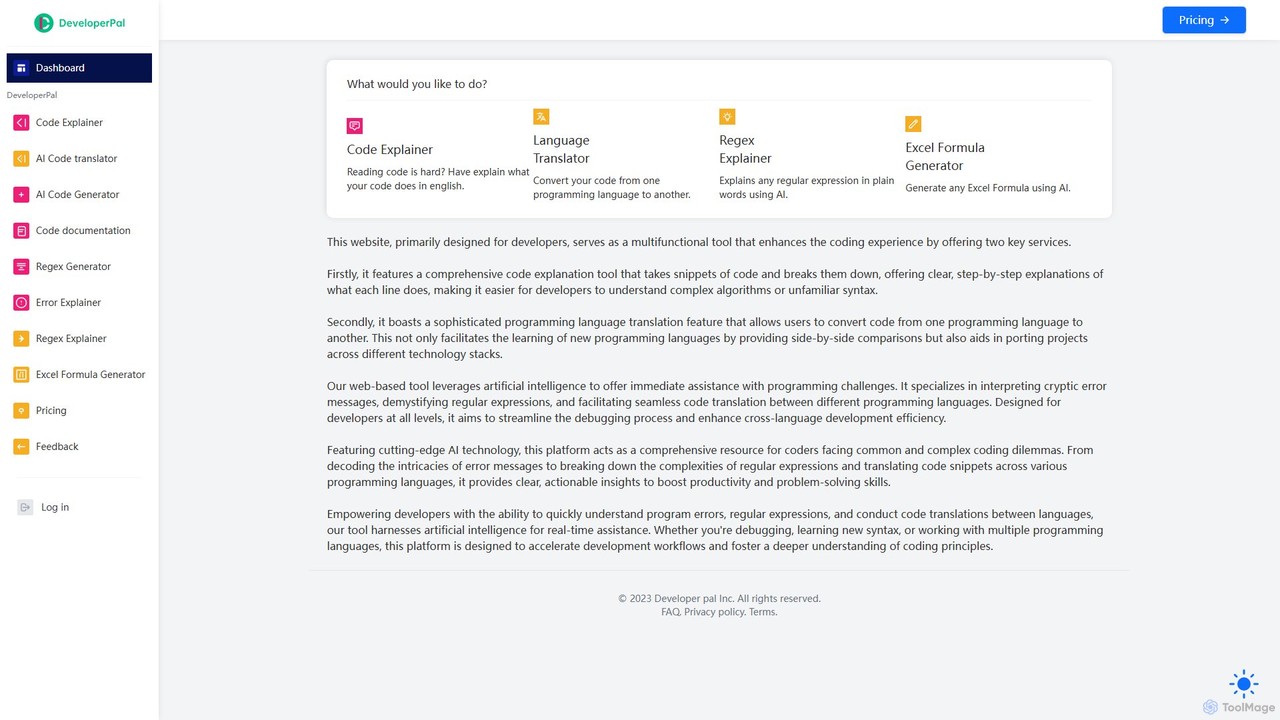
DeveloperPal Product overview

DeveloperPal is an AI-powered suite of tools for developers, offering a code explainer, language translator, regex and error explainer, and an Excel formula generator. It's designed to streamline debugging, accelerate learning, and boost overall coding productivity by providing instant, intelligent assistance for common development challenges.

Preview

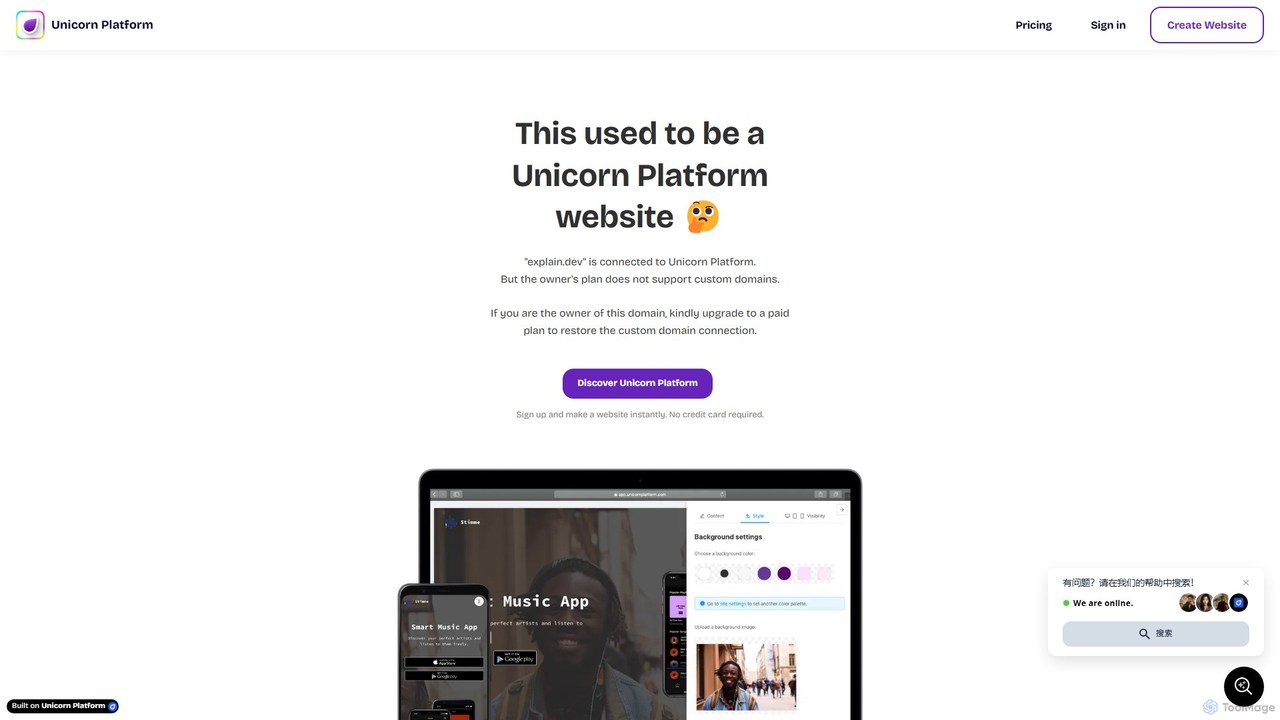
explain.dev Product overview

explain.dev is an AI-powered tool for developers that instantly generates clear, natural-language explanations for any code snippet. It helps demystify complex algorithms, legacy code, and unfamiliar libraries, boosting productivity and accelerating the learning process.

Preview

Quick facts

Compare product focus, pricing models and audiences. Highlighted rows indicate different listed information; unknown pricing does not mean free.

DeveloperPal VS explain.dev — Quick facts
Quick factsDeveloperPalexplain.dev
Pricing modelFreemiumFreemium
Product typeWebWeb
Primary focusCode AssistantCode Assistant
Audience and rolesNo data availableNo data available
CategoriesCode Assistant · Learning · AutomationCode Assistant · Learning · Automation
AddedAug 11, 2025Aug 7, 2025
UpdatedNov 19, 2026Nov 19, 2026

Features, usage and use cases

Explore the listed product descriptions, features and workflows. Taxonomy labels alone are not feature evaluations.

DeveloperPal

DeveloperPal is a comprehensive, AI-driven web platform designed to be the ultimate coding companion for developers at all skill levels. It addresses common and complex programming challenges by offering a suite of intelligent tools that simplify understanding, debugging, and writing code. By leveraging cutting-edge artificial intelligence, DeveloperPal aims to significantly reduce development friction, accelerate learning curves, and enhance productivity across various programming tasks.

The platform serves as a centralized hub for developers needing quick and accurate assistance. Whether you're a junior developer trying to grasp a complex piece of legacy code, a senior developer migrating a project to a new language, or a data analyst struggling with a complicated regular expression, DeveloperPal provides clear, actionable insights in seconds. It demystifies cryptic error messages, translates code seamlessly between languages, and explains intricate code logic in plain English, making it an indispensable tool in any developer's toolkit.

How to use DeveloperPal

Using DeveloperPal is designed to be intuitive and straightforward. The process generally follows these simple steps:

  1. Navigate to the DeveloperPal website and select the specific tool you need from the dashboard, such as 'Code Explainer', 'Language Translator', or 'Error Explainer'.
  2. In the provided input field, paste your code snippet, error message, regular expression, or a description of the Excel formula you need.
  3. For tools like the 'Language Translator', select the source and target programming languages from the dropdown menus.
  4. Click the 'Generate' or 'Explain' button to submit your request to the AI.
  5. Within moments, the AI-generated output will appear in the results panel, providing a detailed explanation, the translated code, or the generated formula. You can then copy the result for use in your project.

Core Features of DeveloperPal

  • AI Code Explainer: Takes any code snippet and provides a step-by-step, line-by-line explanation in natural language, making complex algorithms and unfamiliar syntax easy to understand.
  • AI Code Translator: Converts code from one programming language to another, supporting a wide range of popular languages. This facilitates project migration and helps developers learn new languages by comparing syntax.
  • AI Error Explainer: Deciphers cryptic compiler or runtime error messages, explaining the likely cause of the error and suggesting potential solutions to fix it.
  • AI Regex Explainer & Generator: Breaks down any regular expression into a simple English explanation of what it does. It can also generate complex regex patterns from a natural language description.
  • AI Code Generator: Generates code snippets based on natural language prompts, speeding up the development of standard functions and logic.
  • AI Code Documentation: Automatically generates documentation for your code, helping to maintain clean and understandable codebases.
  • Excel Formula Generator: Creates complex Excel formulas from plain English descriptions, empowering users of all levels to leverage the full power of spreadsheets.

Use Cases for DeveloperPal

DeveloperPal is versatile and can be applied in numerous scenarios:

  • Learning and Onboarding: Junior developers can use the Code Explainer to quickly get up to speed on an existing codebase or learn new programming concepts.
  • Code Reviews: Team members can use the tool to understand complex logic in pull requests, leading to more efficient and thorough reviews.
  • Project Migration: Development teams can leverage the Code Translator to port legacy applications to modern technology stacks with greater speed and accuracy.
  • Debugging: When faced with an obscure error message, any developer can use the Error Explainer to save hours of frustrating troubleshooting.
  • Cross-Language Development: A developer proficient in Python can use the translator to quickly write a utility script in JavaScript without a steep learning curve.
  • Data Processing: Analysts and developers can use the Regex Generator to create patterns for data validation and extraction without being regex experts.

Advantages of DeveloperPal

The primary advantage of DeveloperPal is its ability to centralize multiple development assistance tools into one cohesive, AI-powered platform. This enhances efficiency by eliminating the need to search multiple websites for different tasks. The use of advanced AI ensures that the explanations, translations, and generations are not only fast but also highly accurate and context-aware. It democratizes development knowledge, making complex topics accessible to beginners while providing a significant productivity boost for experienced professionals. It streamlines workflows, fosters a deeper understanding of code, and ultimately accelerates the entire development lifecycle.

Pricing and Plans

DeveloperPal operates on a freemium model, providing value to both individual developers and teams:

  • Free Plan: Ideal for students, hobbyists, and developers with light usage needs. This plan offers a limited number of AI requests per day across all tools, allowing users to experience the core functionalities at no cost.
  • Pro Plan: Designed for professional developers and freelancers. This plan offers a significantly higher number of monthly requests, priority access to new features, and faster processing times for a monthly subscription fee.
  • Team Plan: Tailored for development teams and businesses. It includes all the benefits of the Pro plan, plus centralized billing, user management, and an even larger pool of shared requests. API access for integration into internal workflows is often included in this tier.

explain.dev

explain.dev is an advanced AI-driven platform designed to serve the developer community by providing instant, clear, and concise explanations for code snippets across a wide range of programming languages. In the fast-paced world of software development, engineers often encounter complex algorithms, unfamiliar third-party library functions, or dense legacy code that can be time-consuming to decipher. explain.dev addresses this challenge head-on, acting as an intelligent assistant that translates code into human-readable language, significantly reducing comprehension time and improving workflow efficiency.

The tool is built on sophisticated language models trained specifically on vast datasets of code and technical documentation. This allows it to understand the context, logic, and purpose of the code, providing explanations that are not only accurate but also insightful. It aims to be an indispensable resource for both junior developers learning the ropes and senior engineers navigating complex systems.

How to use explain.dev

Using explain.dev is designed to be a straightforward and intuitive process, allowing developers to get answers without disrupting their workflow:

  1. Paste Your Code: Navigate to the explain.dev website and find the input area. Simply copy your code snippet and paste it into the editor.
  2. Language Selection: The tool often auto-detects the programming language. However, you can manually select the correct language from a dropdown list to ensure maximum accuracy.
  3. Generate Explanation: Click the "Explain" button. The AI will process the code in seconds.
  4. Review the Analysis: The platform will display a detailed explanation. This typically includes a high-level summary of what the code does, a line-by-line or block-by-block breakdown of the logic, and analysis of any complex parts.

Core Features of explain.dev

  • Instant Code Explanation: Get natural language descriptions of code functionality, logic, and purpose in seconds.
  • Multi-Language Support: Comprehensive support for major programming languages such as Python, JavaScript, TypeScript, Java, C++, Go, Rust, and more.
  • Complexity Analysis: Automatically calculates and explains the time and space complexity (Big O notation) of algorithms, helping developers write more efficient code.
  • Code Refactoring Suggestions: Provides recommendations on how to improve the code for better readability, performance, and adherence to best practices.
  • Bug Detection: The AI can identify potential bugs, logical errors, or edge cases that might have been missed during development.
  • Documentation Generation: Automatically create docstrings or comments for functions and classes, saving valuable documentation time.

Use Cases for explain.dev

explain.dev is versatile and can be applied in various scenarios:

  • Learning and Education: Students and junior developers can use it to understand complex programming concepts and see practical examples explained clearly.
  • Onboarding: New team members can quickly get up to speed with an existing codebase by using the tool to understand its various components.
  • Code Reviews: During code reviews, it can help both the reviewer and the author to clarify complex sections of code, leading to more productive discussions.
  • Debugging: When faced with a bug, understanding exactly what a piece of code is supposed to do is the first step. explain.dev provides that clarity instantly.
  • Working with Legacy Code: Deciphering old, undocumented codebases becomes significantly easier and less daunting.

Advantages of explain.dev

The primary advantage of explain.dev is its ability to dramatically boost developer productivity. By removing the mental overhead of deciphering code, it allows engineers to focus on higher-level problem-solving. It democratizes knowledge by making complex code accessible to developers of all skill levels. Furthermore, it promotes better coding practices by offering insights into complexity and potential improvements, ultimately leading to higher-quality software.

Pricing and Plans

While the official website is currently under development, explain.dev is expected to follow a freemium model common for developer tools:

  • Free Tier: Allows users a limited number of code explanations per day, suitable for casual use and learning.
  • Pro Tier (Paid): Offers unlimited explanations, support for larger code snippets, priority access to new features, and API access for integration into custom workflows and IDEs.
  • Team/Enterprise Plan: A custom plan for organizations, providing team-wide access, centralized billing, and enhanced security features.

Specific pricing details will be announced upon the official launch.

Positioning

Their taxonomy shows where the products overlap and where each one has a more distinct focus. Unknown fields are shown explicitly and are never filled with assumptions.

Categories

Shared
Code AssistantLearningAutomation
Only DeveloperPal
No listed items
Only explain.dev
No listed items

Tags

Shared
programmingsoftware development
Only DeveloperPal
ai coding assistantcode explainercode generationcode translatordeveloper productivityerror debuggerexcel formularegex generator
Only explain.dev
AI assistantcode analysiscode explanationcode refactoringcomplexity analysisdeveloper tool

Audience and roles

Shared
No listed items
Only DeveloperPal
No listed items
Only explain.dev
No listed items

Traffic comparison

Traffic is shown on the same scale so differences in market visibility are not visually understated.

How to interpret the traffic data

Both charts share the same months and vertical scale. Each tool identifies its latest reporting month; missing months are left blank, not counted as zero. Regional and source visit counts are estimates calculated from the reported shares.

DeveloperPal monthly traffic:

Latest traffic · 2026-05

Monthly visits
173
Avg. visit duration
0:00
Pages per visit
1.01
Bounce rate
49.21%
Data updated 2026-06-15

Monthly traffic trend

  • 2025-07: 1.3K
  • 2025-08: 426
  • 2025-09: 388
  • 2026-01: No data available
  • 2026-02: No data available
  • 2026-03: 0
  • 2026-04: 0
  • 2026-05: 173

Top regions

Top 5 countries/regions
Country/regionPercentageEstimated visits
🇺🇸United States100%173

Search keywords

code language translatorcode translatorregex explainertranslate code

explain.dev monthly traffic:

Latest traffic · 2026-05

Monthly visits
46.4K
Avg. visit duration
0:26
Pages per visit
2.67
Bounce rate
40.74%
Data updated 2026-06-15

Monthly traffic trend

  • 2025-07: No data available
  • 2025-08: No data available
  • 2025-09: No data available
  • 2026-01: 80K
  • 2026-02: 60.7K
  • 2026-03: 62.6K
  • 2026-04: 42.6K
  • 2026-05: 46.4K

Top regions

Top 5 countries/regions
Country/regionPercentageEstimated visits
🇺🇸United States46.92%21.8K
🇮🇳India18.94%8.8K
🇳🇬Nigeria18.48%8.6K
🇬🇧United Kingdom8.03%3.7K
🇻🇳Vietnam7.63%3.5K

Traffic sources

Source typePercentageEstimated visits
Direct72.17%33.5K
Referral24.71%11.5K
Email3.12%1.4K

Search keywords

advance whether page iosai page builderlifespan gpuunicorn platformunicorn platform custom embed

Community signals

Ratings, comments, favorites, and likes are community signals—not a substitute for product fit.

DeveloperPal

Rating
No data available
Comments
0
Favorites
219
Likes
202

explain.dev

Rating
No data available
Comments
0
Favorites
177
Likes
165

DeveloperPal vs explain.dev · Comparison FAQ

What do DeveloperPal and explain.dev have in common?
Both tools are listed under Code Assistant、Learning、Automation. These categories indicate overlapping use cases; compare their detailed descriptions for workflows, capabilities and limitations.
Are DeveloperPal and explain.dev free?
Listed pricing models: DeveloperPal — Freemium; explain.dev — Freemium. Missing pricing is not proof of a free plan, and freemium does not mean every feature is free. Check official sites for current plans, limits and trials.
How should I choose between DeveloperPal and explain.dev?
The primary listed category is Code Assistant for DeveloperPal, and Code Assistant for explain.dev. Compare features, steps and use cases, then verify pricing, data permissions and deployment needs. This page does not include hands-on testing and does not declare a winner from traffic or tags.

Sources and comparison methodology

This page is assembled from ToolMage product listings, taxonomy, traffic statistics and on-site user feedback. It is not a hands-on test or an independent review.

  • Feature and plan descriptions reflect information in the listings, not real-time guarantees. Verify pricing, quotas, availability and privacy terms on the official sites.
  • Traffic uses the reporting months shown. Missing statistics do not mean zero visits, and different periods do not establish growth or superiority. Regional and source visit counts are estimates based on shares.
  • Different tags indicate differences in the listings, not proof that the other product lacks a capability. Ratings, favorites and visits are not used to declare a winner.

Related comparisons