ToolMage
Sign in

AI TOOL COMPARISON

DocsBot vs DocUp

What is the difference, and which fits your workflow? Compare features, usage, pricing models and traffic side by side.

Jump to key differences

Product overview

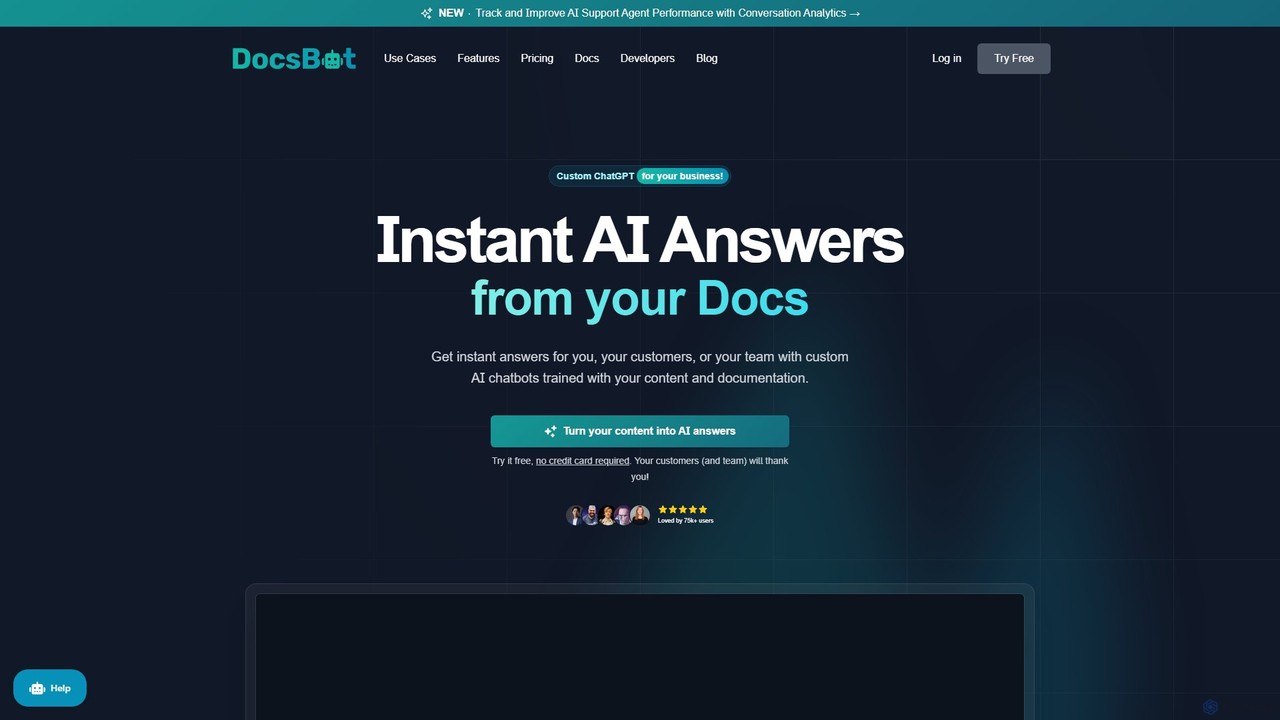
DocsBot Product overview

DocsBot is an AI-powered platform that allows businesses to create custom chatbots trained on their own documentation and content. It provides instant, accurate answers for customers and employees, automating support, improving internal knowledge access, and accelerating research without any coding.

Preview

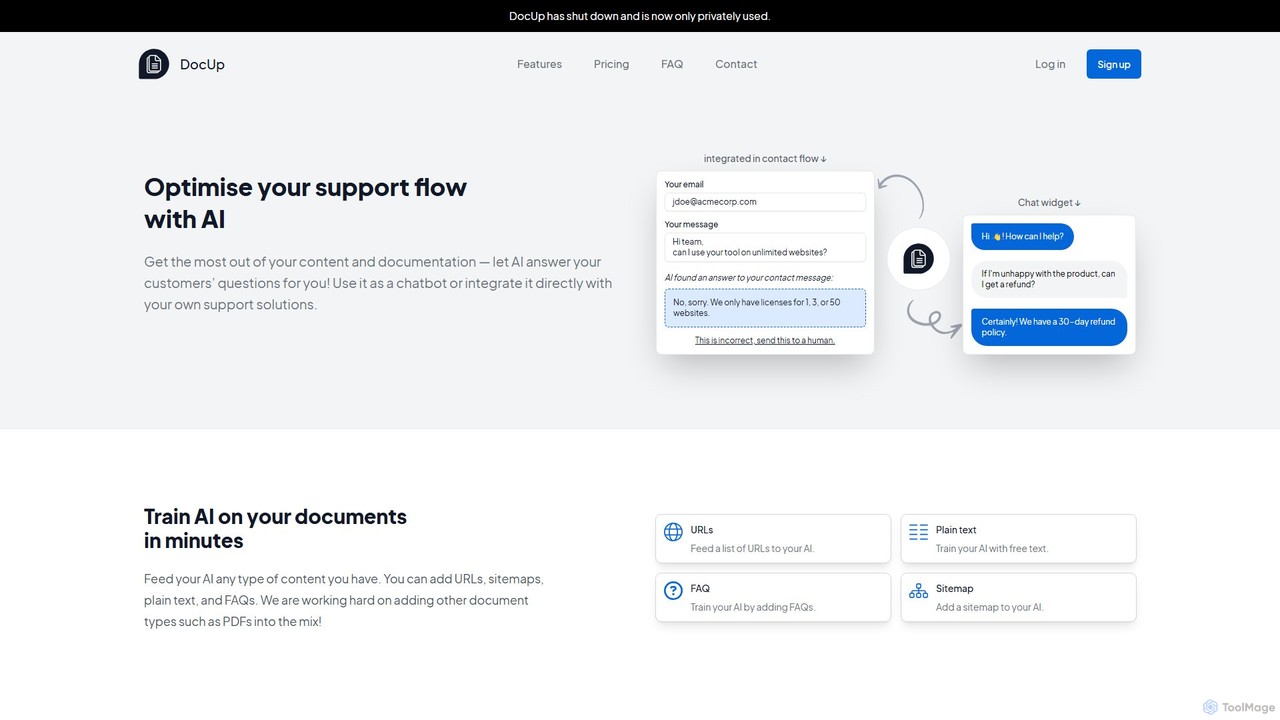
DocUp Product overview

DocUp is an AI-powered platform that transforms your documentation into an intelligent chatbot and Q&A system. Instantly answer customer questions, reduce support tickets, and improve user self-service by deploying an AI assistant trained on your knowledge base, FAQs, and manuals. Offers both a customizable widget and a flexible API for seamless integration.

Preview

Quick facts

Compare product focus, pricing models and audiences. Highlighted rows indicate different listed information; unknown pricing does not mean free.

DocsBot VS DocUp — Quick facts
Quick factsDocsBotDocUp
Pricing modelFreemiumFreemium
Product typeWebWeb
Primary focusChatbotChatbot
Audience and rolesNo data availableNo data available
CategoriesChatbot · Api · Lead Generation · Knowledge ManagementChatbot · Api · Knowledge Management
AddedAug 15, 2025Aug 4, 2025
UpdatedNov 19, 2026Nov 19, 2026

Features, usage and use cases

Explore the listed product descriptions, features and workflows. Taxonomy labels alone are not feature evaluations.

DocsBot

DocsBot is a powerful AI platform designed to transform your existing business content into intelligent, interactive chatbots. By training a custom AI on your documentation, website content, knowledge bases, and other data sources, DocsBot provides instant and accurate answers to questions from your customers or internal teams. This no-code solution is trusted by over 75,000 users and 3,000 businesses to enhance customer experience, boost productivity, and reduce operational costs.

How to use DocsBot

Creating and deploying your own AI assistant with DocsBot is a straightforward, four-step process that requires no technical skills:

  1. Create: Start by building your bot in minutes. You can configure advanced settings, including privacy controls and choosing from various AI models like GPT-4o/4.1 to best suit your specific needs.
  2. Train: Upload your content from over 37 different sources. You can import documents (PDF, DOCX, CSV), scrape websites via URLs or sitemaps, or connect to cloud services like Google Drive, Notion, Confluence, Zendesk, and SharePoint. The system automatically processes and indexes the data for optimal performance.
  3. Test & Refine: Interact with your chatbot to test its accuracy. You can fine-tune its responses, adjust the training data, and add custom instructions to handle specific queries or edge cases. Detailed analytics and logs help you identify areas for improvement.
  4. Launch: Deploy your bot anywhere you need it. Embed it seamlessly on your website, documentation pages, or help center using a customizable widget. You can also share it via a dedicated link or integrate it with thousands of other applications through Zapier, Make, or the DocsBot API.

Core Features of DocsBot

  • Extensive Data Source Integration: Train your bot with content from over 37 sources, including file uploads (PDF, DOCX, TXT, MD), URLs, sitemaps, YouTube videos, Notion, Confluence, Zendesk, Help Scout, Google Drive, and many more.
  • No-Code Chatbot Builder: An intuitive interface allows anyone to build, train, and deploy a powerful AI chatbot without writing a single line of code.
  • Advanced Customization: Tailor your bot's personality, response style, and knowledge base with custom instructions and prompt engineering. Choose from different AI models (including GPT-4o) to balance cost and performance.
  • Powerful Integrations & API: Seamlessly connect DocsBot with your existing workflows using integrations for Slack, Zapier, Help Scout, and more. A robust API is available for custom development.
  • Conversation Analytics: Gain valuable insights from user interactions. Track conversation topics, sentiment, and unanswered questions to improve your documentation, products, and support quality.
  • Multilingual Support: Engage with users worldwide. DocsBot can understand and respond in over 95 languages, regardless of the source documentation's language.
  • Enterprise-Grade Security: Your data is protected with features like private bots, secure access controls, and GDPR compliance. Enterprise plans offer options for Azure OpenAI and self-hosting for maximum data security.

Use Cases for DocsBot

  • Automated Customer Support: Provide 24/7 instant support to your customers. The AI can handle common inquiries, reduce ticket volume, and free up your human agents to focus on complex issues.
  • Internal Knowledge Management: Create an internal knowledge bot for your team. Empower employees to find information instantly from company documents, policies, and databases, boosting productivity and streamlining onboarding.
  • Research & Document Q&A: Accelerate research by asking questions directly to your document library. The AI can quickly surface relevant information, data points, and citations from vast amounts of text.
  • Lead Generation & Pre-Sales: Engage website visitors by answering their questions about your products and services in real-time, helping to qualify leads and guide them through the sales funnel.

Advantages of DocsBot

  • Reduce Costs: Significantly lower customer support costs by automating responses to a high volume of inquiries.
  • Increase Productivity: Save valuable time for both customers and employees by providing instant access to information.
  • Improve Customer Satisfaction: Deliver fast, accurate, and consistent answers 24/7, leading to a better customer experience and increased loyalty.
  • Scalability: Effortlessly handle an unlimited number of concurrent conversations without compromising on service quality.
  • Data-Driven Insights: Use analytics to understand user needs better and identify gaps in your knowledge base or product offerings.

Pricing and Plans

DocsBot offers a range of plans with a 14-day money-back guarantee. Annual subscriptions include two months free.

  • Free Plan: $0/month. Includes 1 DocsBot, 50 source pages, 100 messages/month, and 1 team user. Ideal for personal use.
  • Personal Plan: $49/month. Includes 3 DocsBots, 5,000 source pages, 5,000 messages/month, Zapier integration, and GPT-4o/4.1 support.
  • Standard Plan: $149/month. The most popular plan, offering 10 DocsBots, 15,000 source pages, 15,000 messages/month, 5 team users, and conversation analytics.
  • Business Plan: $499/month. For advanced needs, with 100 DocsBots, 100,000 source pages, 100,000 messages/month, 10 team users, and advanced reporting features.
  • Enterprise Plan: Custom pricing. Offers custom limits, self-hosting options, Azure OpenAI service, SSO, priority support, and custom feature development for large-scale deployments.

DocUp

DocUp is an advanced AI-powered service designed to revolutionize customer support and knowledge management. It transforms your existing company documentation—such as knowledge bases, FAQs, product manuals, and guides—into an intelligent, interactive Q&A system. By leveraging sophisticated AI, DocUp can understand user queries and provide instant, accurate answers, significantly enhancing the customer self-service experience and reducing the burden on human support teams.

The platform is built for flexibility, allowing businesses to integrate its powerful AI capabilities directly into their existing workflows. Whether you want to add a smart chatbot to your website or incorporate automated responses into your contact forms, DocUp provides the tools to do so seamlessly. This proactive approach helps resolve customer issues before they even become support tickets, leading to higher customer satisfaction and operational efficiency.

How to use DocUp

Using DocUp is a straightforward process designed for ease of implementation:

  1. Connect Your Knowledge Sources: Begin by providing DocUp with your documentation. You can do this by crawling your website, uploading files (like PDFs or Markdown), or connecting to existing knowledge base platforms. The system ingests and processes all the provided content.
  2. Train the AI Model: Once the data is ingested, DocUp's AI automatically trains a model based on your specific content. This process creates a custom knowledge brain for your business, capable of understanding the nuances of your products and services.
  3. Deploy the AI Assistant: Choose your preferred deployment method. You can embed a pre-built, customizable chatbot widget directly onto your website or help center. The widget can be styled to match your brand's look and feel.
  4. Integrate via API: For more advanced use cases, leverage the powerful REST API. This allows you to integrate DocUp's Q&A functionality into any application, such as your support desk software, contact forms, or internal tools. The API provides a direct line to the AI's brain, returning structured answers with source citations.
  5. Monitor and Improve: Use the analytics dashboard to gain insights into what your customers are asking. Track query volumes, see the AI's responses, and identify common questions that may indicate gaps in your documentation. Use this data to continuously improve your knowledge base and the AI's performance.

Core Features of DocUp

  • AI-Powered Q&A: Delivers instant, context-aware answers to user questions based on your documentation.
  • Multi-Source Data Ingestion: Supports various data sources including websites, PDFs, text files, and other document formats.
  • Flexible API Integration: A robust REST API allows for deep integration into any support flow, contact form, or custom application.
  • Customizable Chatbot Widget: An easy-to-embed chatbot that can be tailored to your website's design and branding.
  • Source Citation: Builds user trust by providing links to the original documentation from which the answer was derived.
  • Analytics and Insights: A comprehensive dashboard to monitor user interactions, understand customer needs, and identify areas for documentation improvement.
  • Scalable Infrastructure: Built to handle high volumes of queries, making it suitable for businesses of all sizes.

Use Cases for DocUp

DocUp is versatile and can be applied in various scenarios:

  • 24/7 Customer Self-Service: Deploy a chatbot on your website to provide round-the-clock support, answering common questions instantly without human intervention.
  • Support Ticket Deflection: Integrate DocUp into your contact form or helpdesk portal. As a user types their question, DocUp suggests an answer, resolving the issue before a ticket is created.
  • Employee Onboarding and Training: Use DocUp internally to help new hires quickly find information from training manuals, HR policies, and internal wikis.
  • Sales Enablement: Equip your sales team with an internal tool that can instantly answer product-related questions during client calls.

Advantages of DocUp

By implementing DocUp, businesses can achieve significant benefits. It dramatically improves the customer experience by providing immediate resolutions. This leads to a significant reduction in support ticket volume, freeing up human agents to focus on more complex and high-value interactions. The result is a more efficient, cost-effective support operation and a more satisfied customer base. The API-first approach also offers unparalleled flexibility, ensuring the tool can adapt to your specific technical and business requirements.

Pricing and Plans

DocUp likely offers a tiered pricing structure to cater to different business needs, following a freemium model. While specific details should be confirmed on the official website, a typical structure would include:

  • Free Plan: A basic plan ideal for small projects or testing, offering a limited number of questions per month and one knowledge base.
  • Starter Plan: A paid plan for small to medium-sized businesses, offering a higher query limit, more knowledge bases, and basic customization options.
  • Pro/Business Plan: Designed for growing businesses, this tier typically includes full API access, advanced analytics, removal of DocUp branding, and priority support.
  • Enterprise Plan: A custom plan for large organizations with specific needs, offering unlimited usage, dedicated support, SSO integration, and advanced security features.

Positioning

Their taxonomy shows where the products overlap and where each one has a more distinct focus. Unknown fields are shown explicitly and are never filled with assumptions.

Categories

Shared
ChatbotApiKnowledge Management
Only DocsBot
Lead Generation
Only DocUp
No listed items

Tags

Shared
AI assistantAPIchatbotcustomer supportdocumentationknowledge base
Only DocsBot
gpt-4internal toolslead generationno-coderesearch assistant
Only DocUp
helpdesk automationSaaSself-serviceticket deflection

Audience and roles

Shared
No listed items
Only DocsBot
No listed items
Only DocUp
No listed items

Traffic comparison

Traffic is shown on the same scale so differences in market visibility are not visually understated.

How to interpret the traffic data

Both charts share the same months and vertical scale. Each tool identifies its latest reporting month; missing months are left blank, not counted as zero. Regional and source visit counts are estimates calculated from the reported shares.

DocsBot monthly traffic:

Latest traffic · 2026-05

Monthly visits
649.3K
Avg. visit duration
0:49
Pages per visit
2.33
Bounce rate
46.45%
Data updated 2026-06-15

Monthly traffic trend

  • 2025-07: No data available
  • 2025-08: No data available
  • 2025-09: 1.3M
  • 2026-01: 1.4M
  • 2026-02: 1.3M
  • 2026-03: 901.5K
  • 2026-04: 727K
  • 2026-05: 649.3K

Top regions

Top 5 countries/regions
Country/regionPercentageEstimated visits
🇺🇸United States40.14%260.6K
🇮🇳India39.96%259.5K
🇬🇧United Kingdom7.54%49K
🇻🇳Vietnam6.38%41.4K
🇮🇩Indonesia5.98%38.8K

Traffic sources

Source typePercentageEstimated visits
Direct80.57%523.1K
Referral17.47%113.4K
Email1.96%12.7K

Search keywords

docsbotdocsbot aigainzalgo v2 alpha source codelive tv to m3u converterwearedevs deobfuscator

DocUp monthly traffic:

Latest traffic · 2026-05

Monthly visits
244
Avg. visit duration
0:00
Pages per visit
1.22
Bounce rate
34.84%
Data updated 2026-06-15

Monthly traffic trend

  • 2025-07: 781
  • 2025-08: 0
  • 2025-09: 2.8K
  • 2026-01: No data available
  • 2026-02: No data available
  • 2026-03: 0
  • 2026-04: 0
  • 2026-05: 244

Search keywords

doc up

Community signals

Ratings, comments, favorites, and likes are community signals—not a substitute for product fit.

DocsBot

Rating
No data available
Comments
0
Favorites
183
Likes
177

DocUp

Rating
No data available
Comments
0
Favorites
156
Likes
148

DocsBot vs DocUp · Comparison FAQ

What do DocsBot and DocUp have in common?
Both tools are listed under Chatbot、Api、Knowledge Management. These categories indicate overlapping use cases; compare their detailed descriptions for workflows, capabilities and limitations.
Are DocsBot and DocUp free?
Listed pricing models: DocsBot — Freemium; DocUp — Freemium. Missing pricing is not proof of a free plan, and freemium does not mean every feature is free. Check official sites for current plans, limits and trials.
How should I choose between DocsBot and DocUp?
The primary listed category is Chatbot for DocsBot, and Chatbot for DocUp. Compare features, steps and use cases, then verify pricing, data permissions and deployment needs. This page does not include hands-on testing and does not declare a winner from traffic or tags.

Sources and comparison methodology

This page is assembled from ToolMage product listings, taxonomy, traffic statistics and on-site user feedback. It is not a hands-on test or an independent review.

  • Feature and plan descriptions reflect information in the listings, not real-time guarantees. Verify pricing, quotas, availability and privacy terms on the official sites.
  • Traffic uses the reporting months shown. Missing statistics do not mean zero visits, and different periods do not establish growth or superiority. Regional and source visit counts are estimates based on shares.
  • Different tags indicate differences in the listings, not proof that the other product lacks a capability. Ratings, favorites and visits are not used to declare a winner.

Related comparisons