ToolMage
Sign in

AI TOOL COMPARISON

GitStart vs Producta

What is the difference, and which fits your workflow? Compare features, usage, pricing models and traffic side by side.

Jump to key differences

Product overview

GitStart Product overview

GitStart is an elastic engineering platform that scales your software development capacity on demand. It combines powerful AI agents with a global network of expert developers to autonomously handle engineering tickets and deliver production-ready pull requests, allowing your core team to ship up to 10x more work.

Preview

Producta Product overview

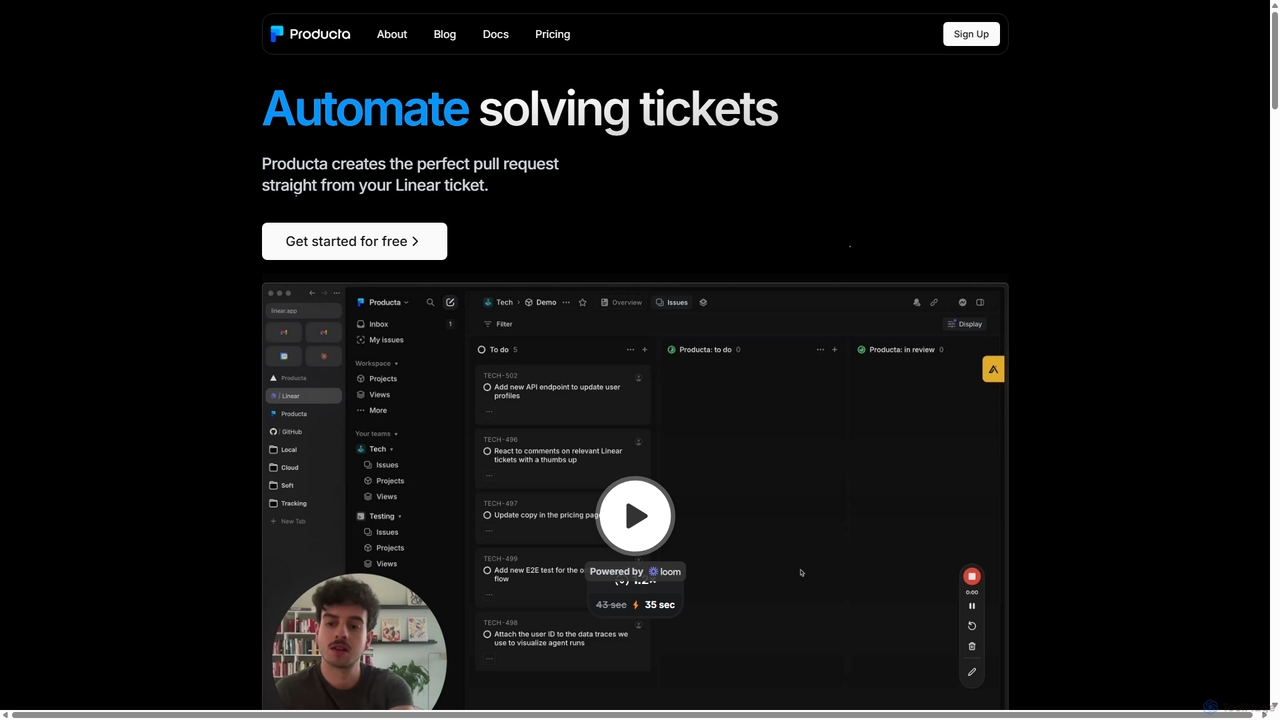
Producta is an AI-powered software development assistant that automates the entire workflow from a Linear ticket to a GitHub pull request. It intelligently clarifies tasks, generates, tests, and refines code, integrating seamlessly into your existing development process to accelerate bug fixes and feature implementation.

Preview

Quick facts

Compare product focus, pricing models and audiences. Highlighted rows indicate different listed information; unknown pricing does not mean free.

GitStart VS Producta — Quick facts
Quick factsGitStartProducta
Pricing modelPaidFreemium
Product typeWebWeb
Primary focusSoftware DevelopmentAutomation
Audience and rolesNo data availableDevOps Engineer · Engineering Manager · Product Manager · Software Developer · Tech Lead
CategoriesSoftware Development · Code Generation · Task ManagementAutomation · Code Assistant · Task Management
AddedAug 13, 2025Sep 24, 2025
UpdatedNov 19, 2026Nov 19, 2026

Features, usage and use cases

Explore the listed product descriptions, features and workflows. Taxonomy labels alone are not feature evaluations.

GitStart

GitStart is redefining the future of software engineering by providing a seamless, scalable solution for development teams. It acts as an elastic engineering capacity layer, integrating directly into your existing workflow. The platform leverages a unique hybrid model, combining advanced Large Language Models (LLMs) as 'Hybrid Agents' with a vetted, global community of real developers. This synergy allows GitStart to absorb context from your codebase, tackle complex tasks, and deliver high-quality, production-ready code with a remarkable 98% merge rate.

The core mission of GitStart is to make software development faster, more efficient, and accessible. By handling tasks ranging from technical debt and support tickets to building entire features from scratch, GitStart frees up your in-house engineers to focus on core architecture, product strategy, and the most complex technical challenges. The platform has a proven track record, having shipped over a billion lines of code for forward-thinking companies and contributed to major open-source projects like Firefox, Sourcegraph, and Cal.com.

How to use GitStart

The process of integrating GitStart into your team is designed to be simple and non-disruptive, allowing you to get started within days.

  1. Assign Tickets: Simply integrate your project management tools like Jira or Linear. Assign tickets to your dedicated GitStart agents just as you would to an in-house developer. For optimal results, tickets should have clear requirements. GitStart's AI Ticket Studio can even assist in scoping and creating well-defined tickets.
  2. Autonomous Work: Once a ticket is assigned, GitStart's platform takes over. It uses a proprietary technology called 'GitSlice' to securely isolate relevant sections of your codebase. The AI agents work on these slices in secure, dynamic environments to generate the initial code.
  3. Human Review & Polish: The AI-generated code is then passed to expert human developers from GitStart's global network. They review, test, and polish the code to ensure it meets your quality standards and coding conventions.
  4. Receive Pull Requests: You receive a fully-vetted, production-ready Pull Request (PR) directly in your GitHub or GitLab repository. Your team's only task is to conduct the final review and merge the PR, maintaining full ownership and control over the codebase.

Core Features of GitStart

  • Hybrid Agents (AI + Human): Combines the speed and scale of LLMs with the nuance, context, and quality assurance of expert human developers.
  • Autonomous Pull Request Delivery: Manages the entire development lifecycle from ticket assignment to a ready-to-merge PR, minimizing management overhead.
  • GitSlice Secure Code Layer: A proprietary technology that isolates codebase sections for secure and efficient work by AI agents, enhancing both security and performance.
  • Seamless Integration: Natively integrates with standard developer tools including GitHub, GitLab, Jira, Linear, and Slack for a smooth workflow.
  • Broad Technology Support: The developer community is proficient in over 15 languages and frameworks, including React, Node.js, Python, Django, Ruby on Rails, and more.
  • AI-Powered Scoping & Review: Offers tools like the GitStart AI Ticket Studio to help create well-scoped tickets and is developing the GitStart AI Review Studio to scale code reviews.

Use Cases for GitStart

GitStart is versatile and can be adapted to various engineering needs:

  • Tackling Technical Debt: Systematically address backlogs of tech debt, refactoring code, and improving codebase health without distracting your core team.
  • Accelerating Feature Development: Augment your team to build and ship new features faster, increasing your product velocity.
  • Handling Support & Bug Fixes: Manage incoming support tickets and bug reports efficiently, ensuring a stable and reliable product for your users.
  • Building an MVP or Entire Product: For startups or new projects, GitStart can act as the entire engineering team, building a product from the ground up.
  • Open-Source Contributions: GitStart has successfully contributed to complex open-source projects, resolving long-standing issues.

Advantages of GitStart

By partnering with GitStart, engineering teams gain a significant competitive edge:

  • Massive Scalability: Instantly scale your engineering output up or down based on project needs, with the potential to ship up to 10x more work.
  • Increased Efficiency: Frees your senior engineers from routine coding tasks, allowing them to focus on high-impact strategic work.
  • Cost-Effective: Eliminates the time and expense associated with hiring, onboarding, and managing additional full-time developers.
  • High-Quality Code: Achieves an industry-leading 98% merge rate with an average of just 1.7 code review cycles, ensuring code quality and consistency.
  • Speed to Market: Drastically reduces development cycle times, helping you launch products and features faster.

Pricing and Plans

GitStart provides flexible engagement options and tailored solutions designed to align with your specific project requirements and budget. Pricing is not publicly listed. To get a customized quote and learn more about the engagement models, you are encouraged to book a demo or contact their sales team directly through the official website.

Producta

Producta is a revolutionary AI tool designed to reimagine the software development lifecycle. It acts as an autonomous AI software engineer that integrates directly into your existing workflow, specifically with issue trackers like Linear and version control systems like GitHub. The core mission of Producta is to automate the resolution of technical tickets by creating perfect, ready-to-review pull requests, thereby freeing up developers to focus on more complex and creative challenges. By bringing AI into the development process at the earliest stage—the ticket creation and refinement—Producta ensures higher accuracy and minimizes the friction often associated with using large language models (LLMs) for code generation.

How to use Producta

The workflow with Producta is designed to be intuitive and requires minimal changes to a team's existing processes. It can be broken down into a simple, three-step cycle:

  1. Assign the Ticket: To begin, a user simply moves a technical ticket they want solved into a designated 'Producta' column within their Linear project board. This action triggers the AI to pick up the task.
  2. Clarify and Refine: If the ticket lacks detail or is ambiguous, Producta's AI will proactively engage with the user to ask clarifying questions directly within the ticket. This crucial step ensures the requirements are fully understood before any code is written. Producta can also help transform high-level ideas into well-defined, actionable technical tasks.
  3. Review in Github: Once the task is clear, Producta gets to work. It validates the task, creates a detailed plan, generates the necessary code, runs tests, and finally opens a pull request in the corresponding GitHub repository. The process doesn't end there; Producta remains active in the PR, reacting to comments and feedback from human reviewers to make necessary revisions until the solution is approved.

Core Features of Producta

  • End-to-End Automation: Producta handles the entire development cycle for a ticket, from initial task validation and planning to code generation, testing, and pull request submission.
  • Seamless Integrations: Deep, native integration with essential developer tools, starting with Linear for issue tracking and GitHub for version control.
  • AI-Powered Task Clarification: An interactive system that ensures ticket requirements are crystal clear, significantly reducing the likelihood of incorrect or irrelevant code generation.
  • Idea-to-Specification Engine: A unique capability that helps users convert vague ideas or high-level feature requests into structured and detailed technical tickets that are ready for development.
  • Interactive Pull Request Management: The AI doesn't just submit code; it participates in the review process, understanding and responding to human feedback to iterate on the solution.
  • Advanced AI Model Access: Enterprise users gain access to a range of powerful AI models, including proprietary ones like R1 and o1, for tackling more complex tasks.

Use Cases for Producta

Producta is versatile and can be applied to a wide range of software development tasks:

  • Accelerating Bug Fixes: Automatically resolve common bugs, from simple UI adjustments like fixing padding issues to more complex backend logic errors, as soon as they are ticketed.
  • Rapid Feature Implementation: Quickly build and ship new features. A product manager can draft an idea, have Producta refine it into technical tasks, and then see a pull request ready for review in a fraction of the usual time.
  • Managing Technical Debt: Assign refactoring tasks or updates to outdated dependencies to Producta, allowing the team to continuously improve the codebase without sacrificing velocity on new features.
  • Streamlining Team Onboarding: New engineers can become productive faster by observing how Producta tackles initial tasks and structures its pull requests, providing a consistent and high-quality learning example.

Advantages of Producta

Producta stands out from other AI coding tools by addressing the core challenges of AI-assisted development. Its primary advantage lies in its workflow-integrated approach. By starting at the issue tracker, it gathers crucial context that standalone code assistants lack, leading to more accurate and relevant solutions. This methodology reduces the time developers spend correcting AI-generated code and debugging misleading suggestions. It boosts overall team velocity, ensures code consistency, and allows engineering talent to be allocated to high-value, strategic work.

Pricing and Plans

Producta offers a pricing structure designed to adapt to different team needs:

  • Free Trial: A one-month free trial is available for teams to experience the platform. It costs $0/month and includes support for 1 GitHub repository, 1 Linear project, and up to 5 merged pull requests.
  • Enterprise Plan: This plan is tailored for companies looking to fully adopt Producta across their organization. It features custom pricing and includes unlimited GitHub repositories, unlimited Linear projects, and unlimited merged pull requests. Subscribers also receive 24/7 support, a private chat group, early access to new features, and access to all available AI models. Interested parties can book a demo to learn more.

Positioning

Their taxonomy shows where the products overlap and where each one has a more distinct focus. Unknown fields are shown explicitly and are never filled with assumptions.

Categories

Shared
Task Management
Only GitStart
Software DevelopmentCode Generation
Only Producta
AutomationCode Assistant

Tags

Shared
AI developercode generationsoftware development
Only GitStart
code automationdeveloper toolsengineering teamGitJira integrationpull requesttask automationtech debt
Only Producta
AI software engineerbug fixingdev toolsfeature implementationgithublinearpull request automationworkflow automation

Audience and roles

Shared
No listed items
Only GitStart
No listed items
Only Producta
DevOps EngineerEngineering ManagerProduct ManagerSoftware DeveloperTech Lead

Traffic comparison

Traffic is shown on the same scale so differences in market visibility are not visually understated.

How to interpret the traffic data

Both charts share the same months and vertical scale. Each tool identifies its latest reporting month; missing months are left blank, not counted as zero. Regional and source visit counts are estimates calculated from the reported shares.

GitStart monthly traffic:

Latest traffic · 2026-05

Monthly visits
1.8K
Avg. visit duration
0:00
Pages per visit
1.08
Bounce rate
39.06%
Data updated 2026-06-15

Monthly traffic trend

  • 2025-09: 2.4K
  • 2026-01: 2.3K
  • 2026-02: 1.9K
  • 2026-03: 1.5K
  • 2026-04: 1.1K
  • 2026-05: 1.8K

Top regions

Top 5 countries/regions
Country/regionPercentageEstimated visits
🇺🇸United States52.56%946
🇮🇳India47.44%854

Search keywords

afghan computer science programmergitstartgitstart acquiredgitstart careershackerhouse san francisco

Producta

No data available

Community signals

Ratings, comments, favorites, and likes are community signals—not a substitute for product fit.

GitStart

Rating
No data available
Comments
0
Favorites
199
Likes
204

Producta

Rating
No data available
Comments
0
Favorites
177
Likes
166

GitStart vs Producta · Comparison FAQ

What do GitStart and Producta have in common?
Both tools are listed under Task Management. These categories indicate overlapping use cases; compare their detailed descriptions for workflows, capabilities and limitations.
Are GitStart and Producta free?
Listed pricing models: GitStart — Paid; Producta — Freemium. Missing pricing is not proof of a free plan, and freemium does not mean every feature is free. Check official sites for current plans, limits and trials.
How should I choose between GitStart and Producta?
The primary listed category is Software Development for GitStart, and Automation for Producta. Compare features, steps and use cases, then verify pricing, data permissions and deployment needs. This page does not include hands-on testing and does not declare a winner from traffic or tags.

Sources and comparison methodology

This page is assembled from ToolMage product listings, taxonomy, traffic statistics and on-site user feedback. It is not a hands-on test or an independent review.


  • Feature and plan descriptions reflect information in the listings, not real-time guarantees. Verify pricing, quotas, availability and privacy terms on the official sites.
  • Traffic uses the reporting months shown. Missing statistics do not mean zero visits, and different periods do not establish growth or superiority. Regional and source visit counts are estimates based on shares.
  • Different tags indicate differences in the listings, not proof that the other product lacks a capability. Ratings, favorites and visits are not used to declare a winner.

Related comparisons