ToolMage
Sign in

AI TOOL COMPARISON

Mini Course Generator vs Slice Knowledge

What is the difference, and which fits your workflow? Compare features, usage, pricing models and traffic side by side.

Jump to key differences

Product overview

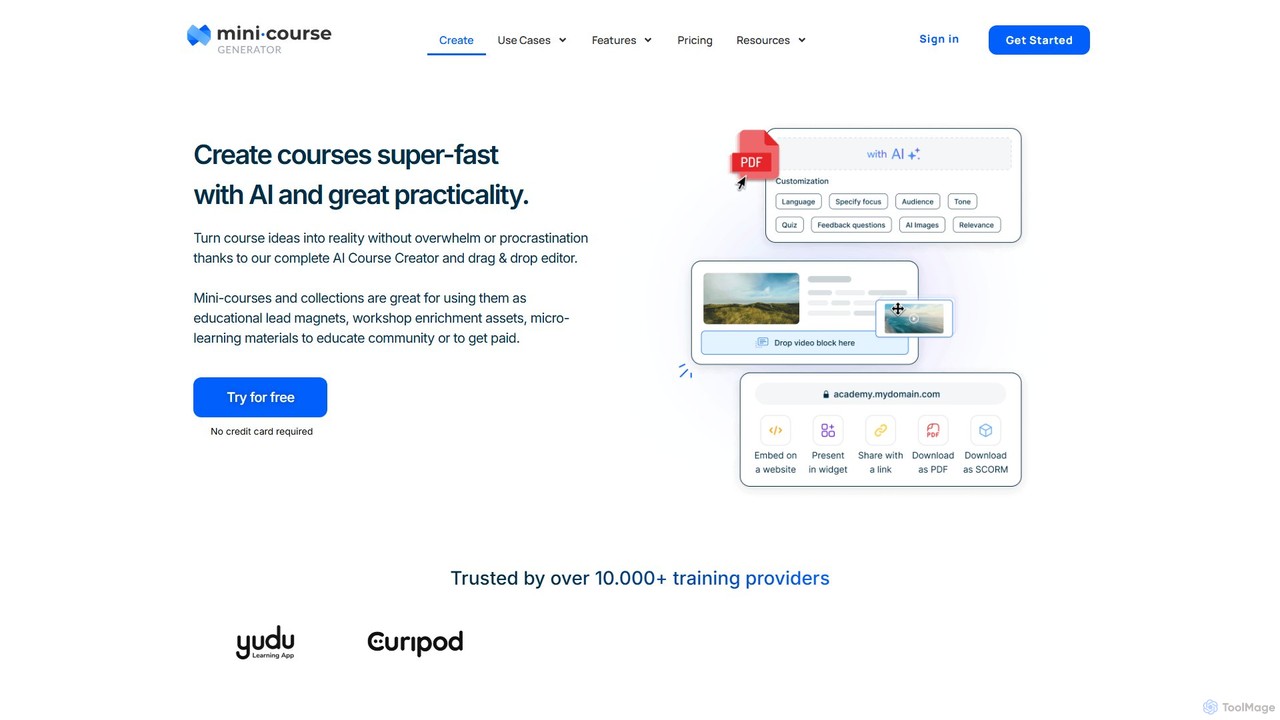
Mini Course Generator Product overview

Mini Course Generator is an AI-powered platform that enables creators, coaches, and businesses to rapidly build and deliver interactive mini-courses. It's ideal for lead generation, customer onboarding, community engagement, and monetization. Turn your ideas into engaging, bite-sized learning experiences with a user-friendly drag-and-drop editor and powerful AI assistance.

Preview

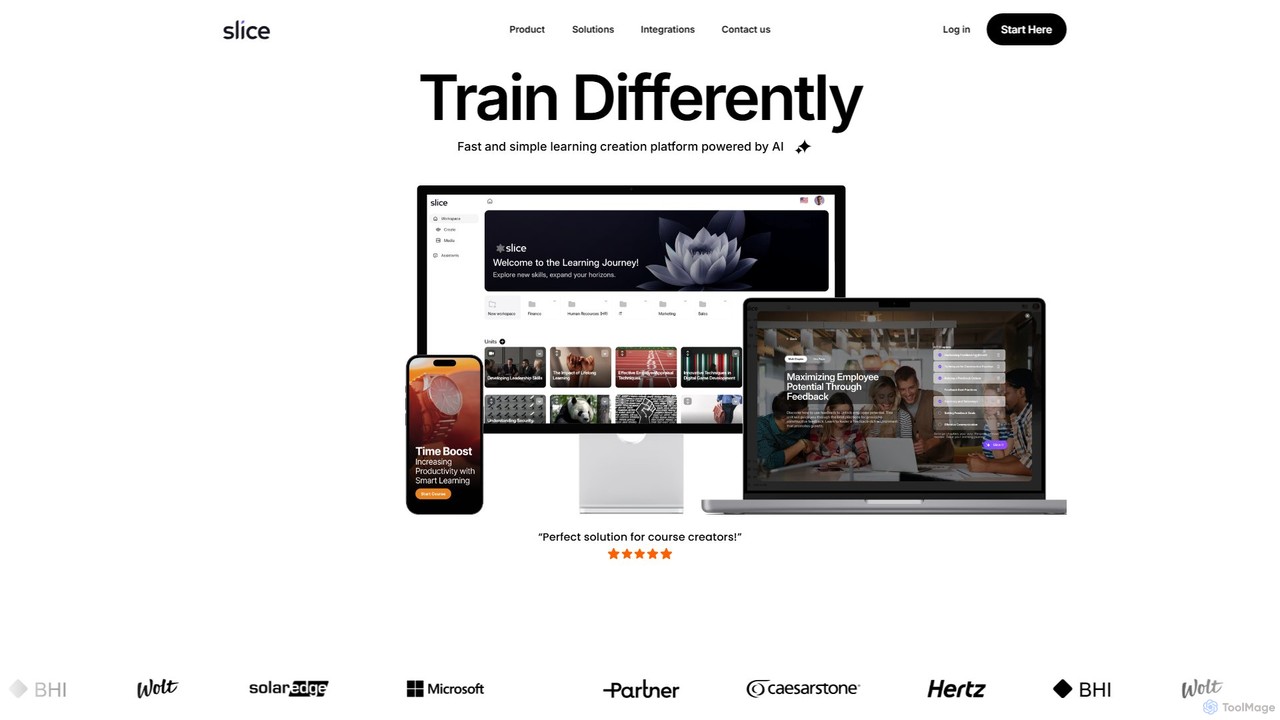
Slice Knowledge Product overview

Slice Knowledge is an AI-powered platform designed for rapid learning content creation. It enables HR, L&D teams, educators, and enterprises to quickly generate interactive, SCORM-compliant courses from documents, topics, or scratch. Features include AI assistants, multi-language support, and integrated media tools.

Preview

Quick facts

Compare product focus, pricing models and audiences. Highlighted rows indicate different listed information; unknown pricing does not mean free.

Mini Course Generator VS Slice Knowledge — Quick facts
Quick factsMini Course GeneratorSlice Knowledge
Pricing modelFreemiumPaid
Product typeWebWeb
Primary focusCustomer SupportCourse Creation
Audience and rolesNo data availableNo data available
CategoriesCustomer Support · Course Creation · Lead Generation · TrainingCourse Creation · Lead Generation · Corporate Training
AddedAug 12, 2025Aug 5, 2025
UpdatedNov 19, 2026Nov 19, 2026

Features, usage and use cases

Explore the listed product descriptions, features and workflows. Taxonomy labels alone are not feature evaluations.

Mini Course Generator

Mini Course Generator is a complete AI course creation platform designed for agile creators who want to turn their knowledge into reality without the complexity of traditional course builders. It empowers product managers, community owners, corporate trainers, coaches, and consultants to build bite-sized, interactive, and engaging micro-learning materials up to 10 times faster. The platform is trusted by over 10,000 professional training providers for its practicality and speed.

The core of Mini Course Generator is its AI-powered toolkit, which simplifies the entire course creation process. You can start from scratch, use your existing resources, or simply provide a prompt, and the AI will generate a comprehensive course structure and content. This eliminates procrastination and the overwhelming feeling often associated with curriculum design.

How to use Mini Course Generator

Creating a course is a streamlined, user-friendly process:

  1. Generate with AI: Start by providing a topic, a document, a URL, or any resource. The AI Course Creator will instantly generate a structured mini-course outline and content, saving you hours of work.
  2. Customize and Edit: Use the intuitive drag-and-drop editor to refine the AI-generated content. You can easily add, remove, or reorder modules, insert interactive elements like quizzes and surveys, and customize the layout and theme to match your brand.
  3. Set Access Rules: Choose how your audience will access the course. Options include public access (anyone with a link), email verification (for lead capture), paid access (monetization), invitation-only (for exclusive groups), and automation triggers via integrations.
  4. Deliver and Share: Share your mini-course with a simple link, embed it directly onto your website, or export it as a SCORM package for use in a corporate LMS or as a PDF for offline access.
  5. Analyze and Iterate: Track learner engagement with detailed analytics. Monitor completion rates, quiz scores, and user progress to understand the impact of your course and identify areas for improvement.

Core Features of Mini Course Generator

  • AI Course Creator: Automatically generate course outlines and content from your resources or simple text prompts.
  • Drag & Drop Editor: A simple, no-code interface for building and customizing your courses with ease.
  • Micro-Learning Formats: Create engaging, bite-sized content presented in various layouts, such as card-type or navigational views.
  • Flexible Access Control: Multiple ways to grant access, including public, email signup, payment, invitation-only, and in-app authentication.
  • Multiple Delivery Options: Share via direct link, embed on any webpage, or export to SCORM and PDF formats.
  • Certificates & Badges: Automatically issue digital certificates and badges to recognize learner achievements upon completion or success.
  • Integrations & Automations: Connect with thousands of apps through Zapier, Make, and Pabbly to automate workflows, such as enrolling users or triggering follow-up actions.
  • Custom Branding (CNAME): Use your own domain for course links to provide a seamless, white-label experience.
  • Detailed Analytics: Get insights into learner progress, engagement, and completion rates for both individual courses and collections.
  • Collaboration: Invite colleagues to work together on creating and managing courses.

Use Cases for Mini Course Generator

Mini Course Generator is a versatile tool suitable for various business needs:

  • Lead Generation: Create valuable mini-courses as educational lead magnets to capture email addresses and nurture potential customers.
  • Customer & Employee Onboarding: Develop quick and effective training modules to onboard new customers to your product or new employees to your company processes.
  • Workshop & Training Enrichment: Enhance live training sessions, webinars, or workshops with pre-session warm-ups and post-session reinforcement materials.
  • Monetization: Sell your expertise by creating paid mini-courses. The platform integrates with payment processors and doesn't take a commission on your sales.
  • Community Engagement: Provide continuous value to your community members with regular micro-learning content to keep them engaged and informed.

Advantages of Mini Course Generator

The platform's primary advantage is its simplicity and speed, allowing you to launch a course in minutes, not weeks. It eliminates the need for technical skills, expensive equipment like cameras or green screens, and a steep learning curve. The focus on micro-learning caters to modern learners' short attention spans, leading to higher engagement and completion rates. Furthermore, its pricing model is highly competitive, offering unlimited learners on all plans, which means your costs don't increase as your audience grows.

Pricing and Plans

Mini Course Generator offers a flexible pricing structure to suit different needs:

  • Basic (Free Forever): Includes 3 mini-courses, 1 landing page, unlimited user engagements, and basic customization. A great way to get started.
  • Pro Plan ($25/month, billed annually): Offers unlimited mini-courses and landing pages, 1,000 AI credits per month, full analytics, up to 5 custom domains, access gateways (email, paywall, invitation), collaboration, and removal of the MCG badge.
  • Elite Plan ($50/month, billed annually): Includes everything in Pro, plus 3,000 AI credits, SCORM export, certificate image customization, unlimited custom domains, and in-app authentication for up to 250 active learners.

All plans support unlimited learner engagements and views, making it a scalable solution for growing businesses and creators.

Slice Knowledge

Slice Knowledge is a revolutionary AI-powered learning creation platform that transforms the way educational and training content is developed. It is specifically designed to serve HR and L&D teams, educators, experts, and enterprises, providing a fast, simple, and efficient solution for creating engaging learning experiences. The platform streamlines the entire course creation process, from initial concept to final delivery, making it an ideal tool for anyone looking to produce high-quality training materials without a steep learning curve.

How to use Slice Knowledge

Using Slice Knowledge is an intuitive process. Users can start by choosing from several content creation methods. You can generate a complete learning unit by simply providing a topic, and the AI will leverage its vast knowledge base to build the course structure and content. Alternatively, you can upload your existing documents—such as PDFs, Word files, or presentations—and the platform will automatically convert them into interactive, responsive, and SCORM-compliant learning modules. Once the base content is ready, you can extensively customize it using the unlimited designer, apply custom CSS, and enrich it with interactive blocks, videos, and quizzes. The platform also allows for the creation of custom AI assistants trained on your own data to provide personalized support to learners.

Core Features of Slice Knowledge

  • AI-Powered Content Generation: Instantly create learning units and full courses from a simple topic or prompt, using the world's knowledge.
  • Document-to-Course Conversion: Automatically transform static documents into interactive, responsive, and SCORM-compliant e-learning modules.
  • SCORM & HTML5 Compliant: Ensures seamless integration and tracking with virtually any Learning Management System (LMS).
  • Interactive & Rich Media: Enhance courses with interactive blocks, videos, and a built-in library of stock photos and videos.
  • AI Image Generation: Create unique, custom images for your courses using integrated models like Midjourney and DALL-E.
  • Custom AI Assistants: Build and deploy custom bots trained on your company's data to provide tailored responses and expert assistance.
  • Multi-Language Support: Easily translate your courses into multiple languages to reach a global audience.
  • Advanced Customization & Branding: Utilize the unlimited designer, custom CSS, and media workspace to apply your company's branding and style.
  • Collaboration Tools: A dedicated media workspace allows teams to collaborate on creating and managing learning content.
  • Seamless Integrations: Effortlessly connect with your existing systems to enhance productivity and streamline workflows.

Use Cases for Slice Knowledge

Slice Knowledge is versatile and caters to a wide range of users. For HR and L&D teams, it's perfect for rapidly developing employee onboarding programs, compliance training (e.g., safety, data privacy), and soft skills or well-being courses. Educators and subject matter experts can use it to quickly turn their knowledge into professional online courses to sell or share. Training content agencies can leverage the platform to streamline their production workflow, delivering high-quality courses to clients faster. For enterprises, it offers a scalable solution for creating and managing large-scale, branded training programs, with options for private cloud deployment and white-labeling.

Advantages of Slice Knowledge

The primary advantage of Slice Knowledge is its incredible speed and efficiency, significantly reducing course development time. It's an all-in-one solution that combines content creation, instructional design, media integration, and AI assistance. This eliminates the need for multiple disparate tools. The platform produces highly engaging and interactive content, which leads to better learning outcomes and knowledge retention. Its scalability and customization options make it a flexible choice for everyone from individual course creators to large corporations.

Pricing and Plans

Slice Knowledge operates on a subscription-based model, offering both monthly and annual plans. While specific pricing tiers are not detailed on the website, the service is a paid one. They offer a 14-day conditional refund period where customers can receive a 50% refund. For detailed information on the different plans and their features, it is recommended to visit the official website or contact their sales team to book a demo.

Positioning

Their taxonomy shows where the products overlap and where each one has a more distinct focus. Unknown fields are shown explicitly and are never filled with assumptions.

Categories

Shared
Course CreationLead Generation
Only Mini Course Generator
Customer SupportTraining
Only Slice Knowledge
Corporate Training

Tags

Shared
course creatore-learninginstructional designSCORM
Only Mini Course Generator
AI course buildercommunity engagementcustomer onboardinglead magnetmicrolearningonline training
Only Slice Knowledge
AI assistantcontent generationcorporate trainingemployee onboardingL&Donline courses

Audience and roles

Shared
No listed items
Only Mini Course Generator
No listed items
Only Slice Knowledge
No listed items

Traffic comparison

Traffic is shown on the same scale so differences in market visibility are not visually understated.

How to interpret the traffic data

Both charts share the same months and vertical scale. Each tool identifies its latest reporting month; missing months are left blank, not counted as zero. Regional and source visit counts are estimates calculated from the reported shares.

Mini Course Generator monthly traffic:

Latest traffic · 2026-05

Monthly visits
79.7K
Avg. visit duration
1:57
Pages per visit
5.2
Bounce rate
35.02%
Data updated 2026-06-15

Monthly traffic trend

  • 2025-09: 88.6K
  • 2026-01: 163.1K
  • 2026-02: 113.5K
  • 2026-03: 119.8K
  • 2026-04: 98.8K
  • 2026-05: 79.7K

Top regions

Top 5 countries/regions
Country/regionPercentageEstimated visits
🇺🇸United States64.08%51.1K
🇨🇦Canada11.21%8.9K
🇵🇭Philippines9%7.2K
🇬🇹Guatemala8.38%6.7K
🇸🇦Saudi Arabia7.33%5.8K

Traffic sources

Source typePercentageEstimated visits
Direct76.93%61.3K
Referral21.09%16.8K
Email1.98%1.6K

Search keywords

hallucination detector aimini course generatorparticipacion activatemelli değerler eğityimizipgrade

Slice Knowledge

No data available

Community signals

Ratings, comments, favorites, and likes are community signals—not a substitute for product fit.

Mini Course Generator

Rating
No data available
Comments
0
Favorites
207
Likes
217

Slice Knowledge

Rating
No data available
Comments
0
Favorites
188
Likes
188

Mini Course Generator vs Slice Knowledge · Comparison FAQ

What do Mini Course Generator and Slice Knowledge have in common?
Both tools are listed under Course Creation、Lead Generation. These categories indicate overlapping use cases; compare their detailed descriptions for workflows, capabilities and limitations.
Are Mini Course Generator and Slice Knowledge free?
Listed pricing models: Mini Course Generator — Freemium; Slice Knowledge — Paid. Missing pricing is not proof of a free plan, and freemium does not mean every feature is free. Check official sites for current plans, limits and trials.
How should I choose between Mini Course Generator and Slice Knowledge?
The primary listed category is Customer Support for Mini Course Generator, and Course Creation for Slice Knowledge. Compare features, steps and use cases, then verify pricing, data permissions and deployment needs. This page does not include hands-on testing and does not declare a winner from traffic or tags.

Sources and comparison methodology

This page is assembled from ToolMage product listings, taxonomy, traffic statistics and on-site user feedback. It is not a hands-on test or an independent review.

  • Feature and plan descriptions reflect information in the listings, not real-time guarantees. Verify pricing, quotas, availability and privacy terms on the official sites.
  • Traffic uses the reporting months shown. Missing statistics do not mean zero visits, and different periods do not establish growth or superiority. Regional and source visit counts are estimates based on shares.
  • Different tags indicate differences in the listings, not proof that the other product lacks a capability. Ratings, favorites and visits are not used to declare a winner.

Related comparisons