ToolMage
Sign in

AI TOOL COMPARISON

Ploomber vs Reflex

What is the difference, and which fits your workflow? Compare features, usage, pricing models and traffic side by side.

Jump to key differences

Product overview

Ploomber Product overview

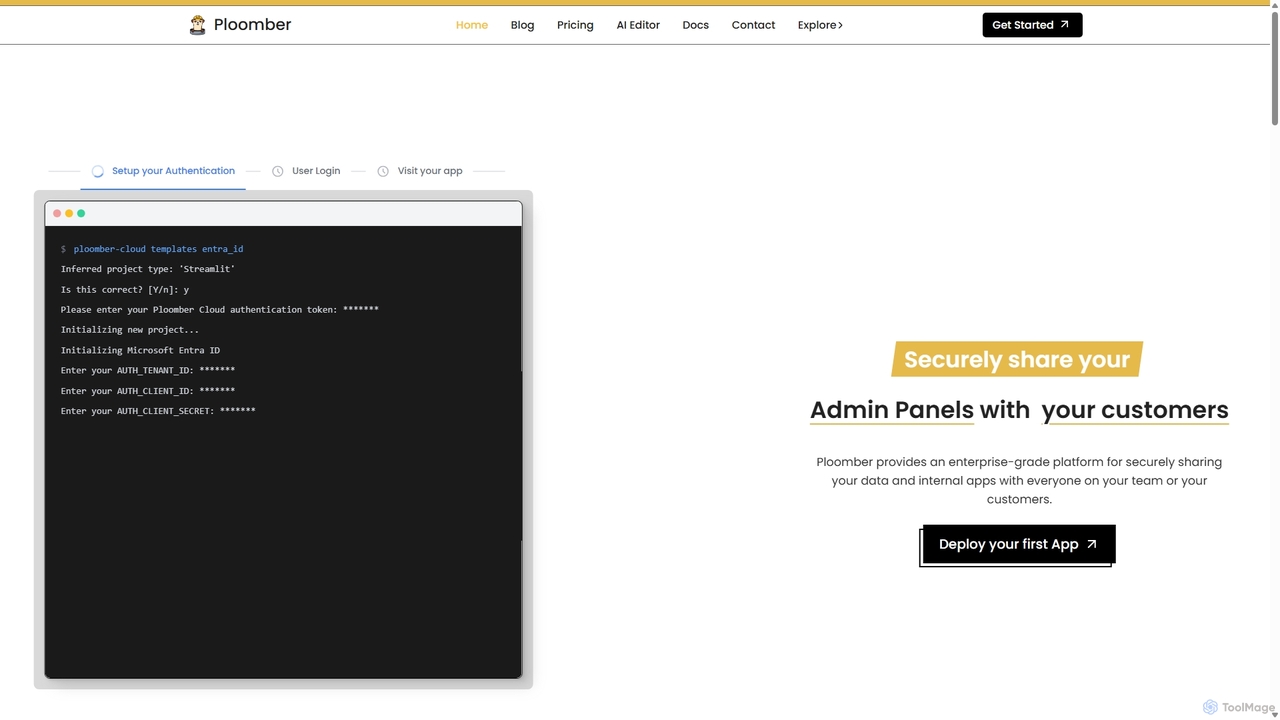
Ploomber is an enterprise-grade platform for deploying, managing, and scaling data applications. It simplifies the deployment of frameworks like Streamlit, Dash, and FastAPI, offering robust features such as automated DevOps, advanced security, auto-scaling, and flexible deployment options from cloud to on-premise, tailored for data science and AI teams.

Preview

Reflex Product overview

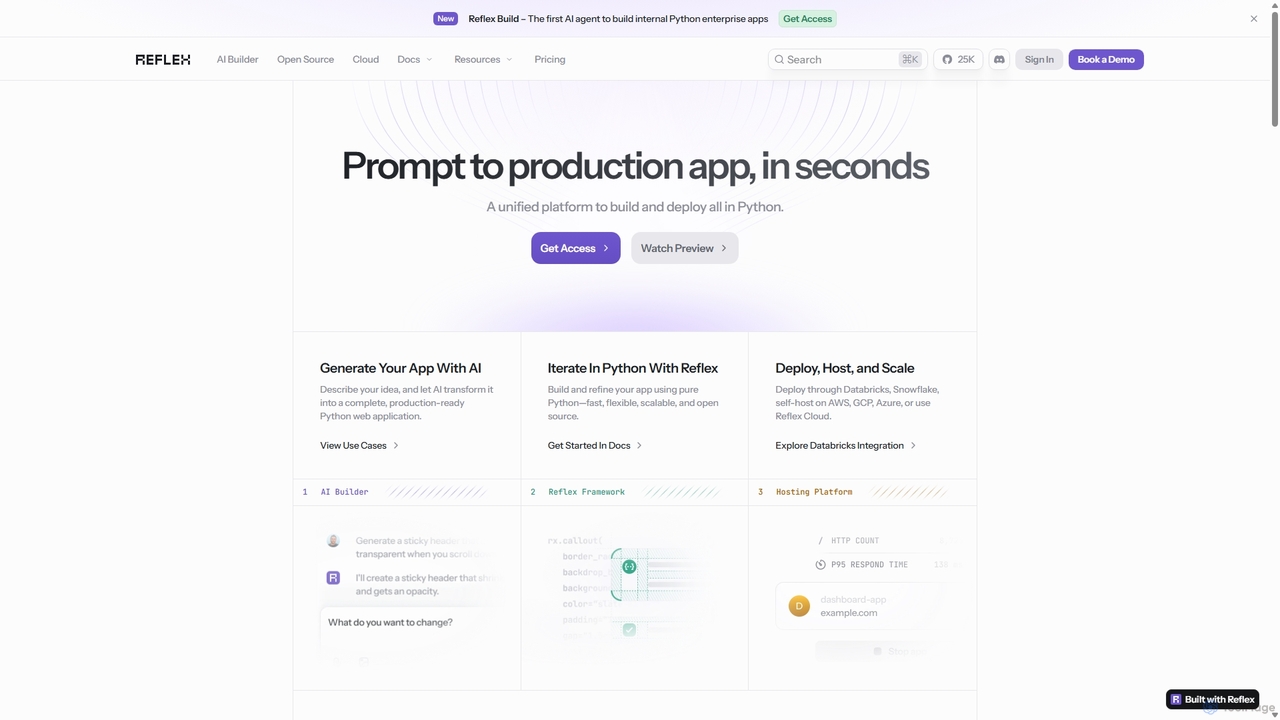
Reflex is an open-source framework for building and deploying high-performance web apps entirely in Python. It features an AI agent, Reflex Build, that generates full-stack applications from simple text prompts, accelerating development from idea to production.

Preview

Quick facts

Compare product focus, pricing models and audiences. Highlighted rows indicate different listed information; unknown pricing does not mean free.

Ploomber VS Reflex — Quick facts
Quick factsPloomberReflex
Pricing modelFreemiumFreemium
Product typeWebWeb
Primary focusMachine LearningDeveloper Tools
Audience and rolesData Analyst · Data Scientist · DevOps Engineer · IT Manager · Machine Learning Engineer · Product Manager · Software DeveloperData Analyst · Data Scientist · DevOps Engineer · IT Manager · Machine Learning Engineer · Product Manager · Software Developer
CategoriesMachine Learning · Deployment · CollaborationDeveloper Tools · Web Development · Low Code No Code
AddedSep 13, 2025Sep 21, 2025
UpdatedNov 19, 2026Nov 19, 2026

Features, usage and use cases

Explore the listed product descriptions, features and workflows. Taxonomy labels alone are not feature evaluations.

Ploomber

Ploomber provides a comprehensive, enterprise-grade platform designed to streamline the deployment, security, and management of data and internal applications. It empowers data science teams, developers, and enterprises to share their work securely and efficiently, whether with internal teams or external customers. Ploomber supports a wide range of popular data science and web frameworks, including Streamlit, Shiny, Dash, FastAPI, Panel, Flask, and more, making it a versatile solution for various projects.

How to use Ploomber

Getting started with Ploomber is designed to be straightforward and flexible, catering to different developer workflows. Users can deploy their applications in several ways:

  • Terminal/CLI: For developers who prefer the command line, Ploomber offers a powerful CLI to initialize projects, configure settings, and deploy applications with a few simple commands.
  • Git Integration: Ploomber seamlessly integrates with GitHub. Users can simply choose their repository, and Ploomber will set up a complete production environment, including continuous integration features like Pull Request (PR) previews.
  • Drag & Drop: For quick deployments, a user-friendly drag-and-drop interface is available on the platform, allowing for easy uploads of project files.

Once an application is deployed, users can manage it through a centralized dashboard, monitor analytics, configure custom domains, and set up advanced security policies without needing to modify their application's source code.

Core Features of Ploomber

  • Flexible Deployment Options: Supports deployment from the terminal, Git repositories, or via drag-and-drop. Compatible with numerous frameworks like Streamlit, Shiny, Dash, and FastAPI.
  • Enterprise-Grade Security: Offers built-in protection at every layer. Features include VPC deployment for isolated network environments, IP whitelisting, static IPs for secure database connections, and robust authentication options (Password, Auth0, Microsoft Entra ID, SSO, LDAP, SAML).
  • Automated DevOps: Simplifies the development lifecycle with features like PR Previews, allowing teams to test new features in isolated environments before merging. It also supports one-click rollbacks and versioning to quickly revert to a stable version if a bug is introduced.
  • Scalability and Performance: Provides auto-scaling to handle traffic peaks automatically, ensuring application performance and availability. Users can also opt for fixed resource mode for predictable costs. On-demand GPU access is available for compute-intensive tasks.
  • Application Management: Includes built-in analytics to monitor performance metrics and understand user behavior. Users can easily set up custom subdomains or top-level domains with automatic SSL certificate provisioning and renewal.
  • Granular Access Control: Allows for detailed permission management with role-based access control (RBAC), team-specific permissions, and customizable security policies.
  • AI Editor: A browser-based AI assistant to help with development, available across different plans with varying usage limits.

Use Cases for Ploomber

Ploomber is ideal for a variety of scenarios where data applications need to be deployed securely and scalably:

  • Internal Tools & Dashboards: Data scientists and analysts can quickly build and share interactive dashboards (e.g., Streamlit CRM, R Shiny dashboards) with business teams.
  • Customer-Facing Applications: Securely deploy and share admin panels or data-driven applications with external customers, with full authentication and custom branding.
  • LLM & AI-Powered Apps: Build and host AI assistants, chatbots, or applications that perform tasks like answering questions on PDF documents, with the necessary infrastructure for scaling.
  • Machine Learning APIs: Deploy machine learning models as robust APIs using frameworks like FastAPI, ready for integration into larger systems.

Advantages of Ploomber

Ploomber offers significant advantages over traditional deployment methods or competing platforms. Testimonials highlight a 40% reduction in development time and faster iteration cycles. Its key strengths include:

  • Zero Complexity: Provides powerful enterprise features without the complex setup and maintenance overhead.
  • Developer-Centric: Built with developers in mind, offering tools and integrations (like GitHub and CLI) that fit seamlessly into existing workflows.
  • Unmatched Security: A comprehensive security suite that goes beyond basic authentication, making it suitable for organizations with strict compliance and security requirements.
  • Flexible Hosting: The choice between multi-tenant SaaS, private cloud (VPC), or on-premise deployment provides flexibility for any organizational need.

Pricing and Plans

Ploomber offers a tiered pricing structure to suit different needs, from individual developers to large enterprises.

  • Community (Free): Ideal for personal projects. Allows up to 2 apps, includes monthly credits for 0.5 vCPU and 1 GiB memory, and offers Slack support. Idle apps are stopped and eventually removed.
  • Professional (Starting at $20/month): For professionals and small teams. Supports up to 10 apps, 2 custom domains, password authentication, GPU access, more resources, and continuous app uptime.
  • Teams (Starting at $200/month): Designed for growing teams. Includes everything in Professional, plus support for up to 20 apps, 5 custom domains, advanced authentication (Auth0), advanced analytics, static IPs, and priority support.
  • Enterprise (Custom Pricing): A tailored solution for large organizations. Offers unlimited apps, custom compute pricing, SSO/LDAP/SAML authentication, VPC or on-premise deployment, and dedicated phone support with an SLA.

Reflex

Reflex is a comprehensive, open-source platform designed to streamline the creation of beautiful, interactive web applications using only Python. It eliminates the need for JavaScript, allowing developers to build both the frontend and backend of their applications in a single, unified language. The platform is built around two core components: the Reflex Framework and the AI-powered Reflex Build.

How to use Reflex

Getting started with Reflex is designed to be quick and intuitive. Developers can begin building their applications with just a few simple commands:

  1. Installation: Install the Reflex library using pip: $ pip install Reflex
  2. Initialization: Create a new project template in your desired directory: $ Reflex init
  3. Run the App: Start the development server to see your app live: $ Reflex run

For AI-powered development, users can leverage Reflex Build by simply describing the application they want to create in natural language. The AI agent interprets the prompt and generates a complete, production-ready Python web application, including the backend, frontend, and database integration. For deployment, Reflex offers a seamless experience. After logging in via the CLI (Reflex login), you can deploy your application to the Reflex Cloud or your own infrastructure with a single command: Reflex deploy.

Core Features of Reflex

  • AI App Builder (Reflex Build): An AI agent that transforms natural language prompts into fully functional, full-stack Python web applications in seconds.
  • Pure Python Framework: Build entire web applications, from frontend UI to backend logic, using only Python. This eliminates context switching and the need to learn multiple languages like JavaScript.
  • Extensive Component Library: Comes with over 50 built-in, customizable UI components for data display, forms, layouts, charts, and more, enabling the creation of complex and beautiful interfaces.
  • State Management: A simple yet powerful state management system where the application's state is defined in a central class, and event handlers modify it. The UI automatically reacts to state changes.
  • Flexible Hosting Platform: Deploy applications with a single command to Reflex Cloud or self-host on major cloud providers like AWS, GCP, Azure, as well as platforms like Databricks and Snowflake.
  • Enterprise-Grade Security: SOC 2 compliant with features like SSO/SAML, granular access control, audit logs, and secret management integrations for secure enterprise deployments.

Use Cases for Reflex

Reflex is versatile and suitable for a wide range of applications across various industries:

  • Analytics & Data Science: Convert Python notebooks and data models into interactive production dashboards with live tables, charts, and custom components.
  • Finance: Develop financial analytics dashboards, such as custom equity-factor risk models, in minutes.
  • E-commerce: Create unified dashboards to monitor marketplace sales, manage inventory alerts, and consolidate supplier data.
  • DevOps: Build internal tools to surface real-time telemetry, automate infrastructure tasks, and replace shell scripts with role-based web UIs.
  • Database Management: Quickly generate full-featured database dashboards and CRUD (Create, Read, Update, Delete) applications.
  • AI Workflows: Construct pipelines to transform unstructured content into actionable insights using OCR, speech-to-text, and LLM integrations.

Advantages of Reflex

Reflex offers significant advantages for developers and teams:

  • Accelerated Development: The AI Builder drastically reduces development time, allowing for rapid prototyping and deployment.
  • Simplicity and Ease of Use: The pure Python approach lowers the barrier to entry for web development, making it accessible to data scientists, backend engineers, and Python enthusiasts.
  • Unified Platform: It provides an all-in-one solution for building, deploying, managing, and scaling applications, simplifying the development lifecycle.
  • Open Source and Flexible: The core framework is free, open-source (Apache 2.0), and highly flexible, allowing for advanced use cases and customization.
  • Scalability: Designed to scale from small internal tools to large, multi-page enterprise websites with high availability and low latency.

Pricing and Plans

Reflex offers a flexible pricing structure to suit different needs:

  • Open Source Framework: The core Reflex framework is completely free and licensed under Apache 2.0.
  • Reflex Cloud - Free Tier: Ideal for personal projects and getting started, this plan includes 20 compute hours per month, 1 day of build logs, and 1 hour of runtime logs.
  • Reflex Cloud - Enterprise Tier: A custom-priced plan for businesses requiring advanced features. It includes unlimited compute, custom log retention, SSO/SAML, audit logs, dedicated support, and deployment on-premise or to a private cloud.
  • Compute Pricing: The cloud platform operates on a usage-based billing model, where you only pay per minute when your app is actively being used. Prices vary based on the allocated vCPU and RAM.

Positioning

Their taxonomy shows where the products overlap and where each one has a more distinct focus. Unknown fields are shown explicitly and are never filled with assumptions.

Categories

Shared
No listed items
Only Ploomber
Machine LearningDeploymentCollaboration
Only Reflex
Developer ToolsWeb DevelopmentLow Code No Code

Tags

Shared
No listed items
Only Ploomber
Application Hostingauto-scalingCI/CDcloud platformdashdata appsdeploymentdevopsenterprise securityfastapiMLOpson-premisestreamlit
Only Reflex
AI app builderdashboard builderfull stack developmentinternal toolslow-codeopen sourcepython guipython web frameworkweb app development

Audience and roles

Shared
Data AnalystData ScientistDevOps EngineerIT ManagerMachine Learning EngineerProduct ManagerSoftware Developer
Only Ploomber
No listed items
Only Reflex
No listed items

Traffic comparison

Traffic is shown on the same scale so differences in market visibility are not visually understated.

How to interpret the traffic data

Both charts share the same months and vertical scale. Each tool identifies its latest reporting month; missing months are left blank, not counted as zero. Regional and source visit counts are estimates calculated from the reported shares.

Ploomber monthly traffic:

Latest traffic · 2026-05

Monthly visits
41.9K
Avg. visit duration
0:16
Pages per visit
1.75
Bounce rate
38.75%
Data updated 2026-06-15

Monthly traffic trend

  • 2025-09: 89.8K
  • 2026-01: 67.4K
  • 2026-02: 48.7K
  • 2026-03: 58.9K
  • 2026-04: 52.1K
  • 2026-05: 41.9K

Top regions

Top 5 countries/regions
Country/regionPercentageEstimated visits
🇺🇸United States28.43%11.9K
🇳🇬Nigeria28.04%11.7K
🇮🇳India16.43%6.9K
🇧🇷Brazil14.7%6.2K
🇩🇪Germany12.4%5.2K

Traffic sources

Source typePercentageEstimated visits
Direct53.74%22.5K
Referral37.21%15.6K
Email9.05%3.8K

Search keywords

convert jupyter notebook to pdf latexnested cross validationnotebook a pdfpii remover in chat gpt conversationspython ocr

Reflex monthly traffic:

Latest traffic · 2026-05

Monthly visits
163.9K
Avg. visit duration
1:30
Pages per visit
2.26
Bounce rate
44.38%
Data updated 2026-06-15

Monthly traffic trend

  • 2025-09: 149.9K
  • 2026-01: 128.8K
  • 2026-02: 122.9K
  • 2026-03: 139.5K
  • 2026-04: 117K
  • 2026-05: 163.9K

Top regions

Top 5 countries/regions
Country/regionPercentageEstimated visits
🇺🇸United States59.16%97K
🇮🇳India11.68%19.1K
🇮🇹Italy11.64%19.1K
🇲🇾Malaysia10.45%17.1K
🇮🇩Indonesia7.07%11.6K

Traffic sources

Source typePercentageEstimated visits
Direct75.58%123.9K
Referral21.99%36K
Email2.43%4K

Search keywords

python reflexreflexreflex aireflex pythonreflex python coding tool

Community signals

Ratings, comments, favorites, and likes are community signals—not a substitute for product fit.

Ploomber

Rating
No data available
Comments
0
Favorites
188
Likes
202

Reflex

Rating
No data available
Comments
0
Favorites
145
Likes
170

Ploomber vs Reflex · Comparison FAQ

What do Ploomber and Reflex have in common?
The current listings have no shared category. Appearing on the same comparison page does not make the products interchangeable; check each tool against your task.
Are Ploomber and Reflex free?
Listed pricing models: Ploomber — Freemium; Reflex — Freemium. Missing pricing is not proof of a free plan, and freemium does not mean every feature is free. Check official sites for current plans, limits and trials.
How should I choose between Ploomber and Reflex?
The primary listed category is Machine Learning for Ploomber, and Developer Tools for Reflex. Compare features, steps and use cases, then verify pricing, data permissions and deployment needs. This page does not include hands-on testing and does not declare a winner from traffic or tags.

Sources and comparison methodology

This page is assembled from ToolMage product listings, taxonomy, traffic statistics and on-site user feedback. It is not a hands-on test or an independent review.

  • Feature and plan descriptions reflect information in the listings, not real-time guarantees. Verify pricing, quotas, availability and privacy terms on the official sites.
  • Traffic uses the reporting months shown. Missing statistics do not mean zero visits, and different periods do not establish growth or superiority. Regional and source visit counts are estimates based on shares.
  • Different tags indicate differences in the listings, not proof that the other product lacks a capability. Ratings, favorites and visits are not used to declare a winner.

Related comparisons