ToolMage
Sign in

AI TOOL COMPARISON

tawk.to vs Web2Chat

What is the difference, and which fits your workflow? Compare features, usage, pricing models and traffic side by side.

Jump to key differences

Product overview

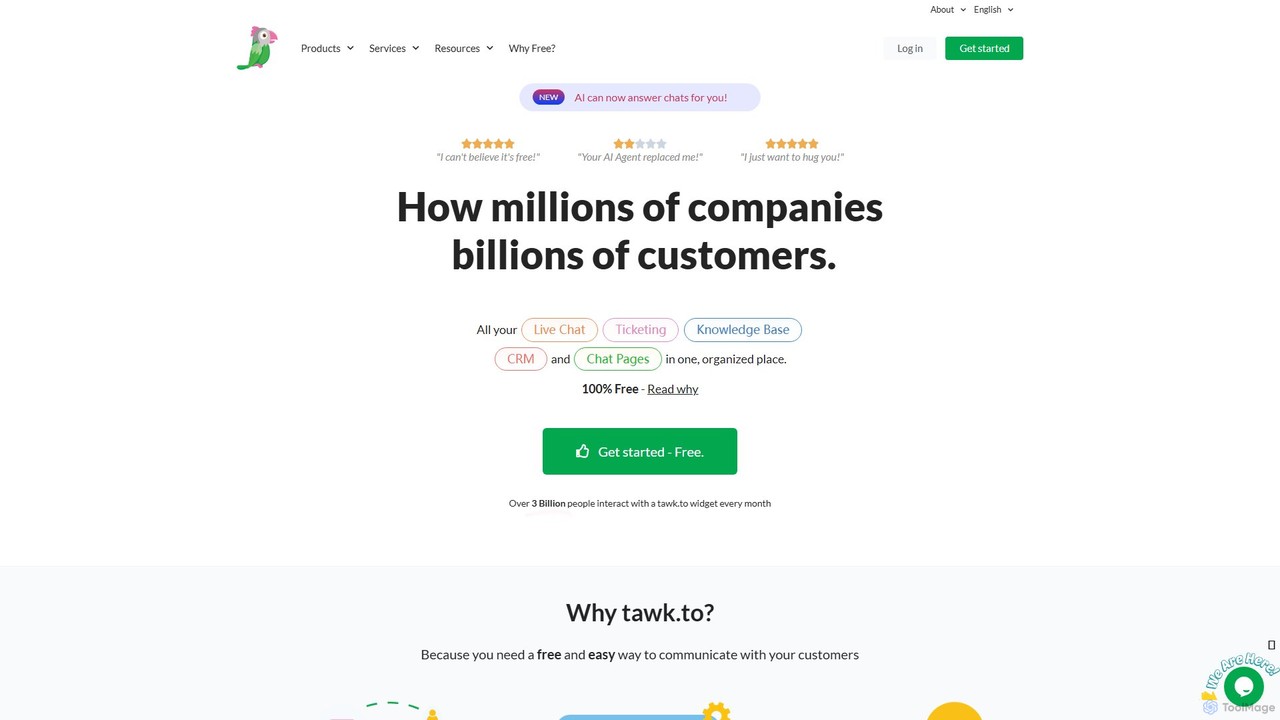
tawk.to Product overview

tawk.to is a 100% free live chat, ticketing, and knowledge base platform, now enhanced with an AI Agent. It allows businesses to monitor website visitors in real-time, engage with customers, and manage all communications from a single dashboard. Used by over 5 million businesses, it offers a robust suite of features to improve customer support and engagement without any cost for the core software.

Preview

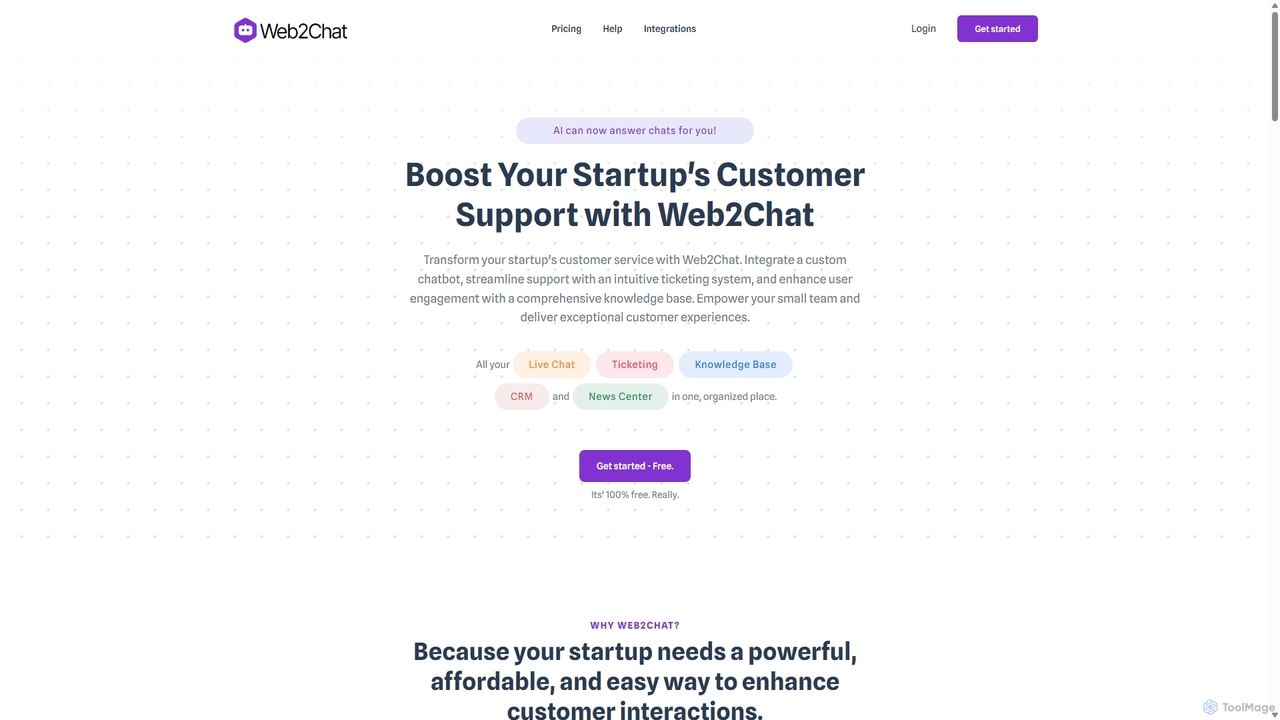
Web2Chat Product overview

Web2Chat is an all-in-one, AI-powered customer communication platform designed for startups. It integrates live chat, a shared inbox, a ticketing system, a knowledge base, and CRM features to streamline customer support, enhance engagement, and drive growth.

Preview

Quick facts

Compare product focus, pricing models and audiences. Highlighted rows indicate different listed information; unknown pricing does not mean free.

tawk.to VS Web2Chat — Quick facts
Quick factstawk.toWeb2Chat
Pricing modelFreemiumFreemium
Product typeWebWeb
Primary focusLive ChatCustomer Service
Audience and rolesNo data availableCustomer Support · E-commerce Manager · HR Manager · Marketing Manager · Product Manager · Sales Representative · Startup Founder
CategoriesLive Chat · Lead Generation · AutomationCustomer Service · Live Chat · Lead Generation · Crm
AddedAug 14, 2025Sep 8, 2025
UpdatedNov 19, 2026Nov 19, 2026

Features, usage and use cases

Explore the listed product descriptions, features and workflows. Taxonomy labels alone are not feature evaluations.

tawk.to

tawk.to is a comprehensive and globally recognized customer communication platform, uniquely positioned in the market by offering its core live chat software completely free of charge. It empowers millions of businesses to connect with their customers in real-time, fostering better relationships and driving sales. The platform consolidates Live Chat, a Ticketing system, a Knowledge Base, and basic CRM functionalities into one unified dashboard, simplifying the customer service workflow. Recently, tawk.to has introduced an AI Agent, which can automatically answer customer chats using your pre-built Knowledge Base, providing 24/7 support and reducing the workload on human agents.

How to use tawk.to

Getting started with tawk.to is designed to be quick and straightforward:

  1. Sign Up: Create a free account on the tawk.to website.
  2. Add Your Website: In the dashboard, add a new 'Property' and enter your website's domain.
  3. Install the Widget: Copy the provided JavaScript snippet. Paste this code into your website's HTML, just before the closing `</body>` tag. Most CMS platforms like WordPress, Shopify, or Wix have simple plugins or integrations for this.
  4. Customize: From the tawk.to dashboard, you can customize the chat widget's color, size, position, and content to match your brand's look and feel.
  5. Build Your Knowledge Base: Populate your Knowledge Base with articles answering frequently asked questions. This allows customers to self-serve and also provides the content for the AI Agent.
  6. Activate the AI Agent: Configure the AI to take over chats and provide instant answers based on your Knowledge Base content.
  7. Invite Your Team: Add an unlimited number of agents to your property, assign them to departments, and start collaborating on customer conversations.
  8. Monitor and Engage: Use the dashboard or mobile apps (iOS & Android) to monitor visitor activity in real-time and proactively start conversations.

Core Features of tawk.to

  • AI Agent: An automated chatbot that answers customer queries using your Knowledge Base, ensuring instant support.
  • Live Chat: Engage with website visitors in real-time with a feature-rich chat widget.
  • Ticketing System: An integrated help desk to manage, track, and resolve customer issues that cannot be solved in a single chat.
  • Knowledge Base: A free, customizable help center where you can publish articles and FAQs for customers and internal team use.
  • Visitor Monitoring: Track visitors on your site in real-time, including the pages they are viewing, their location, and their entire journey.
  • Unlimited Agents & History: Add as many agents as you need and retain a complete conversation history for free.
  • Multi-language Support: The widget and dashboard support over 45 languages, with automated translation features available.
  • Team Collaboration: Agent-to-agent messaging, chat assignments, and departmentalization for efficient workflow.
  • Extensive Customization & API: Customize the widget extensively and use the JavaScript API for deeper integration.
  • Mobile Apps: Full-featured iOS and Android apps to manage conversations from anywhere.

Use Cases for tawk.to

tawk.to is versatile and valuable for various industries:

  • E-commerce Stores: Proactively assist shoppers with product questions, guide them through checkout, and reduce cart abandonment rates.
  • SaaS & Tech Companies: Provide instant technical support, onboard new users effectively, and gather valuable product feedback.
  • Marketing & Sales Teams: Generate and qualify leads by engaging with prospects visiting the website and capturing their information.
  • Customer Support Departments: Centralize all customer interactions (chat, tickets, email) into one platform for faster, more contextual responses.
  • Small Businesses & Startups: Implement a professional customer communication system with zero software cost, allowing them to compete with larger companies.

Advantages of tawk.to

The primary advantage of tawk.to is its powerful 'Forever Free' model. Unlike competitors that offer limited free trials, tawk.to provides a full-featured, enterprise-grade solution at no cost. This includes unlimited agents, unlimited chat history, and core features like ticketing and a knowledge base. The platform is incredibly easy to set up and use. The consolidation of multiple tools into one dashboard streamlines operations and provides a holistic view of the customer journey. The addition of the AI Agent further enhances its value, offering automation capabilities typically found only in expensive, paid platforms.

Pricing and Plans

tawk.to operates on a freemium model where the core software is 100% free and will remain so.

  • Free Plan: Includes all essential features – Live Chat, Ticketing, Knowledge Base, AI Agent, unlimited agents, unlimited history, and basic CRM. The platform is ad-free.
  • Optional Paid Add-ons:
  • Remove Branding: Remove the 'Powered by tawk.to' branding from the chat widget for $19/month.
  • Video, Voice & Screen Sharing: Add video calls, voice calls, and screen sharing capabilities for $29/month.
  • Hire Live Agents: If you need extra help, you can hire professional chat agents directly from tawk.to, starting at $1/hour.

Web2Chat

Web2Chat is a comprehensive, AI-driven customer support platform built to empower startups and growing businesses. It consolidates all customer interactions into a single, intuitive dashboard, eliminating the need for multiple disjointed tools. By integrating a powerful AI assistant, Aura (powered by ChatGPT), with essential support features like live chat, a ticketing system, and a knowledge base, Web2Chat helps businesses deliver instant, efficient, and personalized support. The platform is designed to be both powerful and affordable, providing premium features that enhance customer satisfaction and operational efficiency without a hefty price tag.

How to use Web2Chat

Getting started with Web2Chat is a straightforward process designed for quick implementation:

  1. Sign Up & Setup: Create your Web2Chat account and complete the initial setup wizard.
  2. Customize Your Messenger: Personalize the appearance of the live chat widget to match your website's branding, including colors, logos, and welcome messages.
  3. Train Your AI Assistant: Power up 'Aura', the AI assistant, by providing it with your content. You can easily train it by scraping your website, uploading documents (PDFs), or adding raw text snippets. The AI will use this information to answer customer questions automatically.
  4. Configure Your Shared Inbox: Connect your support email and other channels to the omni-channel inbox. This centralizes all customer communications for easy management.
  5. Build Your Knowledge Base: Create a self-service help center by adding articles, guides, and FAQs. This empowers customers to find answers on their own, 24/7.
  6. Invite Your Team: Add your support agents and team members to the platform, assign roles, and start collaborating on customer tickets and conversations.
  7. Deploy on Your Website: Copy the provided JavaScript snippet and paste it into your website's code to make the chat widget live.

Core Features of Web2Chat

  • Aura AI Assistant: An intelligent chatbot powered by ChatGPT that provides instant, accurate answers based on your trained content (website, PDFs, text). It can handle common queries and seamlessly hand off complex issues to human agents.
  • Shared Omni-Channel Inbox: A unified inbox to manage conversations from live chat, email, and other channels in one place. This simplifies ticket management, assignment, and tracking.
  • Customizable Live Chat Messenger: An interactive and fully brandable chat widget that supports real-time conversations, file transfers, emojis, and multilingual communication (45+ languages).
  • Integrated Knowledge Base: A built-in system to create, organize, and manage a searchable self-help center with articles and FAQs, optimized for SEO.
  • Ticketing System: A complete help desk solution to create, assign, prioritize, and monitor support tickets, ensuring no customer query is missed.
  • Lightweight CRM: Collect, organize, and manage customer data with custom fields. Track interaction history and segment users to provide personalized support.
  • Advanced Customization & Branding: Full control over the look and feel of your chat widget, help center, and email communications to ensure brand consistency.
  • Analytics & Reporting: Track key metrics like customer engagement, sentiment, agent performance, and visitor location (Geo IP) to gain actionable insights.

Use Cases for Web2Chat

Web2Chat is versatile and can be adapted for various business needs:

  • SaaS & Startups: Provide instant onboarding support, answer technical questions with the AI-powered knowledge base, and gather user feedback to improve the product.
  • E-commerce Stores: Assist shoppers in real-time, recommend products, answer questions about shipping and returns, and reduce cart abandonment rates.
  • Lead Generation: Proactively engage website visitors, qualify leads through automated conversations, and schedule demos or calls for the sales team.
  • Customer Self-Service: Build a comprehensive help center that allows customers to find solutions independently, reducing support ticket volume and freeing up agent time.

Advantages of Web2Chat

Choosing Web2Chat provides several key benefits:

  • All-in-One Solution: Replaces multiple separate tools for chat, email, ticketing, and CRM, reducing costs and simplifying workflows.
  • Enhanced Efficiency: The AI assistant automates up to 80% of common inquiries, allowing your human agents to focus on high-value interactions.
  • Improved Customer Satisfaction: Deliver instant, 24/7 support in multiple languages, leading to happier and more loyal customers.
  • Affordable for Startups: Get access to enterprise-grade features at a price point that is accessible for small and medium-sized businesses.
  • Scalability: The platform grows with your business, from a single founder managing support to a full team of dedicated agents.

Pricing and Plans

Web2Chat offers a flexible pricing structure to suit businesses of all sizes.

  • Free Plan: Ideal for individuals and early-stage startups, offering basic live chat functionality, 1 agent, and limited AI conversations.
  • Pro Plan: Designed for growing businesses, this plan includes multiple agents, the full AI assistant with advanced training options, the ticketing system, the knowledge base, and basic CRM features.
  • Business Plan: A comprehensive solution for established teams, offering all Pro features plus advanced branding options, API access, advanced analytics, and priority support.

Positioning

Their taxonomy shows where the products overlap and where each one has a more distinct focus. Unknown fields are shown explicitly and are never filled with assumptions.

Categories

Shared
Live ChatLead Generation
Only tawk.to
Automation
Only Web2Chat
Customer ServiceCrm

Tags

Shared
CRMcustomer engagementcustomer supportknowledge baselead generationlive chatticketing system
Only tawk.to
AI agentchatbotfree live chatwebsite widget
Only Web2Chat
AI chatbothelp deskSaaSstartup tool

Audience and roles

Shared
No listed items
Only tawk.to
No listed items
Only Web2Chat
Customer SupportE-commerce ManagerHR ManagerMarketing ManagerProduct ManagerSales RepresentativeStartup Founder

Traffic comparison

Traffic is shown on the same scale so differences in market visibility are not visually understated.

How to interpret the traffic data

Both charts share the same months and vertical scale. Each tool identifies its latest reporting month; missing months are left blank, not counted as zero. Regional and source visit counts are estimates calculated from the reported shares.

tawk.to monthly traffic:

Latest traffic · 2026-05

Monthly visits
6M
Avg. visit duration
7:52
Pages per visit
4.86
Bounce rate
44.83%
Data updated 2026-06-15

Monthly traffic trend

  • 2025-09: 7M
  • 2026-01: 6.9M
  • 2026-02: 5.6M
  • 2026-03: 6M
  • 2026-04: 6.1M
  • 2026-05: 6M

Top regions

Top 5 countries/regions
Country/regionPercentageEstimated visits
🇺🇸United States42.44%2.5M
🇧🇷Brazil19.04%1.1M
🇮🇳India16.07%965.1K
🇳🇬Nigeria12.2%732.7K
🇮🇩Indonesia10.25%615.6K

Traffic sources

Source typePercentageEstimated visits
Direct77.14%4.6M
Referral19.79%1.2M
Email3.07%184.4K

Search keywords

tawktawk totawk.totawktotwak

Web2Chat

No data available

Community signals

Ratings, comments, favorites, and likes are community signals—not a substitute for product fit.

tawk.to

Rating
No data available
Comments
0
Favorites
165
Likes
151

Web2Chat

Rating
No data available
Comments
0
Favorites
171
Likes
184

tawk.to vs Web2Chat · Comparison FAQ

What do tawk.to and Web2Chat have in common?
Both tools are listed under Live Chat、Lead Generation. These categories indicate overlapping use cases; compare their detailed descriptions for workflows, capabilities and limitations.
Are tawk.to and Web2Chat free?
Listed pricing models: tawk.to — Freemium; Web2Chat — Freemium. Missing pricing is not proof of a free plan, and freemium does not mean every feature is free. Check official sites for current plans, limits and trials.
How should I choose between tawk.to and Web2Chat?
The primary listed category is Live Chat for tawk.to, and Customer Service for Web2Chat. Compare features, steps and use cases, then verify pricing, data permissions and deployment needs. This page does not include hands-on testing and does not declare a winner from traffic or tags.

Sources and comparison methodology

This page is assembled from ToolMage product listings, taxonomy, traffic statistics and on-site user feedback. It is not a hands-on test or an independent review.

  • Feature and plan descriptions reflect information in the listings, not real-time guarantees. Verify pricing, quotas, availability and privacy terms on the official sites.
  • Traffic uses the reporting months shown. Missing statistics do not mean zero visits, and different periods do not establish growth or superiority. Regional and source visit counts are estimates based on shares.
  • Different tags indicate differences in the listings, not proof that the other product lacks a capability. Ratings, favorites and visits are not used to declare a winner.

Related comparisons