ToolMage
Sign in

Best 1 3D Modeling AI tools for 3D & Ar

Popular 3D Modeling AI tools in 3D & Ar include Animant, helping you work more efficiently.

Animant
Freemium

Animant

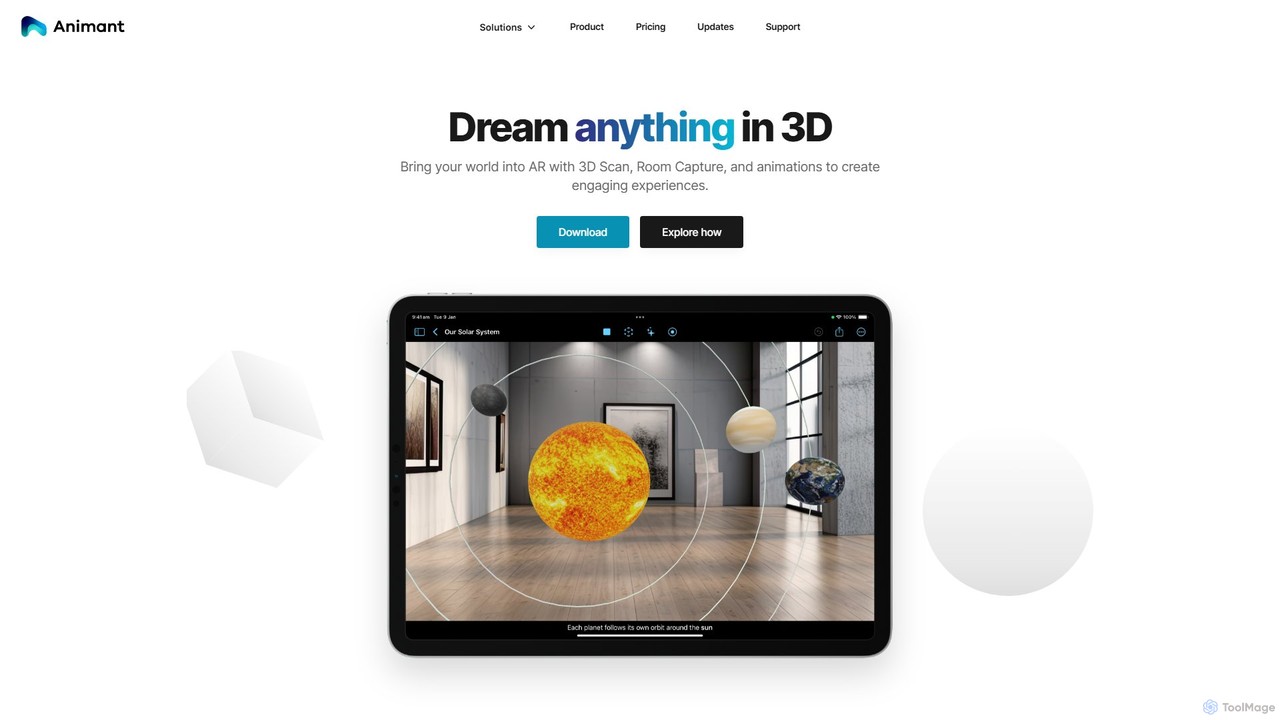
Animant is a powerful AR creation studio for Apple devices that lets you build interactive augmented reality scenes. It features advanced 3D scanning for objects and rooms, intuitive animation tools, and real-time collaboration, making AR creation accessible to everyone.

3D Modeling
Visits 4.2KFavorites 117Likes 136

About 3D Modeling

3D Modeling tools are a category of AI-powered software designed to create, manipulate, and optimize three-dimensional digital models. These tools leverage advanced AI algorithms, including generative AI and machine learning, to automate complex tasks, enhance design processes, and generate realistic assets. They significantly accelerate workflows for designers, artists, and engineers, enabling the rapid production of high-quality 3D content for various applications.

Core Features

  • AI-Assisted Mesh Generation: Automatically creates complex 3D geometries from simple inputs like text, 2D images, or basic sketches.
  • Intelligent Texture & Material Synthesis: Generates realistic textures, PBR materials, and shaders, often from reference images or descriptive prompts.
  • Automated Rigging & Animation: Simplifies the process of creating skeletal structures and animating 3D characters or objects.
  • Topology Optimization: Automatically refines mesh structures for better performance, reduced polygon count, or improved aesthetics.
  • Style Transfer & Conversion: Applies artistic styles to existing models or converts models between different formats and levels of detail.

Applicable Scenarios

AI 3D modeling tools are invaluable across industries. Game developers use them to rapidly generate environmental assets, character models, and props, significantly cutting down production time. Product designers leverage AI for quick prototyping and visualization, iterating on designs with unprecedented speed. Architects and interior designers utilize these tools for creating detailed building models and realistic virtual walkthroughs, enhancing client presentations.

How to Choose

When selecting an AI 3D modeling tool, consider its integration capabilities with your existing design software and pipelines. Evaluate the range of supported file formats to ensure compatibility with your projects. Assess the specific AI features offered, such as generative capabilities, optimization, or animation assistance, to match your primary needs. Finally, consider the learning curve and community support to ensure a smooth adoption process.

Featured tool rankings

3D Modeling use cases

1

Rapid Game Asset Creation from Text

Game developers can utilize AI 3D modeling tools to generate diverse environmental props, character accessories, or even basic building structures by simply inputting text descriptions. This significantly accelerates the initial concept and prototyping phases, allowing artists to focus on refining unique elements rather than spending hours on repetitive asset creation. It enables quick iteration and exploration of various visual styles for game worlds.

2

Streamlining Industrial Product Prototyping

Industrial designers can leverage AI 3D modeling for rapid prototyping and visualization of new product concepts. By inputting design parameters or 2D sketches, AI tools can quickly generate multiple 3D model variations, allowing for immediate feedback and iteration. This process drastically reduces the time and cost associated with traditional physical prototyping, enabling faster market entry for innovative products.

3

Enhancing Architectural Visualization Realism

Architects and interior designers can employ AI 3D modeling to create highly realistic and detailed architectural visualizations. Tools can automatically generate complex textures, furniture arrangements, and environmental elements based on floor plans or conceptual inputs. This capability provides clients with immersive virtual walkthroughs and photorealistic renderings, significantly improving project communication and decision-making.

4

Automating Character Rigging for Animators

Animators and character artists benefit from AI 3D modeling tools that automate the complex and time-consuming process of character rigging. AI can intelligently identify joints and bone structures, then automatically create a functional rig with inverse kinematics. This frees up animators to concentrate on creative motion design, dramatically speeding up animation production for films, games, and virtual reality experiences.

5

Synthesizing PBR Textures from Simple Inputs

3D artists and material designers can use AI 3D modeling tools to synthesize high-quality Physically Based Rendering (PBR) textures from minimal inputs, such as a single photograph or a text prompt. The AI generates diffuse, normal, roughness, and metallic maps, ensuring realistic surface properties. This capability saves immense time in texture creation, allowing for more detailed and visually rich 3D scenes.

6

Optimizing Models for AR/VR Performance

Developers creating augmented reality (AR) and virtual reality (VR) experiences can utilize AI 3D modeling tools to optimize complex 3D models for real-time performance. AI algorithms can automatically reduce polygon counts, simplify mesh topology, and bake high-detail information into lower-poly models without significant loss of visual quality. This ensures smooth frame rates and efficient resource usage in immersive applications.

3D Modeling FAQ

What are AI 3D Modeling tools?

AI 3D Modeling tools are software applications that integrate artificial intelligence to assist in the creation, modification, and optimization of three-dimensional digital models. They leverage machine learning and generative AI to automate repetitive tasks, generate complex geometries or textures from simple inputs, and enhance the overall efficiency and quality of 3D content production. These tools are transforming how designers, artists, and engineers approach 3D design.

How do AI 3D Modeling tools differ from traditional 3D software?

Traditional 3D software relies heavily on manual input and skilled craftsmanship for every detail, from mesh creation to texturing and rigging. AI 3D Modeling tools, however, introduce automation and intelligence. They can generate models from text, optimize topology, synthesize textures, or even animate characters with minimal human intervention. While traditional software provides granular control, AI tools excel in speed, efficiency, and democratizing complex 3D tasks, often working in conjunction with traditional methods.

What are the main benefits of using AI in 3D modeling?

The primary benefits of using AI in 3D modeling include significant time savings through automation of repetitive tasks like rigging, texturing, and mesh generation. AI enhances creativity by allowing rapid iteration and exploration of design variations from simple prompts. It also improves model quality through intelligent optimization, ensuring better performance and realism. Furthermore, AI lowers the barrier to entry for 3D creation, enabling more users to produce professional-grade 3D content.

Who can benefit from AI 3D Modeling tools?

A wide range of professionals can benefit from AI 3D Modeling tools. This includes game developers seeking to accelerate asset creation, industrial designers for rapid prototyping, architects for detailed visualizations, and animators for automating rigging processes. Content creators, VFX artists, and even hobbyists can leverage these tools to produce high-quality 3D assets more efficiently and with less specialized technical skill, expanding their creative possibilities.

What should I consider when choosing an AI 3D Modeling tool?

When selecting an AI 3D Modeling tool, evaluate its specific AI capabilities—whether it excels in generative design, optimization, texturing, or animation. Consider its compatibility with your existing software ecosystem and preferred file formats. Assess the user interface and learning curve, as some tools are more beginner-friendly than others. Finally, review pricing models, community support, and the quality of output to ensure it meets your project requirements and budget.