ToolMage
Sign in

Best 1 Unified Inbox AI tools for Customer Support

Popular Unified Inbox AI tools in Customer Support include getmaxify, helping you work more efficiently.

getmaxify
Freemium

getmaxify

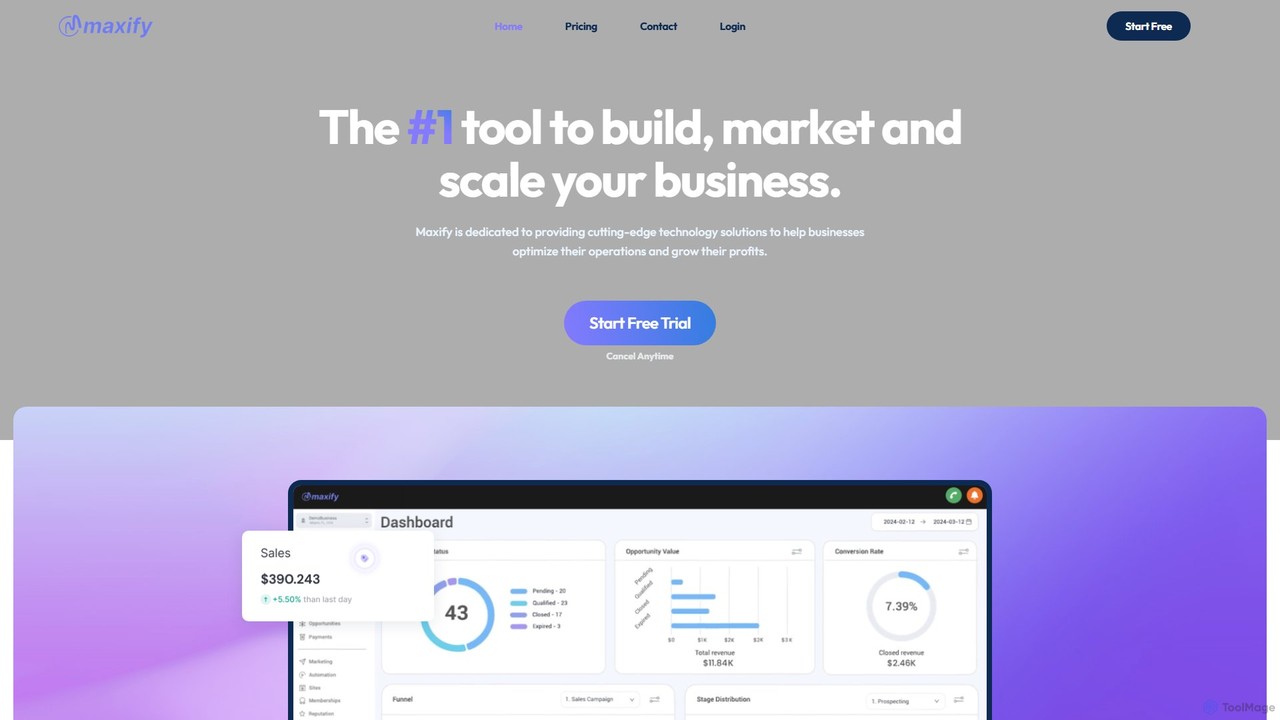
getmaxify is an all-in-one AI-powered platform for CRM, marketing, and sales. It combines over 25 tools to help businesses streamline communication, automate workflows, and scale operations. With its 'Genius Automation', users can automate repetitive tasks, manage customer relationships, and generate content, all from a single, intuitive dashboard.

Unified Inbox
Visits 5.5KFavorites 177Likes 162

About Unified Inbox

A Unified Inbox is a centralized platform that consolidates customer conversations from multiple channels like email, social media, live chat, and SMS into a single, manageable interface. These tools leverage AI to automatically tag, prioritize, and route inquiries, ensuring no message is overlooked. By providing a complete, chronological view of every customer interaction, a Unified Inbox empowers support and sales teams to deliver faster, more consistent, and context-aware service. This approach significantly improves team efficiency and enhances the overall customer experience.

Core Features

  • Multi-Channel Aggregation: Consolidates messages from email, social media DMs, live chat, SMS, and more into one view.
  • AI-Powered Automation: Uses AI for intelligent ticket routing, sentiment analysis, automated tagging, and generating reply suggestions.
  • Collaborative Workspace: Enables team members to assign conversations, leave internal notes, and avoid duplicate responses with collision detection.
  • Unified Customer Profiles: Creates a single view of a customer's entire communication history across all integrated channels.
  • Performance Analytics: Provides dashboards and reports to track team performance, response times, and customer satisfaction.

Use Cases

Unified Inboxes are essential for customer-facing teams in sectors like e-commerce, SaaS, and hospitality. Customer support agents use them to manage inquiries without constantly switching between platforms. Social media managers track brand mentions and direct messages, while sales teams can manage leads from various sources to ensure timely follow-ups.

How to Choose

When selecting a Unified Inbox, first evaluate its channel integration capabilities to ensure it supports all your communication touchpoints. Assess the sophistication of its AI and automation features for routing and response assistance. Consider its collaboration tools, such as conversation assignment and internal notes, for team workflows. Finally, check its integration potential with your existing CRM or helpdesk systems for a seamless data flow.

Unified Inbox use cases

1

Streamlining E-commerce Customer Support

An e-commerce support team uses a unified inbox to manage customer inquiries from various channels. When a customer asks about their order status via an Instagram DM, the agent sees the message alongside previous email inquiries and live chat sessions from the same person. The AI automatically tags the conversation as 'Order Status'. The agent can quickly access the order history from the integrated Shopify panel within the inbox, provide an accurate update, and resolve the issue in minutes without switching applications, significantly reducing response time.

2

Coordinating Sales Leads from Multiple Sources

A SaaS company's sales team manages leads coming from their website's contact form, LinkedIn messages, and direct emails. Using a unified inbox, all new leads are automatically funneled into one view and assigned to sales representatives based on territory rules. A representative can see a lead's entire interaction history, leave internal notes for colleagues, and use AI-suggested templates to respond quickly. This prevents leads from being missed and ensures a consistent and professional follow-up process, improving conversion rates.

3

Managing Social Media Community Engagement

A social media manager for a consumer brand is responsible for monitoring comments, mentions, and DMs across Facebook, Twitter, and Instagram. The unified inbox aggregates all these interactions, allowing the manager to respond to customer feedback, answer questions, and engage with user-generated content from one dashboard. The tool's sentiment analysis feature helps prioritize negative comments for immediate attention, enabling proactive reputation management and fostering a positive online community.

4

Centralizing Property Management Communications

A property management company handles inquiries from tenants and prospective renters via email, SMS, and a portal on their website. A unified inbox brings all these communications together. When a tenant reports a maintenance issue via SMS, a ticket is automatically created and assigned to the maintenance team. The property manager can track the status of the request, communicate with the tenant, and view the entire conversation history in one place, ensuring timely service and maintaining clear records for all properties.

5

Collaborative Support for High-Value B2B Clients

An account management team for a B2B software company uses a shared unified inbox to support enterprise clients. When a client emails a complex technical question, the primary account manager can see it, add an internal note tagging a technical support specialist, and assign the conversation to them. The specialist can then respond with the correct information while the account manager remains aware of the conversation's progress. This collaborative workflow ensures that high-value clients receive accurate and expert responses quickly, improving client satisfaction and retention.

6

Managing Public Relations During a Crisis

During a service outage, a company's PR team uses a unified inbox to monitor and respond to a surge of inquiries across social media, news outlet emails, and support tickets. The AI automatically tags all outage-related messages for easy tracking. The team can use pre-approved templates for consistent messaging and assign specific high-profile inquiries to senior members. This centralized command center allows the team to manage communications efficiently, provide timely updates, and control the narrative during a critical event.

Unified Inbox FAQ

What is a Unified Inbox?

A Unified Inbox is a software tool that centralizes customer communications from multiple channels—such as email, social media DMs, live chat, and SMS—into a single, shared interface. Its primary purpose is to streamline customer service and sales workflows by eliminating the need for teams to switch between different platforms. By using a unified inbox, businesses can ensure faster response times, maintain a complete history of customer interactions, and improve team collaboration.

How does a Unified Inbox differ from a standard email client?

A standard email client, like Gmail or Outlook, is designed primarily for email communication. A Unified Inbox goes far beyond that by integrating multiple communication channels. Key differences include:

  • Multi-Channel Support: Unified Inboxes handle social media, live chat, SMS, and more, not just email.
  • Team Collaboration: They offer features like conversation assignments, internal notes, and collision detection, which are absent in standard email clients.
  • Automation & AI: They often include AI-powered routing, tagging, and analytics to manage high volumes of conversations efficiently.
  • Customer Context: They provide a holistic view of a customer's entire communication history across all channels.

What are the key benefits of using an AI-powered Unified Inbox?

AI enhances a Unified Inbox by adding intelligent automation that improves efficiency and effectiveness. Key benefits include:

  • Intelligent Routing: AI can analyze the content and sentiment of a message to automatically route it to the most appropriate team or agent.
  • Automated Tagging: Conversations can be automatically categorized based on keywords or intent, saving manual effort and improving analytics.
  • Reply Suggestions: AI can suggest relevant responses or pull information from a knowledge base, helping agents reply faster and more accurately.
  • Sentiment Analysis: It helps teams prioritize urgent or negative conversations, enabling proactive customer service and reputation management.

How do I choose the right Unified Inbox for my business?

Choosing the right Unified Inbox depends on your specific needs. Consider these factors:

  • Supported Channels: Ensure the tool integrates with all the channels your customers use (e.g., Facebook Messenger, WhatsApp, email, live chat).
  • Team Size and Workflow: Look for features that match your team's size, such as user roles, permissions, and collaborative tools like internal notes and assignments.
  • Scalability: Select a tool that can grow with your business, both in terms of conversation volume and the number of users.
  • Integrations: Check if it connects with your other essential tools, like your CRM, e-commerce platform (e.g., Shopify), or helpdesk software.
  • Pricing Model: Compare pricing structures—some charge per user, while others charge based on conversation volume. Choose the one that best fits your budget and usage patterns.

Who benefits most from using a Unified Inbox?

While many roles can benefit, Unified Inboxes are particularly valuable for customer-facing teams that handle a high volume of interactions across multiple channels. This includes:

  • Customer Support Teams: To manage tickets, answer questions, and resolve issues efficiently without missing any inquiries.
  • Sales Teams: To track leads from various sources, manage follow-ups, and maintain a complete record of prospect communications.
  • Social Media Managers: To monitor brand mentions, engage with the community, and handle direct messages from a single dashboard.
  • Small Business Owners: To manage all customer communications personally without being overwhelmed by switching between different apps and platforms.