ToolMage
Sign in

Best 1 Smart Assistant for Smart Home

Popular Smart Assistant in Smart Home include ibobi, helping you work more efficiently.

ibobi
Paid

ibobi

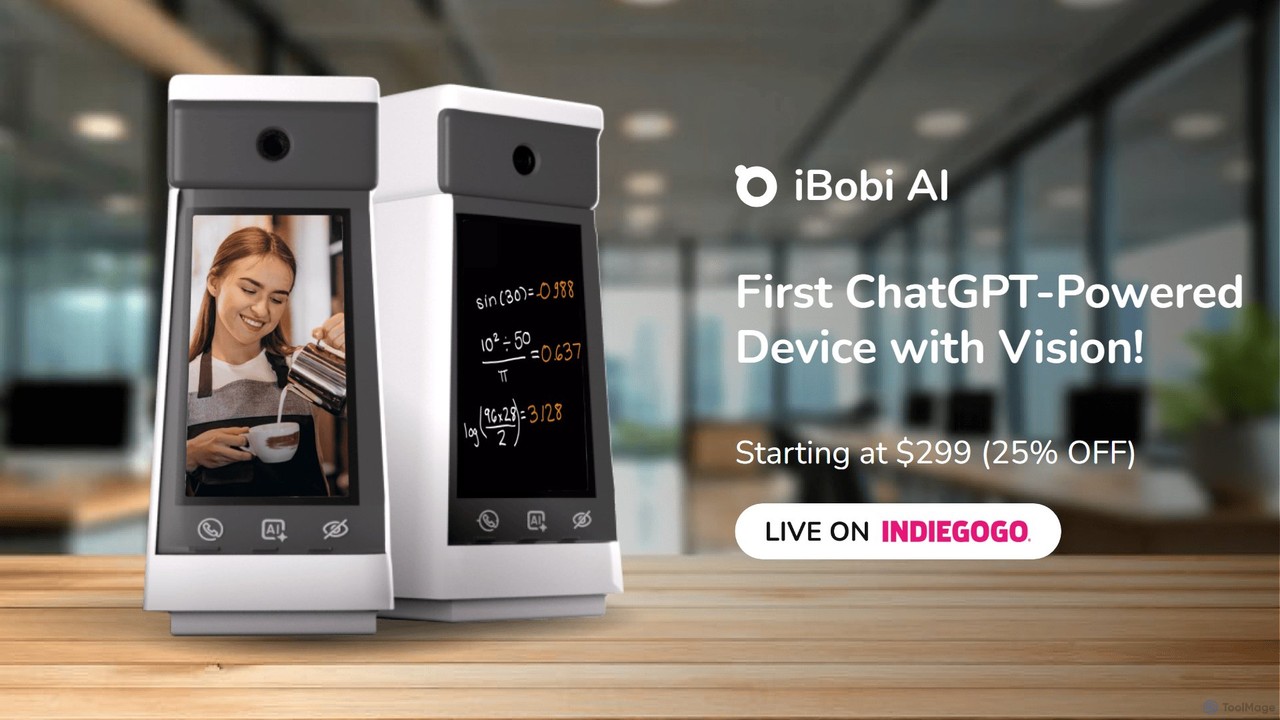
ibobi is the world's first video chatbot device powered by ChatGPT with vision. It functions as a personal assistant, private tutor, best friend, and home security monitor. Engage in real-time video conversations with an AI that sees and understands your environment, or make one-click video calls to loved ones. It's an all-in-one smart device for communication, education, companionship, and security.

Video Calling
Visits 5.5KFavorites 85Likes 107

About Smart Assistant

Smart Assistants are AI-powered, voice-controlled interfaces that serve as a central hub for managing smart home devices and personal tasks. They utilize advanced natural language processing (NLP) to understand and respond to spoken commands conversationally. Their primary value is providing hands-free control over your environment, accessing information instantly, and automating daily routines. These assistants integrate with a vast ecosystem of third-party services and devices, making them a cornerstone of the modern smart home.

Core Features

  • Voice Command Recognition: Accurately interprets and executes spoken instructions for various tasks, from playing music to controlling lights.
  • Smart Device Integration: Seamlessly controls compatible smart lights, thermostats, locks, cameras, and other IoT devices from various brands.
  • Personalized Routines: Allows users to create and trigger multi-step automations with a single command, such as a "Good Morning" routine.
  • Information Retrieval: Provides real-time answers to questions, weather forecasts, news updates, traffic reports, and more.
  • Third-Party Skills/Actions: Extends functionality by connecting with thousands of external services for music streaming, food ordering, ride-sharing, and more.

Use Cases

In a home setting, Smart Assistants are used to control entertainment systems, manage shopping lists, set kitchen timers, and operate connected appliances. For personal productivity, they help schedule meetings, make hands-free calls, and dictate notes, streamlining daily workflows for busy professionals and families.

How to Choose

When selecting a Smart Assistant, consider its ecosystem compatibility (e.g., Amazon Alexa, Google Assistant, Apple Siri) to ensure it works with your existing devices. Evaluate the breadth of its third-party skills library for the services you use. Also, review its privacy features, data handling policies, and the hardware options available, such as smart speakers versus smart displays.

Smart Assistant use cases

1

Automate Morning and Evening Routines

For busy professionals and families, a Smart Assistant can streamline daily transitions. Users can create a "Good Morning" routine that, with a single voice command, simultaneously turns on lights to a gentle brightness, adjusts the thermostat, provides a summary of the day's calendar, and plays a preferred news podcast. Similarly, a "Good Night" routine can lock all smart doors, turn off all lights and electronics, and play calming sounds, ensuring a consistent and effortless end to the day.

2

Hands-Free Kitchen and Cooking Assistance

For home cooks, a Smart Assistant acts as an invaluable kitchen helper. While handling ingredients with messy hands, a user can ask the assistant to set multiple timers simultaneously (e.g., "set a 15-minute timer for the pasta"). They can also perform unit conversions ("how many tablespoons in a quarter cup?"), add items to a shopping list the moment they run out, and have recipes read aloud step-by-step, all without touching a phone or tablet screen.

3

Centralized Smart Home Device Control

For homeowners with a growing number of smart devices, a Smart Assistant eliminates the need to juggle multiple apps. It acts as a universal remote, allowing users to control devices from different brands with simple voice commands. A user can say, "dim the living room lights to 40%," "show me the front door camera," or "set the upstairs thermostat to 21 degrees." This centralizes control and makes managing a complex smart home environment intuitive and accessible for everyone in the household.

4

Manage Family Schedules and Communications

A Smart Assistant can serve as a family's organizational hub. Any family member can ask it to add an event to a shared calendar ("add soccer practice on Thursday at 5 PM"). It can be used to set reminders for chores or appointments. Furthermore, its broadcast feature allows a user to send a voice message to all other smart speakers in the house, making it easy to announce things like "dinner is ready!" without shouting, thus improving household communication.

5

Instant Information and Entertainment Access

For curious individuals and media consumers, a Smart Assistant is a gateway to a world of content. Users can ask complex questions ("What was the economic impact of the Silk Road?") and receive concise answers. They can request real-time information like weather forecasts or stock prices. For entertainment, they can ask to play any song, artist, or playlist from integrated streaming services, listen to podcasts, or play audiobooks, providing immediate, hands-free access to a vast library of media.

6

Enhance Accessibility for Independent Living

For individuals with mobility limitations or visual impairments, Smart Assistants are a transformative technology. They provide a powerful, voice-first method to interact with the home environment and digital world. Users can make phone calls, have news articles or books read aloud, and control essential home functions like lights and thermostats without physical interaction. This significantly increases independence, safety, and overall quality of life by making technology more accessible.

Smart Assistant FAQ

What is a Smart Assistant?

A Smart Assistant is a voice-activated AI service that understands natural language to perform tasks, answer questions, and control other devices. Its core function is to act as a conversational interface between you and your technology. Key features include voice recognition, smart home integration, and access to a vast range of information and third-party services. They are commonly found in hardware like smart speakers and displays.

How to choose the right Smart Assistant?

Choosing the right Smart Assistant depends on several key factors. Consider the following to make an informed decision:

  • Ecosystem Compatibility: Select an assistant that integrates well with your existing devices (e.g., Amazon Alexa for Echo, Google Assistant for Nest/Android, Apple's Siri for HomeKit).
  • Skills and Integrations: Check if it supports the third-party apps and services you use most, such as music streaming, calendars, or smart home brands.
  • Privacy Controls: Review the privacy settings, such as the ability to delete voice recordings and physically mute the microphone.
  • Hardware Form Factor: Decide if you need a simple speaker for audio, a smart display for visual feedback, or an assistant integrated into other devices like TVs or cars.
What's the difference between a Smart Assistant and a Smart Home?

A Smart Assistant is the interface or brain, while a Smart Home is the ecosystem of connected devices. The Smart Assistant (like Alexa or Google Assistant) is the AI you talk to. The Smart Home includes the physical devices it controls, such as smart lights, thermostats, and security cameras. In short, you use the Smart Assistant to manage and command your Smart Home.

Are Smart Assistants always listening?

Smart Assistants are designed to listen only for a specific "wake word" (e.g., "Alexa," "Hey Google"). They are technically always "hearing" by processing audio in short, local loops on the device to detect this word. However, they do not record or send any data to the cloud until the wake word is recognized. For added privacy, most smart speakers and displays include a physical button to mute the microphone completely, which electronically disconnects it.

What are the main functions of a Smart Assistant?

The primary functions of a Smart Assistant revolve around providing information and controlling devices. Key capabilities include:

  • Answering Questions: Providing facts, definitions, calculations, and real-time data like weather and traffic.
  • Device Control: Managing smart home gadgets such as lights, thermostats, locks, and plugs.
  • Media Playback: Playing music, podcasts, and audiobooks from various streaming services.
  • Personal Organization: Setting alarms, timers, reminders, and managing calendar events.
  • Communication: Making hands-free calls, sending messages, and broadcasting announcements within the home.